
소개
The Hunter ZenTech 44-inch smart ceiling fan combines modern design with advanced technology to provide efficient air circulation and adjustable lighting for indoor and covered outdoor spaces. This fan features a slim DC motor for quiet operation and energy efficiency, TrueLight LED technology for customizable lighting, and HunterSMART technology for seamless integration with smart home systems like Amazon Alexa, Google Assistant, and Apple HomeKit.
This manual provides detailed instructions for the safe installation, operation, and maintenance of your ZenTech ceiling fan. Please read all instructions carefully before beginning installation or use.
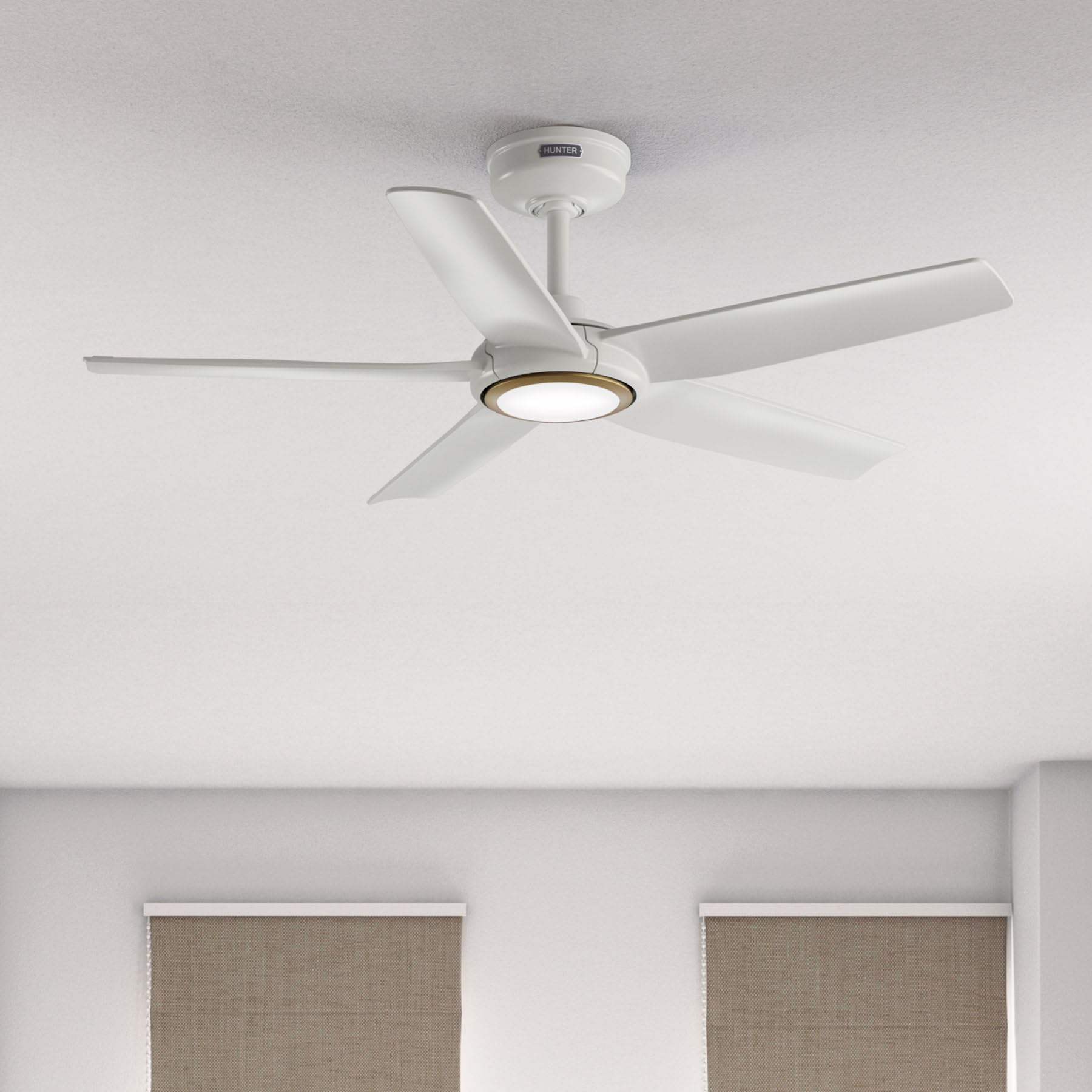
Image: Hunter ZenTech 44-inch ceiling fan in Fresh White, showcasin세련된 디자인과 내장형 LED 조명이 특징입니다.
안전 정보
To reduce the risk of electric shock, fire, or injury to persons, always follow these important safety precautions:
- 이 선풍기를 설치하거나 사용하기 전에 모든 지침을 읽으십시오.
- 설치나 정비를 하기 전에 회로 차단기의 전원이 꺼져 있는지 확인하세요.
- 모든 배선은 국가 및 지역 전기 규정을 준수해야 합니다. 배선에 익숙하지 않은 경우 자격을 갖춘 전기 기술자에게 문의하십시오.
- 선풍기는 날개 끝에서 바닥까지 최소 7피트(2.1미터)의 간격을 두고 설치해야 합니다.
- 설치 구조물이 팬의 무게(약 13.45파운드)를 지탱할 수 있는지 확인하십시오.
- 날개나 기타 부품이 손상된 선풍기는 작동하지 마십시오.
- 이 팬은 damp-rated, suitable for indoor use and covered outdoor areas where exposure to moisture may occur. Do not expose to direct water spray.
설정 및 설치
Proper installation is crucial for the performance and safety of your ceiling fan. It is recommended to have a qualified electrician perform the installation.
설치 전 확인 사항
- 포장 목록에 있는 모든 구성품이 들어 있는지 확인하세요.
- Ensure the electrical box is securely mounted and capable of supporting a ceiling fan.
- 주 회로 차단기의 전원을 끕니다.
팬 장착
- Attach the mounting bracket to the ceiling electrical box using the provided screws.
- Assemble the downrod (6 inches included) to the motor housing. Factory-installed wiring and connectors are designed for downrods up to 24 inches. Do not extend or modify.
- 팬 조립체를 조심스럽게 들어 올려 장착 브래킷에 걸어주세요.
전기 연결
- 전체 사용 설명서의 배선도에 따라 선풍기의 전선을 가정용 배선에 연결하십시오. 모든 연결이 단단히 고정되었는지 확인하십시오.
- 모든 전선을 전기 상자에 깔끔하게 밀어 넣습니다.
날개 및 조명 키트 부착
- Securely attach the five fan blades to the motor housing.
- Install the LED light kit module. The fan includes in-box accessories for a personalized finish, including an interchangeable LED module, a no-light cap, and two trim ring options (one matching the fan finish and one in Luxe Gold).

Image: Hunter ZenTech ceiling fan installed in a modern living room, demonstrating its aesthetic integration into a home environment.

Image: Hunter ZenTech ceiling fan installed on a covered outdoor patio, highlighting its damp-rated suitability for outdoor use.
작동 지침
Your ZenTech fan offers multiple control options for convenience.
원격 제어
A handheld remote control is included for basic fan and light functions:
- 팬 속도: Adjust between 6 speeds.
- 팬 방향: Reverse the fan direction for summer (downward airflow) or winter (upward airflow) operation.
- 조명 켜기/끄기: Turn the LED light on or off.
- 조명 어둡게 하기: LED 조명의 밝기를 조정합니다.
HunterSMART App Control
The HunterSMART app provides advanced control and customization options:
- Download the HunterSMART app from your device's app store.
- Follow the in-app instructions to connect your ZenTech fan to your home Wi-Fi network.
- Once connected, you can control fan speed, light brightness, and color temperature from your smartphone or tablet.
- Access additional features such as scheduling and custom settings.

Image: Diagram illustrating HunterSMART app interface and voice command examples for controlling the ceiling fan.
음성 제어
The ZenTech fan is compatible with leading smart home platforms:
- 아마존 알렉사: Enable the Hunter skill in the Alexa app and link your HunterSMART account.
- 구글 어시스턴트: Link your HunterSMART account through the Google Home app.
- Apple HomeKit: Follow the pairing instructions in the Apple Home app.
Use voice commands such as "Alexa, turn on the living room fan" or "Hey Google, set the bedroom light to warm white."
TrueLight LED Lighting
The integrated TrueLight LED technology allows for fully adjustable lighting:
- Choose from 10 brightness levels to suit your needs.
- Adjust the color temperature between warm and cool tones to create the desired ambiance.

Image: Graphic illustrating the 'Clearly Brighter' TrueLight features, showing 10 levels of light and 10 color temperatures for adjustable LED lighting.
유지
Regular maintenance ensures the longevity and optimal performance of your ZenTech ceiling fan.
청소
- 팬 블레이드: Wipe the blades with a soft, damp 천으로 닦으십시오. 연마성 세제는 마감재를 손상시킬 수 있으므로 사용하지 마십시오.
- 모터 하우징 : Dust the motor housing with a soft, dry cloth.
- 조명 키트: Clean the light diffuser with a soft, lint-free cloth.
Always ensure the power is off at the circuit breaker before cleaning any part of the fan.
일반 유지 관리
- 모든 나사와 연결부가 단단히 조여졌는지 정기적으로 점검하세요. 필요하면 다시 조이세요.
- 선풍기의 DC 모터는 장기간 유지보수 없이 작동하도록 설계되었으며 윤활이 필요하지 않습니다.
문제 해결
If you encounter issues with your ZenTech ceiling fan, refer to the following common problems and solutions:
| 문제 | 가능한 원인 | 해결책 |
|---|---|---|
| 팬이 시작되지 않음 | 팬에 전원이 들어오지 않습니다. 전선 연결이 느슨합니다. 리모컨 배터리가 부족합니다. | 회로 차단기를 확인하세요. 모든 전선 연결이 안전한지 확인하세요. 리모컨 배터리를 교체하세요. |
| 빛이 작동하지 않습니다 | Loose wire connection to light kit; LED module faulty. | Check light kit wiring; Contact customer support for LED module replacement if necessary. |
| 팬이 흔들린다 | 날 나사가 헐거워짐; 날의 균형이 맞지 않음; 장착 브래킷이 헐거워짐. | 모든 날 나사를 조이십시오. 날 균형 조정 키트(별도 구매)를 사용하십시오. 장착 브래킷이 단단히 고정되었는지 확인하십시오. |
| 리모컨이 작동하지 않습니다 | Battery low or dead; Remote not paired with fan. | Replace battery; Refer to the full manual for remote pairing instructions. |
| Wi-Fi 연결 문제 | Wi-Fi 비밀번호가 잘못되었습니다. 라우터가 너무 멀리 떨어져 있습니다. 네트워크 간섭이 있습니다. | Verify Wi-Fi password; Move router closer or use a Wi-Fi extender; Reduce interference from other devices. |
For more complex issues or if troubleshooting steps do not resolve the problem, please contact Hunter customer support.
명세서
| 특징 | 세부 사항 |
|---|---|
| 상표 | 사냥꾼 |
| 모델명 | ZenTech |
| 모델 번호 | 53641 |
| 크기 | 44인치 |
| 색상 | 신선한 흰색 |
| 제품 치수 | 44인치 깊이 x 44인치 너비 x 11.78인치 높이 |
| 품목 무게 | 13.45 파운드 |
| 블레이드 수 | 5 |
| 모터 유형 | DC Motor (43% slimmer) |
| 속도의 수 | 6 |
| 라이트 타입 | TrueLight LED (Adjustable Brightness & Color Temperature) |
| 제어 방법 | App Control (HunterSMART), Remote Control, Voice Control |
| 스마트 홈 호환성 | Amazon Alexa, Google Assistant, Apple HomeKit |
| 실내/실외 사용 | 실내, 지붕 있는 야외 (D)amp 정격) |
| 권tage | 120 볼트 |
| 왓tage | 14 와트 |
| 기류 용량 | 분당 4493.25입방 피트 |
| 다운로드 길이 | 6 Inches (included), compatible up to 24 inches |
| 인증 | ETL, 에너지 스타, FCC |
보증
The Hunter ZenTech ceiling fan is backed by a limited lifetime motor warranty, reflecting Hunter's commitment to engineering and quality. This warranty covers defects in materials and workmanship of the fan motor for the lifetime of the original purchaser. Specific terms and conditions apply. Please refer to the warranty card included with your product or visit the official Hunter web자세한 내용은 사이트를 참조하십시오.
지원하다
For technical assistance, warranty claims, or additional information regarding your Hunter ZenTech ceiling fan, please contact Hunter customer support:
- 온라인 지원: Visit the Hunter Fan Company webFAQ, 문제 해결 가이드, 문의 양식을 제공하는 사이트입니다.
- 전화 지원: 제품 포장 또는 헌터 설명서를 참조하십시오. web최신 고객 서비스 전화번호를 확인하려면 사이트를 방문하세요.
지원팀에 문의할 때는 모델 번호(53641)와 구매 증빙 서류를 준비해 두세요.