
1. 제품 오버view
The ATK N9 Tri-Mode Gaming Headset is designed for gamers requiring flexible connectivity, clear audio, and reliable communication across multiple devices. It supports 3.5 mm wired, 2.4G wireless, and Bluetooth connections, allowing seamless switching between gaming consoles, PC, and mobile devices. Stereo-tuned dynamic drivers deliver balanced sound, enhancing in-game audio cues such as footsteps, gunfire, and environmental effects. The detachable noise-canceling microphone improves voice clarity for team communication, online gaming, and voice calls. Its over-ear design, with soft ear cushions and an adjustable headband, ensures a comfortable fit for extended gaming sessions. The headset is compatible with PS5, PS4, PC, Nintendo Switch, and mobile devices. For Xbox Series X|S, audio and microphone functions are supported via the 3.5 mm wired connection.

2. 패키지 내용
아래 나열된 모든 품목이 패키지에 포함되어 있는지 확인하세요.
- ATK N9 Pro/White Gaming Headset
- 탈착식 노이즈 캔슬링 마이크
- USB-C 충전 케이블
- 3.5mm 오디오 케이블
- 2.4G 무선 USB 어댑터
- 사용 설명서 (본 문서)

3. 초기 설정
3.1. 헤드셋 충전
Before first use, fully charge the headset using the provided USB-C charging cable. Connect the USB-C end to the headset's charging port and the USB-A end to a compatible USB power source (e.g., PC, wall adapter). The LED indicator will show charging status.
3.2. 마이크 부착
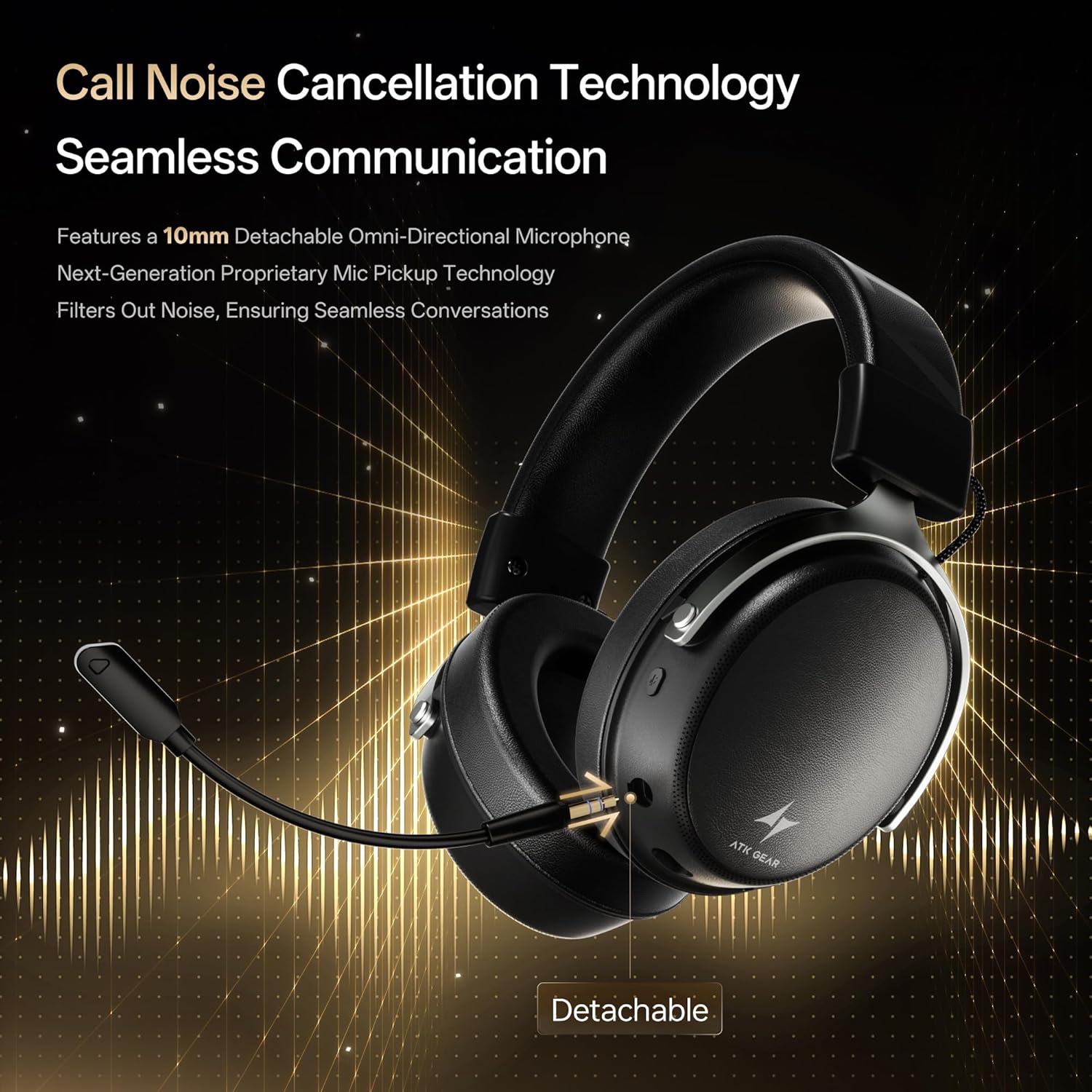
Insert the detachable boom microphone into the microphone port on the left earcup until it clicks into place. Ensure it is securely connected for optimal voice pickup.
3.3. 연결 옵션
The ATK N9 Pro/White headset offers three connectivity modes:
- 2.4G 무선 모드: For PC, PS4, PS5, and Nintendo Switch (docked mode).
- Plug the 2.4G wireless USB adapter into an available USB port on your device.
- 헤드셋의 전원을 켭니다.
- Switch the headset to 2.4G mode using the mode switch. The headset will automatically pair with the adapter.
- Adjust audio output settings on your device if necessary to select the headset.
- 블루투스 모드 : For mobile devices, PC, and Nintendo Switch (handheld mode).
- Power on the headset and switch to Bluetooth mode. The LED indicator will flash, indicating pairing mode.
- On your device, go to Bluetooth settings and select "ATK N9 Pro" from the list of available devices.
- 연결되면 LED 표시등이 계속 켜져 있습니다.
- 3.5mm 유선 모드: For Xbox Series X|S, PS4, PS5, PC, Nintendo Switch, and mobile devices.
- 3.5mm 오디오 케이블의 한쪽 끝을 헤드셋의 3.5mm 잭에 연결하십시오.
- Connect the other end to the 3.5mm audio port on your device (e.g., controller, PC audio jack).
- 헤드셋은 무선 기능을 우회하여 유선 모드로 작동합니다.

4. 사용 설명서
4.1. 헤드셋 제어
The ATK N9 Pro/White headset features intuitive controls located on the earcups:
- 전원 버튼: Press and hold to power on/off. Short press for play/pause (in 2.4G/Bluetooth mode).
- 모드 스위치: Toggle between 2.4G wireless, Bluetooth, and wired modes.
- 볼륨 높이기/낮추기 휠: 회전하여 오디오 볼륨을 조절하세요.
- 마이크 음소거 버튼: 마이크를 음소거/음소거 해제하려면 누릅니다.
- Spatial Audio Button: Press to activate/deactivate 3D Spatial Audio.
- Mic Monitoring Button: Press to enable/disable microphone monitoring (sidetone).
4.2. 마이크 사용
The detachable noise-canceling microphone is designed for clear communication. Position the microphone approximately 1-2 inches from your mouth for optimal voice pickup. Use the microphone mute button on the headset to quickly mute your voice when needed.
4.3. 핏 조절
The headset features an adjustable headband and soft ear cushions for comfort. Extend or retract the headband to achieve a snug yet comfortable fit. The earcups are designed to fully enclose your ears for passive noise isolation and comfort during long gaming sessions.
5. 기술 사양
| 특징 | 사양 |
|---|---|
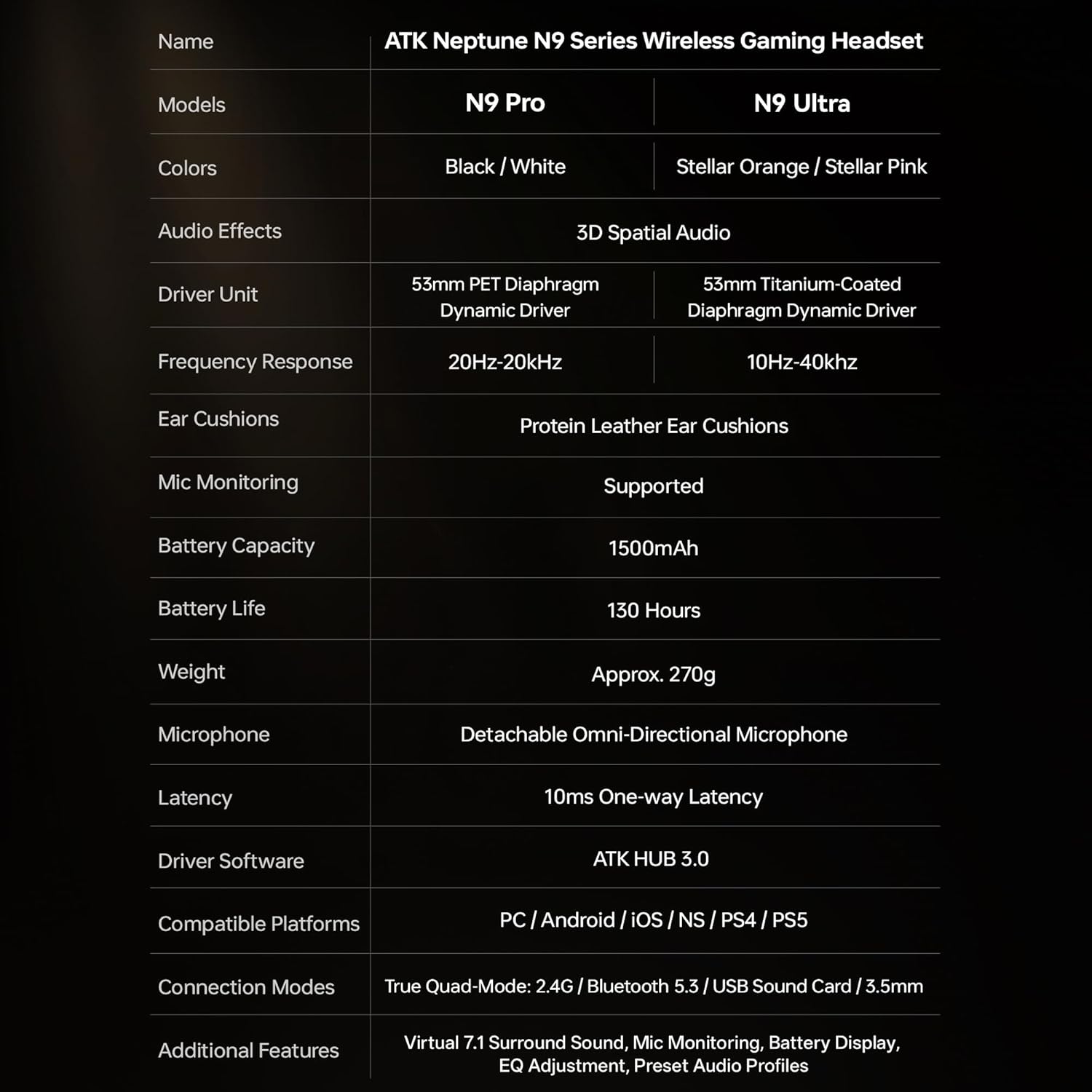
| 모델명 | ATK N9 Pro |
| 연결성 | 3.5mm Wired, 2.4G Wireless, Bluetooth 5.3 |
| 드라이버 유형 | 동적 드라이버 |
| 드라이버 크기 | 53mm (XNUMXmm) |
| 주파수 범위 | 20Hz - 20,000Hz |
| 임피던스 | 64옴 |
| 마이크로폰 | Detachable Noise-Canceling Omni-Directional |
| 배터리 용량 | 1500mAh |
| 배터리 수명 | 최대 130시간 |
| 지연 시간(2.4G) | 10 Milliseconds (one-way) |
| 무게 | 270그램 |
| 귀 위치 | 귀 위 |
| 호환 장치 | PS5, PS4, PC, Nintendo Switch, Mobile Devices, Xbox Series X|S (wired) |
| 추가 기능 | 3D Spatial Audio, Mic Monitoring, Volume Control |

6. 관리 및 유지 보수
- 청소: 부드럽고 마른 천을 사용하여 헤드셋을 닦으세요. 강한 화학 물질이나 연마재는 사용하지 마세요.
- 저장: 헤드셋은 직사광선과 극한의 온도를 피해 서늘하고 건조한 곳에 보관하세요.
- 배터리 관리 : 배터리 수명을 연장하려면 헤드셋을 자주 완전히 방전시키지 마세요. 장시간 사용하지 않더라도 정기적으로 충전하세요.
- 방수 기능: 헤드셋은 방수 기능이 없습니다. 액체에 노출되지 않도록 하십시오.
7. 문제 해결
7.1. 소리가 안 나거나 소리가 작음
- Ensure the headset is powered on and connected in the correct mode (2.4G, Bluetooth, or 3.5mm wired).
- 헤드셋의 볼륨 휠과 기기의 볼륨 설정을 확인하세요.
- For wireless modes, ensure the headset is paired correctly and selected as the audio output device in your system settings.
- If using 3.5mm wired, ensure the cable is fully inserted into both the headset and the device.
7.2. 마이크가 작동하지 않음
- 마이크가 헤드셋에 단단히 부착되었는지 확인하세요.
- 헤드셋의 마이크 음소거 버튼이 켜져 있는지 확인하세요.
- Verify that the headset microphone is selected as the input device in your device's sound settings.
- For Xbox Series X|S, ensure you are using the 3.5mm wired connection for microphone support.
7.3. 연결 문제
- 2.4G 무선: Ensure the USB adapter is firmly plugged in. Try a different USB port.
- 블루투스: Ensure the headset is in pairing mode. Forget the device on your phone/PC and re-pair. Keep the headset within the 5-meter Bluetooth range.
- 일반적인: Power cycle both the headset and your connected device.
8. 보증 및 지원
8.1. 보증 정보
The ATK N9 Pro/White Gaming Headset comes with a 6개월 보증 구매일로부터 적용됩니다. 본 보증은 정상적인 사용 조건에서 발생하는 제조상의 결함 및 불량에 적용됩니다. 단, 오용, 사고, 무단 개조 또는 정상적인 마모로 인한 손상은 보증 대상에서 제외됩니다.
8.2. 고객 지원
For further assistance, technical support, or warranty claims, please contact ATK customer service through the retailer where the product was purchased or visit the official ATK web지원 연락처 정보 사이트.


