
1. 서론
Thank you for choosing the BEISHI Mobile TV Cart on Wheels. This versatile and height-adjustable rolling TV stand is designed to accommodate televisions ranging from 32 to 85 inches. It features a 5-level height adjustment and a 35-degree swivel capability, providing flexible viewing angles for various environments such as offices, homes, or outdoor settings. This manual provides essential information for safe assembly, operation, and maintenance of your new TV cart.
이미지 1.1: 이상view of the BEISHI Mobile TV Cart on Wheels.
2. 안전 정보
Please read all safety warnings and instructions carefully before assembly and use. Failure to follow these instructions may result in property damage, serious injury, or death.
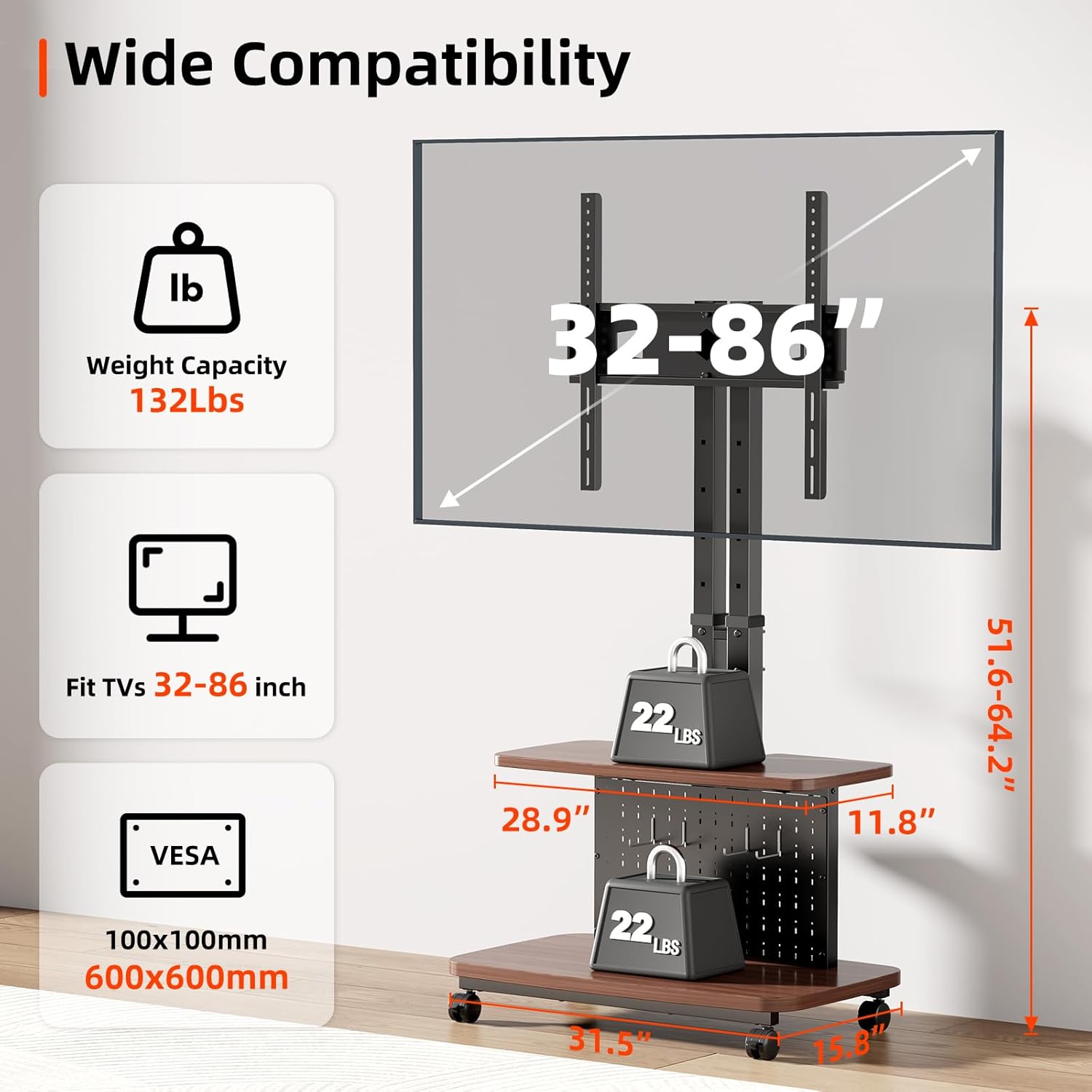
- 중량 용량: Do not exceed the maximum weight capacity of 132 lbs (60 kg) for the TV mount. Ensure your TV's weight is within this limit.
- TV 크기 호환성: 이 스탠드는 32인치에서 85인치 사이의 TV에 맞게 설계되었습니다.
- VESA 호환성: Ensure your TV's VESA mounting pattern is compatible with the stand (100x100mm to 600x600mm).
- 안정: Always ensure the TV cart is on a stable, level surface. Lock the wheels when the cart is stationary to prevent accidental movement.
- 집회: Assemble the product according to the instructions. Do not modify the product or use it for purposes not explicitly intended.
- 어린이들: Keep children away from the TV cart during assembly. Do not allow children to climb on or play with the TV cart.
- 카트 이동: When moving the cart, ensure the TV is securely mounted and all items on shelves are stable. Move slowly and carefully, especially over uneven surfaces.

Image 2.1: Key compatibility and weight specifications for the TV cart.
3. 패키지 내용
Before beginning assembly, verify that all parts are present and undamaged. Refer to the included parts list in your product packaging. If any parts are missing or damaged, do not proceed with assembly and contact customer support.
4. 설치 및 조립
Assembly typically requires two people. Follow the step-by-step instructions provided in the separate assembly guide included with your product. Below are general guidelines and important considerations.
4.1. Base and Column Assembly
Begin by assembling the base and attaching the dual support columns. Ensure all screws are tightened securely to provide a sturdy foundation for your television.

Image 4.1: The robust base and dual column design ensure stability.
4.2. Wheel Installation
Attach the four caster wheels to the base. Ensure the wheels are correctly threaded and securely fastened. Two of the wheels are typically lockable to prevent unwanted movement.
4.3. TV Mount Installation
Attach the TV mounting brackets to the rear of your television, ensuring they align with your TV's VESA pattern. Then, carefully lift and hook the TV onto the stand's main column. Secure the TV with the provided safety screws or locking mechanisms.
4.4. 선반 설치
Install the top and bottom shelves onto the main column. These shelves provide space for media devices, remote controls, or other accessories.

Image 4.2: The integrated shelves and pegboard with hooks offer convenient storage and organization.
5. 사용 설명서
5.1. 높이 조절
The TV cart features a 5-level height adjustment mechanism. To adjust the height:
- Locate the tool-free adjustment knobs on the main column.
- Twist the knobs to loosen the locking mechanism.
- Carefully lift or lower the TV mount to your desired height.
- Twist the knobs to tighten and secure the TV mount at the new height.

Image 5.1: Tool-free adjustment knobs allow for easy 5-level height changes.
5.2. TV Swivel
The TV mount allows for a 35-degree swivel (17.5 degrees left or right) to optimize your view잉 각도.
- 텔레비전 양쪽 측면을 살살 잡으세요.
- Rotate the TV to the desired left or right angle. The swivel mechanism is designed for smooth movement.
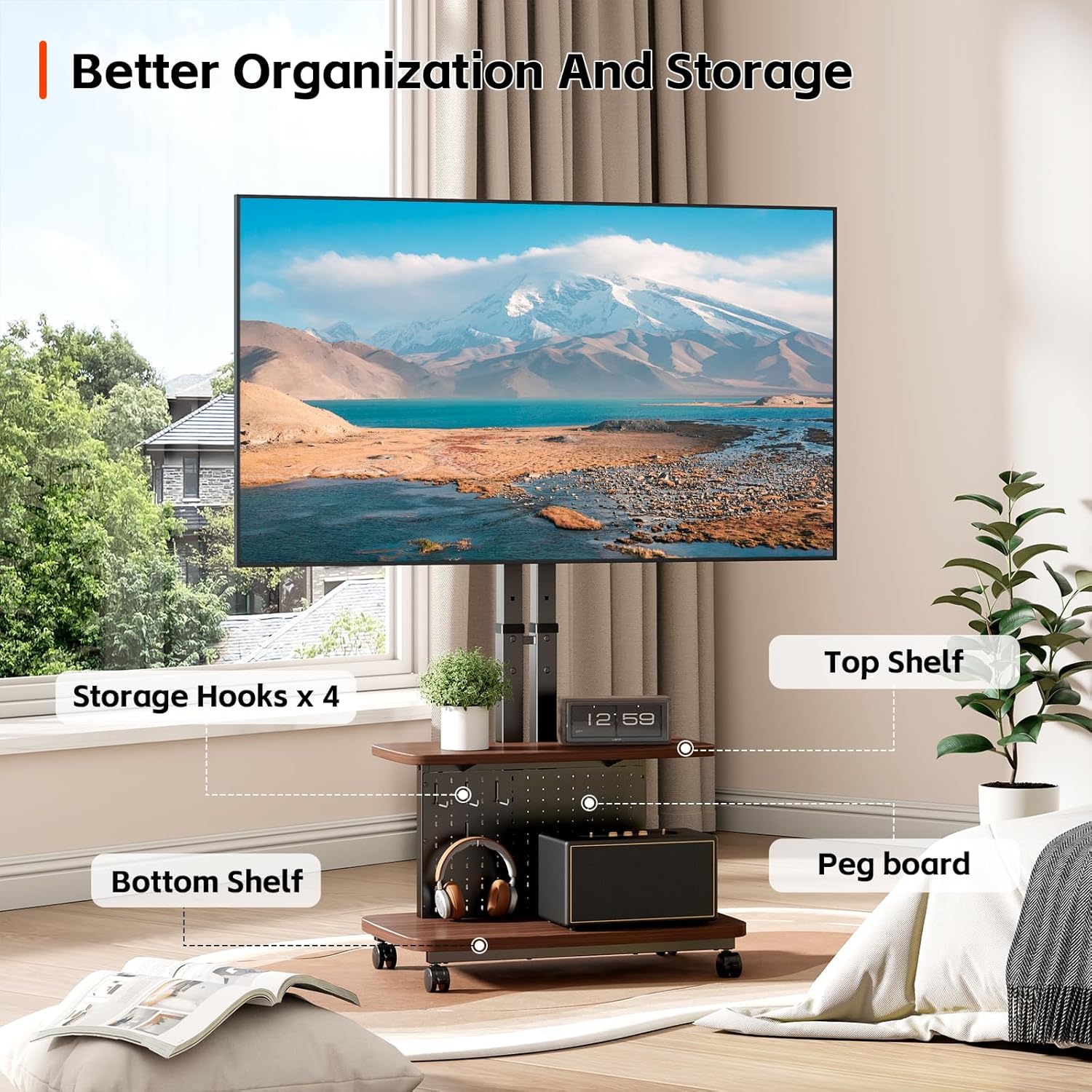
Image 5.2: The 35-degree swivel feature provides flexible view각도를 나타냅니다.
5.3. Moving and Locking the Cart
To move the TV cart:
- Unlock the caster wheels by flipping the locking levers upwards.
- Gently push the cart to its new location.
- Once in position, lock the caster wheels by flipping the locking levers downwards to ensure stability.

Image 5.3: The 360-degree rotating wheels allow for easy movement, and the locking mechanism ensures stability.
6. 유지관리
- 청소: 부드럽고 마른 천으로 스탠드를 닦으십시오. 마감재를 손상시킬 수 있는 연마성 세제나 용제 사용은 피하십시오.
- 정기 점검: 모든 나사와 연결부가 단단히 조여져 있는지 정기적으로 점검하십시오. 필요한 경우 다시 조이십시오.
- 휠 유지 관리: 바퀴에 이물질이 없도록 하여 원활한 움직임을 보장하세요.
7. 문제 해결
- 받침대가 불안정합니다. Ensure all assembly screws are fully tightened. Verify the TV weight and size are within the specified limits. Ensure the cart is on a flat, level surface.
- Wheels do not move smoothly: Check for debris caught in the wheels. Ensure the wheel locks are disengaged.
- 높이 조절이 어렵습니다. Ensure the adjustment knobs are fully loosened before attempting to change height. Do not force the mechanism.
- TV does not swivel: Ensure no cables are obstructing the swivel mechanism.
- 누락되거나 손상된 부품: 조립을 진행하지 마십시오. 즉시 고객 지원 센터에 연락하여 교체 부품을 받으십시오.
8. 사양
| 특징 | 사양 |
|---|---|
| 상표 | 베이시 |
| 모델 | B0GFCQ1YMF |
| 장착 유형 | 플로어 마운트 |
| 이동 유형 | Swivel, Tilt (implied by height adjustment) |
| 재료 | 탄소강 |
| 호환 장치 | 텔레비전 |
| Maximum Supported Screen Size | 85 인치 |
| Minimum Supported Screen Size | 32 인치 |
| 최대 중량 용량 | 132파운드(60kg) |
| VESA 호환성 | 100x100mm ~ 600x600mm |
| 높이 조정 | 5-Level (51.6"-64.2" from floor to TV center) |
| 회전 각도 | 35 degrees (17.5 degrees left/right) |
9. 보증
This BEISHI Mobile TV Cart on Wheels comes with a one-month warranty from the date of purchase. Please retain your proof of purchase for any warranty claims. The warranty covers manufacturing defects under normal use. It does not cover damage caused by misuse, accidents, unauthorized modifications, or failure to follow assembly and operating instructions.
10. 고객 지원
For any questions, assistance with assembly, troubleshooting, or warranty inquiries, please contact BEISHI customer support through the retailer where the product was purchased. Please have your model number (B0GFCQ1YMF) and proof of purchase ready when contacting support.


