
1. 서론
Thank you for choosing the GRIFEMA GB1057-1 Selfie Stick Tripod with Fill Lights. This versatile device combines a selfie stick, a stable tripod, and integrated fill lights to enhance your photography and videography experience. It is designed for use with smartphones, offering adjustable height, multi-angle shooting capabilities, and a detachable Bluetooth remote control for convenient operation.
Please read this manual thoroughly before using the product to ensure proper setup, operation, and maintenance. Keep this manual for future reference.
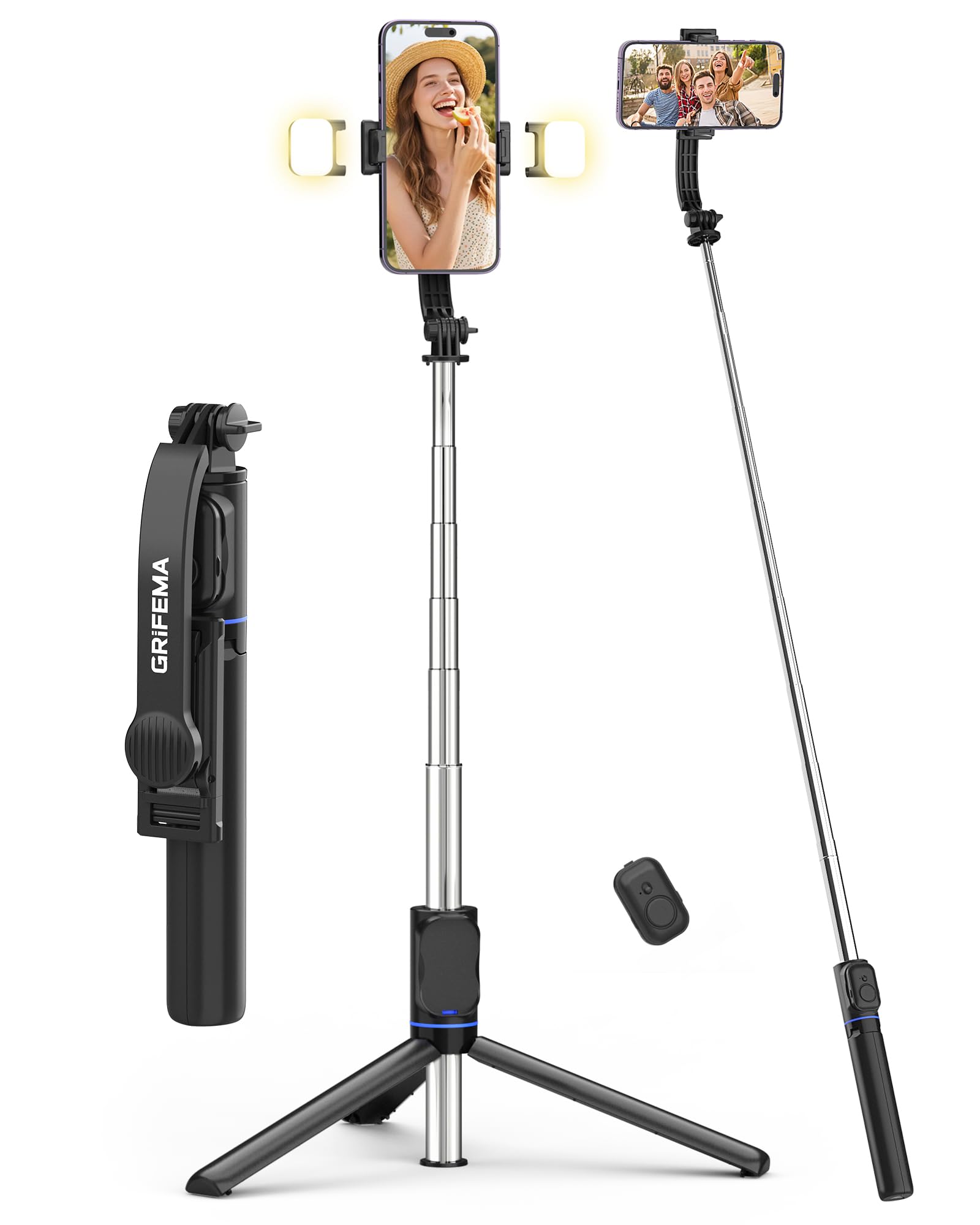
Image 1: GRIFEMA GB1057-1 Selfie Stick Tripod with Fill Lights. This image shows the product in its extended form, highlighting the phone clamp, fill lights, and extendable pole.
2. 제품 구성품
The GRIFEMA GB1057-1 package includes the following components:
- Selfie Stick Tripod Body: The main unit, featuring an extendable pole and integrated tripod legs.
- 전화번호amp: 조정 가능한 CLamp 스마트폰을 안전하게 고정하기 위해.
- 분리형 블루투스 리모컨: For wireless photo and video capture.
- Dual Fill Lights (x2): Two detachable LED lights for adjustable illumination.
- USB-C 충전 케이블: For recharging the fill lights.
3. 설정
Follow these steps to set up your GRIFEMA GB1057-1 Selfie Stick Tripod:
- 장치 포장 풀기: 포장에서 모든 구성 요소를 조심스럽게 제거합니다.
- Charge Fill Lights: Before first use, ensure the fill lights are fully charged using the provided USB-C cable. Connect the cable to the charging port on each light and a standard USB power source. The indicator light will change when charging is complete.
- 전화번호 첨부: 전화선을 연장하세요amp and carefully insert your smartphone. Ensure the phone is centered and securely held by the non-slip silicone pads. The clamp supports phones between 65mm and 95mm in width.
- Bluetooth 리모컨 페어링:
- Remove the detachable remote control from the handle.
- Press and hold the button on the remote until the indicator light flashes, indicating it is in pairing mode.
- 스마트폰에서 Bluetooth 설정으로 가서 사용 가능한 기기를 검색하세요.
- Select "GRIFEMA Remote" (or similar name) to pair. The indicator light on the remote will stop flashing once successfully paired.
4. 사용 설명서
4.1. Extending and Retracting the Selfie Stick
- To extend: Hold the base and pull the phone clamp upwards. The stick extends in 7 stages up to 107cm.
- To retract: Push the phone clamp downwards until the stick is fully collapsed to 19.6cm.
4.2. Converting to Tripod Mode
- From the collapsed position, gently pull the bottom handle downwards to unfold the three tripod legs.
- 삼각대를 평평하고 안정적인 표면에 놓으십시오.
- Extend the pole to your desired height for stable hands-free shooting.
4.3. Adjusting Phone Angle
- 전화 clamp features a dual-axis 360° rotation, allowing you to switch between portrait and landscape modes.
- The head of the tripod is 225° adjustable, enabling various shooting angles, including overhead and low-angle shots. Loosen the adjustment knob, set the desired angle, and tighten the knob to secure.
4.4. Using the Fill Lights
- Attach the two fill lights to the designated slots on the phone clamp.
- Press the power button on each light to turn it on.
- Press the button repeatedly to cycle through the 3 color temperatures (Cold, Warm, Natural) and 2 brightness levels for each color, offering a total of 6 lighting options.
- 버튼을 길게 누르면 조명이 꺼집니다.
4.5. 리모컨 사용
- Once paired with your smartphone, open your phone's camera application.
- Press the button on the remote control to trigger the camera shutter or start/stop video recording.
- The remote operates wirelessly up to 10 meters (33 feet) away.
5. 유지관리
- 청소: 부드럽고 마른 천으로 기기를 닦으세요. 연마성 세제나 용제를 사용하지 마세요.
- 저장: Store the selfie stick tripod in a cool, dry place, away from direct sunlight and extreme temperatures. Ensure it is fully retracted and the tripod legs are folded.
- 배터리 관리 : Recharge the fill lights regularly, even if not in frequent use, to maintain battery health.
6. 문제 해결
- 리모컨이 연결되지 않음:
- Ensure the remote control has power (check battery if replaceable, or charge if rechargeable).
- 스마트폰에서 Bluetooth가 활성화되어 있는지 확인하세요.
- 휴대폰의 블루투스 설정에서 리모컨의 연결을 해제한 후 다시 연결하세요.
- 리모컨이 10m 작동 범위 내에 있는지 확인하세요.
- Fill Lights Not Turning On:
- Check if the fill lights are charged. Connect them to the USB-C charging cable.
- 전원 버튼을 확실하게 눌렀는지 확인하세요.
- 삼각대 안정성 문제:
- 삼각대 다리가 완전히 펼쳐지고 평평하고 안정적인 표면에 고정되었는지 확인하십시오.
- Avoid extending the pole to its maximum height in windy conditions or on uneven terrain.
- 휴대전화가 안전하게 닫혀 있는지 확인하십시오.amp균형 잡히고 조화로운.
7. 사양
| 특징 | 사양 |
|---|---|
| 모델 번호 | GB1057-1 |
| 상표 | 그리페마 |
| 재료 | 스테인리스 스틸, 플라스틱 |
| 최대 높이 | 107cm(42.1인치) |
| 최소 높이 | 34cm(13.4인치) |
| 접힌 길이 | 19.6cm(7.7인치) |
| Weight (excluding lights) | 182g(6.4온스) |
| 전화번호amp 너비 | 65mm - 95mm(2.5 - 3.7인치) |
| 필라이트 모드 | 3 Colors (Cold, Warm, Natural), 2 Brightness Levels each (6 total) |
| 원격 제어 범위 | 최대 10미터(33피트) |
| 특별 기능 | Foldable, Lightweight, Detachable Remote Control, Telescopic, 360° Rotating Head |
| 호환 장치 | 스마트폰(아이폰, 안드로이드) |
8. 보증 및 지원
For warranty information, technical support, or service inquiries, please refer to the warranty card included with your purchase or visit the official GRIFEMA web사이트. 보증 청구를 위해 구매 증빙 자료를 보관하세요.
9. 안전 정보
- 기기를 물이나 과도한 습기에 노출시키지 마세요.
- 장치를 떨어뜨리거나 강한 충격을 가하지 마십시오.
- 어린이의 손이 닿지 않는 곳에 보관하세요.
- 기기를 분해하거나 개조하지 마십시오. 보증이 무효화됩니다.
- 해당 지역 규정에 따라 장치와 구성품을 책임감 있게 폐기하세요.