
소개 및 이상view
The Tribit StormBox Micro 3 is a compact and powerful portable Bluetooth speaker designed for versatile use. It features advanced audio technology, robust durability, and convenient mounting options, making it ideal for both indoor and outdoor environments.
- 13W XBass Technology: Equipped with a 48mm Neodymium driver and 2 coaxial passive radiators, delivering 13W rich audio with deep, punchy bass and clear highs/mids.
- 24H Non-Stop Music: Enjoy up to 24 hours of continuous music playback at medium volume. A 15-minute quick charge provides 4 hours of playtime.
- IP68 & 1.22m Drop-Proof: SGS-certified IP68 waterproof protection against rain, splashes, and brief submersion. Tested to withstand drops from up to 1.22 meters.
- Strap & Magnetic Mount: Features a 2-in-1 design allowing secure attachment via a non-slip strap to handlebars, backpacks, or tent poles, or magnetic attachment to metal surfaces.
- Bluetooth 6.0 & 45m Range: Utilizes the latest Bluetooth 6.0 chipset with AAC/SBC codec for stable audio up to 45 meters, ensuring faster pairing and stronger anti-interference.
- Versatile Smart Functions: Supports TWS pairing for immersive stereo sound, a dedicated app with 7 presets and 9 EQ bands for audio customization, auto shut-off, OTA updates, and a built-in mic for hands-free calls.
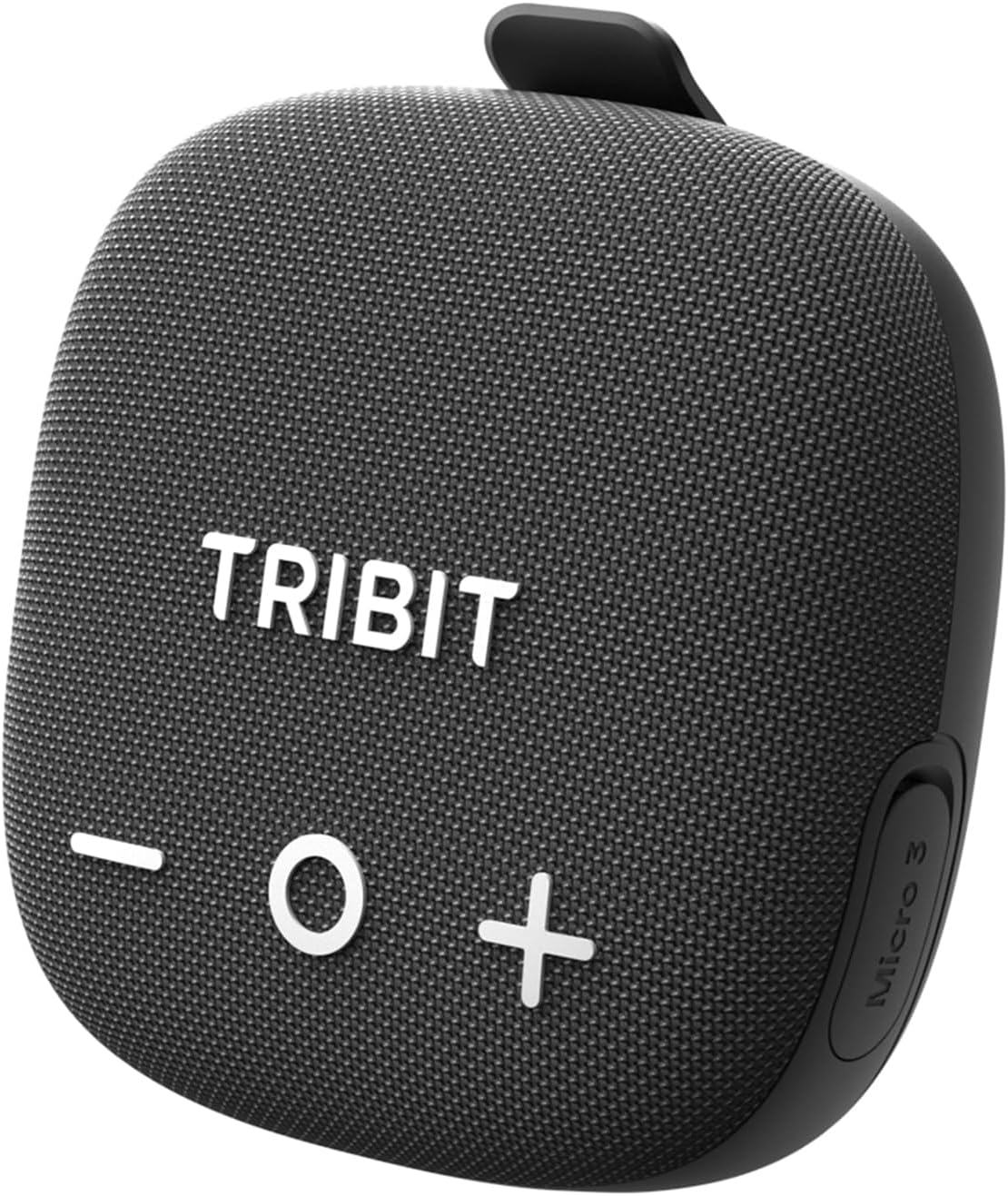
Image: The Tribit StormBox Micro 3 Portable Bluetooth Speaker in black, showcasin컴팩트한 디자인과 전면 그릴이 특징입니다.
설정
1. 초기 충전
Before first use, fully charge your speaker. Connect the provided USB-C charging cable to the speaker's charging port and a compatible power source. A full charge takes approximately 2 hours. A 15-minute quick charge provides 4 hours of playtime.
2. 전원 켜기/끄기
- 전원 켜기: 전원 버튼(
 ) 2초간.
 - 전원 끄기 : 전원 버튼을 2초간 길게 누르세요.
3. 블루투스 페어링
- Ensure the speaker is powered on and the Bluetooth indicator is blinking, indicating it's in pairing mode.
- 사용하시는 기기(스마트폰, 태블릿 등)에서 블루투스를 활성화하고, 검색 결과 목록에서 "Tribit StormBox Micro 3"를 찾아주세요.
- Select the speaker to connect. Once connected, the Bluetooth indicator will turn solid blue.

Image: The Tribit StormBox Micro 3 speaker held in hand next to a smartphone displaying its Bluetooth settings, showing the speaker as 'Connected'.
4. Tribit App Download
For enhanced control and customization, download the Tribit App from the App Store (iOS) or Google Play Store (Android). The app allows you to adjust EQ settings, manage auto shut-off, and receive firmware updates.
스피커 작동
1. 기본 제어
- 볼륨 높이기/낮추기: '+' 또는 '-' 버튼을 누르세요.
- 재생/일시 중지: Press the 'O' button.
- 다음 트랙: Double-press the 'O' button.
- 이전 트랙 : Triple-press the 'O' button.

이미지: 상단 view of the Tribit StormBox Micro 3 speaker, clearly showing the large '+' (volume up), 'O' (play/pause), and '-' (volume down) buttons.
2. XBass Technology
The speaker features XBass technology for enhanced low-end frequencies. Press the 'XBass' button (often indicated by an 'X' icon) to activate or deactivate this feature, boosting bass impact.

이미지: 폭발된 view diagram of the Tribit StormBox Micro 3, highlighting the 48mm NdFeB driver and two coaxial passive radiators, with 'XBass' logo.
3. True Wireless Stereo(TWS) 페어링
Pair two StormBox Micro 3 speakers together for an immersive stereo sound experience. Activate TWS mode on both speakers (usually by pressing a dedicated TWS button or through the app) and follow the pairing instructions.

Image: Two Tribit StormBox Micro 3 speakers are shown attached to backpacks of hikers, illustrating TWS pairing for stereo sound in an outdoor setting.
4. 핸즈프리 통화
The built-in microphone allows for hands-free calls. When a call comes in, press the 'O' button to answer or end the call. Press and hold the 'O' button to reject a call.

Image: A man cycling with the Tribit StormBox Micro 3 attached to his bike handlebars, making a hands-free call, indicated by a green phone icon.
5. App-Controlled Sound Evolution
Use the Tribit App to customize your audio experience. Choose from 7 preset EQ modes or create your own using the 9-band equalizer. The app also offers features like auto shut-off and firmware updates.

Image: A man in a golf cart using the Tribit App on his smartphone to control the Tribit StormBox Micro 3 speaker, showing the app's equalizer and preset options.
6. Reverse Charging (Power Bank)
The speaker can act as a power bank to charge your devices. Connect your device to the speaker's USB-C port using a compatible cable to initiate reverse charging.
장착 옵션
The StormBox Micro 3 offers flexible mounting solutions to suit various activities:
- 스트랩 마운트: Use the integrated non-slip silicone strap to securely attach the speaker to bicycle handlebars, backpack straps, or tent poles.
- 마그네틱 마운트: The speaker features strong magnets on its base, allowing it to securely attach to metal surfaces like refrigerators, toolboxes, or metal poles when stationary.

Image: A composite image showing the Tribit StormBox Micro 3 being magnetically attached to a refrigerator and strapped to a bicycle handlebar, illustrating its 2-in-1 mount feature.
유지
Tribit StormBox Micro 3의 수명 연장 및 최적 성능 유지를 위해 다음 유지 관리 지침을 따르십시오.
- 청소: 부드러운 d를 사용하세요amp 스피커 표면을 닦을 때는 천을 사용하세요. 강한 화학 물질이나 연마성 세제는 사용하지 마세요.
- 저장: 장기간 사용하지 않을 때는 스피커를 서늘하고 건조한 곳에 보관하고, 극한 온도와 직사광선을 피하십시오.
- 방수 씰: Ensure the USB-C port cover is securely closed to maintain IP68 waterproof integrity, especially before exposure to water.
내구성 및 보호
The StormBox Micro 3 is built to withstand challenging environments:
- IP68 방수: The speaker is fully protected against dust and can be submerged in water up to 1.5 meters for 30 minutes.
- 1.22m Drop-Proof: Engineered to survive drops from up to 1.22 meters, making it suitable for rugged outdoor activities.
Image: A Tribit StormBox Micro 3 speaker is shown covered in muddy water on a bike handlebar, with icons indicating IP68 waterproof/dustproof and 1.22m military drop resistance.
문제 해결
If you encounter any issues with your Tribit StormBox Micro 3, please refer to the following general advice:
- 전원 없음: 스피커가 완전히 충전되었는지 확인하십시오. 전원에 연결하고 충전 표시등을 확인하세요.
- 페어링할 수 없습니다: Make sure the speaker is in pairing mode (blinking Bluetooth indicator). Disable and re-enable Bluetooth on your device, then try pairing again.
- 나쁜 음질: Check the volume levels on both the speaker and your connected device. Ensure there are no obstructions between the speaker and your device. Try adjusting the EQ settings via the Tribit App.
- 연결 끊김: 기기가 블루투스 범위 내 45미터 이내에 있는지 확인하십시오. 강한 전자기 간섭을 피하십시오.
For more detailed troubleshooting or persistent issues, please contact Tribit customer support.
명세서
| 상표 | 트리빗 |
| 모델명 | 스톰박스 마이크로 3 |
| 모델 번호 | 비티에스36 |
| 스피커 최대 출력 전력 | 13 와트 |
| 연결 기술 | 블루투스 |
| 블루투스 범위 | 45 미터 |
| 오디오 출력 모드 | 단핵증 |
| 장착 유형 | Magnetic & Strap |
| 인클로저 재료 | ABS+PC/TPE |
| 방수 | 참(IP68) |
| 배터리 평균 수명 | 24시간 |
| 배터리 충전 시간 | 2시간 |
| 품목 치수(D x W x H) | 3.93인치 깊이 x 3.93인치 너비 x 1.77인치 높이 |
| 품목 무게 | 0.34 킬로그램 |
상자 안에 무엇이 들어있나요?
- Portable Bluetooth Speaker (Tribit StormBox Micro 3)
- 사용자 설명서
- USB-C 충전 케이블
보증 및 지원
Tribit StormBox Micro 3에는 다음이 포함됩니다. 1년 보증. For any product-related inquiries, technical support, or warranty claims, please contact Tribit customer service.
Additionally, Tribit offers 12개월 지원 질문이나 문제가 발생할 경우 도움을 드리겠습니다.
You can find more information and contact details on the official Tribit website or through the Tribit App.
공식 제품 영상
Bike Speaker, IP68, 24H Playtime, BT6.0, TWS Pairing
Video: This official seller video highlights the key features of the Tribit StormBox Micro 3, including its suitability as a bike speaker, IP68 rating, 24-hour playtime, Bluetooth 6.0 connectivity, and TWS pairing capabilities.