
1. 중요한 보호 조치
전기 제품을 사용할 때는 다음을 포함한 기본적인 안전 예방 조치를 반드시 따라야 합니다.
- 토스터를 작동하기 전에 모든 지침을 읽으세요.
- 뜨거운 표면을 만지지 마십시오. 손잡이나 손잡이를 사용하십시오.
- 감전을 예방하려면 코드, 플러그 또는 토스터를 물이나 다른 액체에 담그지 마십시오.
- 어린이가 가전제품을 사용하거나 어린이 근처에서 사용할 때는 면밀한 감독이 필요합니다.
- 사용하지 않을 때와 세척하기 전에는 콘센트에서 플러그를 뽑으세요. 부품을 끼우거나 떼기 전에 식히세요.
- 코드나 플러그가 손상된 경우 또는 기기가 오작동하거나 어떤 식으로든 손상된 경우에는 기기를 작동하지 마십시오.
- 옥외에서는 사용하지 마십시오.
- 코드가 테이블이나 카운터 가장자리에 걸려 있거나 뜨거운 표면에 닿지 않도록 하세요.
- 뜨거운 가스나 전기 버너 근처 또는 가열된 오븐에 두지 마십시오.
- 본 제품을 본래 용도 외에는 사용하지 마십시오.
- 크기가 큰 음식이나 금속 호일 포장, 또는 주방용품을 토스터에 넣으면 화재나 감전의 위험이 있으므로 넣지 마세요.
- 토스터가 작동 중일 때 커튼, 휘장, 벽 등의 가연성 물질에 덮여 있거나 닿아 있으면 화재가 발생할 수 있습니다.
- 토스터의 전원이 꽂혀 있는 상태에서 음식을 꺼내려고 하지 마세요.
- 무인으로 조작하지 마십시오.
2. 제품 오버view
The Foyoconven TA1428E-UL is a 2-slice smart digital toaster featuring a responsive touchscreen interface and 900W heating elements for consistent toasting. It includes 1.5-inch wide slots to accommodate various bread types, 6 browning levels, and specialized functions like Defrost, Reheat, and Single-Slice mode. The memory function allows you to save your preferred settings for future use.

Image: Foyoconven 2-slice toaster with touchscreen display, illustrating the 5 bread modes (Pastry, Bread, Muffin, Bagel, Waffle) and a digital timer set to 2:00.
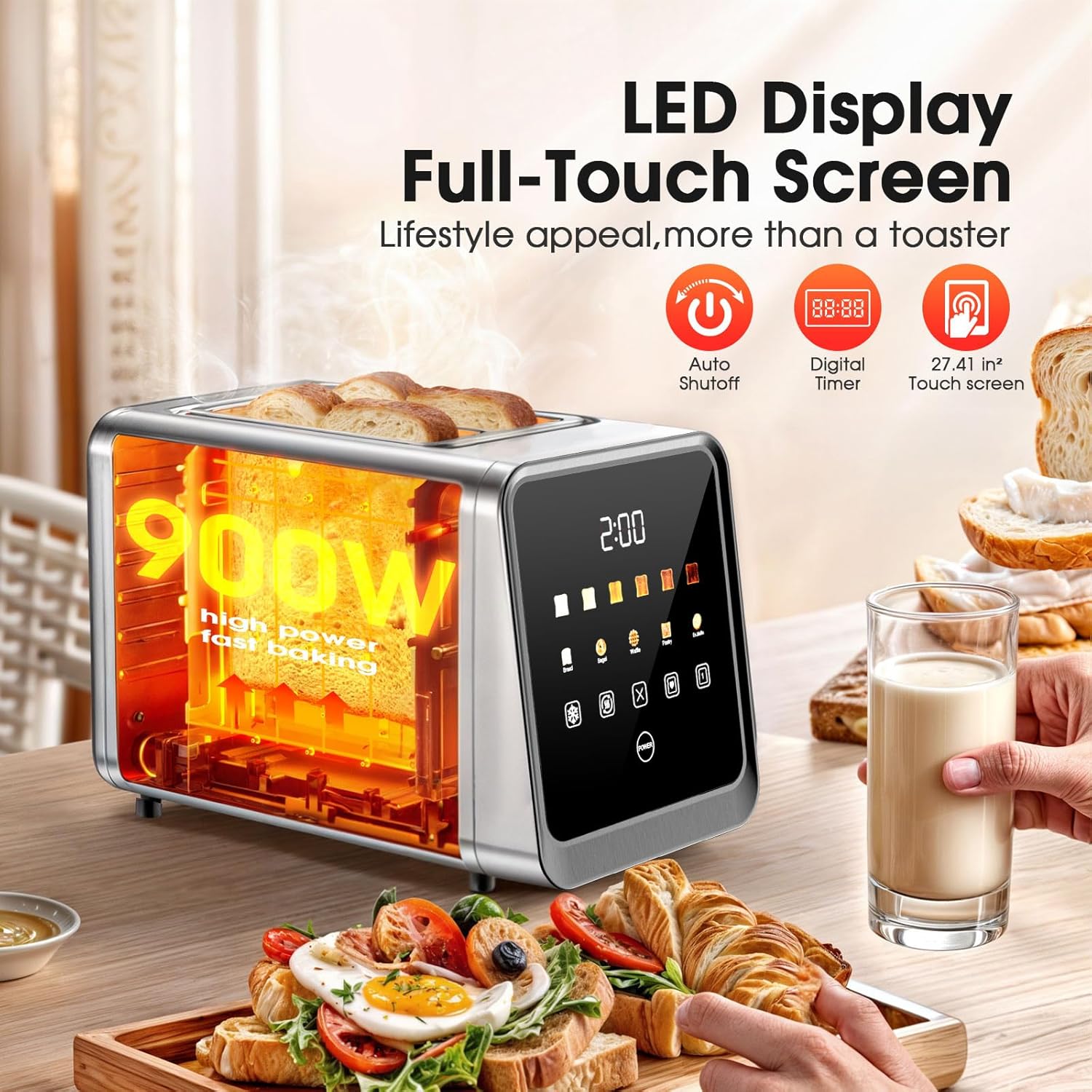
Image: Close-up of the toaster's LED full-touch screen, highlighting its 900W power, auto shutoff, digital timer, and touch screen capabilities. Toasted bread is visible in the slots.
3. 패키지 내용
패키지에 모든 구성 요소가 들어 있는지 확인하세요.
- 1 x Foyoconven Digital Toaster 2 Slice with Touch Screen
4. 설정
4.1 풀기
- 토스터와 모든 포장재를 상자에서 조심스럽게 꺼내세요.
- Remove any protective film or stickers from the toaster's surfaces.
4.2 배치
- Place the toaster on a stable, flat, heat-resistant surface, away from flammable materials such as curtains or walls.
- Ensure there is adequate ventilation around the toaster.
- 전원 코드를 표준 120V AC 콘센트에 꽂으세요.

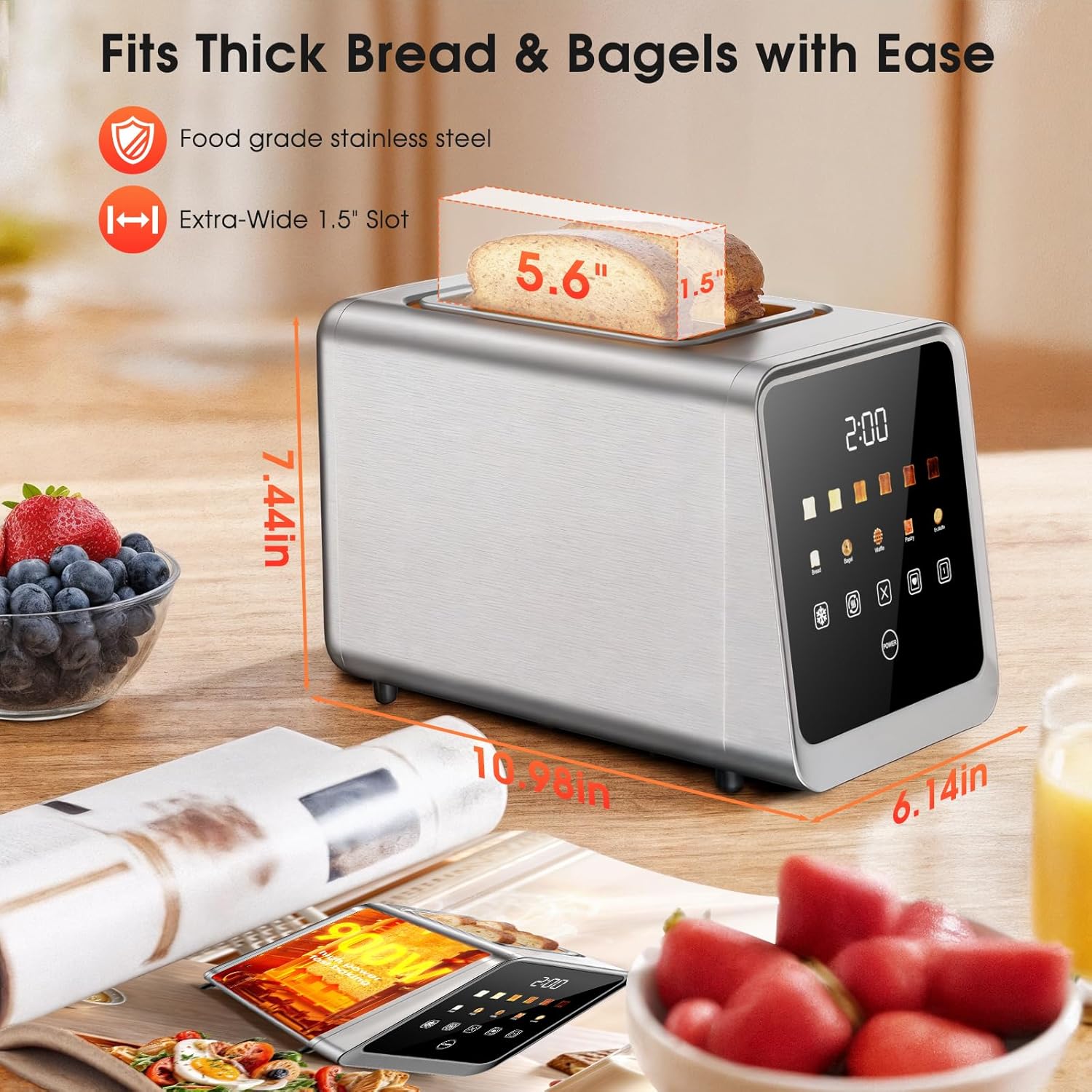
Image: The Foyoconven toaster with dimensions indicated (6.14"D x 7.44"W x 10.98"H) and highlighting its 1.5-inch extra-wide slots, suitable for thick bread and bagels.
4.3 첫 번째 사용
- Before toasting food for the first time, operate the toaster without bread on the highest shade setting (Level 6) to burn off any manufacturing residues. A slight odor or smoke may be present; this is normal and will dissipate.
- 토스터를 처음 사용하기 전에 완전히 식히십시오.
5. 사용 설명서
5.1 Basic Toasting Steps
- 빵을 놓으세요: Insert up to two slices of bread or other items into the toaster slots. The 1.5-inch wide slots accommodate various thicknesses.
- 빵 종류 선택: On the touchscreen, select the appropriate bread type icon (Bread, Bagel, Waffle, Pastry, Muffin). This optimizes toasting for different textures.
- Adjust Browning Level: Choose your desired browning level from 1 (lightest) to 6 (darkest) using the shade setting indicators on the touchscreen.
- 토스트를 시작하세요: Press the lever down firmly until it locks into place. The toaster will begin the toasting cycle.
- 자동 팝업: 토스트가 완료되면 토스트가 자동으로 튀어나옵니다.

Image: A visual guide showing the 4 steps to baking bread: 1. Place bread in any slot, 2. Select bread type and browning level on the touchscreen, 3. Press the lever down firmly, 4. Toast pops up automatically.
5.2 Browning Levels
The toaster offers 6 browning levels to suit individual preferences:
- Level 1 (70s): Lightly warm soft
- Level 2 (90s): Lightly crispy tender
- Level 3 (115s): Golden soft center
- Level 4 (130s): Crisp golden brown
- Level 5 (145s): Crunchy rich flavor
- Level 6 (160s): Very crispy hearty crunch
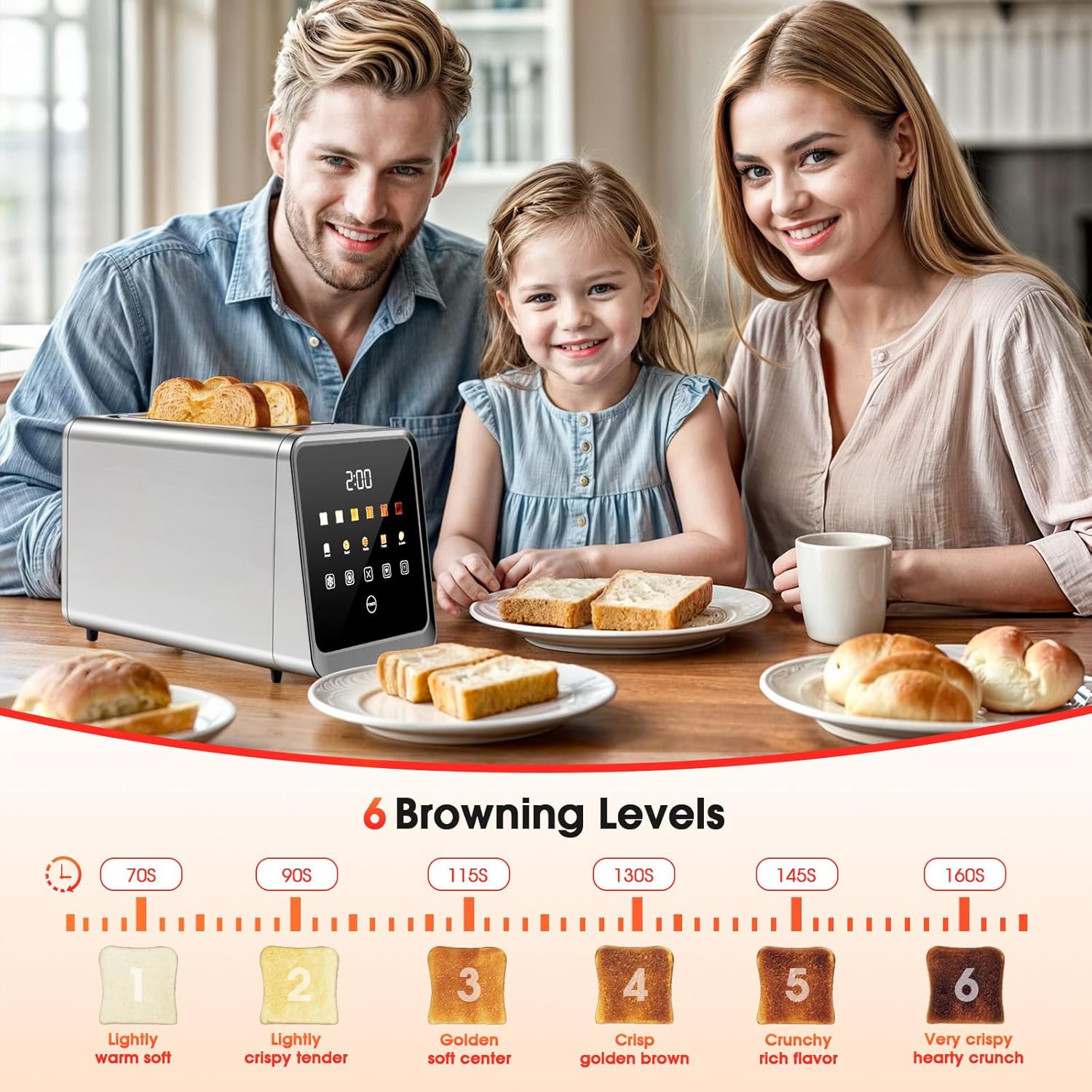
Image: The Foyoconven toaster on a kitchen table with a family, illustrating the 6 browning levels from 'Lightly warm soft' to 'Very crispy hearty crunch' with corresponding toast images and approximate times.
5.3 특수 기능
The touchscreen offers several dedicated functions:
- 해동 모드: Use this setting for frozen bread or waffles. The toaster will automatically adjust the toasting time to first thaw and then toast the item.
- Reheat Mode: This function warms previously toasted items without further browning. Ideal for refreshing cold toast.
- Single-Slice Mode: When toasting only one slice of bread, select this mode to reduce energy consumption by heating only the occupied slot.
- 메모리 기능: After selecting your preferred bread type and browning level, you can save these settings. Refer to the touchscreen interface for the specific memory icon. Once saved, you can recall these settings with a single tap for future toasting.
- 취소 기능: To stop the toasting cycle at any time, press the cancel button on the touchscreen.
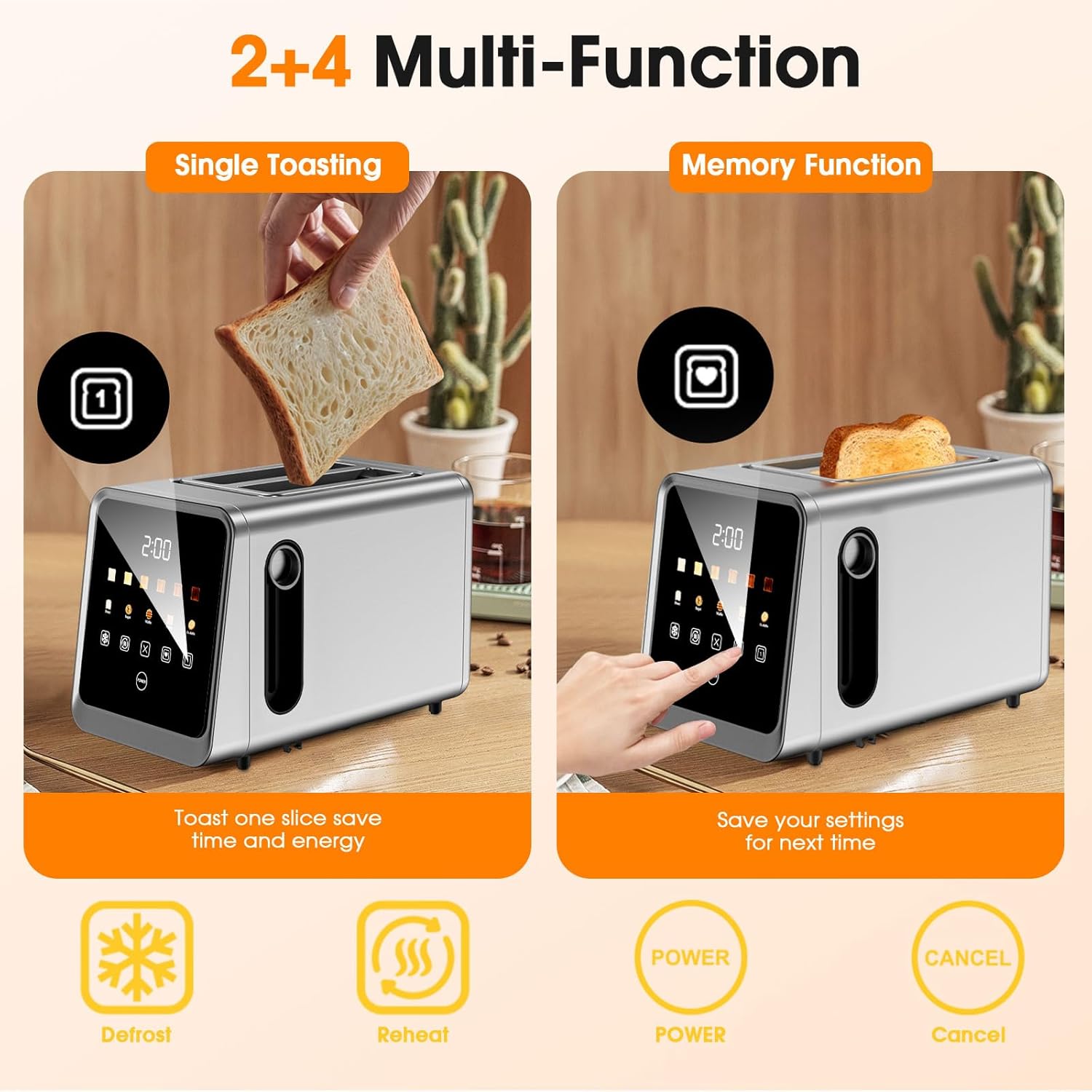
Image: The toaster demonstrating 'Single Toasting' (toasting one slice to save energy) and 'Memory Function' (saving settings for next time). Icons for Defrost, Reheat, Power, and Cancel are also visible.
Video: An official product video demonstrating the features of the Foyoconven 2-slice smart digital touchscreen toaster, including its single-slot technology and memory function.
6. 유지관리 및 청소
6.1 부스러기 받침대 청소
- 토스터를 청소하기 전에는 항상 플러그를 뽑고 완전히 식히십시오.
- 토스터기 바닥에 있는 분리 가능한 부스러기 받침대를 찾으세요.
- Pull the crumb tray out to remove accumulated crumbs.
- Discard crumbs and wipe the tray clean with a damp 천으로 닦아주세요. 다시 넣기 전에 완전히 말려주세요.
- 부스러기 받침대를 딸깍 소리가 나면서 제자리에 단단히 고정될 때까지 밀어 넣으세요.
6.2. 외부 청소
- 토스터 외부를 부드러운 천으로 닦으세요.amp 천으로 닦으세요. 연마성 세제나 수세미는 스테인리스 스틸 마감 처리가 긁힐 수 있으므로 사용하지 마세요.
- Ensure no moisture enters the toasting slots or electrical components.
- For stubborn marks, a mild stainless steel cleaner can be used, applied to a cloth first, not directly to the toaster.
이미지: 상세 view of the toaster's design, highlighting the removable crumb tray for easy cleanup and the wire storage slot on the back for organization.
7. 문제 해결
토스터 사용 중 문제가 발생하면 다음의 일반적인 문제 및 해결 방법을 참고하세요.
| 문제 | 가능한 원인 | 해결책 |
|---|---|---|
| 토스터가 켜지지 않습니다. | 전원이 연결되지 않았습니다. 콘센트에 문제가 있습니다. 회로 차단기가 작동했습니다. | 토스터기가 제대로 된 콘센트에 꽂혀 있는지 확인하세요. 집의 차단기도 점검해 보세요. |
| 레버가 아래로 고정되지 않습니다. | 토스터의 전원이 꽂혀 있지 않습니다. 부스러기 수집함이 완전히 삽입되지 않았습니다. 내부 메커니즘에 문제가 있습니다. | Ensure the toaster is plugged in. Verify the crumb tray is fully pushed in. If the problem persists, contact customer support. |
| 토스트가 고르지 않게 갈색으로 변했습니다. | Inconsistent bread thickness; crumb buildup; heating element issue. | Ensure bread slices are of uniform thickness. Clean the crumb tray regularly. If unevenness persists, contact support. |
| 작동 중 연기나 타는 냄새가 납니다. | Food lodged in slots; crumb buildup; first use burn-off. | Unplug immediately. Remove any lodged food carefully after cooling. Clean crumb tray. If it's the first use, this is normal. If persistent, contact support. |
| 터치스크린이 반응하지 않습니다. | 일시적인 소프트웨어 오류입니다. 전원을 껐다 켜십시오. | Unplug the toaster for 1-2 minutes, then plug it back in. If the issue continues, contact customer support. |
8. 사양
| 특징 | 세부 사항 |
|---|---|
| 상표 | Foyoconven |
| 모델 번호 | TA1428E-UL |
| 재료 | 스테인리스 스틸 |
| 제품 크기(D x W x H) | 6.14인치 x 7.44인치 x 10.98인치 |
| 왓tage | 900 와트 |
| 권tage | 120 볼트 |
| Slot Count | 2 |
| 음영 설정 개수 | 6 |
| 프로그램 수 | 3 (Defrost, Reheat, Single-Slice) |
| 특별 기능 | Built-In Timer, Cancel Function, Defrost Mode, LED Indicator, Touchscreen, Memory Recall |
| 품목 무게 | 3.03 파운드 |
9. 보증 및 지원
Foyoconven products are designed and manufactured to the highest quality standards. For information regarding warranty coverage, please refer to the warranty card included with your purchase or visit the official Foyoconven web대지.
For technical support, troubleshooting assistance, or to inquire about replacement parts, please contact Foyoconven customer service through the contact information provided on our web사이트 또는 제품 포장에 포함되어 있습니다.