
중요 안전 지침
설치 및 사용 전에 모든 지침을 주의 깊게 읽어 주십시오. 나중에 참조할 수 있도록 이 설명서를 보관하십시오.
- 모든 전기 연결 작업은 자격을 갖춘 전기 기술자가 수행하고 지역 규정을 준수해야 합니다.
- 제품을 물에 담그거나 전기 부품에 직접 물을 뿌리지 마십시오.
- Unplug the toilet from the power outlet before cleaning or performing any maintenance.
- Do not use abrasive cleaners, solvents, or chemical sprays on any part of the toilet.
- Keep children and individuals with reduced physical, sensory, or mental capabilities away from the product unless supervised.
- 이 제품은 실내에서만 사용하도록 설계되었습니다.
제품 끝view
The VIPBEAR Tankless One-Piece Smart Toilet Model OPT12 offers advanced features for enhanced hygiene and comfort. This section provides an overview of its key functionalities.
주요 특징
- Touchless operation with foot sensor flush and auto seat-sensing flush.
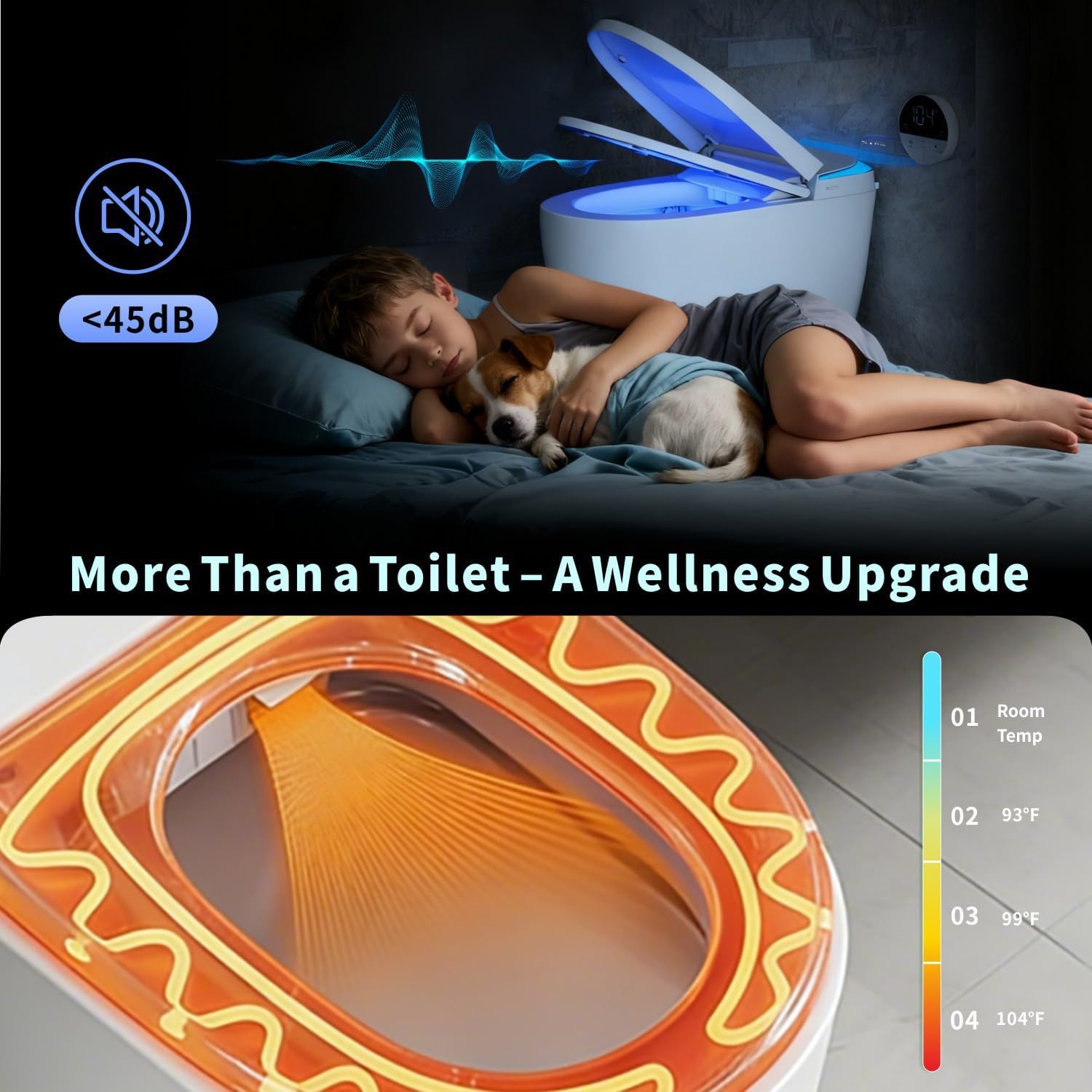
- Soft-glow night light for safe nighttime use.
- High-efficiency dual flush (1.0/1.27 GPF) with MaP 1000g certified waste removal.
- Tankless design for space-saving and leak prevention.
- Foam Shield technology to prevent splash, control odor, and provide an antibacterial barrier.
- Heated toilet seat with quick-warm technology and four temperature settings (Room Temp to 104°F).
- LED display for real-time temperature indication.
- Auto open/close soft-close lid.
- Battery backup for flushing during power outag에스.


패키지 내용
설치를 시작하기 전에 모든 구성 요소가 있는지 확인하세요.
- 앵글 밸브
- 고정 디스크
- 플랜지 링
- 원격 제어
- 사용 설명서 (본 문서)
- Foam solution bottle
- Foam liquid effervescent tablet
- 파워 오우tage Flushing Battery

설정 및 설치
Professional installation is recommended. Ensure water supply and electrical outlets are properly prepared according to local plumbing and electrical codes.
설치 전 체크리스트
- Verify rough-in dimensions (minimum 12 inches).
- Ensure a dedicated GFCI electrical outlet is available near the installation area.
- 급수관에 접근이 가능하고 차단 밸브가 있는지 확인하십시오.
- Gather necessary tools (wrench, screwdriver, sealant, etc.).
설치 단계(일반)
- Prepare the floor flange and ensure it is clean and level.
- Install the angle valve and connect the water supply line to the toilet.
- Position the toilet over the floor flange, ensuring proper alignment.
- Secure the toilet to the floor using the provided fixed disk and screws.
- Connect the power cord to the GFCI outlet.
- 물 공급을 켜고 누수 여부를 확인하세요.
- Perform initial function tests as described in the operating instructions.
작동 지침
자동 기능
- 발 센서식 물내림: A sensor at the base of the toilet detects foot movement, initiating a flush. This provides a hands-free flushing experience.
- 자동 열기/닫기 뚜껑: The lid automatically opens when a user approaches and closes after a set period of inactivity, or after flushing. This feature enhances hygiene and convenience.
- 야간 조명: An integrated soft-glow night light illuminates the bowl and surrounding area, providing visibility in low-light conditions without being overly bright.

수동 제어
- Side Console: An intuitive side console allows for manual control of various functions, including foam shield activation, lighting modes, and seat temperature adjustments.
- 원격 제어: A dedicated remote control is included for convenient access to all smart toilet features from a distance. Refer to the remote control section in the full manual for detailed instructions.

열선 시트
The heated seat offers four adjustable temperature levels for personalized comfort:
- Level 1: Room Temperature
- Level 2: 93°F (34°C)
- Level 3: 99°F (37°C)
- Level 4: 104°F (40°C)
Adjust the temperature using the side console or remote control. The LED display shows the current temperature setting.


세척 옵션
- 이중 물내림: Choose between a 1.0 GPF (Gallons Per Flush) for liquids, meeting EPA WaterSense standards, and a 1.27 GPF for solids, providing powerful cleaning while conserving water.
- Blackout Flush with Battery Backup: 정전이 발생한 경우tage, the integrated battery backup ensures that flushing functionality remains available.


Foam Shield Technology
The Foam Shield creates a protective layer on the water surface, offering multiple benefits:
- 99% Splash Reduction: Minimizes splash-back during use.
- 냄새 제어: Traps odor molecules beneath the foam layer.
- Antibacterial Barrier: Helps inhibit bacterial growth and keeps the bowl cleaner.
- 얼룩 예방: Reduces the likelihood of stains adhering to the bowl surface.


Video 1: Demonstration of the VIPBEAR One-Piece Tankless Smart Toilet's features.
유지관리 및 청소
정기적인 청소와 유지 관리는 스마트 변기의 수명과 최적의 성능을 보장합니다.
일반 청소
- 청소하기 전에 변기 마개를 뽑으세요.
- Use a soft cloth and mild, non-abrasive cleaner to wipe down the exterior surfaces.
- For the bowl, use a toilet brush and a standard toilet bowl cleaner. Avoid harsh chemicals that could damage internal components.
- Clean sensors regularly with a soft, dry cloth to ensure proper functionality.
Foam Solution Refill
When the foam solution level is low, refill the dedicated foam solution bottle with the provided effervescent tablets and water, or a compatible foam solution. Refer to the full manual for specific instructions on accessing and refilling the foam solution reservoir.
문제 해결
If you encounter issues, consult the table below for common problems and solutions. If the problem persists, contact customer support.
| 문제 | 가능한 원인 | 해결책 |
|---|---|---|
| Toilet does not power on. | No power supply; GFCI tripped. | Check power cord connection. Reset GFCI outlet. Ensure power outlet is functional. |
| Flush is weak or not working. | Water supply valve closed; low water pressure; obstruction. | Ensure water supply valve is fully open. Check household water pressure. Inspect for any blockages in the trapway. |
| 열선 시트가 작동하지 않습니다. | 열선 시트 기능이 꺼져 있습니다. 온도 설정이 너무 낮습니다. | Activate heated seat function via side console or remote. Increase temperature setting. |
| Auto lid not opening/closing. | Sensor obstructed; sensor malfunction. | Ensure the sensor area is clean and unobstructed. Try resetting the toilet by unplugging and replugging. |
| Foam Shield not activating. | Low foam solution; foam function off. | Refill foam solution reservoir. Activate foam function via side console or remote. |
명세서
| 특징 | 사양 |
|---|---|
| 상표 | Vipbear |
| 모델 번호 | 옵션12 |
| 색상 | OPT12 (Black) |
| 재료 | 세라믹 |
| 품목 무게 | 100 파운드 |
| 설치 유형 | 바닥 장착 |
| 한국어: | 753747376814 |
| 플러시 타입 | 이중 물내림 (1.0 GPF / 1.27 GPF) |
| MaP Rating | 1000g |
보증 및 지원
The VIPBEAR Tankless One-Piece Smart Toilet Model OPT12 comes with a comprehensive warranty. For specific warranty details, please refer to the warranty card included with your product or contact Vipbear customer support.
If you require assistance with installation, operation, troubleshooting, or warranty claims, please contact Vipbear customer support through the contact information provided on our official website or your purchase documentation. Our team is dedicated to providing reliable performance and peace of mind.