
1. 서론
구매해주셔서 감사합니다asing the Sharp PS-916 Bluetooth Party Speaker System. This system includes two identical portable Bluetooth speakers designed to deliver powerful audio with versatile connectivity options. Please read this manual carefully before using the product to ensure proper operation and to maximize your listening experience.
패키지 내용:
- 2 x Sharp PS-916 Party Speakers
- 1 x 충전 케이블
- 1 x 원격 제어
- 1 x 사용자 설명서

Image: The Sharp PS-916 system includes two speakers for a complete stereo experience.
2. 설정
2.1 스피커 충전하기
The PS-916 speakers are equipped with rechargeable batteries, providing up to 12 hours of playback. Before initial use, fully charge both speakers.
- Connect the charging cable to the DC IN port on the rear of each speaker.
- Plug the other end of the charging cable into a suitable power adapter (not included) or USB power source.
- The charging indicator light will illuminate. It will change color or turn off once charging is complete.
2.2 전원 켜기/끄기
To power on or off each speaker, press and hold the ON/STAND BY INPUT 제어판에 있는 버튼.
2.3 블루투스 페어링 (스피커 1개)
- Ensure the speaker is powered on and in Bluetooth mode. The Bluetooth indicator will flash, indicating it is ready for pairing.
- 모바일 기기에서 블루투스를 활성화하고 사용 가능한 기기를 검색하세요.
- Select "Sharp PS-916" from the list of devices.
- 연결되면 Bluetooth 표시등이 깜박임을 멈추고 계속 켜져 있습니다.
2.4 트루 와이어리스 스테레오(TWS) 페어링(스피커 2개)
TWS allows you to connect two PS-916 speakers wirelessly for a stereo sound experience.
- Power on both PS-916 speakers.
- Ensure neither speaker is currently connected to a Bluetooth device.
- 스피커 중 하나(기본 스피커)에서 버튼을 누르세요. 트위스 버튼을 누르세요. 스피커가 TWS 페어링 모드로 진입합니다.
- The primary speaker will automatically search for the secondary speaker. Once connected, you will hear an audible confirmation, and the TWS indicator lights on both speakers will illuminate.
- 이제 2.3절에 설명된 대로 모바일 기기를 블루투스를 통해 메인 스피커에 연결하세요. 그러면 두 스피커를 통해 스테레오로 소리가 재생됩니다.
3. 운영
3.1 제어판 이상view

Image: Main control panel for the Sharp PS-916 speaker.
- ON/STAND BY INPUT: Power on/off, switch input modes (Bluetooth, USB, TF, AUX, FM).
- PLAY/PAUSE (►/∕∕): 오디오 재생을 재생하거나 일시 정지합니다.
- PREVIOUS (◀◀): 이전 트랙으로 건너뜁니다.
- 다음 (▶▶): 다음 트랙으로 건너뜁니다.
- 볼륨 노브: 회전하여 마스터 볼륨을 조절합니다.
- TWS: Initiate or disconnect True Wireless Stereo pairing.
- 평형 장치: Cycle through preset equalizer modes.
- 베이스: Activate or deactivate bass boost.
- 빛: Change or turn off the LED light effects.
- 마이크 컨트롤: Adjust microphone volume or echo (if applicable).
3.2개의 입력 포트
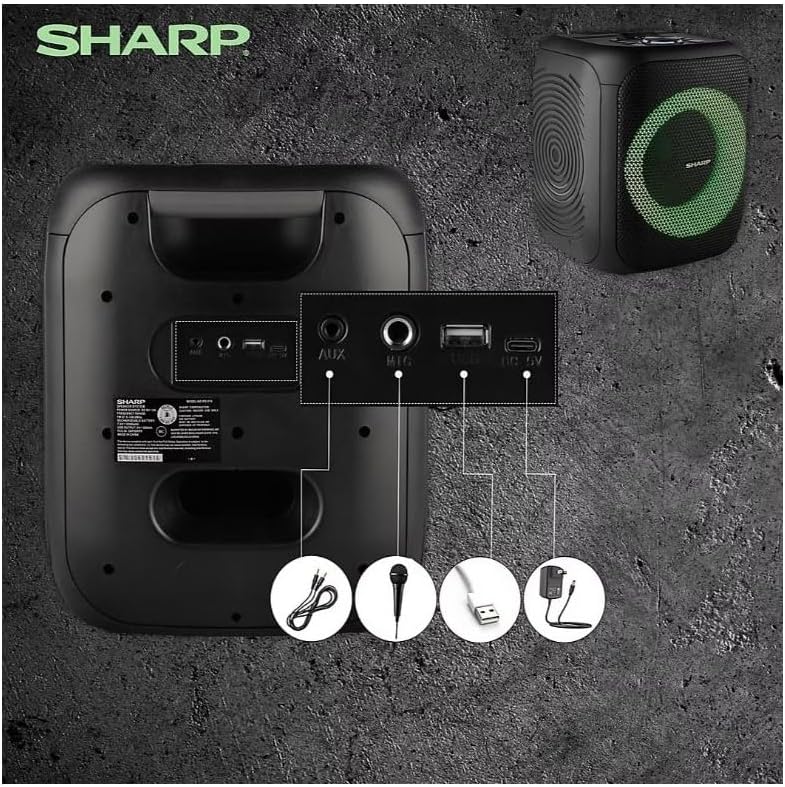
Image: Rear panel with various input and charging ports.
- AUX 입력 : 3.5mm 오디오 케이블을 사용하여 외부 오디오 장치를 연결합니다.
- 마이크 입력: 노래방이나 안내 방송을 위해 마이크(별매)를 연결하세요.
- USB: 오디오 재생을 위해 USB 플래시 드라이브를 삽입하세요.
- TF 카드: 오디오 재생을 위해 TF(microSD) 카드를 삽입하세요.
- DC 입력 : Connect the charging cable to power and charge the speaker.
3.3 Playing Audio from USB/TF Card
- Insert a USB flash drive or TF card into the corresponding port.
- 를 누르세요 ON/STAND BY INPUT button repeatedly until the display shows the USB or TF mode.
- 재생이 자동으로 시작됩니다. 재생/일시정지, 이전의, 그리고 다음 재생을 제어하는 버튼.
3.4 AUX 입력 사용
- Connect one end of a 3.5mm audio cable to the AUX IN port on the speaker.
- 다른 쪽 끝을 외부 장치의 헤드폰 잭이나 오디오 출력에 연결합니다.
- 를 누르세요 ON/STAND BY INPUT button repeatedly until the display shows AUX mode.
- 외부 기기에서 재생과 볼륨을 제어하세요.
3.5 FM 라디오 작동

Image: The PS-916 features an integrated FM Tuner.
- 를 누르세요 ON/STAND BY INPUT button repeatedly until the display shows FM mode.
- 를 누르고 계세요 재생/일시정지 사용 가능한 FM 방송국을 자동으로 스캔하고 저장하는 버튼입니다.
- 사용하세요 이전의 그리고 다음 버튼을 사용하여 저장된 방송국을 탐색합니다.
3.6 LED 조명 효과
를 누르세요 빛 button to cycle through different LED light modes or to turn the lights off.
4. 유지관리
4.1 청소
- Always power off the speaker and disconnect it from the power source before cleaning.
- 부드럽고 마른 천으로 외부 표면을 닦으세요.
- 액체 세척제, 에어로졸 또는 용제를 사용하지 마십시오. 이러한 제품은 마감재나 내부 부품을 손상시킬 수 있습니다.
4.2 보관
- 스피커는 직사광선과 극한의 온도를 피해 서늘하고 건조한 곳에 보관하세요.
- 장기간 보관할 경우, 배터리 수명 유지를 위해 몇 달에 한 번씩 배터리를 약 50%까지 충전하십시오.
5. 문제 해결
If you encounter issues with your Sharp PS-916 speakers, please refer to the following common problems and solutions:
| 문제 | 가능한 해결책 |
|---|---|
| 스피커의 전원이 켜지지 않습니다. | 배터리가 충전되었는지 확인하세요. 충전 케이블을 연결하고 다시 시도해 보세요. |
| 스피커에서 소리가 나지 않습니다. | 스피커와 연결된 기기의 볼륨 레벨을 확인하세요. 올바른 입력 모드가 선택되었는지 확인하십시오. |
| Bluetooth 장치를 페어링할 수 없습니다. | Ensure the speaker is in Bluetooth pairing mode (indicator flashing). Move your device closer to the speaker. Disconnect from other Bluetooth devices. |
| TWS 페어링이 실패합니다. | Ensure both speakers are powered on and not connected to any other Bluetooth devices. Try initiating TWS pairing again. |
| 왜곡된 소리. | 스피커와 연결된 기기의 볼륨을 모두 줄이세요. 오디오 소스가 왜곡되지 않는지 확인하세요. |
6. 사양
| 특징 | 세부 사항 |
|---|---|
| 상표 | 날카로운 |
| 모델명 | PS-916 |
| 스피커 구성 | 8" Woofer, 1" Tweeter (per speaker) |
| 최대 출력 전력 | 400와트(스피커당) |
| RMS 출력 전력 | 40와트(스피커당) |
| 연결 기술 | 블루투스 |
| 추가 입력 | USB, TF Card, 3.5mm AUX, Microphone Input |
| 배터리 수명 | 최대 12시간 |
| 특별 기능 | True Wireless Stereo (TWS) Pairing, Bass Boost, LED Light Effects, FM Tuner |
| 색상 | 검은색 |
| 품목 무게 | 6.5파운드(스피커당) |
| 한국어: | 728434122111 |
| GTIN | 728434122111 |
7. 보증 및 지원
7.1 보증 정보
This Sharp PS-916 product comes with a 90-day limited warranty. This warranty covers manufacturing defects under normal use. It does not cover damage caused by misuse, accidents, unauthorized modifications, or normal wear and tear.
7.2 고객 지원
For technical assistance, warranty claims, or further inquiries, please refer to the contact information provided with your purchase documentation or visit the official Sharp support web대지.