
1. 서론
Thank you for choosing the TOPTRO TP3 4K Google TV Portable Projector. This manual provides essential information for setting up, operating, and maintaining your projector. Please read it thoroughly before use to ensure optimal performance and safety.
The TOPTRO TP3 is designed to deliver a versatile and immersive viewing experience, featuring integrated Google TV, AI-powered image adjustments, and comprehensive connectivity options. Enjoy your content at home, outdoors, or on the go.
2. 제품 오버view
2.1 주요 특징
- Integrated Google TV: Access over 10,000 official streaming applications, including Netflix, Prime Video, and YouTube, without additional devices.
- Google Voice Control: Use the remote control's voice assistant button to search for content, adjust settings, and control playback hands-free.
- AI-Powered Image Adjustment: Features automatic focus, automatic keystone correction, obstacle avoidance, and automatic screen adjustment for a perfectly aligned and clear image within seconds.
- Native 1080P Resolution with 4K Decoding: Delivers sharp, detailed images and natural colors, supporting 4K video decoding.
- Short Throw Ratio (0.8:1): Projects a 60-inch image from just one meter distance, ideal for small spaces.
- 90-Degree Rotating Stand: Allows for flexible projection angles, including ceiling projection.
- 고급 연결성 : Equipped with dual-band WiFi 6, Bluetooth 5.3, HDMI ARC, USB, and a 3.5mm audio jack for wide device compatibility.
- 휴대성 있는 디자인: Weighing only 1.2 kg (2.6 lbs) with a hidden carry handle, making it easy to transport.
2.2 패키지 내용
패키지에 모든 품목이 들어 있는지 확인하세요.
- TOPTRO TP3 프로젝터
- 원격 제어
- HDMI 케이블
- 전원 어댑터
- 사용자 설명서
3. 설정
3.1 초기 배치
Place the projector on a stable, flat surface. The 90-degree rotating stand allows for various projection angles, including wall, ceiling, or tabletop. For optimal image quality, ensure the projection surface is smooth and light-colored.

Image: The TOPTRO TP3 projector can be used in diverse environments, from living rooms to outdoor camping, showcasin적응성이 뛰어납니다.
3.2 전원 연결
- 프로젝터의 전원 입력 단자에 전원 어댑터를 연결하세요.
- 전원 어댑터를 적절한 전기 콘센트(220V)에 꽂으십시오.
- 프로젝터나 리모컨의 전원 버튼을 눌러 전원을 켜세요.
3.3 네트워크 연결
Upon first startup, follow the on-screen prompts to connect to your Wi-Fi network. The projector supports dual-band WiFi 6 for a fast and stable connection.
3.4 Google TV 설정
After connecting to Wi-Fi, sign in with your Google account to access Google TV and download applications from the Google Play Store. This step is crucial for utilizing the integrated streaming services.

Image: The projector's interface showing integrated Google TV with direct access to popular streaming applications.
4. 사용 설명서
4.1 기본 작업
- 전원 켜기/끄기: 리모컨이나 프로젝터의 전원 버튼을 누르세요.
- 항해: Use the directional buttons on the remote to navigate menus.
- 선택: 선택 사항을 확정하려면 '확인' 버튼을 누르세요.
- 볼륨 조절: 리모컨의 볼륨 버튼을 사용하세요.
4.2 이미지 조정
The TOPTRO TP3 features AI-powered automatic image adjustments:
- 자동 초점 : 프로젝터가 자동으로 이미지 선명도를 조정합니다.
- 자동 키스톤 보정: Automatically corrects distorted images to a rectangular shape.
- 장애물 회피: Detects and adjusts the image to avoid objects on the projection surface.
- Auto Screen Adjustment: 화면 영역에 맞게 이미지를 최적화합니다.
These adjustments occur automatically within seconds of powering on or repositioning the projector. Manual digital zoom (80-100%) is also available for fine-tuning image size.

Image: Visual representation of the projector's AI-powered automatic image adjustment features, ensuring a clear and aligned picture.
4.3 Google Voice Control
Press the dedicated voice assistant button on your remote control and speak your command. For example, say "Open YouTube" or "Play music." The projector will respond to your voice commands for quick access to functions and content.
4.4 Screen Mirroring (Google Cast)
Utilize Google Cast technology to wirelessly mirror content from your smartphone or tablet to the projector. For iPhone users, download the "AirScreen" application from the Google Play Store on the projector for wireless screen mirroring.
4.5 Rotating Stand Usage
The integrated 90-degree rotating stand allows you to easily adjust the projection angle. Simply pivot the projector to direct the image onto a wall, screen, or ceiling. This feature is particularly useful for bedroom viewing or creative setups.
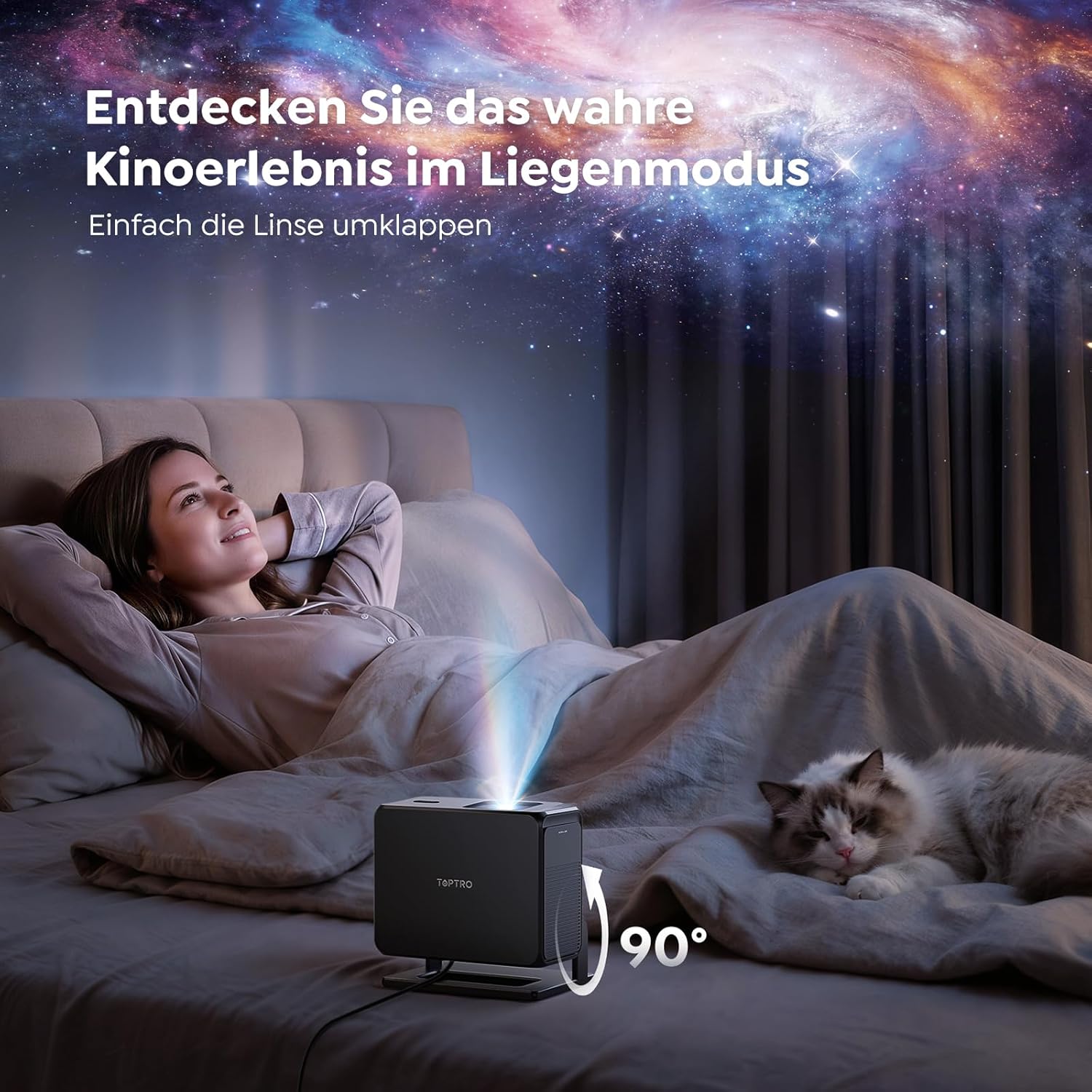
Image: The TOPTRO TP3 projector rotated 90 degrees to project content onto a bedroom ceiling, offering a unique view경험.
5. 연결성
5.1 유선 연결
- HDMI ARC/CEC: Connect external devices like laptops, gaming consoles (Xbox/PlayStation 5), or Blu-ray players. The ARC feature allows audio to be sent back to a compatible sound system.
- USB: 미디어 재생을 위해 USB 드라이브를 연결하세요.
- 3.5mm 오디오 잭: 외부 유선 스피커 또는 헤드폰을 연결하세요.
5.2 무선 연결
- 와이파이 6: Provides faster and more stable wireless connectivity for streaming and online content.
- 블루투스 5.3 : 더욱 향상된 오디오 경험을 위해 블루투스 헤드폰이나 스피커를 연결하세요.
6. 유지관리
6.1 렌즈 청소
Gently clean the projector lens with a soft, lint-free cloth designed for optical surfaces. Avoid using abrasive cleaners or excessive force, as this can scratch the lens.
6.2 일반 청소
프로젝터 외부를 부드럽고 마른 천으로 닦으십시오. 액체 세척제를 기기에 직접 사용하지 마십시오.
6.3 보관
사용하지 않을 때는 프로젝터를 서늘하고 건조한 곳에 직사광선과 극한 온도 변화를 피해 보관하십시오. 먼지 축적 및 손상을 방지하기 위해 원래 포장재 또는 보호 케이스를 사용하십시오.
7. 문제 해결
7.1 이미지가 표시되지 않음
- 프로젝터의 전원이 켜져 있고 전원에 연결되어 있는지 확인하십시오.
- Check all cable connections (HDMI, USB) to external devices.
- Verify the input source selected on the projector matches the connected device.
- Confirm the lens cap is removed.
7.2 흐릿한 이미지
- 자동 초점 기능이 조정을 완료할 때까지 기다리세요.
- 투사 표면이 평평하고 프로젝터가 안정적인지 확인하세요.
- Clean the projector lens if smudges or dust are visible.
7.3 소리가 나지 않습니다
- 프로젝터와 연결된 소스 기기의 볼륨 레벨을 모두 확인하십시오.
- Ensure external speakers or headphones are properly connected (wired or Bluetooth).
- If using HDMI ARC, verify your sound system is compatible and correctly configured.
7.4 리모컨이 작동하지 않음
- 리모컨의 배터리를 교체하세요.
- 리모컨과 프로젝터의 IR 수신기 사이에 장애물이 없는지 확인하세요.
For further assistance, refer to the detailed troubleshooting section in the full user manual or contact customer support.
8. 사양
| 특징 | 사양 |
|---|---|
| 상표 | 탑트로 |
| 모델명 | TP3 |
| 네이티브 해상도 | 1920 x 1080(1080P) |
| Video Decoding Support | 4K |
| 디스플레이 유형 | 주도의 |
| 특별 기능 | Auto Focus, Auto Keystone Correction, Obstacle Avoidance, Auto Screen Adjustment, Google TV, Google Voice Control |
| 연결 기술 | HDMI, USB, Bluetooth 5.3, Wi-Fi 6 |
| 하드웨어 인터페이스 | HDMI ARC/CEC, USB, 3.5mm Audio |
| 제품 크기(LxWxH) | 19.4 x 15.8 x 14.1cm |
| 품목 무게 | 1.2kg |
| 폼 팩터 | 가지고 다닐 수 있는 |
| 장착 유형 | Ceiling Mount, Tabletop, Wall |
| 최소 이미지 크기 | 40인치 |
| 최대 이미지 크기 | 120인치 |
| 최대 투사 거리 | 2.13 미터 |
| 권tage | 220 볼트 |
| 포함된 구성 요소 | HDMI 케이블 |
| 색상 | 검은색 |
| 컨트롤러 유형 | 원격 제어 |
| 호환 장치 | Xbox/PlayStation 5, Smartphone, Tablet, Laptop, Speaker, Notebook |
| 추천 용도 | Gaming, Business, Home Cinema, Education |
9. 보증 및 지원
9.1 보증 정보
제품에 동봉된 보증서를 참조하여 구체적인 보증 조건을 확인하십시오. 보증 청구를 위해 구매 증빙 자료를 보관하십시오.
9.2 고객 지원
If you encounter any issues or have questions regarding your TOPTRO TP3 projector, please contact our customer service team. We provide prompt, professional, and effective support to ensure a smooth user experience.
연락처 정보는 일반적으로 당사 공식 웹사이트에서 확인할 수 있습니다. web사이트나 보증 카드에 적혀 있습니다.