
toocki Wi-Fi 6 USB Adapter
Toocki Wi-Fi 6 USB Adapter Instruction Manual
Model: Wi-Fi 6 USB Adapter
소개
This manual provides detailed instructions for the installation, operation, and maintenance of your Toocki Wi-Fi 6 USB Adapter. This device is designed to provide high-speed wireless internet connectivity and Bluetooth 5.4 functionality to your desktop or laptop computer. Please read this manual thoroughly before using the product to ensure proper setup and optimal performance.
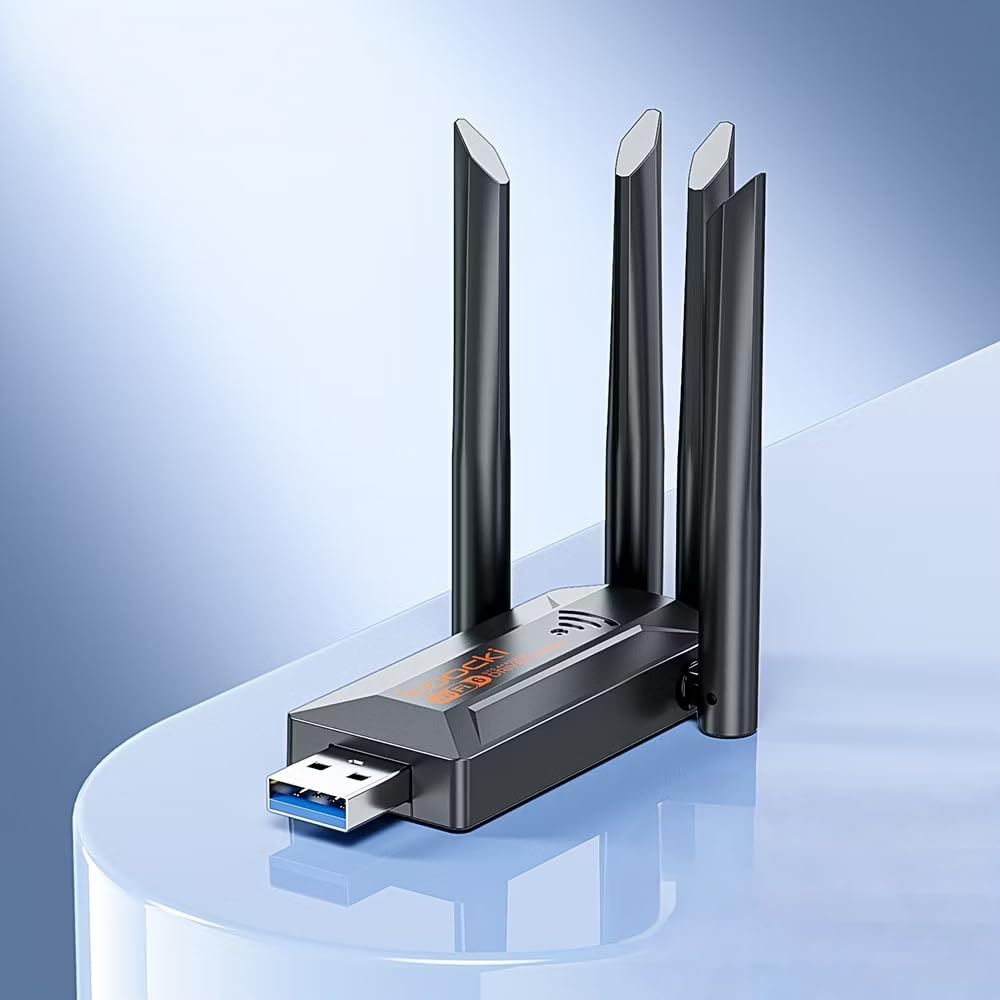
Image: The Toocki Wi-Fi 6 USB Adapter, showcasin컴팩트한 디자인과 4개의 조절 가능한 안테나가 특징입니다.
안전 정보
- Keep the device away from water, fire, high humidity, or hot environments.
- 장치를 분해, 수리 또는 개조하려고 하지 마십시오.
- 기기를 직사광선이나 열원에 노출시키지 마십시오.
- Use only with compatible USB ports (USB 3.0 recommended for optimal performance).
- 어린이의 손이 닿지 않는 곳에 보관하세요.
패키지 내용
패키지에 모든 품목이 들어 있는지 확인하세요.
- Toocki Wi-Fi 6 USB Adapter (1 unit)
- 사용 설명서 (본 문서)
Note: The product is designed for driver-free installation on Windows 10/11. No separate driver CD is included.
제품 끝view
The Toocki Wi-Fi 6 USB Adapter integrates advanced Wi-Fi 6 technology and Bluetooth 5.4 into a compact USB device. It features four high-gain external antennas for improved signal reception and transmission.

이미지: 내부 view highlighting the Wi-Fi 6 smart algorithm chip, indicating enhanced signal stability and wider coverage.
주요 특징:
- Wi-Fi 6(802.11ax) 지원: Provides stronger signal stability and wider coverage.
- 듀얼 밴드 연결: Supports both 2.4GHz and 5GHz frequencies for flexible network options and speeds up to 900Mbps.
- 블루투스 5.4 : Enables stable, multi-device connections for peripherals like mice, keyboards, and headphones.
- Four High-Gain Antennas: Enhances signal strength and extends wireless range.
- USB 3.0 인터페이스: Ensures rapid data transfer speeds.
- 드라이버 설치 필요 없음: Plug-and-play compatibility for Windows 10/11.
- 이중 기능: Acts as a Wi-Fi receiver and an AP/Hotspot.
설치 지침
1. 어댑터 연결
- 컴퓨터의 전원이 켜져 있는지 확인합니다.
- 데스크톱이나 노트북에서 사용 가능한 USB 3.0 포트를 찾으세요. 최적의 성능을 위해 USB 3.0 포트(일반적으로 내부가 파란색)를 사용하십시오.
- Carefully insert the Toocki Wi-Fi 6 USB Adapter into the USB port.
- The operating system (Windows 10/11) should automatically detect and install the necessary drivers. A notification may appear indicating successful installation.
2. Adjust Antennas
The adapter features four adjustable antennas. For best signal reception and transmission, position the antennas vertically or at an angle that provides the strongest signal in your environment. Experiment with different orientations to find the optimal setup.

Image: The Toocki Wi-Fi 6 USB Adapter with its four antennas fully extended, ready for use.
작동 지침
1. Connecting to Wi-Fi (Receiver Mode)
- After successful driver installation, click on the Wi-Fi icon in your computer's system tray (usually bottom-right corner for Windows).
- 사용 가능한 무선 네트워크 목록이 나타납니다.
- Select your desired Wi-Fi network (either 2.4GHz or 5GHz band, if both are available).
- 메시지가 나타나면 네트워크 보안 키(비밀번호)를 입력하세요.
- Click "Connect". Your computer should now be connected to the internet wirelessly.

Image: Illustration of the adapter functioning as a Wi-Fi receiver, enabling a desktop PC to connect to a wireless network without cables.
2. Using as an AP/Hotspot (Transmission Mode)
The adapter can also create a Wi-Fi hotspot, allowing other devices (phones, tablets) to connect to your computer's internet connection.
- Ensure your computer is connected to the internet via an Ethernet cable or another Wi-Fi adapter.
- On Windows 10/11, go to Settings > Network & Internet > Mobile hotspot.
- Toggle the "Share my Internet connection with other devices" switch to On.
- You can customize the network name (SSID) and password under "Edit".
- Other devices can now search for and connect to this hotspot.

Image: Illustration demonstrating the adapter's Wi-Fi transmission function, creating a hotspot from a connected PC to share internet with mobile devices.
3. 블루투스 5.4 연결
The integrated Bluetooth 5.4 allows for stable connections with multiple Bluetooth-enabled devices.
- On Windows 10/11, go to 설정 > 기기 > Bluetooth 및 기타 기기.
- 블루투스가 켜져 있는지 확인하십시오. On.
- "Bluetooth 또는 기타 장치 추가"를 클릭하고 "Bluetooth"를 선택합니다.
- 블루투스 기기(예: 헤드폰, 마우스, 키보드)를 페어링 모드로 설정하세요.
- 목록에서 기기를 선택하고 화면의 안내에 따라 페어링을 완료하세요.

Image: The Toocki Wi-Fi 6 USB Adapter connected to a laptop, symbolizing its Bluetooth 5.4 capability for multiple device connections.
유지
- 어댑터를 깨끗하고 청결하게 유지하려면 부드럽고 마른 천으로 닦아주세요.
- 액체 세척제나 용제의 사용은 피하세요.
- Ensure the adapter is not obstructed to allow for proper heat dissipation.
- 장기간 사용하지 않을 경우 어댑터를 USB 포트에서 안전하게 분리하는 것이 좋습니다.
문제 해결
Wi-Fi 연결 없음:
- USB 포트 확인: Ensure the adapter is firmly inserted into a working USB port. Try a different USB port, preferably a USB 3.0 port.
- 드라이버 설치: For Windows 10/11, the driver should install automatically. Verify in Device Manager (search "Device Manager" in Windows) under "Network adapters" that the Toocki adapter is listed and has no error symbols. If not, try restarting your computer.
- 안테나 위치: 최적의 신호 수신을 위해 안테나를 조정하십시오.
- 라우터 설정: Ensure your Wi-Fi router is powered on and broadcasting a signal. Check if other devices can connect to the same network.
- 네트워크 프로file: 네트워크 연결을 해제하고 다시 연결해 보세요.
느린 Wi-Fi 속도:
- USB 3.0 포트 : Ensure the adapter is connected to a USB 3.0 port for maximum speed. USB 2.0 ports will limit performance.
- 신호 강도: Check your Wi-Fi signal strength. A weak signal can lead to slower speeds. Move closer to the router or adjust antennas.
- 네트워크 혼잡: Too many devices on the same network or channel can cause slowdowns. Try switching to the 5GHz band if available and less congested.
- 간섭: Other electronic devices (microwaves, cordless phones) can interfere with Wi-Fi signals.
블루투스가 작동하지 않습니다:
- 블루투스 켜기: Verify Bluetooth is enabled in Windows Settings.
- 장치 페어링: 블루투스 기기가 페어링 모드인지, 그리고 연결 범위 내에 있는지 확인하십시오.
- 간섭: Reduce distance between devices and remove any obstructions.
- 다시 시작: Try restarting your computer and re-pairing the device.
명세서

Image: Visual representation emphasizing the 900Mbps dual-band Wi-Fi 6 features for faster, more stable connections.
| 특징 | 세부 사항 |
|---|---|
| 상표 | 투키 |
| 모델 | Wi-Fi 6 USB 어댑터 |
| 하드웨어 인터페이스 | USB 3.0 |
| 무선 표준 | Wi-Fi 6 (IEEE 802.11ax), IEEE 802.11ac, IEEE 802.11n, IEEE 802.11g, IEEE 802.11b, IEEE 802.11a |
| 데이터 전송 속도 | 초당 최대 900메가비트 |
| 주파수 대역 | 2.4GHz, 5GHz |
| 블루투스 버전 | 블루투스 5.4 |
| 안테나 | 4개의 고이득 외부 안테나 |
| 호환 장치 | 데스크탑, 노트북 |
| 운영 체제 지원 | Windows 10/11 (Driver-Free) |
| 제품 치수 | 30L x 20W x 60H Millimeters (approx. 3 x 2 x 6 cm) |
| 품목 무게 | 30그램 |
| 색상 | 검은색 |
보증 정보
This Toocki Wi-Fi 6 USB Adapter comes with a 6개월 보증 from the date of purchase. This warranty covers manufacturing defects and malfunctions under normal use. It does not cover damage caused by misuse, accidents, unauthorized modifications, or external factors. Please retain your proof of purchase for warranty claims.
고객 지원
If you encounter any issues or have questions regarding your Toocki Wi-Fi 6 USB Adapter that are not addressed in this manual, please contact your retailer or the manufacturer's customer support.
For support inquiries, please refer to the contact information provided with your purchase documentation or visit the official Toocki web대지.