
1. 서론
The CAMWAY RCA to HDMI Converter and ARC Audio Extractor is a versatile device designed to bridge the gap between older analog equipment and modern digital displays and audio systems. It allows you to connect devices with RCA composite outputs (like older game consoles, DVD players, and VCRs) to HDMI-enabled TVs or monitors. Additionally, it functions as an Audio Return Channel (ARC) audio extractor, enabling you to output audio from an ARC-enabled TV to an AV amplifier via optical or coaxial connections.
2. 제품 특징
- RCA to HDMI Conversion: Converts analog RCA composite input to HDMI 1080P (60Hz) or 720P (60Hz) output.
- 폭넓은 호환성: Supports PAL/NTSC formats and is compatible with devices such as Wii, PS1, PS2, N64, X-box, VHS, VCR, and Blue-Ray DVD Players.
- Aspect Ratio Switching: Features a toggle switch to select between 4:3 and 16:9 aspect ratios, restoring the original output ratio for game consoles.
- ARC Audio Extraction: Extracts audio from an ARC-enabled HDTV and outputs it to a soundbar, amplifier, speakers, or headphones via optical or coaxial cable.
- 고품질 오디오: Supports PCM/LPCM 2.0CH audio format with sampling rates of 32 kHz, 44.1 kHz, 48 kHz, 96 kHz, and 192 kHz.
- Professional Chipset: Utilizes a professional video conversion chip for advanced signal processing and a built-in audio amplifier chip for clear sound quality.
3. 패키지 내용
패키지에 모든 품목이 들어 있는지 확인하세요.
- CAMWAY RCA to HDMI Converter + ARC Audio Extractor Unit
- USB Type-C 전원 케이블
- Optical Cable (3.3ft)
- 사용자 설명서
4. 설정 지침
4.1 RCA to HDMI Converter Setup
- Connect your analog source device (e.g., Wii, PS2, DVD player) to the RCA input ports (yellow for video, white for left audio, red for right audio) on the converter.
- Connect an HDMI cable from the converter's HDMI output port to an HDMI input port on your HDTV or computer monitor.
- Connect the USB Type-C power cable to the converter and plug the other end into a 5V USB power source (e.g., TV USB port, USB wall adapter).
- Power on all connected devices and select the appropriate HDMI input on your display.

Figure 4.1: Connection diagram for RCA to HDMI conversion. Shows Wii, PS2, N64, DVD, and VCR connecting to the converter, which outputs to an HDTV or computer monitor. Also illustrates that RCA to HDMI is supported, but HDMI to RCA is not.

그림 4.2: 상세 view of the converter's input/output ports and a typical setup with a Wii console. The image highlights the RCA (Video, Audio Left, Audio Right), Type-C power, and HDMI ports.
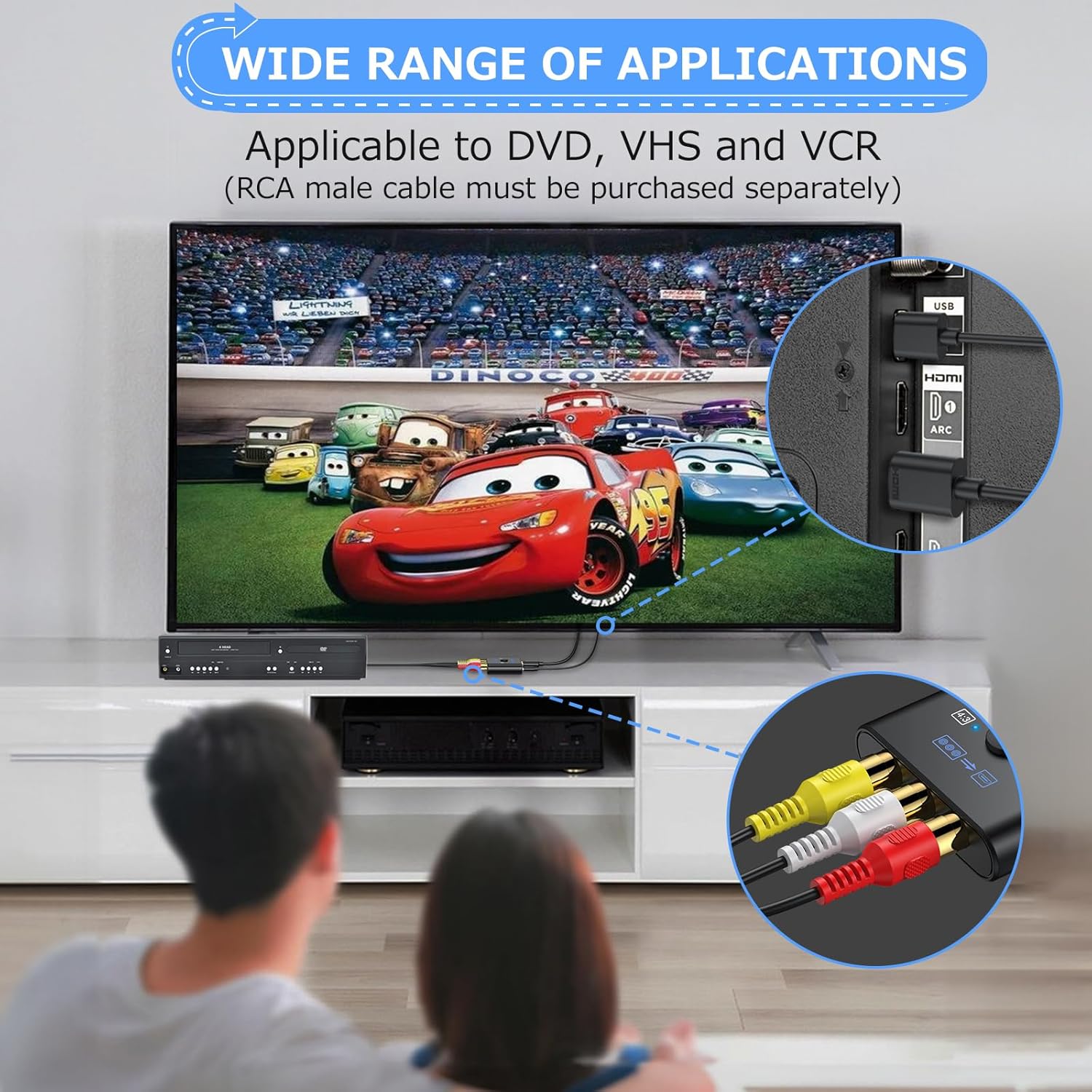
그림 4.3: 예ample of the converter's application with DVD and VCR players. Note that an RCA male cable must be purchased separately for these connections.
4.2 ARC Audio Extractor Setup
- Connect an HDMI cable from your TV's HDMI ARC port to the ARC input port on the CAMWAY unit.
- Connect an optical or coaxial cable from the corresponding output port on the CAMWAY unit to the optical or coaxial input on your AV ampliifier 또는 사운드 시스템.
- Connect the USB Type-C power cable to the CAMWAY unit and plug the other end into a 5V USB power source.
- Ensure your TV's ARC function is enabled in its audio settings and select the correct input on your AV amp리퍼.
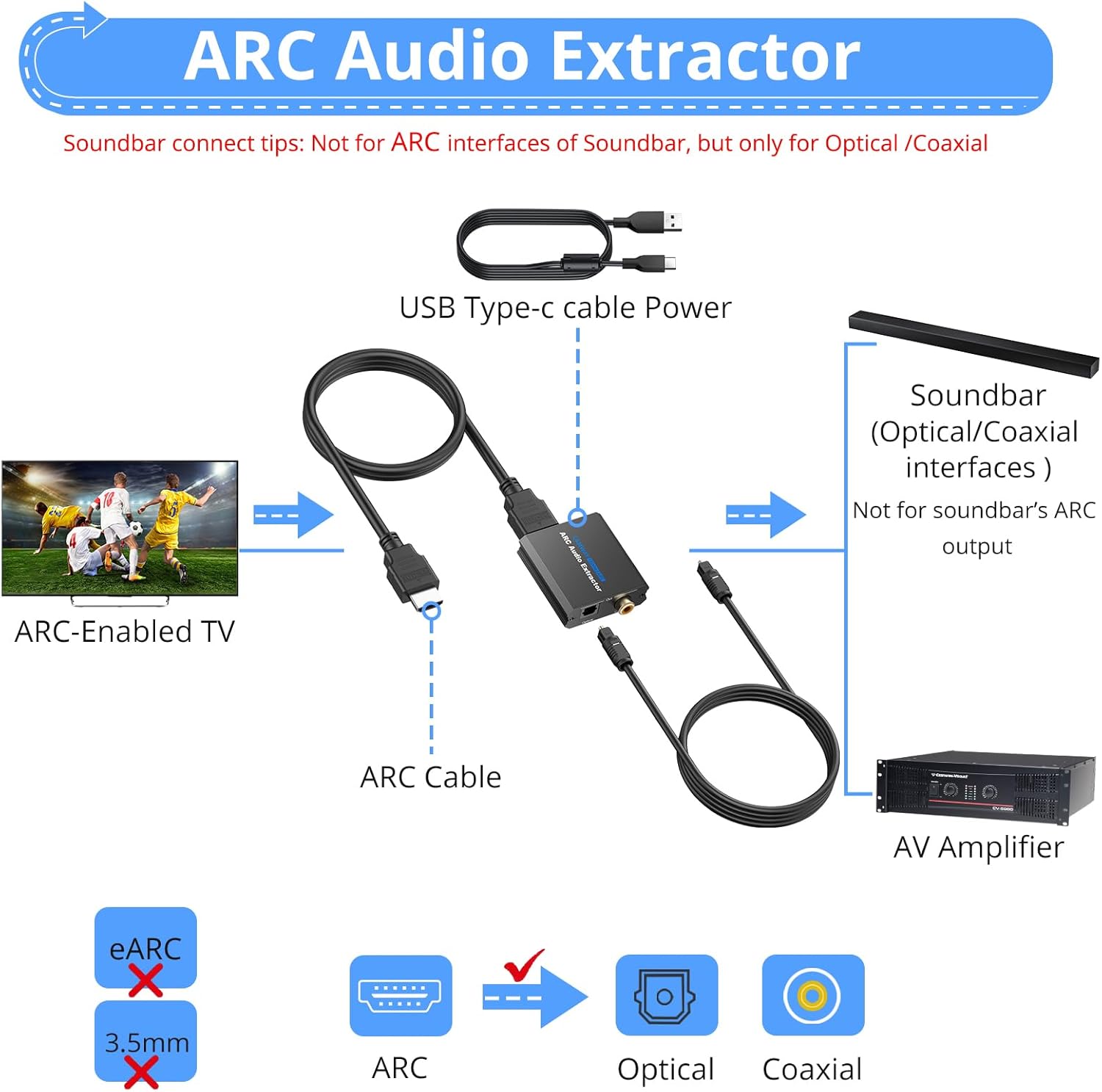
Figure 4.4: Connection diagram for ARC audio extraction. An ARC-enabled TV connects to the CAMWAY unit, which then provides optical or coaxial audio output to an AV amplifier. It clarifies that the unit is not for soundbar's ARC output or eARC/3.5mm interfaces.
5. 사용 설명서
5.1 화면비 전환
The RCA to HDMI converter features a physical switch to change the aspect ratio between 4:3 and 16:9. Locate the switch on the device and slide it to your desired aspect ratio. This allows you to restore the original display ratio of older game consoles or content.
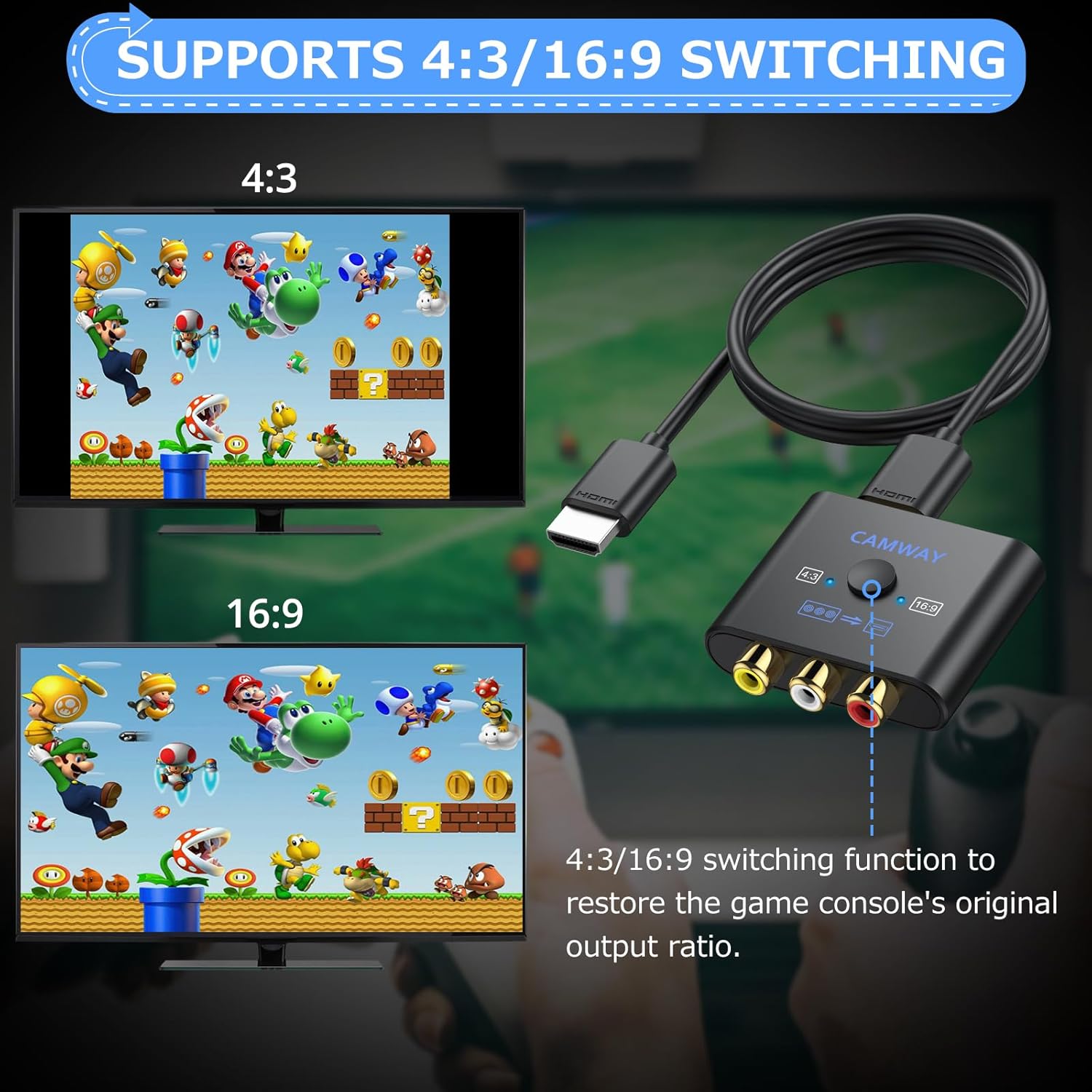
Figure 5.1: Illustration of the 4:3 and 16:9 aspect ratio switching function. The image demonstrates how the switch on the converter restores the game console's original output ratio.
5.2 Audio Output (ARC Mode)
When using the ARC audio extractor function, ensure your TV's audio output is set to 'External Speaker' or 'Audio System' and that the ARC feature is enabled. The CAMWAY unit will automatically extract the audio and send it through the optical or coaxial output. Note that the volume cannot be adjusted using the TV's remote control when audio is output through the extractor; volume control must be done on your connected AV ampliifier 또는 사운드 시스템.

그림 5.2: 예ample of clear sound quality output from the ARC audio extractor to an external speaker system. The image highlights the support for various PCM/LPCM 2.0CH audio formats and samp링 요금.
6. 유지관리
To ensure the longevity and optimal performance of your CAMWAY device, please follow these maintenance guidelines:
- 기기를 서늘하고 건조한 곳에 보관하고 직사광선, 열원 및 습기를 피하십시오.
- 장치를 극한의 온도나 습도에 노출시키지 마십시오.
- 부드럽고 마른 천으로 기기를 닦으세요. 액체나 에어로졸 세척제는 사용하지 마세요.
- 기기를 직접 열거나 수리하려고 하지 마십시오. 수리가 필요한 경우 자격을 갖춘 서비스 담당자에게 문의하십시오.
- 과열을 방지하려면 장치 주변을 적절하게 환기시키십시오.
7. 문제 해결
If you encounter issues with your CAMWAY RCA to HDMI Converter and ARC Audio Extractor, please refer to the following common solutions:
- No Video Output (RCA to HDMI):
- Ensure all cables (RCA, HDMI, USB power) are securely connected.
- Verify the converter is receiving power (check power indicator light if available).
- TV의 HDMI 입력 소스가 올바르게 설정되어 있는지 확인하십시오.
- 다른 HDMI 케이블을 사용하거나 TV의 입력 포트를 사용해 보세요.
- Some N64 consoles output 240P resolution, which this converter does not support. It only supports 480P, which may result in a blue screen on some TVs.
- No Audio Output (RCA to HDMI):
- Check RCA audio cable connections (white and red).
- 소스 장치가 오디오를 출력하고 있는지 확인하십시오.
- Verify TV volume is not muted or too low.
- No Audio Output (ARC Extractor):
- Confirm your TV's HDMI port supports ARC and that the ARC function is enabled in your TV's audio settings.
- Ensure the HDMI cable is connected to the ARC input on the CAMWAY unit and the ARC output on your TV.
- Check optical/coaxial cable connections to your AV amp리퍼.
- Verify your AV amplifier is set to the correct optical/coaxial input.
- Ensure the CAMWAY unit is powered.
- This unit is not compatible with HDMI eARC interfaces or soundbar's ARC output.
- 화질이 좋지 않음:
- Ensure RCA cables are fully inserted and not damaged.
- Check the aspect ratio switch on the converter.
- The quality of the output is dependent on the quality of the original analog signal.

그림 7.1: 내부 view of the converter's professional video conversion chip. A note clarifies that due to native N64 console resolution (240P), the converter only supports 480P, which may result in a blue screen on some TVs.
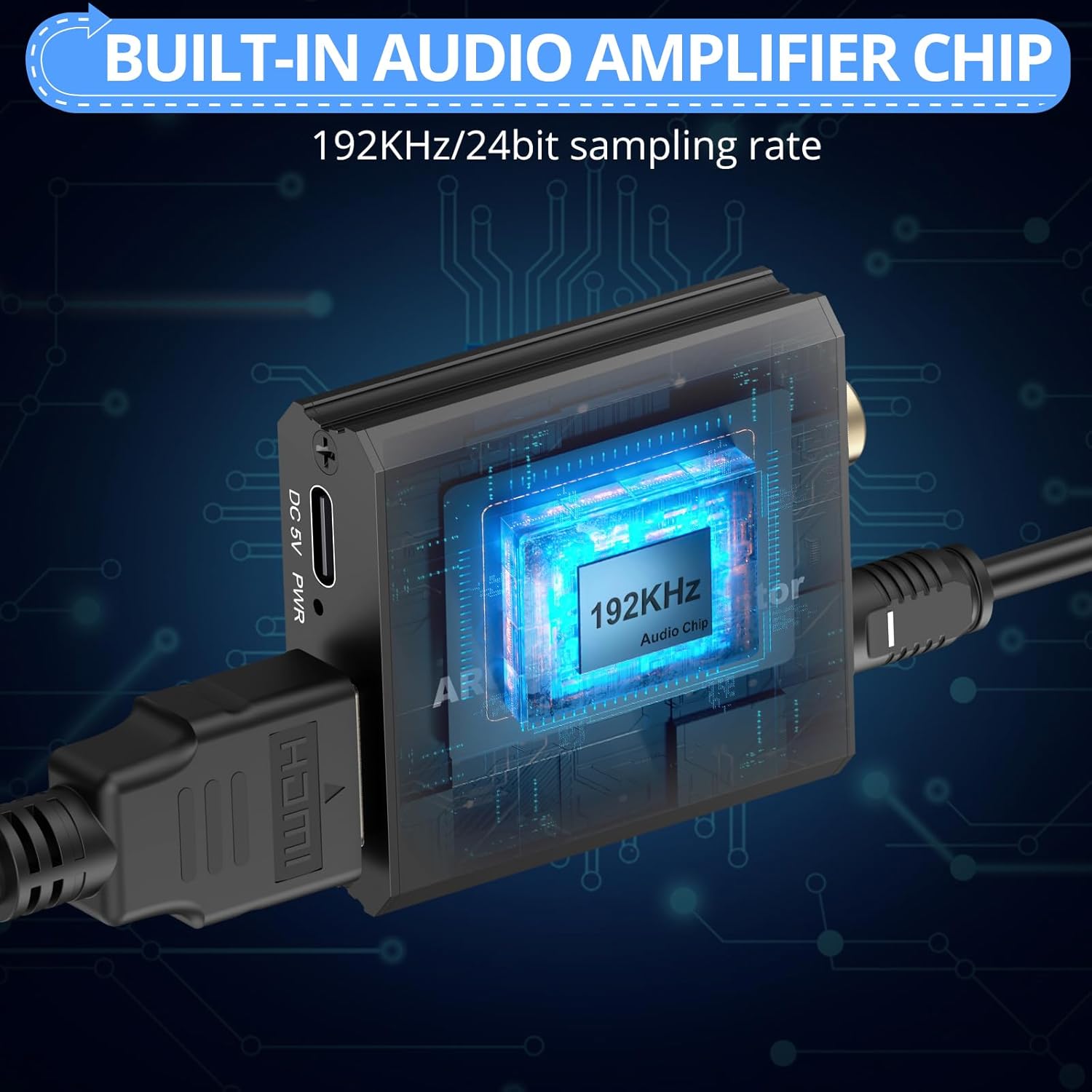
그림 7.2: 내부 view of the built-in audio amplifier chip, emphasizing its 192KHz/24bit sampling rate for high-quality audio processing.
8. 사양
| Input Ports (RCA to HDMI) | 1 x RCA(노란색, 흰색, 빨간색) |
| Output Port (RCA to HDMI) | 1개의 HDMI |
| Input Port (ARC Extractor) | 1 x HDMI (ARC) |
| Output Ports (ARC Extractor) | 광 입력 1개, 동축 입력 1개 |
| HDMI 출력 해상도 | 1080P/60Hz, 720P/60Hz |
| Supported RCA Formats | PAL, NTSC |
| Supported Audio Formats (ARC) | PCM/LPCM 2.0CH |
| 오디오 Sampling Rates (ARC) | 32kHz, 44.1kHz, 48kHz, 96kHz, 192kHz |
| 전원 공급 장치 | DC 5V (USB Type-C를 통해) |
| ASIN | B0GCMD45W8 |
| 첫 번째 이용 가능 날짜 | 28년 2024월 XNUMX일 |
9. 보증 및 지원
CAMWAY products are designed for reliability and performance. This product comes with a standard manufacturer's warranty against defects in materials and workmanship. Please refer to the product packaging or contact CAMWAY customer support for specific warranty terms and conditions.
For technical assistance, troubleshooting, or warranty claims, please contact CAMWAY customer support through the retailer's platform or the official CAMWAY website. Please have your product model number (B0GCMD45W8) and purchase date ready when contacting support.