DELUX GM909 Ergonomic Split Keyboard and M618AIR GX Wireless Vertical Mouse User Manual
Models: GM909 (Keyboard), M618AIR GX (Mouse)
1. 서론
This manual provides detailed instructions for setting up, operating, and maintaining your DELUX GM909 Ergonomic Split Keyboard and M618AIR GX Wireless Vertical Mouse Combo. This combo is designed to enhance comfort and productivity through its ergonomic features and versatile connectivity options.
2. Keyboard Features (GM909)
2.1. Ultra-thin Ergonomic Split Design
The GM909 keyboard features a scientific wave key layout and a split design with a natural arc and slight arch. This design promotes a more natural typing posture, reducing wrist strain and maximizing comfort during extended use.
Image: The DELUX GM909 Ergonomic Split Keyboard, showcasing its unique wave-shaped, split key layout designed for natural hand positioning.
비디오: 오버view of the DELUX Ultra-thin Ergonomic Split Wireless Keyboard (GM909), demonstrating its design and features.
2.2. Comfortable Cushioned Palm Rest
An integrated cushioned palm rest provides support for your hands and wrists, helping to maintain a neutral wrist position and reduce pressure during prolonged typing sessions.
이미지: 자세한 view of the DELUX GM909 keyboard's comfortable cushioned palm rest, designed to support wrists.
2.3. 다중 장치 연결
The keyboard supports both 2.4G wireless and Bluetooth dual channels, allowing seamless switching between up to three connected devices (e.g., computer, tablet, smartphone).
Image: The DELUX GM909 keyboard demonstrating its multi-device connectivity, showing indicators for 2.4G and Bluetooth channels.
2.4. Scissor Switches and Receiver Storage
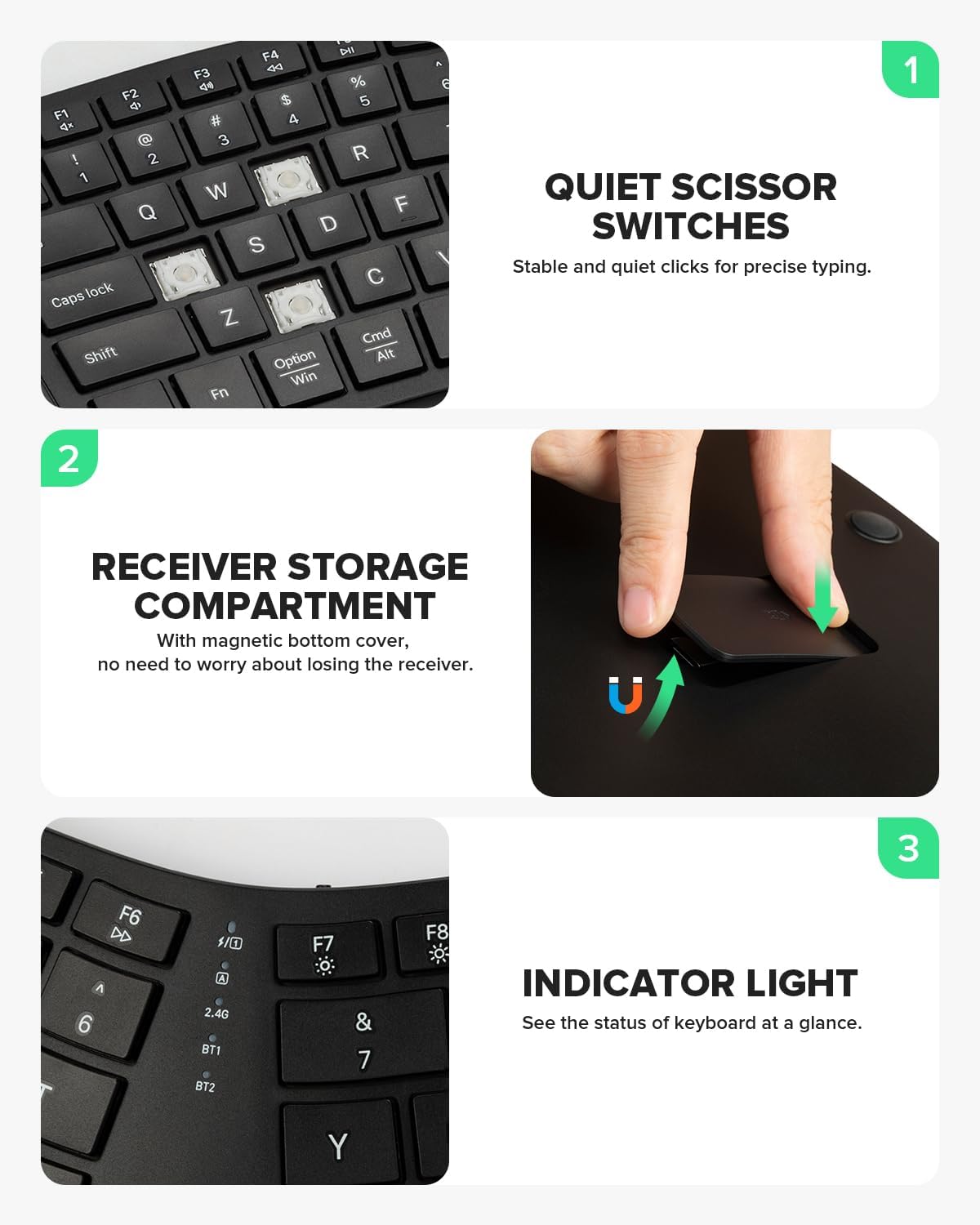
Equipped with scissor-switch keys, the keyboard offers quiet and responsive typing with excellent rebound. The 2.4G USB receiver is conveniently stored in a magnetic compartment on the underside of the keyboard.
Image: A close-up of the DELUX GM909 keyboard keys, highlighting the scissor switch mechanism and the magnetic storage for the 2.4G receiver.
3. Mouse Features (M618AIR GX)
3.1. Ergonomic Vertical Design and Lightweight Build
The M618AIR GX vertical mouse is designed with a natural vertical slope (57° angle) to promote a handshake posture, reducing wrist pronation and muscle strain. Weighing only 75g, it is ideal for small hands and comfortable for long hours of use.
Image: The DELUX M618AIR GX Wireless Vertical Mouse, illustrating its ergonomic 57-degree angle for a natural handshake grip and its lightweight construction.
Video: A demonstration of the DELUX Wireless Ergonomic Vertical Mouse for Small Hands, highlighting its comfortable design.
3.2. 다중 시스템 호환성
The mouse offers stable 2.4G wireless connectivity via a USB receiver and is compatible with Windows 7/8/10/11 and Mac systems.
Image: The DELUX M618AIR GX Wireless Vertical Mouse displayed alongside a laptop and desktop, indicating its multi-system compatibility with Windows and Mac.
3.3. Adjustable DPI and Quiet Clicks
The M618AIR GX features three adjustable DPI levels (1000, 1600 (default), 2400) for precise cursor control. Its quiet click design ensures a noise-free working environment.
Image: The bottom of the DELUX M618AIR GX Wireless Vertical Mouse, highlighting the DPI switch button and the on/off switch.
4. 설정 지침
4.1. Keyboard Setup (GM909)
충전 중: Connect the keyboard to a USB power source using the provided USB-C cable. The charging indicator light will illuminate.
2.4G 무선 연결:
Locate the 2.4G USB receiver in the magnetic compartment on the underside of the keyboard.
수신기를 컴퓨터의 사용 가능한 USB 포트에 연결하십시오.
Turn on the keyboard using the power switch. The keyboard should automatically connect.
블루투스 연결 :
키보드를 켭니다.
를 누르고 계세요 BT1 or BT2 해당 표시등이 빠르게 깜빡이며 페어링 모드에 진입했음을 나타낼 때까지 키를 3~5초 동안 누르십시오.
On your device (computer, tablet, smartphone), go to Bluetooth settings and select "DELUX GM909" from the list of available devices to pair.
Repeat for additional Bluetooth devices using the other BT key.
4.2. Mouse Setup (M618AIR GX)
전원 켜기: 마우스 바닥에 있는 ON/OFF 스위치를 찾아 "ON" 위치로 밀어 넣으세요.
2.4G 무선 연결:
마우스 바닥에 있는 배터리 칸을 엽니다.
Remove the 2.4G USB receiver.
수신기를 컴퓨터의 사용 가능한 USB 포트에 연결하십시오.
마우스가 자동으로 연결됩니다.
Video: An unboxing and setup guide for the DELUX Wireless Ergonomic Vertical Mouse (M618AIR), showing how to access the USB receiver.
5. 사용 설명서
5.1. 키보드 조작
스위칭 장치: 를 누르세요 2.4G, BT1, 또는 BT2 key to switch between connected devices. The corresponding indicator light will show the active connection.
기능 키: The F1-F12 keys have secondary functions (e.g., media control, volume). Press the Fn key simultaneously with an F-key to activate its secondary function.
표시등:
2.4G/BT1/BT2: Indicates active connection or pairing mode.
Caps Lock : Caps Lock 키가 활성화되면 불이 켜집니다.
Num 잠금: Num Lock이 활성화되면 불이 켜집니다.
배터리 표시기: Flashes when battery is low, solid when charging.
5.2. 마우스 조작
DPI 조정: 를 누르세요 디피에이 button on the bottom of the mouse to cycle through the 1000, 1600, and 2400 DPI settings.
앞으로/뒤로 버튼: Use the side buttons for navigation in web 브라우저 또는 file 탐험가.
스크롤 휠: Scroll up or down for navigation. The scroll wheel also functions as a middle click button.
6. 유지관리
청소: 부드러운 d를 사용하세요amp cloth to clean the surfaces of the keyboard and mouse. Avoid harsh chemicals or abrasive materials. For keys, use compressed air to remove debris.
배터리 관리 : Recharge the keyboard when the battery indicator flashes. For the mouse, replace the AA battery when performance degrades (if applicable, or recharge if it's a rechargeable model).
저장: When not in use for extended periods, turn off both devices to conserve battery life. Store the 2.4G USB receiver in its designated magnetic compartment on the keyboard or inside the mouse's battery compartment to prevent loss.
7. 문제 해결
장치가 연결되지 않음:
키보드와 마우스의 전원이 모두 켜져 있는지 확인하세요.
Check battery levels and recharge/replace if necessary.
2.4G 연결의 경우 USB 수신기가 기기에 제대로 연결되어 있는지 확인하십시오.
For Bluetooth connection, ensure Bluetooth is enabled on your device and re-attempt pairing.
컴퓨터나 기기를 다시 시작해 보세요.
지연 또는 간헐적 연결:
Move the devices closer to the USB receiver or your Bluetooth-enabled device.
Avoid placing devices near sources of interference (e.g., Wi-Fi routers, other wireless devices).
키/버튼이 작동하지 않음:
Check for debris under the keys/buttons and clean if necessary.
Ensure the correct operating mode (2.4G/BT1/BT2) is selected on the keyboard.
8. 사양
특징
DELUX GM909 Keyboard
DELUX M618AIR GX Mouse
연결성
2.4G 무선, 블루투스(BT1, BT2)
2.4G 무선
키 유형
가위형 스위치
Quiet Click Buttons
인간 공학
Split Design, Cushioned Palm Rest
Vertical (57°), Natural Handshake Posture
DPI 레벨
없음
1000 / 1600(기본값) / 2400
무게
지정되지 않음
75g
배터리
500mAh 리튬이온(충전식)
AA Battery (not specified if rechargeable)
호환성
윈도우, 맥, iOS, 안드로이드
윈도우 7/8/10/11, 맥 OS
9. 보증 및 지원
DELUX products are manufactured to high-quality standards. For warranty information, technical support, or service inquiries, please refer to the warranty card included with your product or visit the official DELUX web대지. 보증 청구를 위해 구매 영수증을 보관하십시오.
Ask a question about this manual
Ask about setup, troubleshooting, compatibility, parts, safety, or missing instructions. Manuals+ will review the question and use this page’s manual context to help answer it.