
1. 제품 오버view
The uahpet Pet Air Purifier (Model UJHQ03A) is designed to improve air quality in homes with pets by effectively reducing pet hair, dander, odors, dust, and smoke. It features a multi-layer filtration system and smart controls for convenient operation.
주요 특징:
- Pet Hair Optimized Design: Features a U-shaped, clog-resistant air intake to efficiently capture airborne pet fur and dander.
- 세척 가능한 사전 필터: A reusable pre-filter captures large particles like pet hair, extending the lifespan of the main HEPA filter and reducing maintenance costs.
- Multi-Layer Deep Purification: Equipped with an H13 True HEPA filter and activated carbon to remove 99.97% of airborne particles as small as 0.3 microns, including pet odors, litter box smells, and common household allergens.
- Smart Control & Quiet Operation: Supports 2.4GHz WiFi for app control, allowing real-time air quality monitoring and mode adjustments. Operates at an ultra-quiet 25dB in sleep mode, suitable for bedrooms and pet areas.
- 소형 및 휴대성: Weighing 5.73 lb (2.6 kg), its slim design allows for easy placement in various locations, including near litter boxes or pet beds, for targeted purification.
- Certified Safety & Support: ETL, EPA, FCC, CE, CARB, and CA65 certified. Includes a 1-year protection plan and lifetime technical support.
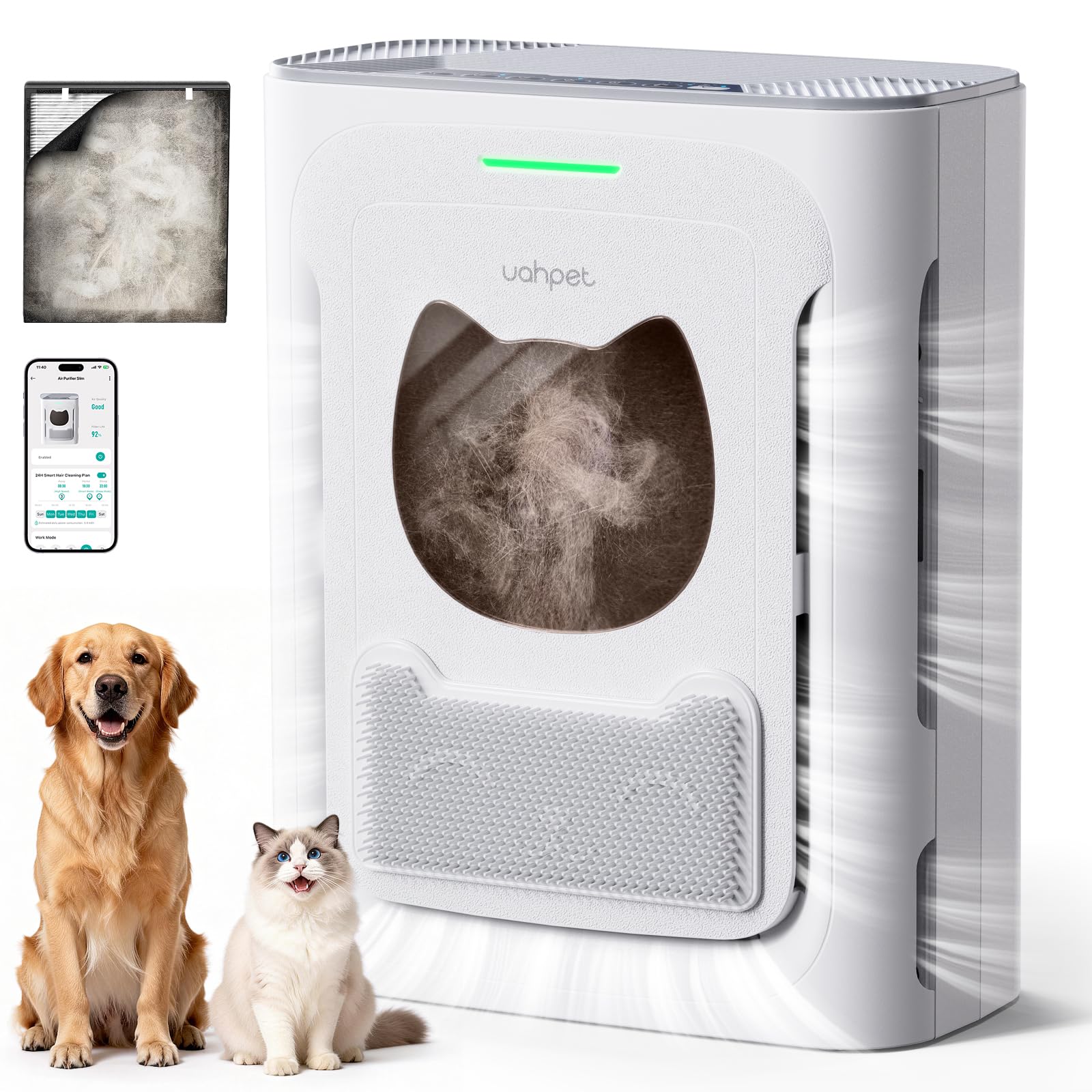
Image 1.1: The uahpet Pet Air Purifier (Model UJHQ03A).
2. 설정 지침
2.1 언박싱 및 배치
- 공기 청정기의 포장을 조심스럽게 꺼내세요.
- Place the unit on a flat, stable surface. Ensure there is at least 6 inches (15 cm) of space around all sides for optimal airflow.
- For best results in pet homes, position the purifier near pet activity zones, such as litter boxes, pet beds, or feeding areas.

Image 2.1: Place the air purifier in areas where pets are active for targeted purification.
2.2 필터 설치
Before first use, ensure all filters are properly installed and any protective packaging is removed.
- 일반적으로 기기 측면이나 뒷면에 있는 필터함 덮개를 여십시오.
- Remove the pre-installed filter set (pre-filter, H13 HEPA filter, activated carbon filter) and remove any plastic packaging.
- Insert the filters back into the unit in the correct order, ensuring they are securely seated.
- 필터 칸 덮개를 닫습니다.

Image 2.2: The multi-layer filtration system, including washable pre-filter, H13 HEPA, and activated carbon.

Image 2.3: Filter installation is designed to be simple and tool-free.
2.3 전원 연결
Connect the power adapter to the air purifier and then plug it into a standard electrical outlet. The unit will typically emit a beep or light up to indicate it has power.
2.4 App Connection (2.4GHz WiFi)
For smart control features, download the uahpet app from your device's app store. Follow the in-app instructions to connect your air purifier to your 2.4GHz WiFi network. This enables remote control, air quality monitoring, and scheduling.

Image 2.4: The uahpet app allows for convenient remote control and monitoring.
3. 사용 설명서
3.1 제어판 이상view
The air purifier can be operated using the touch controls on the top panel or via the uahpet mobile app.
- 전원 버튼: 장치를 켜거나 끕니다.
- 팬 속도 버튼: Cycles through different fan speeds (Low, Medium, High).
- 모드 버튼: Selects operating modes such as Auto Mode or Sleep Mode.
- 타이머 버튼: 자동 종료 타이머를 설정합니다.
- 아동 잠금: 실수로 설정이 변경되는 것을 방지하기 위해 자녀 보호 기능을 활성화 또는 비활성화합니다.
Video 3.1: Official uahpet video demonstrating the air purifier's features and controls.
3.2 작동 모드
- 자동 모드 : 공기청정기는 감지된 공기 질에 따라 자동으로 팬 속도를 조절합니다.
- 수면 모드 : Operates at the lowest fan speed with minimal noise (25dB) and dimmed indicator lights for undisturbed rest.
- 수동 속도: Choose from Low, Medium, or High fan speeds for continuous operation at your desired intensity.
3.3 공기질 표시기
The unit features an LED indicator light that changes color to reflect real-time air quality:
- 녹색: 좋은 공기질.
- 노란색/주황색: Fair air quality.
- 빨간색: 공기질이 좋지 않습니다.

Image 3.1: The air quality indicator provides visual feedback on your indoor environment.
4. 유지관리
정기적인 유지관리를 통해 최적의 성능을 보장하고 공기 청정기의 수명을 연장할 수 있습니다.
4.1 세척 가능한 프리필터 청소
The washable pre-filter should be cleaned regularly, especially in homes with multiple pets. This helps prevent clogging and maintains purification efficiency.
- 공기 청정기의 전원을 끄고 플러그를 뽑으세요.
- Open the filter compartment and carefully remove the pre-filter.
- Gently tap or vacuum the pre-filter to remove loose pet hair and dust.
- Rinse the pre-filter under running water until clean. Use mild soap if necessary.
- Allow the pre-filter to air dry completely before reinserting it into the unit.

Image 4.1: The washable pre-filter can be easily rinsed under water.

Image 4.2: Step-by-step guide for cleaning the reusable pre-filter.

이미지 4.3: Example of pet hair collected by the pre-filter over time.
4.2 Replacing the H13 HEPA Filter
The H13 HEPA filter and activated carbon filter are integrated and should be replaced together. The replacement frequency depends on usage and air quality, typically every 6-8 months.
- 공기 청정기의 전원을 끄고 플러그를 뽑으세요.
- 필터 칸을 엽니다.
- 기존 HEPA 필터를 제거하세요.
- Insert a new H13 HEPA filter, ensuring it fits snugly.
- 필터 칸 덮개를 닫습니다.
- Reset the filter replacement indicator (if applicable, refer to the app or control panel instructions).
Replacement filters can be purchased from authorized uahpet retailers or online stores. 검색 "uahpet Air Purifier Slim Replacement Filter".
5. 문제 해결
5.1 일반적인 문제 및 해결 방법
| 문제 | 가능한 원인 | 해결책 |
|---|---|---|
| 기기가 켜지지 않습니다. | 전원이 들어오지 않고 연결이 느슨합니다. | 전원 어댑터가 본체와 작동하는 콘센트에 제대로 꽂혀 있는지 확인하십시오. |
| 공기 정화 성능이 떨어집니다. | Clogged pre-filter, expired HEPA filter, unit placed incorrectly. | Clean the washable pre-filter. Replace the HEPA filter if due. Ensure adequate space around the unit for airflow. |
| 작동 중 비정상적인 소음이 발생합니다. | Obstruction in fan, loose filter. | Turn off and unplug the unit. Check for any foreign objects near the fan or air intake. Ensure filters are properly seated. |
| App cannot connect to the purifier. | Incorrect WiFi network (not 2.4GHz), poor signal, app error. | Ensure your phone and purifier are on a 2.4GHz WiFi network. Restart the app and purifier. Re-attempt the pairing process. |
| 대기질 지표는 항상 나쁨을 나타냅니다. | High levels of pollutants, sensor obstruction. | Ensure the air quality sensor (refer to manual for location) is clean and unobstructed. Allow time for the purifier to clean the air. |
If the problem persists after trying these solutions, please contact uahpet customer support.
6. 제품 사양
| 특징 | 세부 사항 |
|---|---|
| 모델 번호 | UJHQ03A |
| 제품 치수 | 6.1 x 11.81 x 14.64 인치 |
| 품목 무게 | 4.63파운드(2.1kg) |
| 전원 | AC |
| 제어 방법 | 앱, 푸시 버튼 |
| 필터 유형 | H13 헤파 |
| 바닥 면적 적용 | 최대 2100평방피트 |
| 소음 수준 | 25데시벨(수면 모드) |
| 오염물질 여과 능력 | Dust, Odors, Pet Dander, Pet Hair, Smoke |
| 특별 기능 | U-shaped air intake for pet hair, washable pre-filter, compact and quiet operation |
| 포함된 구성 요소 | Air Purifier Unit, HEPA Filter, Pre-Filter, Power Cable |
7. 보증 및 지원
7.1 제품 보증
The uahpet Pet Air Purifier (Model UJHQ03A) comes with a 1-year full-unit protection plan. This warranty covers defects in materials and workmanship under normal use. For specific terms and conditions, please refer to the warranty card included with your product or contact customer support.
7.2 고객 지원
For any questions, technical assistance, or warranty claims, please contact uahpet customer service. We offer 24/7 온라인 고객 서비스 그리고 평생 기술 지원 to ensure your peace of mind.
- 온라인 지원: Visit the official uahpet webFAQ 및 지원 리소스를 위한 사이트입니다.
- 이메일 지원: Refer to your product packaging or the uahpet web연락처 이메일 사이트입니다.
Please have your model number (UJHQ03A) and purchase information ready when contacting support.