
SKKTKT 85113
SKKTKT Vanity Desk with LED Lights Mirror & Power Outlet - Model 85113 User Manual
조립, 작동, 유지관리에 대한 포괄적인 지침입니다.
소개
Thank you for choosing the SKKTKT Vanity Desk. This manual provides detailed instructions to ensure safe assembly, proper operation, and effective maintenance of your new vanity desk. Please read all instructions carefully before beginning assembly or use.
안전 정보
경고: This product requires assembly. Follow the instructions carefully to avoid injury. The intelligent sensor light technology may cause the lights to turn on unexpectedly when approached, which could startle users. Always ensure the area around the vanity is clear and free from obstructions to prevent accidents.
- 모든 작은 부품과 포장재는 어린이와 반려동물의 손이 닿지 않는 곳에 보관하십시오.
- 사용하기 전에 모든 연결이 안전한지 확인하십시오.
- 서랍이나 선반에 물건을 너무 많이 넣지 마세요.
- Use only the provided power adapter for the LED lights and power outlets.
설정 및 조립
The SKKTKT Vanity Desk is designed for quick and hassle-free setup. All necessary parts and step-by-step instructions are included in the packaging. For visual guidance, a specific installation video is available on the product listing page.
- 구성 요소 풀기: 모든 부품을 포장에서 조심스럽게 꺼내세요. 부품 목록에 나열된 모든 구성품이 들어 있고 손상되지 않았는지 확인하세요.
- 부품 구성: Arrange parts in order of assembly to streamline the process.
- 기본 구조 조립: Follow the provided diagrams to assemble the main frame of the vanity desk.
- 서랍과 선반 설치: Insert drawers into their respective slots and secure adjustable shelves as desired.
- 거울 부착 장치: Securely attach the tri-folding mirror unit to the main desk structure.
- 전기 부품 연결: Plug in the LED lights and power outlet module.
- 위치 선정 및 확보: Place the vanity desk in its desired corner location. For enhanced stability, the top section must be mounted to the wall using appropriate hardware.
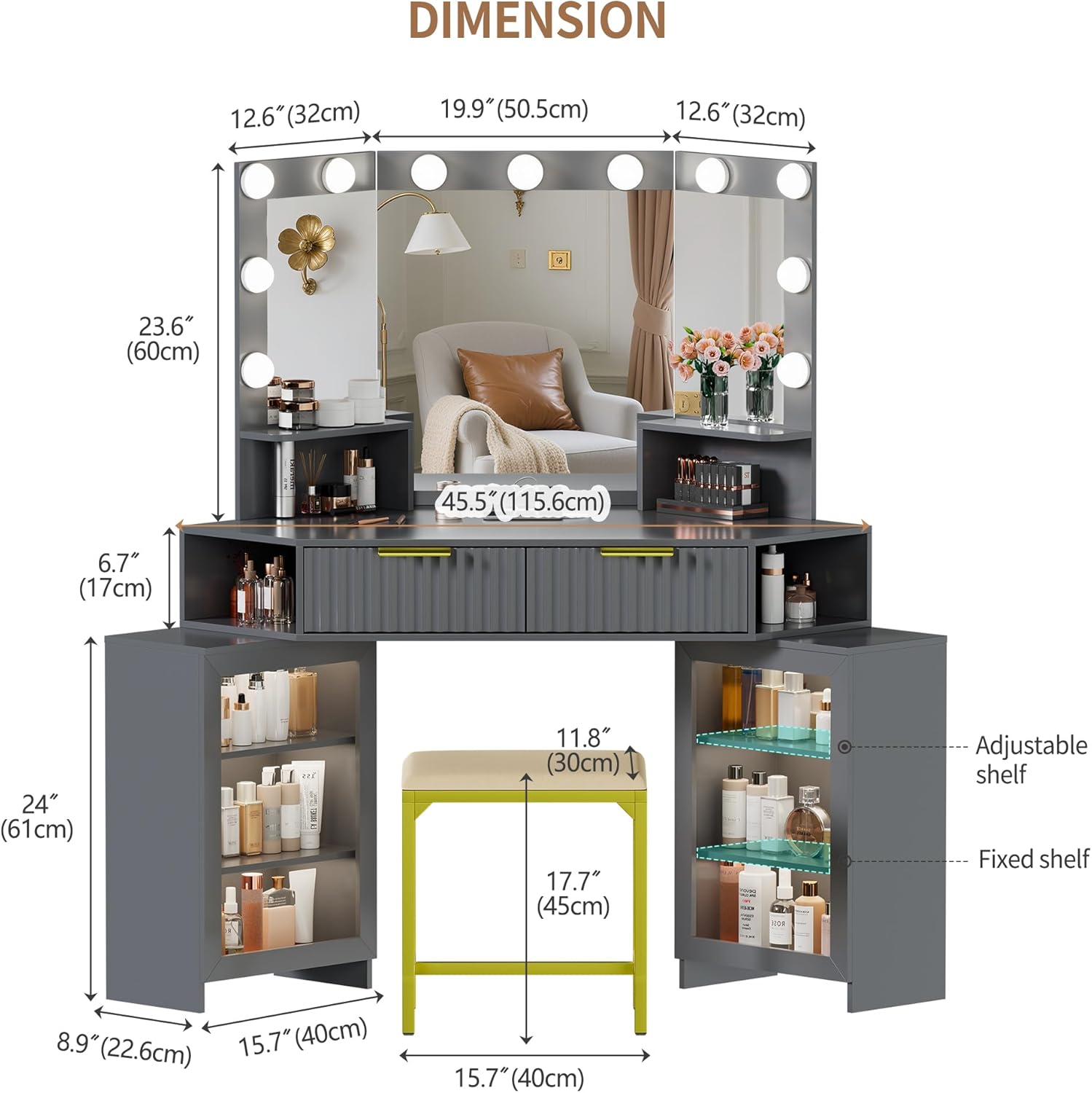
Figure 1: Product Dimensions and Component Layout. This image illustrates the overall dimensions of the vanity desk and its various sections, including the mirror, drawers, and side cabinets with shelves. The accompanying stool dimensions are also shown.

Figure 2: Fully Assembled Vanity Desk. This image displays the vanity desk in a typical corner setup, highlighting its storage capabilities with open drawers and side cabinets, and the illuminated tri-folding mirror.
작동 지침
LED Lights and Lighting Modes
The tri-folding mirror is equipped with built-in LED lights offering three lighting modes and adjustable brightness.
- 스위칭 모드: Tap the light button on the mirror frame to cycle through the 3 lighting modes (e.g., warm, natural, cool).
- 밝기 조정: Long press the light button to adjust the brightness level for the selected mode. Release when the desired brightness is achieved.
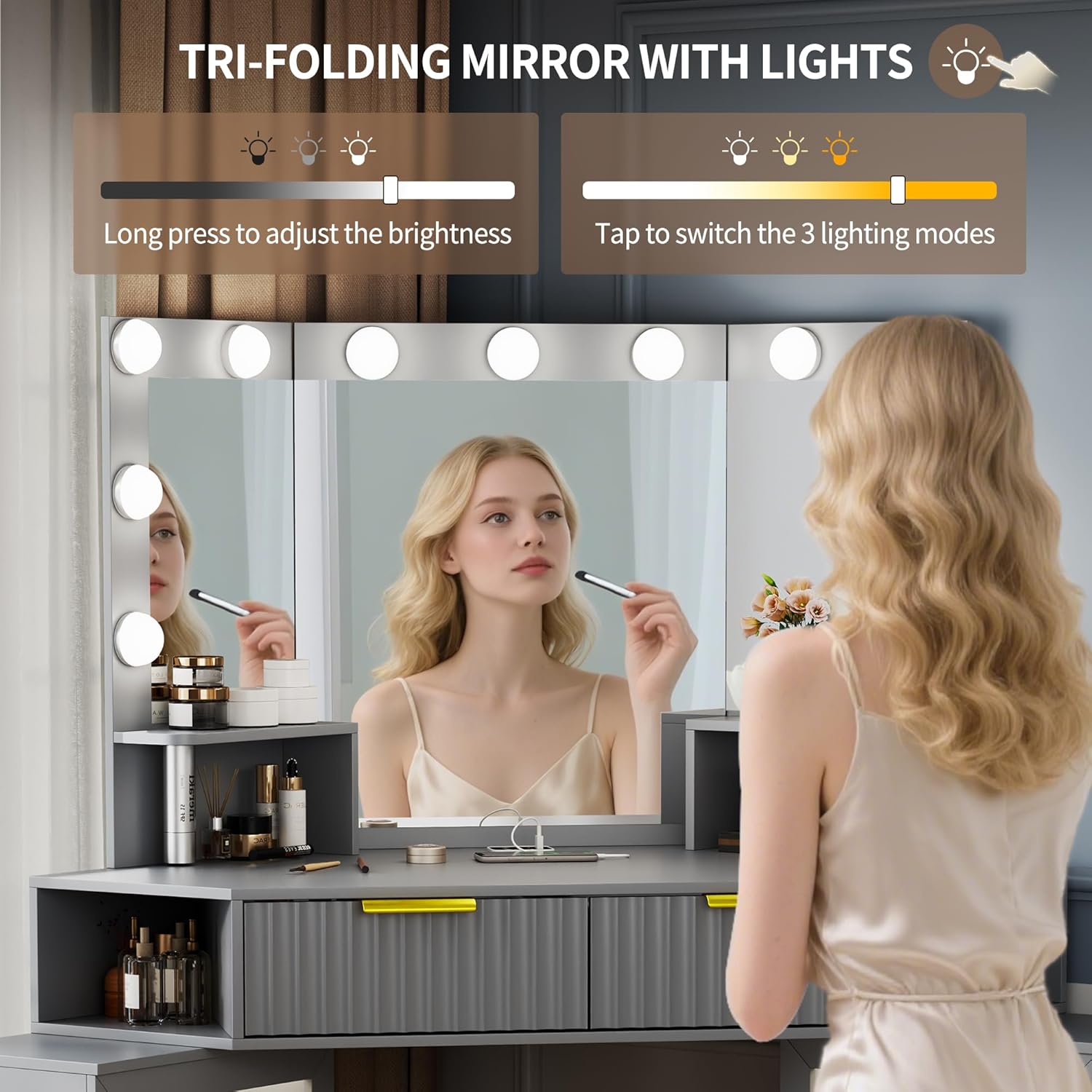
Figure 3: LED Light Controls. This image demonstrates how to operate the LED lights on the mirror, including tapping to switch between three lighting modes and long-pressing to adjust brightness.
Smart Module: Power Outlet and Sensor Light
The vanity desk includes a smart module with power sockets, USB, and Type-C ports, along with an intelligent sensor light function.
- 전원 콘센트: Use the two power sockets, USB port, and Type-C charger to power your electronic devices and beauty tools.
- Drawer and Cabinet Lights: A sensor switch on the socket activates lights within the drawers and cabinets.
- Human Sensor Function: Activate the human sensor function via the "Body" button on the smart module. When enabled, lights will automatically turn on when someone approaches within 1.5 meters and turn off a few seconds after they leave.

Figure 4: Smart Module Interface. This image details the smart module, showing the power outlets, USB and Type-C charging ports, and the "Body" and "Light" control buttons for the sensor and internal lighting features.
저장 기능
화장대 책상은 다음을 제공합니다. ample storage with drawers and adjustable partitions to keep your cosmetics and accessories organized.
- 서랍: Utilize the spacious drawers for storing various items. Some drawers may include a jewelry tray for delicate accessories.
- 조절 가능한 파티션: Customize the layout of the drawers and shelves using the adjustable partitions to fit items of different sizes.
- Extra Display Shelves: Use the open shelves on the desktop for frequently used items or decorative displays.

Figure 5: Drawer and Storage Details. This image highlights the internal organization of the drawers, including a jewelry tray, and showcases the design of the metal handles and extra display shelves.

그림 6: Ample Storage Space. This image provides a visual representation of the vanity desk's storage capacity, with drawers and side cabinets filled with cosmetics and beauty products, illustrating the practical use of space.
유지
To ensure the longevity and appearance of your SKKTKT Vanity Desk, follow these maintenance guidelines:
- 표면 청소 : The product's surface finish makes cleaning easy. Use a soft, damp cloth to wipe away dust and cosmetic residue. Avoid abrasive cleaners or harsh chemicals that could damage the finish.
- 거울 청소: Use a glass cleaner and a lint-free cloth for the mirror surfaces.
- 전기 부품: Ensure all electrical connections are dry and free from spills. Do not attempt to repair electrical components yourself.
- 정기 점검: 모든 나사와 패스너가 단단히 조여져 있는지 정기적으로 점검하세요. 필요하면 조여주세요.
문제 해결
| 문제 | 가능한 원인 | 해결책 |
|---|---|---|
| LED 조명이 켜지지 않습니다. | Power cable disconnected; light button not pressed; power outage. | Check if the power cable is securely plugged into the wall outlet and the vanity. Press the light button. Verify power supply. |
| Sensor light not activating. | Human sensor function is off; obstruction in sensor path; sensor malfunction. | Ensure the "Body" button on the smart module is activated. Clear any objects in front of the sensor. If the issue persists, contact support. |
| 전원 콘센트가 작동하지 않습니다. | Main power to the vanity is off; device not properly plugged in. | Check the main power connection to the vanity. Ensure devices are fully inserted into the outlets/ports. |
| 허영심은 불안정하게 느껴진다. | Not properly assembled; not secured to the wall. | Recheck all assembly connections and tighten screws. Ensure the vanity is mounted to the wall as recommended for stability, especially in corner setups. |
명세서
- 모델 번호: 85113
- 상표: SKKTKT
- 프레임 소재: 목재
- 제품 크기: 40"D x 50"W x 54.3"H (101.6cm D x 127cm W x 137.9cm H)
- 품목 무게: 91.4파운드(41.46kg)
- 필요한 조립: 예
- 조명: LED with 3 modes and adjustable brightness
- 전원 콘센트: 2 AC sockets, 1 USB port, 1 Type-C port
- 특별 기능: Intelligent human sensor light, tri-folding mirror, ample storage with adjustable partitions.
보증 및 지원
For warranty information or technical support, please refer to the documentation included with your purchase or visit the official SKKTKT website. If you encounter any issues not covered in this manual, please contact SKKTKT customer service for assistance.
SKKTKT Customer Service: Visit the SKKTKT Store on Amazon
Ask a question about this manual
Ask about setup, troubleshooting, compatibility, parts, safety, or missing instructions. Manuals+ will review the question and use this page’s manual context to help answer it.