
1. 서론
The GEEVON-LINK GL-25TH08 is a smart WiFi and Bluetooth-enabled indoor hygrometer thermometer designed to monitor temperature and humidity levels in your environment. It features a large E-Ink display, smart app connectivity for remote monitoring and alerts, and data storage capabilities. This manual provides essential information for setting up, operating, and maintaining your device.
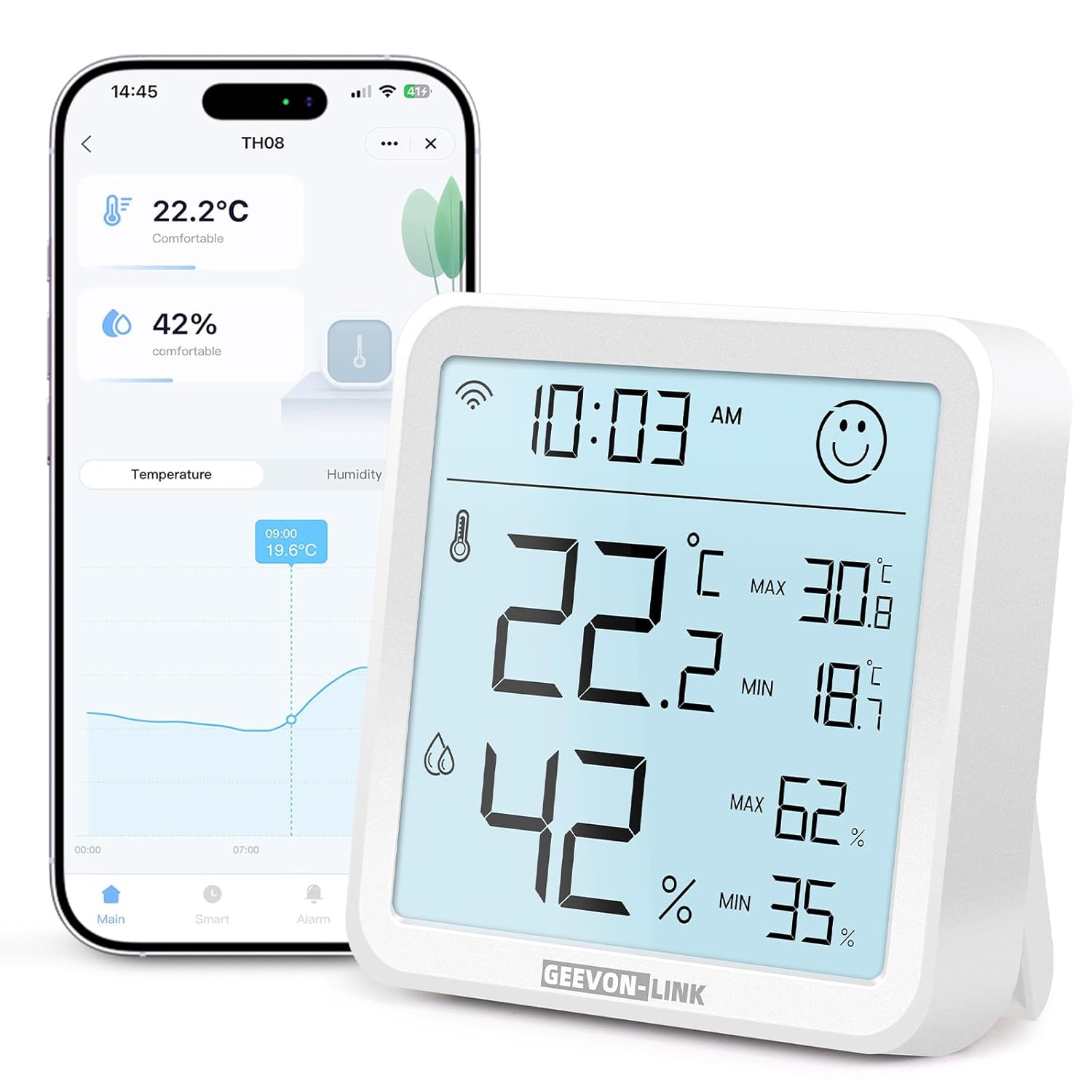
Image: GEEVON-LINK GL-25TH08 WiFi Indoor Hygrometer Thermometer, front view showing the large digital display.
2. 제품 특징
- Dual Wi-Fi & Bluetooth Connectivity: Connects to 2.4GHz Wi-Fi for remote monitoring and Bluetooth for local data access via the Smart Life app.
- 높은 정확도: Provides temperature accuracy of ±1°C (±1.8°F) and humidity accuracy of ±5% RH.
- Large Backlit E-Ink Display: A 3.2-inch screen with an ultra-wide viewing angle for clear readability. Backlight activates for 8 seconds with a top touch button press.
- Smart Alerts & Automated Control: Receive instant app alerts for high/low temperature, humidity, and low battery. Integrates with Alexa and Google Home for voice control and automated scene creation.
- Long-Term Data Storage & Export: View historical data trends (hour, day, month, year) and export records for up to one year via the app.
- Face Icon Comfort Indicator: Displays a happy face for comfortable conditions (18°C-28°C / 64.4°F-82.4°F and 40%-65% RH) and an unhappy face when conditions are outside this range.
- 오래 지속되는 배터리: Energy-efficient design powered by 3 AAA batteries (included), with in-app low battery alerts.

Image: Close-up of the GEEVON-LINK GL-25TH08 display showing temperature, humidity, time, comfort indicator, and max/min records.
3. 설정 지침
3.1. 배터리 설치
- Open the rear battery cover of the device.
- Remove any battery insulation sheet if present.
- Insert 3 new AAA alkaline batteries into the battery compartment, ensuring correct polarity.
- 배터리 덮개를 단단히 닫으세요.

Video: This video demonstrates the physical features of the GEEVON-LINK WiFi Thermometer Hygrometer, including how to open the battery compartment and insert batteries.
3.2. App Installation & Device Pairing
- 다운로드 스마트 라이프 app from your smartphone's app store (Google Play Store or Apple App Store). You can also scan the QR code provided in the product packaging.
- 새 계정을 등록하거나 이미 계정이 있는 경우 로그인하세요.
- Ensure the device's Wi-Fi icon is flashing. If not, press and hold the reset button (usually a small pinhole on the back or side) for 5 seconds until it flashes.
- In the Smart Life app, tap the "+" icon in the top-right corner or select "Add Device" to begin searching for devices.
- Enable phone Bluetooth as prompted by the app.
- 목록에서 기기를 선택하고 화면의 안내에 따라 페어링을 완료하세요.

Image: Step-by-step guide for installing the Smart Life app, inserting batteries, checking the Wi-Fi indicator, and pairing the device.
3.3. Wi-Fi 연결
During the pairing process, you will be prompted to enter your Wi-Fi network details. The device supports 2.4GHz Wi-Fi networks only (5GHz is not supported). Ensure your smartphone is connected to a 2.4GHz network during setup.
4. 사용 설명서
4.1. 디스플레이 오버view
The large E-Ink display shows current temperature, humidity, time, and max/min records. A comfort icon (happy/unhappy face) indicates the environmental comfort level. Press the top touch button to activate the backlight for 8 seconds in low-light conditions.

Image: The GEEVON-LINK GL-25TH08 display with its backlight activated, showing clear visibility in a dim environment.
4.2. 편안함 지표
The device features a face icon to visually represent comfort levels:
- 행복한 얼굴: Temperature between 18°C-28°C (64.4°F-82.4°F) and humidity between 40%-65% RH.
- Unhappy Face: Conditions are outside the comfortable range.
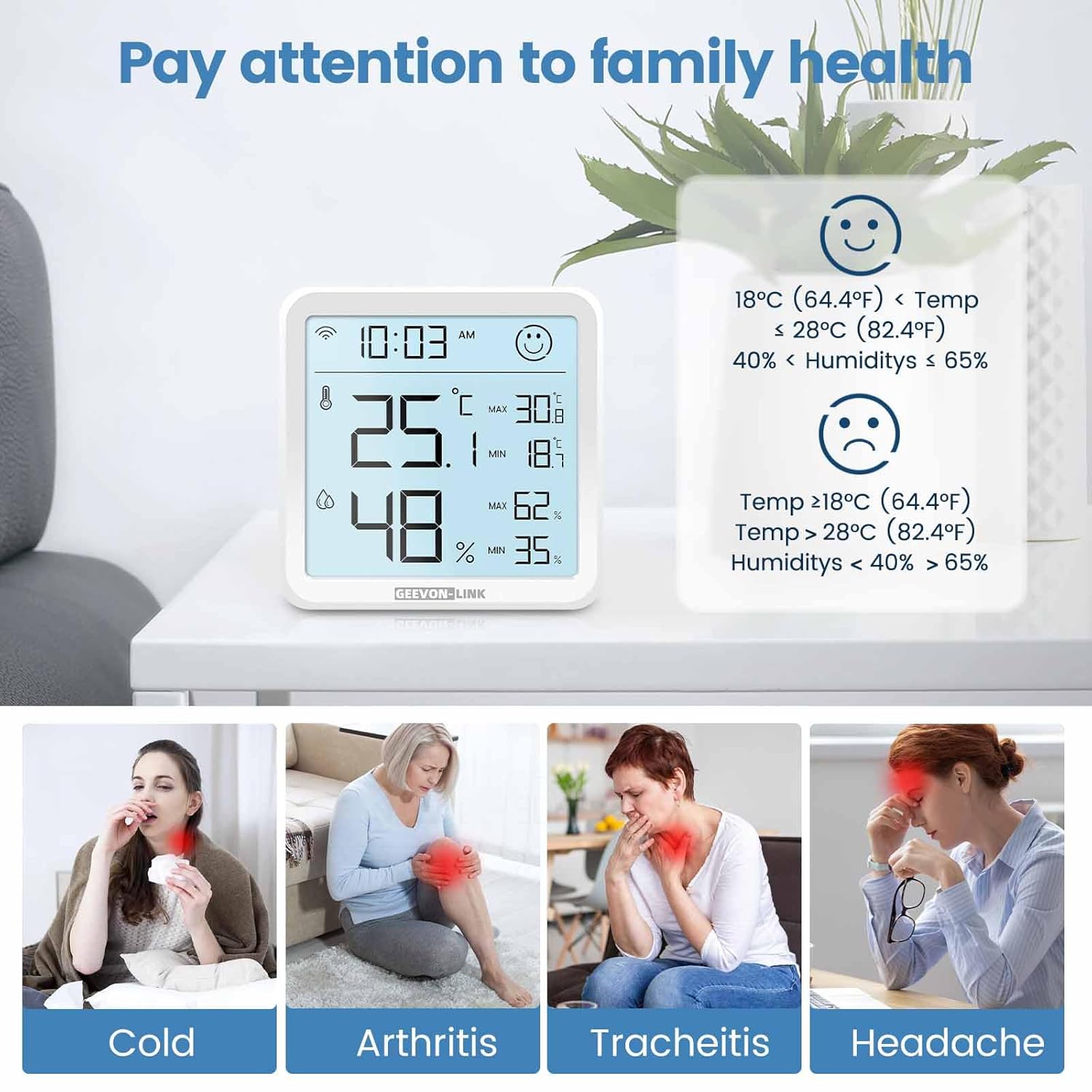
Image: The GEEVON-LINK GL-25TH08 display showing the comfort indicator face icon, with examples of temperature and humidity ranges for happy and unhappy faces.
4.3. App Monitoring & Data Export
Once connected to the Smart Life app, you can:
- View current temperature and humidity readings remotely.
- Access historical data graphs by hour, day, month, or year.
- Export up to one year of data records by tapping the share icon in the top-right corner of the data screen and entering your email address.
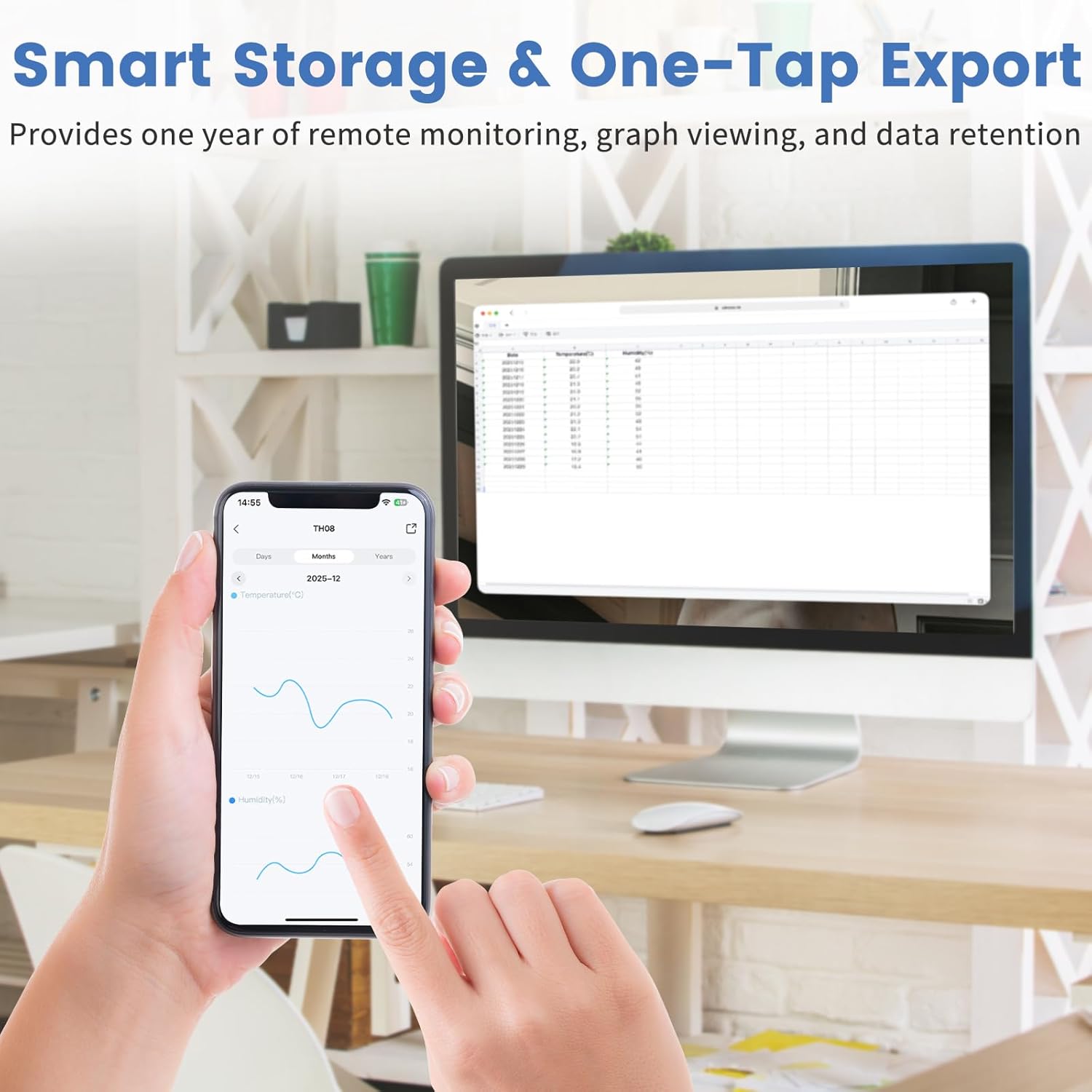
Image: A smartphone displaying the Smart Life app interface with temperature and humidity graphs, demonstrating the data storage and export function.
4.4. Smart Alerts & Automation
Configure custom alerts and smart scenes through the Smart Life app:
- Set upper and lower limits for temperature and humidity to receive instant app, phone, or SMS notifications.
- Integrate with Alexa or Google Home to create automated scenes, such as turning on an AC or dehumidifier when specific conditions are met.
- Use voice commands (e.g., "Alexa, what's the temperature in the living room?") to get current readings.

Image: Screenshots of the Smart Life app demonstrating real-time notifications for temperature and humidity, and options for smart device linkage.

Image: A person interacting with a smart speaker, illustrating the device's compatibility with Alexa and Google Home for voice control.
Video: A detailed "How to Use" guide demonstrating app setup, alarm functions, and settings for the GEEVON-LINK WiFi Thermometer Hygrometer.
4.5. 교정
The Smart Life app allows for temperature and humidity calibration to ensure accuracy. Navigate to the device settings within the app to adjust calibration values if needed. These settings will take effect the next time the device wakes up.
4.6. 배치 옵션
The device can be placed on a flat surface using its integrated bracket or mounted on a wall using the keyhole slot on the back. Ensure placement in a location that provides accurate readings for the desired area, away from direct sunlight, heat sources, or drafts.

Image: The GEEVON-LINK GL-25TH08 device shown with its adjustable stand extended and retracted, illustrating flexible placement options.
5. 사양
| 특징 | 세부 사항 |
|---|---|
| 상표 | GEEVON-LINK |
| 모델명 | GL-25TH08-1-WH-WUS |
| 색상 | 하얀색 |
| 겉감 소재 | 플라스틱 |
| 전원 | 배터리 구동(AAA 배터리 3개 포함) |
| 품목 길이 | 3.2 인치 |
| 품목 무게 | 3.68 온스 |
| 온도 범위 | -9.9°C ~ 60°C |
| 온도 정확도 | ±1°C (±1.8°F) |
| 습도 범위 | 상대습도 0%-99% |
| 습도 정확도 | 상대습도 ±5% |
| Wi-Fi 주파수 | 2.4GHz (5GHz는 지원하지 않음) |
6. 유지관리
- 청소: 부드럽고 마른 천으로 기기를 닦으세요. 액체 세척제나 연마재를 사용하지 마세요.
- 배터리 교체: Replace all three AAA batteries when the low battery alert is received in the app or indicated on the device display.
- 저장: 장기간 보관할 경우 누액을 방지하기 위해 배터리를 제거하십시오. 서늘하고 건조한 곳에 보관하십시오.
7. 문제 해결
- 장치가 켜지지 않음: Check battery installation and ensure batteries are new and correctly inserted.
- Wi-Fi에 연결할 수 없습니다:
- Wi-Fi 네트워크가 2.4GHz인지 확인하세요. 이 기기는 5GHz 네트워크를 지원하지 않습니다.
- Wi-Fi 비밀번호가 올바른지 확인하세요.
- 기기를 와이파이 공유기 가까이로 옮기세요.
- Reset the device by holding the reset button for 5 seconds and try pairing again.
- 부정확한 판독값:
- Ensure the device is not placed near heat sources, direct sunlight, or strong drafts.
- Perform temperature and humidity calibration via the Smart Life app settings.
- App alerts not received:
- Check your phone's notification settings for the Smart Life app.
- Verify that alert thresholds are correctly set in the app.
- Ensure the device has a stable Wi-Fi connection.
8. 보증 및 지원
GEEVON-LINK products are designed for reliability and performance. For warranty information, technical support, or service inquiries, please refer to the contact information provided in your product packaging or visit the official GEEVON-LINK web사이트. 보증 청구를 위해 구매 증빙 자료로 구매 영수증을 보관하세요.