
1. 서론
Thank you for choosing the FORGING MOUNT Full-Motion TV Wall Mount. This manual provides essential information for safe and correct installation, operation, and maintenance of your new TV wall mount. Please read these instructions thoroughly before installation and keep them for future reference.
2. 안전 정보
경고: 잘못된 설치는 심각한 부상 및 재산 피해를 초래할 수 있습니다. 본 설명서를 이해하지 못하거나 설치 안전성에 의문이 있는 경우, 자격을 갖춘 설치 전문가에게 문의하십시오.
- Ensure the mounting surface can safely support the combined weight of the equipment and all attached hardware and components.
- Do not install on drywall alone. This mount is designed for wood stud, concrete, and brick walls.
- Always use an assistant or mechanical lifting equipment to safely lift and position the television.
- Tighten screws firmly but do not overtighten. Overtightening can damage the screws and components.
- 설치하는 동안 어린이와 애완동물이 접근하지 못하도록 하세요.
- Regularly check the mount for any signs of wear or loosening.
3. 패키지 내용
Verify that all components are present and undamaged before proceeding with installation. If any parts are missing or defective, please contact customer support.

Figure 3.1: All components included in the package. This includes the main wall plate, TV attachment brackets, extension arms, a variety of mounting hardware for different TV models and wall types, a spirit level for accurate installation, and cable ties for cable management.
패키지에는 일반적으로 다음이 포함됩니다.
- 벽판 조립체
- TV 브래킷 암 (2개)
- Extension Arms (if applicable)
- 설치 하드웨어 키트(TV와 벽 사이의 간격을 조절하는 다양한 나사, 와셔, 스페이서 포함)
- 콘크리트 앵커 (콘크리트/벽돌 설치용)
- 수평기
- 케이블 타이
- 설치 템플릿
4. 사양
| 특징 | 사양 |
|---|---|
| 모델 번호 | 하이9370 |
| 호환 가능한 TV 크기 | 37~75인치 |
| 최대 하중 용량 | 45kg(99파운드) |
| VESA 호환성 | 100x100mm ~ 600x400mm |
| 장착 유형 | 벽걸이형 |
| 이동 유형 | Full-Motion (Swivel, Tilt, Level Adjustment) |
| 기울기 각도 | +5° / -10° |
| 회전 각도 | 최대 180° (TV 크기에 따라 다름) |
| 레벨 조정 | ±3° |
| 팔 연장 | Up to 103.5 cm (1015mm) |
| 최소 벽 거리 | 82mm (XNUMXmm) |
| 재료 | 중장비 탄소강 |
| 색상 | 검은색 |
| 제품 무게 | 7.1kg |
5. 설정 및 설치
Before installation, ensure you have the necessary tools (e.g., drill, stud finder, screwdriver, wrench). It is highly recommended to have at least two people for installation.
5.1 벽면 호환성
This mount is compatible with:
- 목재 스터드 벽
- 견고한 콘크리트 벽
- 벽돌 벽
DO NOT install this mount on drywall (plasterboard) alone without securing it to wood studs or concrete.

Figure 5.1: Wall type compatibility. The mount can be installed on wood stud, concrete, or brick walls. Drywall installation without proper stud support is prohibited.
5.2 VESA 호환성
Ensure your TV's VESA mounting pattern falls within the supported range of 100x100mm to 600x400mm.

Figure 5.2: VESA mounting pattern. Measure the horizontal and vertical distance between the mounting holes on the back of your TV to determine its VESA size.
5.3 Cable Exit Check
Before attaching the TV brackets, check if the cable exit points on your TV will be obstructed by the brackets. Adjust bracket placement if necessary.

Figure 5.3: Cable exit check. Ensure that the TV brackets do not block any essential cable ports on your television.
5.4 설치 단계
Follow these general steps for installation. Refer to the included detailed manual and installation template for precise measurements and hardware selection.
- TV에 브라켓 부착: Secure the TV bracket arms to the back of your television using the appropriate screws, washers, and spacers from the hardware kit. Ensure they are centered and firmly tightened.
- 벽면 플레이트 설치: Using the provided drilling template and spirit level, mark and drill pilot holes on your chosen wall location. Secure the wall plate assembly to the wall using the appropriate anchors and screws for your wall type.
- 벽걸이형 TV 거치대: Carefully lift the television with the attached brackets and hook it onto the wall plate. Ensure the TV is securely seated and engage any safety locking mechanisms.
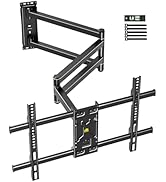
Figure 5.4: Simplified 3-step installation process. (1) Attach brackets to TV, (2) Mount wall plate to wall, (3) Hang TV onto wall plate.
6. 작동 지침 (조정)
The FORGING MOUNT HY9370 offers full-motion capabilities for optimal view유연성.
6.1 Arm Extension and Retraction
The mount features an ultra-long dual-folding arm that can extend up to 103.5 cm (1015mm) from the wall and retract to a minimum distance of 82mm.

Figure 6.1: Arm extension and retraction. The mount's arm can be extended to provide a maximum reach of 1015mm and folded back to a minimum distance of 82mm from the wall.
6.2 회전 조절
The TV can be swiveled up to 180 degrees left or right, depending on the TV size and wall position, allowing for viewing from multiple angles or rooms.

Figure 6.2: 180-degree swivel capability. The TV can be rotated horizontally to accommodate various viewing positions, ideal for open-plan living spaces or corner installations.
6.3 기울기 조정
Adjust the tilt angle from +5° (upward) to -10° (downward) to reduce glare and optimize your view경험.
6.4 레벨 조정
After installation, fine-tune the TV's horizontal level by adjusting it ±3° to ensure a perfectly straight display.

Figure 6.3: Tilt and level adjustments. The top image shows the TV tilting up to +5 degrees and down to -10 degrees to minimize glare. The bottom image demonstrates the ability to adjust the TV's horizontal level by +/-3 degrees for perfect alignment.
7. 유지관리
정기적인 유지 관리는 TV 벽걸이 거치대의 수명 연장과 안전한 작동을 보장합니다.
- 청소: 부드럽고 마른 천으로 마운트를 닦으세요. 마감재를 손상시킬 수 있는 연마성 세제나 용제는 사용하지 마세요.
- 점검: 모든 나사와 볼트가 단단히 조여져 있는지 주기적으로 확인하십시오. 필요한 경우 다시 조이되, 과도하게 조이지 마십시오.
- 움직임: If the arm movement becomes stiff, apply a small amount of silicone-based lubricant to the pivot points.
8. 문제 해결
TV 벽걸이 거치대에 문제가 발생하면 다음의 일반적인 문제 및 해결 방법을 참조하십시오.
| 문제 | 가능한 원인 | 해결책 |
|---|---|---|
| 설치 후 TV가 수평이 아닙니다. | 설치 과정에서 약간의 정렬 불량이 발생했습니다. | Use the built-in level adjustment feature (±3°) to correct the horizontal alignment. |
| 마운트가 헐거워지거나 불안정하게 느껴집니다. | 고정 나사가 완전히 조여지지 않았거나 벽 고정 장치가 불충분합니다. | Re-check all wall mounting screws and TV attachment screws. Ensure proper anchors were used for your wall type. If unsure, consult a professional. |
| Arm movement is stiff or difficult. | Lack of lubrication or dust accumulation. | Clean the arm joints and apply a small amount of silicone-based lubricant to the pivot points. |
| TV cables are pinched or obstructed. | Cables were not routed correctly during installation. | Carefully detach the TV, re-route cables using the provided cable ties, and re-attach the TV. Ensure cables have enough slack for full motion. |
9. 보증 및 지원
This FORGING MOUNT product is covered by a 1년 제조사 보증 구매일로부터. 이 보증은 정상적인 사용 하에서 재료 및 제조상의 결함을 포함합니다.
보증은 다음 사항을 포함하지 않습니다:
- 부적절한 설치, 오용 또는 방치로 인해 발생한 손상.
- 허가받지 않은 개조 또는 수리로 인한 손상.
- 정상적인 마모 및 파손.
For warranty claims, technical support, or any questions regarding your product, please contact FORGING MOUNT customer service through your retailer or the official FORGING MOUNT web대지.


