
1. 서론
This user manual provides comprehensive instructions for the installation, operation, and maintenance of your Polarlander B5350 Car Stereo. Please read this manual thoroughly before using the product to ensure proper functionality and to prevent damage. Keep this manual for future reference.
2. 안전 정보
- 운전 안전: Always prioritize safe driving. Do not operate the system in a way that distracts you from the road.
- 설치: Professional installation is recommended. Ensure all wiring is correctly connected to prevent short circuits or damage.
- 전원 공급 장치: Connect the unit to a 9-30V DC power supply. Incorrect voltag손상을 초래할 수 있습니다.
- 온도: Operate the unit within the specified temperature range of -20℃ to 60℃.
- 수분: 본 제품을 물과 과도한 습기로부터 멀리하십시오.
3. 패키지 내용
패키지에 모든 품목이 들어 있는지 확인하세요.
- 본체 (차량용 스테레오)
- 방수 전원 코드
- Fixed Mounting Bracket Set (Hardware bracket + Sunshade)
- MINI-USB to USB2.0 Cable
- 사용 설명서 (본 문서)

Image 3.1: Contents of the Polarlander B5350 package, including the main unit, power cord, mounting bracket, and USB cable.
4. 제품 오버view
The Polarlander B5350 is a double DIN car stereo featuring a 5.0-inch touchscreen display with 800x480 resolution. It supports wireless CarPlay and Android Auto, Bluetooth 5.0, and various media playback options.
4.1 전면 패널 및 디스플레이
The front panel features the 5.0-inch touchscreen, which is the primary interface for controlling the unit. The display provides access to various functions including navigation, media playback, and phone calls.

이미지 4.1: Examples of the user interface display, showing various application icons and menu layouts.
4.2 측면 및 후면 연결
The unit includes several ports for connectivity and expansion:
- 헤드폰 잭: 개인적인 오디오 청취를 위해.
- TF 카드 슬롯 : For media playback from a TransFlash (MicroSD) card.
- MINI to USB Interface: For connecting USB devices or the provided MINI-USB to USB2.0 cable.
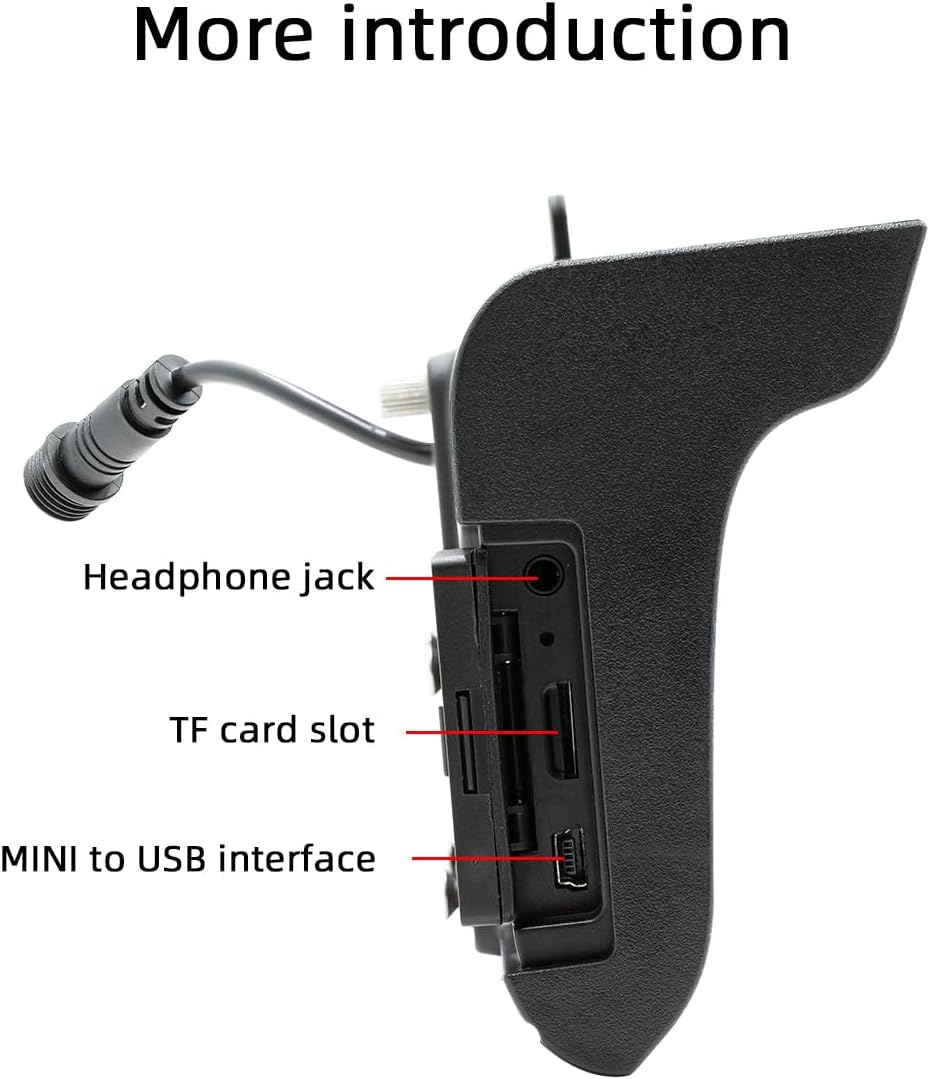
이미지 4.2: 측면 view illustrating the headphone jack, TF card slot, and MINI to USB interface.
The rear of the unit houses a built-in 1W speaker and mounting points for the bracket.

이미지 4.3: 후면 view of the unit, highlighting the built-in 1W speaker.
5. 설치
This unit is designed for double DIN installation. Due to the complexity of vehicle wiring and dashboard configurations, professional installation is highly recommended. Incorrect installation can lead to vehicle damage or malfunction of the stereo unit.
5.1 일반 설치 단계 (전문가와 상담하십시오)
- 전기 단락을 방지하려면 차량의 배터리를 분리하세요.
- Remove the existing car stereo or dashboard trim to access the double DIN slot.
- Connect the wiring harness from the vehicle to the stereo's power and speaker connections. Ensure correct polarity.
- Connect any additional inputs/outputs such as the reversing camera, AUX-in, or RCA audio outputs.
- Mount the stereo securely into the double DIN slot using the provided mounting bracket set.
- 차량 배터리를 다시 연결하고 장치의 작동 여부를 테스트하십시오.
- 대시보드 트림을 다시 조립하세요.
Note: The waterproof power cord should be routed carefully to avoid damage and ensure proper sealing.
6. 초기 설정
6.1 전원 켜기/끄기
The unit will power on automatically when the vehicle's ignition is turned on. To power off, turn off the vehicle's ignition.
6.2 언어 설정
Upon first use, you may be prompted to select your preferred language. Navigate through the on-screen menu to select from English, Chinese, Spanish, Portuguese, Russian, German, French, Polish, Turkish, Arabic, Hebrew, Italian, Czech, Japanese, or Korean.
7. 사용 설명서
7.1 터치스크린 탐색
The 5-inch touchscreen is the primary control interface. Tap icons to open applications, swipe to navigate menus, and use pinch-to-zoom gestures where applicable (e.g., in navigation apps).
7.2 스티어링 휠 컨트롤
If your vehicle supports steering wheel controls, connect the appropriate wires during installation. The unit supports programmable steering wheel controls, allowing you to map functions like volume, track skip, and mode selection to your vehicle's buttons.
7.3 Seven-Color Key Backlights
The unit features adjustable seven-color key backlights. Access the settings menu to customize the backlight color to match your vehicle's interior lighting or your personal preference.
8. 연결성
8.1 블루투스 5.0
The unit features Bluetooth 5.0 for wireless audio streaming and hands-free calling. The default Bluetooth name is "SWL-BT".
- 휴대폰에서 블루투스를 활성화합니다.
- 차량용 스테레오에서 블루투스 메뉴로 이동하세요.
- 검색 available devices on your phone and select "SWL-BT".
- 메시지가 표시되면 페어링 코드를 확인하세요.
The unit supports connecting to two Bluetooth devices simultaneously, such as a mobile phone and a Bluetooth earphone.

Image 8.1: Illustration of the dual Bluetooth connection capability, powered by a Bluetooth 5.0 chip.
8.2 무선 및 유선 CarPlay/Android Auto
Connect your smartphone to access functions like navigation, phone calls, messages, and music directly on the car stereo display. Both wired and wireless connections are supported.

Image 8.2: Display showing the CarPlay and Android Auto interfaces, demonstrating mobile phone function integration.
8.2.1 무선 연결
For wireless CarPlay or Android Auto, ensure your phone's Wi-Fi and Bluetooth are enabled. Follow the on-screen prompts on the car stereo to pair your device wirelessly.
8.2.2 유선 연결
Connect your smartphone to the unit's USB port using a compatible USB cable. The system will automatically detect and launch CarPlay or Android Auto.
9. 미디어 재생
The Polarlander B5350 supports multiple methods for media playback:
- Bluetooth (BT) Playback: 연결된 스마트폰에서 오디오를 무선으로 스트리밍하세요.
- TF 카드 재생: Insert a TF (MicroSD) card into the designated slot to play audio and video files.
- USB 재생 : Connect a USB flash drive to the USB port for audio and video file 재생.
- 보조 입력: 외부 오디오 장치는 보조 입력 단자를 통해 연결하십시오.
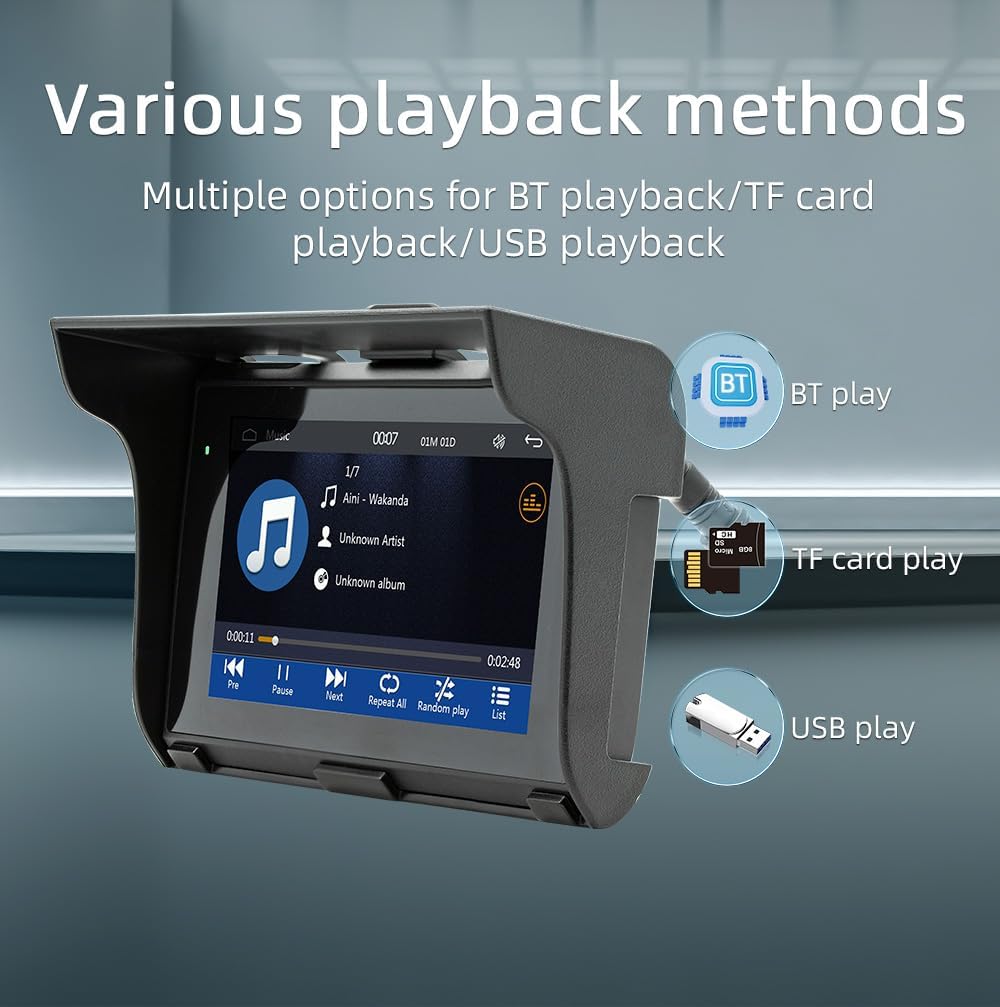
Image 9.1: Visual representation of the various media playback methods available: Bluetooth, TF card, and USB.
9.1 지원되는 미디어 형식
- 오디오 포맷: MP3, AAC, APE, OGG, M4A, RA, WAV
- 비디오 형식: H263, H264, H265, DIVX HD, AVI, FLV, MKV, MPEG, MP4, WMV9, VC, ASF, TS, QT
- 이미지 형식: JPEG, PNG, BMP, GIF, TIFF
10. AM/FM 라디오 작동
The unit includes an AM/FM radio receiver. To access the radio function, select the "Radio" icon from the main menu.
- 스캐닝: Use the scan function to automatically search for and save available radio stations.
- 수동 조정 : Manually tune to specific frequencies using the on-screen controls.
- 사전 설정 : 즐겨 듣는 방송국을 사전 설정 버튼에 저장해 두면 빠르게 이용할 수 있습니다.
The radio allows you to stay updated with real-time traffic, news broadcasts, and weather forecasts.
11. Driving Recorder Function (Optional)
The Polarlander B5350 supports an optional car driving recorder. When connected, the unit can display and record your driving dynamics, providing additional security and peace of mind.

Image 11.1: The car stereo displaying footage from an optional driving recorder camera.
Note: The driving recorder camera is an optional accessory and is not included in the standard package.
12. 문제 해결
| 문제 | 가능한 원인 | 해결책 |
|---|---|---|
| 장치의 전원이 켜지지 않습니다. | 전원 연결이 안 되었거나 배선이 잘못되었습니다. | Check power cables and fuse. Ensure correct 9-30V DC supply. |
| 소리가 나지 않습니다. | Volume too low, mute activated, or speaker wiring issue. | Increase volume, check mute status, verify speaker connections. |
| 블루투스 연결에 실패했습니다. | Bluetooth not enabled on phone/unit, or device out of range. | Ensure Bluetooth is active on both devices. Move phone closer to unit. Re-pair device. |
| CarPlay/Android Auto가 연결되지 않습니다. | Incorrect cable, phone settings, or app issues. | Use a certified USB cable. Check phone settings for CarPlay/Android Auto. Restart phone and unit. |
| 터치스크린이 응답하지 않습니다. | System freeze or temporary software issue. | Restart the unit (turn off/on ignition). If issue persists, consult support. |
13. 사양
| 특징 | 세부 사항 |
|---|---|
| 제품 유형 | Car Stereo (Double Din) |
| 디스플레이 크기 | 5.0인치 |
| 디스플레이 해상도 | 800x480 |
| 출력 전력 | 1W 스피커 내장 |
| 작업 볼륨tage | 9~30V 직류 |
| 작동 온도 | -20℃ ~ 60℃ |
| 블루투스 버전 | 5.0 (기본 이름: SWL-BT) |
| 러닝 메모리 | 1기가비트 DRAM |
| 지원되는 오디오 형식 | MP3, AAC, APE, OGG, M4A, RA, WAV |
| 지원되는 비디오 형식 | H263, H264, H265, DIVX HD, AVI, FLV, MKV, MPEG, MP4, WMV9, VC, ASF, TS, QT |
| 지원되는 이미지 형식 | JPEG, PNG, BMP, GIF, TIFF |
| 입력/출력 | SD Card, USB, AUX-in, RCA Audio output, Reversing camera input |
| 제조업체 부품 번호 | B5350 |
14. 유지관리
- 디스플레이 청소: 부드럽고 보풀 없는 천으로 터치스크린을 살살 닦아주세요. 연마성 세척제나 용제를 사용하지 마세요.
- 일반 청소: 본체에 먼지와 이물질이 쌓이지 않도록 하십시오. 손이 닿기 어려운 부분은 부드러운 브러시나 압축 공기를 사용하여 청소하십시오.
- 케이블 연결: 모든 케이블 연결을 주기적으로 점검하여 안전한지 확인하세요.
15. 보증 및 지원
보증 정보 및 기술 지원에 대한 자세한 내용은 구매 시 제공된 설명서를 참조하거나 판매점에 문의하십시오. 보증 청구를 위해 구매 증빙 자료를 보관하십시오.
For further assistance, visit the official Polarlander web사이트 또는 고객 서비스 부서에 문의하십시오.