
1. 제품 오버view
The CAMWAY eARC HDMI ARC/eARC Audio Extractor is designed to extract audio signals from your television's HDMI ARC or eARC port. This device allows for simultaneous audio output through multiple interfaces: optical fiber (supporting 5.1 channel surround sound), RCA (2.0 stereo), and a 3.5mm jack (2.0 stereo). It provides a versatile solution for connecting various audio devices, such as soundbars, amplifiers, active speakers, or headphones, to your home audiovisual system.
Key features include support for the latest eARC technology, enabling high-quality 5.1 channel audio output via optical fiber when connected to an eARC-compatible television. Stereo audio (2.0) is available through the RCA and 3.5mm outputs, catering to different listening requirements.
2. 패키지 내용
아래 나열된 모든 품목이 패키지에 포함되어 있는지 확인하세요.
- 1 x CAMWAY eARC Audio Extractor
- 1 x 광 케이블
- 1 x HDMI 케이블
- 1 x USB 전원 케이블
- 1 x 사용자 설명서

Figure 2.1: All items included in the product package: the eARC Audio Extractor unit, an optical cable, an HDMI cable, a USB power cable, and the user manual.
3. Product Diagram and Connections
설치하기 전에 장치의 포트와 표시등을 숙지하십시오.

Figure 3.1: Input side of the device, featuring the power switch, DC 5V power input, power indicator, and indicators for 2.0 channel and 5.1 channel audio output. The eARC IN port connects to your TV's HDMI ARC/eARC.
- 온 / 오프 스위치: Power toggle for the device.
- DC5V PWR: Power input port (connects to the USB power cable).
- PWR 표시기: 장치의 전원이 켜지면 켜집니다.
- 2.0CH Indicator: Lights up when the device is outputting 2.0 channel stereo audio (PCM).
- 5.1CH Indicator: Lights up when the device is outputting 5.1 channel surround sound (e.g., Dolby Digital 5.1, DTS 5.1).
- eARC IN: HDMI input port for connecting to your TV's HDMI ARC/eARC port.
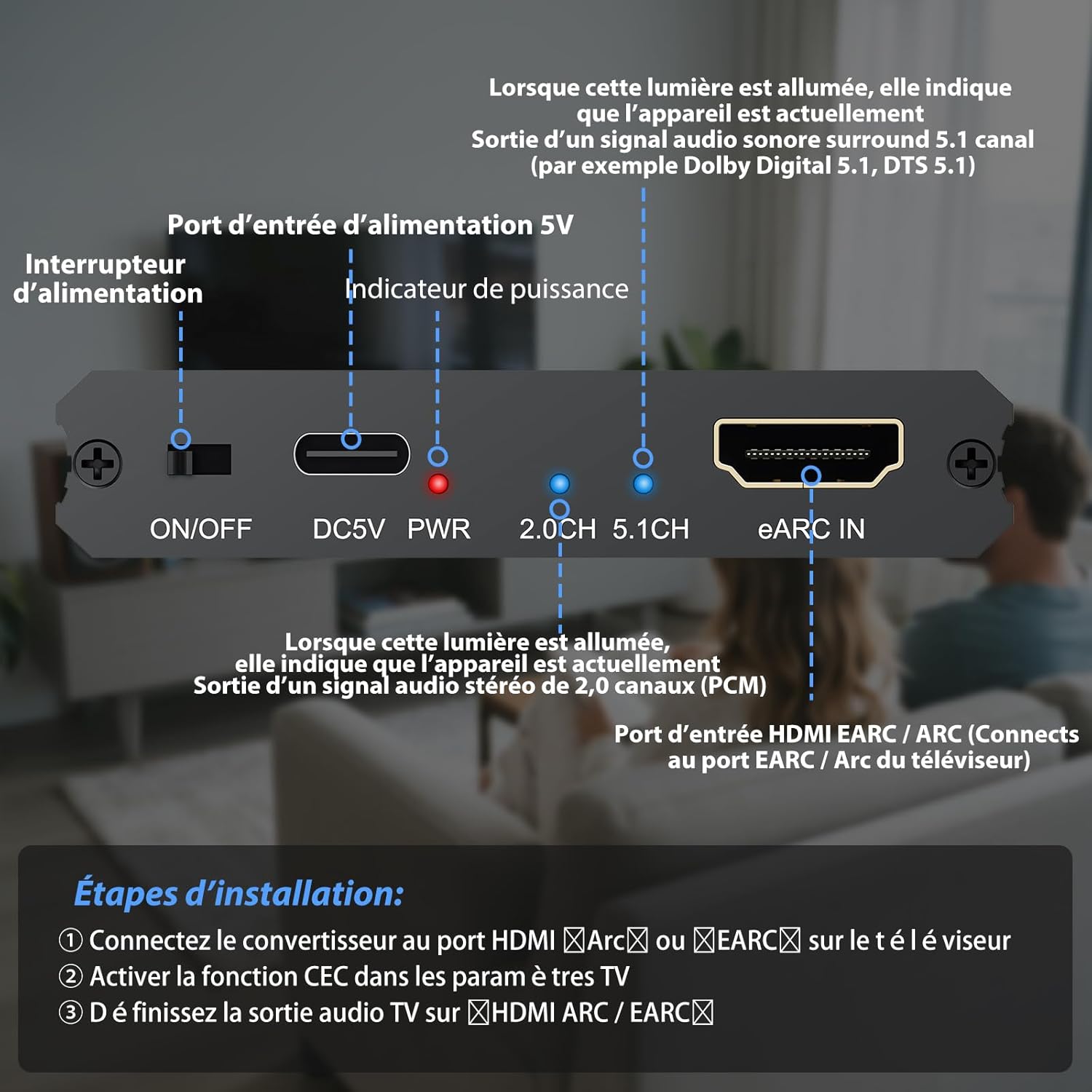
Figure 3.2: Output side of the audio extractor, showing the Optical digital audio output, left and right RCA analog audio outputs, and a 3.5mm stereo audio jack.
- 광 출력: Digital audio output for 5.1 channel surround sound.
- RCA(좌/우) 출력: Analog stereo audio output (2.0 channels).
- 3.5mm 출력: Analog stereo audio output (2.0 channels) for headphones or other stereo devices.

Figure 3.3: This diagram illustrates the typical connection setup for the eARC Audio Extractor. It connects to your TV's HDMI ARC/eARC port and provides audio outputs for various devices like headphones, soundbars, amplifiers, and home cinema systems.
4. 설치 및 설정
Follow these steps to set up your CAMWAY eARC Audio Extractor:
- TV에 연결: Use the included HDMI cable to connect the 'eARC IN' port on the extractor to the HDMI ARC or eARC port on your television. Ensure your TV's HDMI port supports ARC/eARC.
- Activate TV Settings: Access your TV's settings menu and activate the CEC (Consumer Electronics Control) function. This is often required for ARC/eARC functionality.
- Set TV Audio Output: In your TV's audio settings, configure the audio output to 'HDMI ARC/eARC'. For 5.1 channel optical output, ensure the TV's audio format is set to 'Bitstream' or 'Auto'. For RCA/3.5mm stereo output, set the TV's audio format to 'PCM'.
- 오디오 장치 연결: Connect your desired audio output devices (soundbar, amplifier, headphones) to the corresponding ports on the extractor (Optical, RCA, or 3.5mm). You can use multiple outputs simultaneously.
- 전원 켜기: Connect the included USB power cable to the 'DC5V PWR' port on the extractor and plug the other end into a USB power source (e.g., a TV USB port or a 5V/1A USB power adapter). Turn on the extractor using the ON/OFF switch.
중요 참고 사항: For stable operation, especially when using RCA or 3.5mm outputs or if your audio system does not support Bitstream, it is recommended to use an independent USB power adapter for power supply to avoid issues caused by unstable power from the TV's USB port.
5. 사용 설명서
Once connected and powered on, the CAMWAY eARC Audio Extractor operates automatically based on your TV's audio output settings.
- 오디오 형식 표시기: 관찰하다 2.0채널 그리고 5.1채널 indicators on the device. The illuminated indicator will show the current audio format being outputted.
- 5.1 채널 출력: If your TV is eARC compatible and its audio output is set to 'Bitstream' or 'Auto', the 5.1채널 indicator will light up, and 5.1 surround sound will be available via the optical output. Ensure your connected audio receiver or soundbar supports 5.1 channel decoding.
- 2.0 채널 출력: If your TV's audio output is set to 'PCM', the 2.0채널 indicator will light up, and stereo audio will be available via the optical, RCA, and 3.5mm outputs.
- 동시 출력: The device can output audio to all connected outputs (Optical, RCA, 3.5mm) simultaneously, allowing you to use multiple audio systems at once.
6. 관리 및 유지 보수
To ensure the longevity and optimal performance of your CAMWAY eARC Audio Extractor, please follow these guidelines:
- 청소: 부드럽고 마른 천으로 기기를 닦으십시오. 액체 세척제나 스프레이형 세척제는 기기를 손상시킬 수 있으므로 사용하지 마십시오.
- 환경: Keep the device in a cool, dry place, away from direct sunlight, heat sources, and moisture. Avoid extreme temperatures.
- 손질: 기기를 조심스럽게 다루십시오. 떨어뜨리거나 강한 충격을 가하지 마십시오.
- 통풍: 기기의 과열을 방지하기 위해 기기 주변에 적절한 환기가 이루어지도록 하십시오. 환기구를 막지 마십시오.
- 힘: Always use the provided USB power cable and a compatible 5V/1A power source. Disconnect power when the device is not in use for extended periods.
7. 문제 해결
If you encounter issues with your audio extractor, please refer to the following common problems and solutions:
| 문제 | 가능한 원인 | 해결책 |
|---|---|---|
| 오디오 출력이 없습니다 |
|
|
| No 5.1 surround sound via optical |
|
|
| Unstable or intermittent audio |
|
|
| CEC function not working |
|
|
8. 기술 사양
| 특징 | 세부 사항 |
|---|---|
| 상표 | 캠웨이 |
| 모델 | CAM079CAV |
| 제조업체 부품 번호 | CAMCAM079 |
| 인터페이스 유형 | Optical, RCA, 3.5 mm |
| 채널 수 | 6 (for 5.1 surround sound) |
| 장착 유형 | 케이블 마운트 |
| 입력 임피던스 | 10,000옴 ~ 47,000옴 |
| 출력 임피던스 | 2,500옴 ~ 10,000옴 |
| 얻다 | -12dB MAXIMUM |
| 포함된 구성 요소 | eARC 오디오 추출기 |
9. 보증 및 지원
보증 정보: This CAMWAY product comes with an 18-month warranty from the date of purchase. This warranty covers manufacturing defects and malfunctions under normal use. It does not cover damage caused by misuse, accidents, unauthorized modifications, or improper installation.
고객 지원: For technical assistance, troubleshooting, or warranty claims, please contact CAMWAY customer support through the retailer where the product was purchased or visit the official CAMWAY website for contact information. Please have your model number (CAM079CAV) and proof of purchase ready when contacting support.