
소개
Thank you for choosing the TESSAN 13-in-1 Tower Power Strip. This manual provides essential information for the safe and efficient use of your device. Please read these instructions carefully before use and retain them for future reference.
This power strip is designed to provide multiple power outlets and USB charging ports in a compact tower design, featuring surge protection and individual switches for enhanced control and safety.
제품 특징
- 13-in-1 연결성: Features 8 Schuko outlets and 5 USB ports (3 USB-C, 2 USB-A) to power and charge multiple devices simultaneously.
- 개별 스위치: Four independent switches allow you to control power to specific sections of the Schuko outlets, saving energy and preventing frequent plugging/unplugging.
- 서지 보호: Integrated surge protection safeguards your connected devices from voltag전자 스파이크.
- 컴팩트한 타워형 디자인: Space-saving vertical design with a stable base and non-slip pads.
- 2미터 연장 케이블: 배치에 유연성을 제공합니다.
- USB 충전: 3 USB-C ports (up to 15W) and 2 USB-A ports (up to 12W) for various USB-powered devices.

이미지: 이상view of the TESSAN 13-in-1 Tower Power Strip, highlighting its 8 Schuko outlets, 3 USB-C ports, 2 USB-A ports, 3680W maximum power, and 2-meter cable length. A smartphone is shown charging via a USB-C port.
안전 지침
안전한 작업을 위해 다음 안전 지침을 준수해 주십시오.
- 최대 부하 용량 3680W를 초과하지 마십시오.
- 멀티탭을 여러 개 직렬로 연결하지 마십시오.
- 젖거나 d에서 사용하지 마십시오amp 환경.
- 어린이의 손이 닿지 않는 곳에 보관하세요.
- 장치를 분해하거나 개조하지 마세요.
- 플러그가 콘센트에 완전히 꽂혀 있는지 확인하십시오.
- If the surge protection indicator light is off, the surge protection may no longer be active.
설정
- 풀다: 전원 스트립을 포장에서 조심스럽게 꺼내세요.
- 놓기: Place the power strip on a stable, flat surface. Ensure adequate ventilation around the unit. The compact tower design is suitable for various locations such as desks, workshops, or hotel rooms.
- 벽면 콘센트에 연결: Plug the power strip's 2-meter extension cable into a grounded wall outlet.
- 전원 켜기: Press the main power switch (if available, otherwise individual switches control sections). The surge protection indicator light should illuminate, indicating active protection.

Image: The TESSAN Tower Power Strip positioned on a side table, demonstrating its compact size and the reach of its 2-meter extension cable. Dimensions of 18 cm height and 11.5 cm width are indicated.
작동 지침
Using Schuko Outlets:
- Insert the plug of your device into one of the 8 Schuko outlets. The outlets are spaced 5.4 cm apart to accommodate most plugs.
- 개별 스위치: The power strip features 4 individual switches, each controlling two Schuko outlets on one side of the tower. Press a switch to turn on or off the corresponding outlets. An indicator light on the switch will show its status.
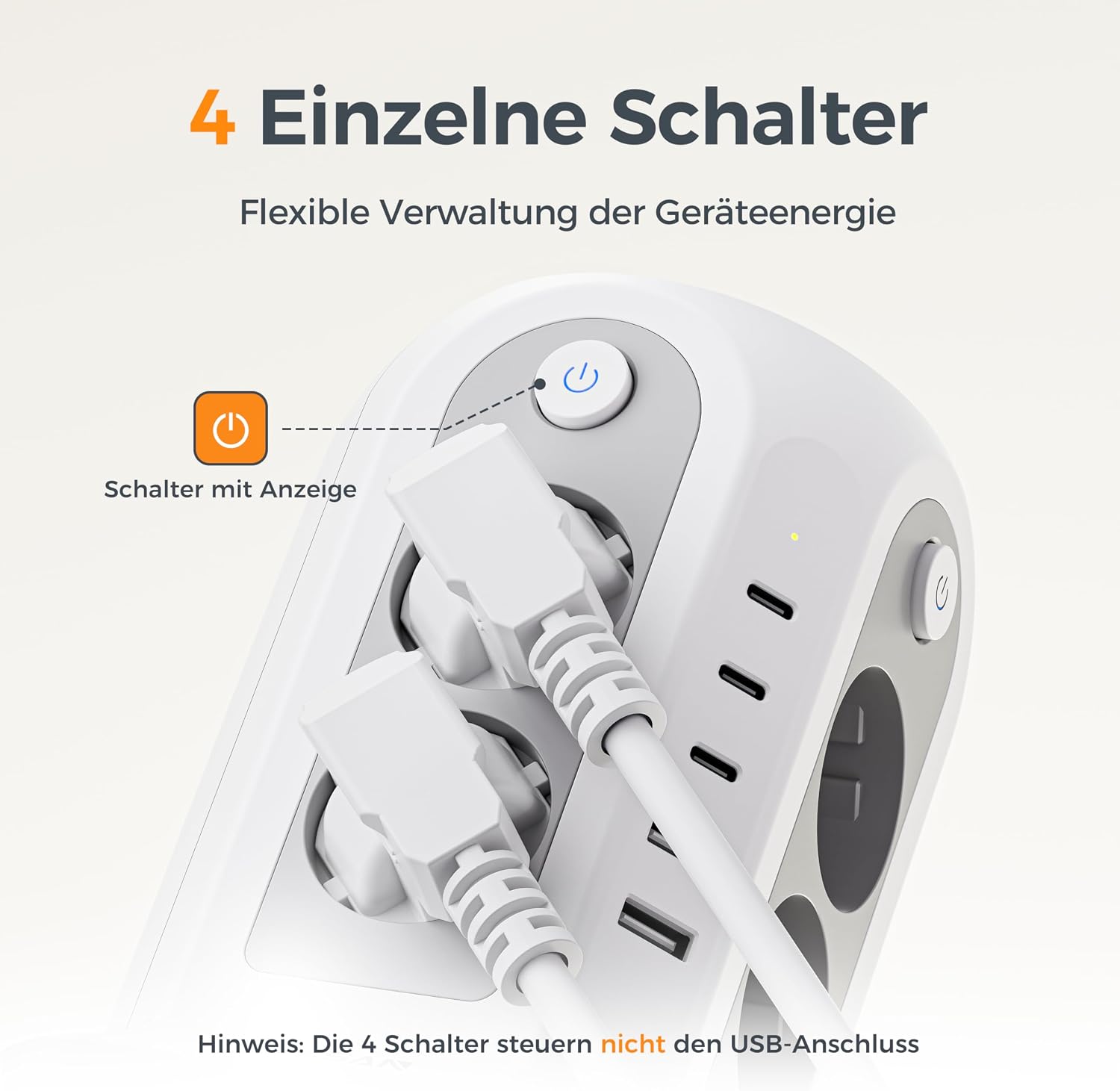
이미지: 자세한 view of an individual power switch on the TESSAN Tower Power Strip, complete with an illuminated indicator. A crucial note clarifies that these switches manage only the Schuko outlets and not the USB ports.
USB 포트 사용:
- Connect your USB-powered devices (smartphones, tablets, smartwatches, etc.) to the available USB-C (3 ports, up to 15W) or USB-A (2 ports, up to 12W) ports.
- The USB ports are always active when the power strip is plugged in and do not depend on the individual Schuko outlet switches.
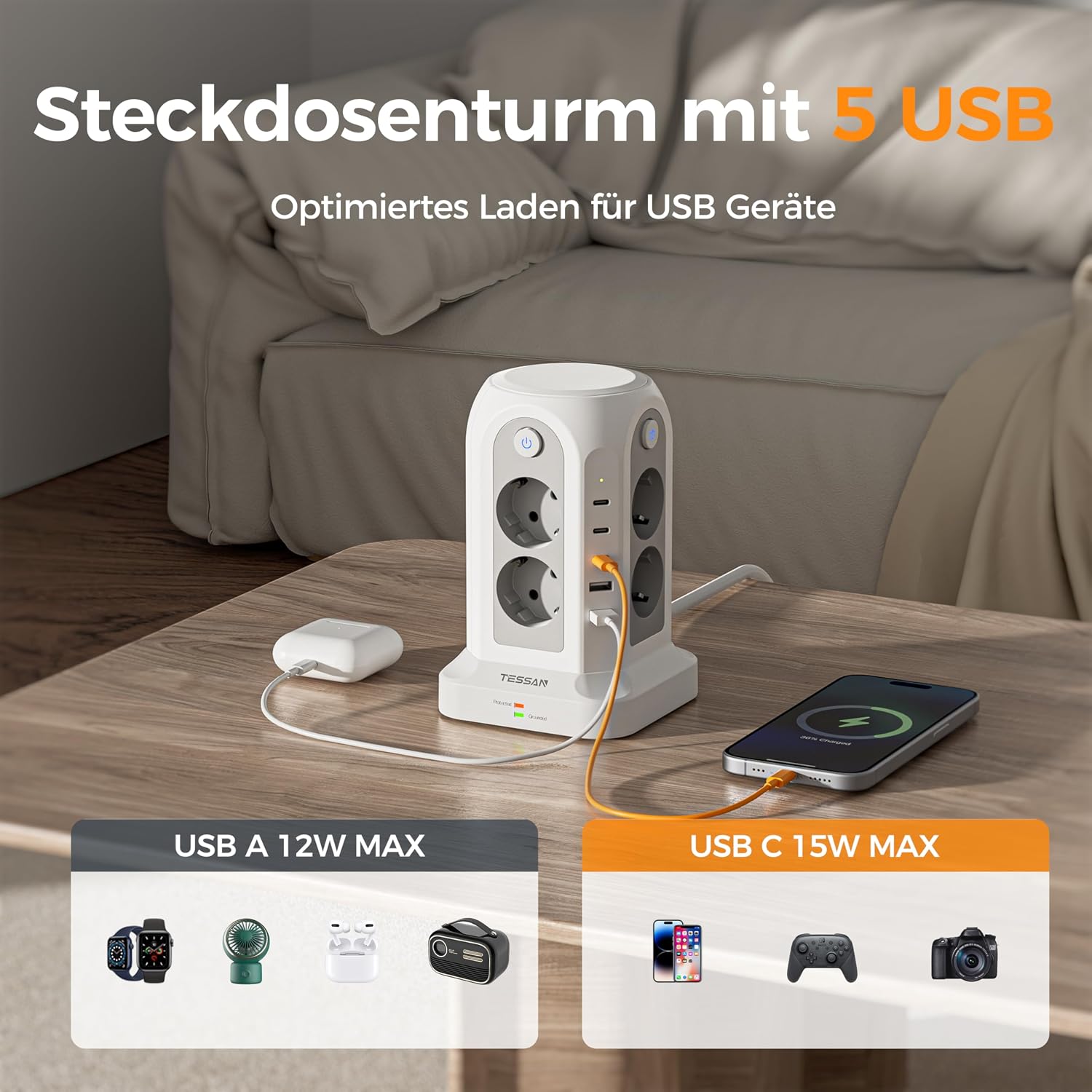
Image: The TESSAN Tower Power Strip actively charging multiple devices via its 5 USB ports, including 3 USB-C and 2 USB-A. The image highlights the maximum power output for each USB type: 12W for USB-A and 15W for USB-C.
서지 보호:
- The power strip includes an integrated surge protector. A dedicated indicator light (often green) will be illuminated when the surge protection is active and functioning correctly.
- If this light is off, the surge protection may have been compromised and the unit should be replaced to ensure continued protection for your devices.

Image: The TESSAN Tower Power Strip on a desk, visually emphasizing its surge protection feature with a glowing blue shield graphic. This illustrates the multi-protection capabilities for connected devices.
유지
- 청소: 청소하기 전에 멀티탭의 전원 플러그를 벽면 콘센트에서 뽑으세요. 마른 부드러운 천으로 표면을 닦으세요. 액체 세제나 연마제를 사용하지 마세요.
- 저장: 장기간 사용하지 않을 경우 멀티탭을 직사광선과 습기를 피해 서늘하고 건조한 곳에 보관하십시오.
- 점검: Periodically inspect the power cord and the unit for any signs of damage. If damage is found, discontinue use and replace the unit.
문제 해결
| 문제 | 가능한 원인 | 해결책 |
|---|---|---|
| 콘센트/USB 포트에 전원이 공급되지 않습니다. | Power strip not plugged in; wall outlet not working; individual switch off; overload. | Ensure power strip is fully plugged into a working wall outlet. Check if individual switches are ON. Reduce connected devices if overloaded. |
| Surge protection indicator light is off. | Surge protection has been activated and is no longer functional. | The power strip has protected your devices from a surge. Replace the unit to ensure continued surge protection. |
| USB 장치가 충전되지 않습니다. | Faulty USB cable; device not compatible; USB port damaged. | Try a different USB cable or device. Ensure the device is compatible with USB charging. |
명세서
- 모델: JA-EU02A
- 상표: 테산
- 총 매장 수: 13 (8 Schuko, 5 USB)
- USB 포트: 3 x USB-C (up to 15W), 2 x USB-A (up to 12W)
- 개별 스위치: 4 (controlling Schuko outlets)
- 특징: 서지 보호
- 최대 전력 등급: 3680와트
- 케이블 길이: 2 미터
- 치수(길이 x 너비 x 높이): 11.5cm x 11.5cm x 17.9cm (대략)
- 플러그 유형: F형(슈코)
- 색상: 회색
- 제조업체: Jiaan Electrical Appliance(Dongguan)Co.,LTD
- 원산지: 중국
보증 및 지원
TESSAN products are designed and manufactured to the highest quality standards. This product comes with a standard manufacturer's warranty. For specific warranty details, please refer to the documentation provided with your purchase or contact TESSAN customer support.
If you encounter any issues or have questions regarding your TESSAN 13-in-1 Tower Power Strip, please contact our customer support team for assistance. Please have your model number (JA-EU02A) and purchase information ready.