
소개
This manual provides detailed instructions for the installation, operation, and maintenance of your PolarLander AV252B Universal 1-DIN In-Dash Car Audio Player. Please read this manual thoroughly before using the product to ensure proper function and safety. Keep this manual for future reference.
안전 정보
- Ensure all wiring is correctly connected to prevent damage to the unit or vehicle. Incorrect wiring can cause fire or electrical shock.
- 본 기기는 항상 네거티브 접지 방식의 12V DC 전원 공급 장치에 연결하십시오.
- 운전에 방해가 되는 방식으로 기기를 작동하지 마십시오. 항상 도로 안전을 최우선으로 생각하세요.
- 극한의 온도, 직사광선 또는 높은 습도에 장치를 노출시키지 마십시오.
- 장치를 분해하거나 개조하지 마십시오. 모든 정비는 자격을 갖춘 기술자에게 맡기십시오.
패키지 내용
패키지에 모든 품목이 들어 있는지 확인하세요.
- 1 x PolarLander AV252B 12V Bluetooth Vehicle MP3 Audio Player
- 1 x 영어 사용 설명서(이 문서)
- 배선 마구
- 장착 하드웨어(해당되는 경우)
제품 끝view
The PolarLander AV252B is a versatile 1-DIN in-dash car audio player featuring Bluetooth connectivity, FM radio, USB, SD card, and AUX-in support. It is designed for easy integration into most vehicles with a standard 1-DIN slot.

이미지: 앞면 view of the PolarLander AV252B car audio player, showing the display, control knob, and various buttons.
전면 패널 컨트롤 및 연결
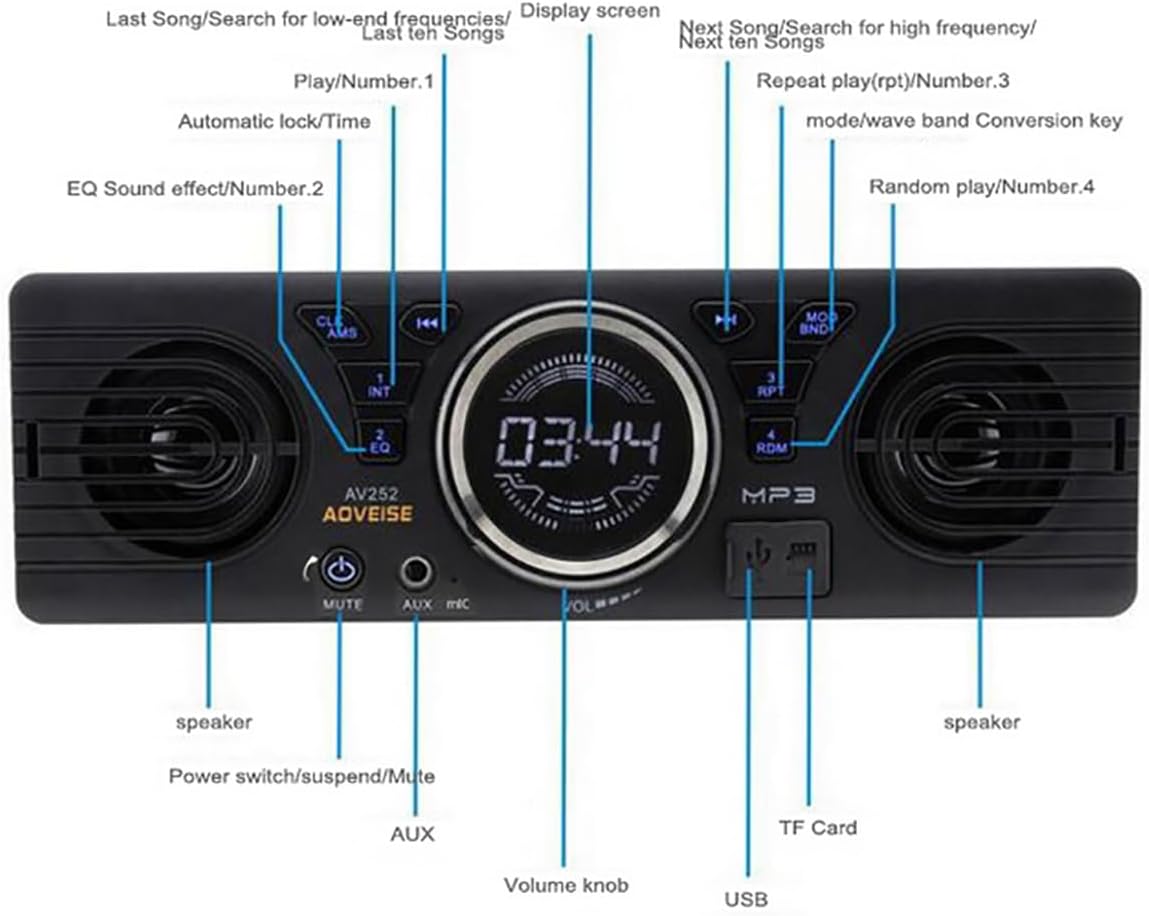
Image: Diagram illustrating the front panel controls of the AV252B unit, with labels for each button and port.
- CLK/AMS Button: Short press for clock display, long press to set time. In radio mode, short press for automatic station search.
- INT/EQ Button: Short press for intro play (first 10 seconds of each track). Long press to cycle through EQ sound effects (Jazz, Rock, Pop, Classical, etc.).
- MUTE/Power Button: Short press to mute/unmute audio. Long press to power the unit on/off.
- AUX-IN 포트: 외부 오디오 장치를 연결하기 위한 3.5mm 잭입니다.
- 마이크: Built-in microphone for Bluetooth hands-free calls.
- 볼륨 노브: Rotate to adjust volume. Press to select functions in menu.
- USB 포트: For connecting USB flash drives for media playback and charging.
- TF 카드 슬롯 : 미디어 재생을 위해 TF(MicroSD) 카드를 삽입하세요.
- MOD/BND Button: Short press to switch between modes (FM, Bluetooth, USB, SD, AUX). In radio mode, long press to switch between FM bands.
- RPT/Number 3 Button: Short press for repeat play.
- RDM/Number 4 Button: Short press for random play.
- Next Song/Search Button: Short press for next track/station. Long press for fast forward.
- Previous Song/Search Button: Short press for previous track/station. Long press for fast rewind.
- 디스플레이 화면: Shows current time, radio frequency, track information, etc.
- 스피커: 오디오 출력을 위한 내장 스피커.
설치
치수

이미지: 위에서 아래로 view of the AV252B unit showing its length (178mm / 7 inches) and height (58mm / 2.3 inches).

이미지: 측면 view of the AV252B unit showing its depth (54mm).
The installation size is 187mm x 49mm, suitable for standard 1-DIN center consoles. The unit's dimensions are approximately 178mm (length) x 58mm (height) x 54mm (depth).
배선도
다음 그림을 참조하여 올바른 배선 연결을 하십시오. 배선이 잘못되면 장치 또는 차량이 손상될 수 있습니다.

Image: A detailed wiring diagram for the car radio, showing connections for antenna, ignition switch, battery, and RCA audio outputs.
- 노란색 와이어: Connect to the car's battery positive (+) (constant 12V).
- 빨간색 선: Connect to the car's ACC ignition switch (switched 12V).
- 검은색 와이어: Connect to the car's battery negative (-) / ground.
- 블루 와이어 : 에 연결 automatic antenna (해당되는 경우).
- White RCA: Left RCA audio output.
- Red RCA: Right RCA audio output.
- 안테나 소켓: 차량의 라디오 안테나에 연결합니다.
Important: The car radio cannot be turned on if the red and yellow wires are not connected to the 12V power positive at the same time. Ensure the black wire is securely connected to ground.
물리적 설치 단계
Follow these general steps for installing the unit into your vehicle's dashboard. Specific vehicle models may vary.

Image: A series of six images demonstrating the step-by-step process of removing an old car radio and installing a new one, including dashboard disassembly, wiring, and reassembly.
- 1단계: Carefully remove the trim panels and screws securing the existing car radio or blank panel in your dashboard.
- 2단계: Use removal tools to extract the old radio or the factory blanking plate from the dashboard slot.
- 3단계: If applicable, install the mounting sleeve or cage into the dashboard opening.
- 4단계: Disconnect any existing wiring from the old unit.
- 5단계: Connect the wiring harness of the AV252B unit to your vehicle's wiring, following the wiring diagram provided above. Ensure all connections are secure.
- 6단계: Carefully slide the AV252B unit into the dashboard opening until it clicks into place or is secured with screws. Reassemble any removed trim panels.
작동 지침
전원 켜기/끄기
를 누르고 계세요 MUTE/Power 버튼을 눌러 장치를 켜거나 끕니다.
볼륨 조절
회전하다 볼륨 노브 시계 방향으로 돌리면 소리가 커지고, 시계 반대 방향으로 돌리면 소리가 작아집니다.
모드 선택
를 누르세요 MOD/BND button repeatedly to cycle through available modes: FM Radio, Bluetooth, USB, SD Card, and AUX-in.
FM 라디오 작동
- 자동 검색 : FM 모드에서 길게 누르세요 CLK/AMS button to automatically search for and store strong stations.
- 수동 조정 : 사용하세요 Previous/Next Song/Search 주파수를 수동으로 조정하는 버튼입니다.
- 밴드 선택: 길게 누르세요 MOD/BND FM 밴드(FM1, FM2, FM3)를 전환하는 버튼입니다.
Bluetooth Pairing and Audio Playback
The unit features built-in Bluetooth 2.1 + EDR for hands-free calls and audio streaming.
- Ensure the unit is powered on and in Bluetooth mode (select using MOD/BND 단추).
- 모바일 기기에서 블루투스를 활성화하고 사용 가능한 기기를 검색하세요.
- Select "AV252B" (or similar name) from the list of devices to pair. No password is typically required.
- Once paired, you can play audio from your device, and it will stream through the car audio player.
- For hands-free calls, the built-in microphone will capture your voice.
USB/SD 카드 재생
USB 플래시 드라이브를 삽입하세요 USB 포트 또는 TF(MicroSD) 카드를 TF 카드 슬롯. The unit will automatically switch to USB/SD mode and begin playing compatible audio file(MP3/WMA).
- 사용하세요 Previous/Next Song/Search 트랙을 탐색하는 버튼입니다.
- 누르다 RPT for repeat play (e.g., repeat current track).
- 누르다 RDM for random play.
AUX-in Operation
외부 오디오 장치(예: 스마트폰, MP3 플레이어)를 연결하세요. AUX-IN 포트 using a 3.5mm audio cable. Select AUX mode using the MOD/BND button. Audio will play through the car speakers.
EQ 사운드 효과
길게 누르세요 INT/EQ button to cycle through preset equalizer settings such as Jazz, Rock, Pop, and Classical.
시계 설정
짧게 누르세요 CLK/AMS button to display the time. Long press it to enter time setting mode. Use the 볼륨 노브 to adjust hours and minutes, and press the knob to confirm.
유지
- 청소: 부드럽고 마른 천을 사용하여 기기 표면을 닦으세요. 연마성 세제나 용제는 사용하지 마세요.
- 먼지: USB 및 SD 카드 슬롯에 먼지와 이물질이 들어가지 않도록 하십시오.
- 온도: Avoid prolonged exposure to direct sunlight or extreme temperatures, which can affect the unit's lifespan.
문제 해결
| 문제 | 가능한 원인 | 해결책 |
|---|---|---|
| 장치의 전원이 켜지지 않습니다. | Incorrect wiring (Red/Yellow wires not connected to 12V, Black wire not grounded). Blown fuse. | Check all power connections (Red to ACC, Yellow to constant 12V, Black to ground). Check vehicle's fuse box and the unit's fuse. |
| 소리가 나지 않습니다. | Volume too low. Mute function active. Speaker wires disconnected. Incorrect source selected. | Increase volume. Press MUTE button. Check speaker wiring. Select correct input mode (FM, BT, USB, AUX). |
| FM 라디오 수신이 좋지 않습니다. | Antenna not connected or damaged. Weak signal area. | Ensure antenna is securely connected. Try tuning to a stronger station or move to an area with better reception. |
| 블루투스가 연결되지 않습니다. | Unit not in Bluetooth mode. Device not discoverable. Already paired with another device. | Switch unit to Bluetooth mode. Ensure your mobile device's Bluetooth is on and discoverable. Disconnect from other devices. |
| USB/SD 카드가 인식되지 않습니다. | 지원되지 않음 file format. Card/drive corrupted. Incorrectly inserted. | 보장하다 files are MP3/WMA format. Try a different USB/SD card. Reinsert the card/drive correctly. |
명세서
| 특징 | 사양 |
|---|---|
| 모델 번호 | AV252B |
| 입력 Voltage | 12V 직류 |
| 출력 전력 | 60W x 4 (최대) |
| 블루투스 버전 | 2.1 + 업데이트 |
| FM 주파수 범위 | 87.5~108MHz |
| 지원되는 오디오 형식 | MP3, WMA |
| 연결성 | Bluetooth, USB, TF Card, AUX-in, RCA Output |
| 임피던스 | 4옴 / 8옴 |
| 주파수 응답 | 20-20000Hz |
| 감광도 | 12dB 미만 |
| 치수(단위) | 180 x 42 x 50mm(근사치) |
| 패널 크기 | 188 x 15 x 58mm(근사치) |
보증 및 지원
This product is covered by a standard manufacturer's warranty. For specific warranty terms, please refer to the documentation provided at the time of purchase or contact your retailer. For technical support or service inquiries, please reach out to your product vendor or the PolarLander customer service department.