
1. 제품 오버view
The BN-LINK WiFi Smart Plug (Model CP-J31WT) allows you to control your home appliances remotely, set schedules, and use voice commands for a smarter, more convenient lifestyle. This compact plug is designed for ease of use and integrates seamlessly with popular smart home platforms.

Image: BN-LINK WiFi Smart Plug overview with icons for WiFi, timer, app control, voice control, remote operation, and group control.
주요 특징:
- 원격 제어: Turn appliances ON/OFF from anywhere using your smartphone.
- 음성 제어: 알렉사 및 구글 홈과 호환되어 음성 인식 기능을 사용할 수 있습니다.
- 타이머 기능: Schedule appliances to turn ON/OFF automatically, saving energy and preventing overcharging.
- 컴팩트한 디자인: Small size ensures it doesn't block adjacent outlets.
- 안전 기능: Equipped with high-temperature flame-retardant material, overload protection, electric shock prevention, and anti-tracking design.

Image: Diagram highlighting the smart plug's features: LED indicator, ON/OFF button, WiFi connection, timer function, remote operation, and voice control.
2. 안전 정보
본 제품을 사용하기 전에 모든 안전 지침을 읽고 이해하십시오. 지침을 따르지 않을 경우 감전, 화재 또는 심각한 부상이 발생할 수 있습니다.
- 장치를 분해하거나 개조하지 마세요.
- 습한 환경이나 물 근처에서는 사용하지 마십시오.
- 플러그가 콘센트에 완전히 삽입되었는지 확인하세요.
- 최대 부하 정격인 15A/1500W를 초과하지 마십시오.
- 어린이의 손이 닿지 않는 곳에 보관하세요.
- 청소하기 전에 기기의 전원 플러그를 콘센트에서 뽑으세요.
- 이 제품은 실내에서만 사용하도록 설계되었습니다.
내장된 안전 기능:
- High-Temperature Flame-Retardant Material: Reduces fire risk.
- 과부하 보호: 과전류로 인한 손상을 방지하기 위해 자동으로 전원을 차단합니다.
- Electric Shock Prevention Design: Enhanced safety against accidental contact.
- Anti-Tracking Design: Prevents dust accumulation and potential short circuits.
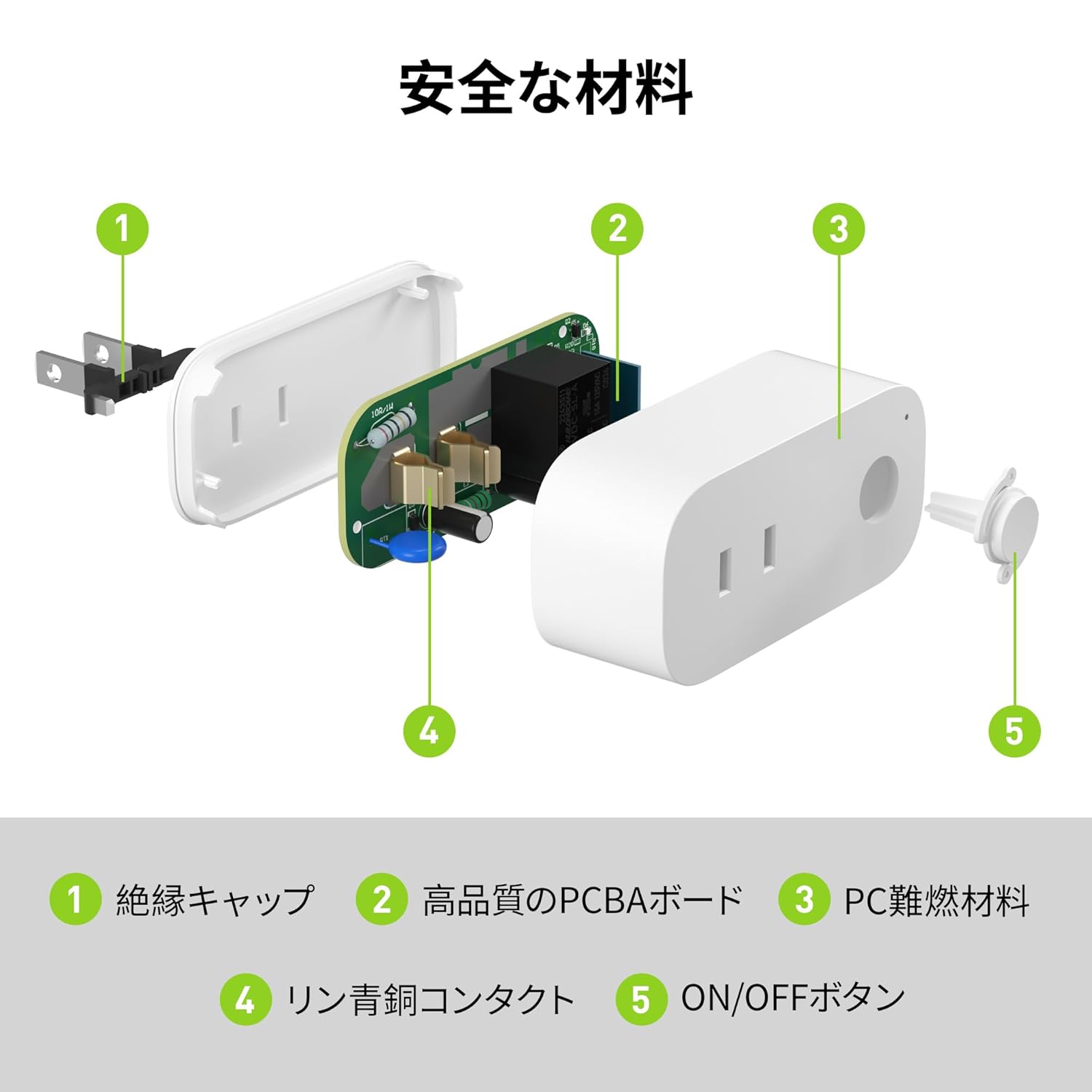
Image: Internal components of the smart plug, highlighting safety features such as the insulation cap, high-quality PCBA board, PC flame-retardant material, phosphor bronze contacts, and the ON/OFF button.
3. 설정 지침
3.1. 초기 설정
- Unpack the BN-LINK Smart Plug from its packaging.
- Plug the smart plug into a standard wall outlet.
- Observe the indicator light on the plug. It should start blinking. If it does not blink, press and hold the ON/OFF button for approximately 5 seconds until it starts blinking rapidly.
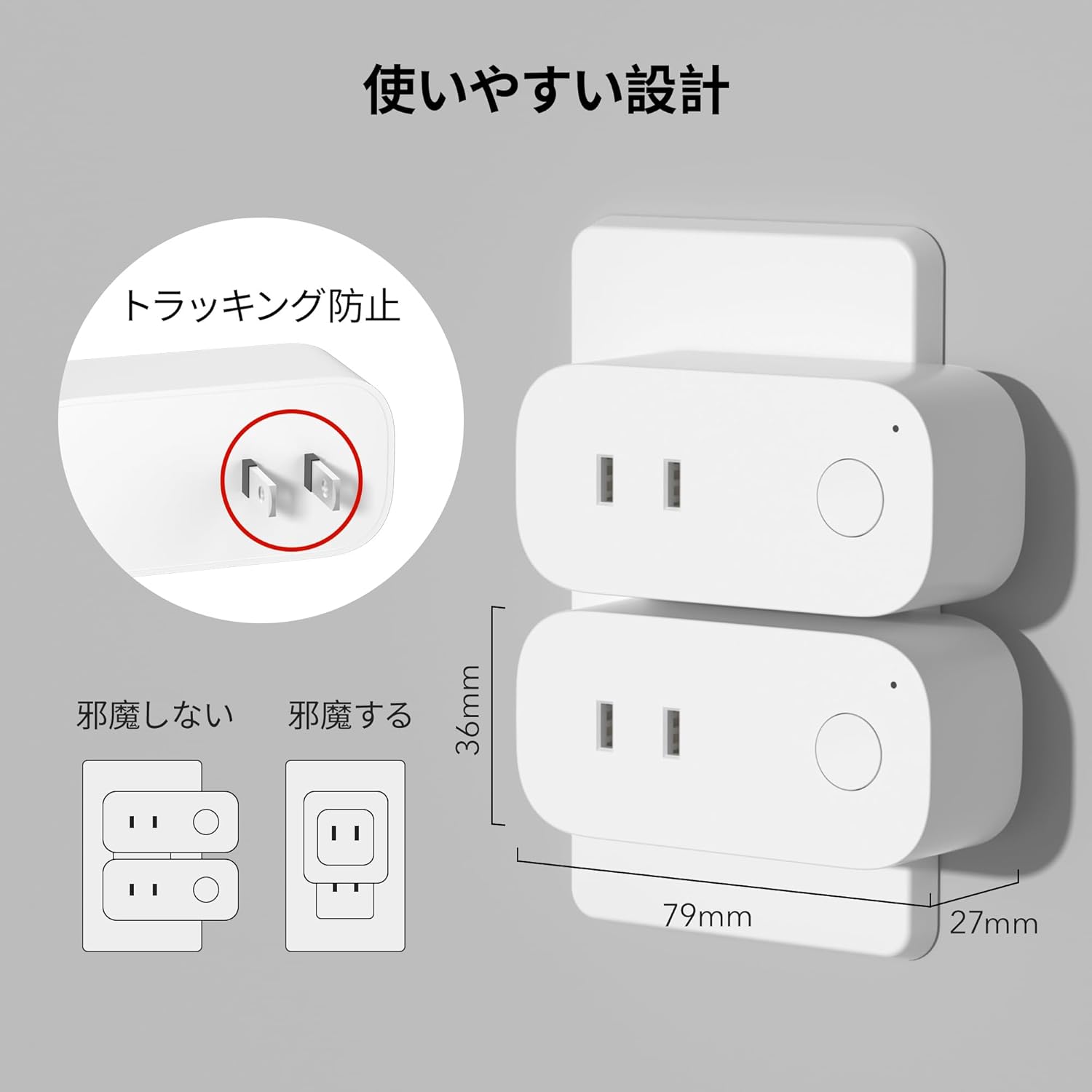
Image: The compact design of the smart plug, illustrating how it fits into an outlet without obstructing the adjacent one. Dimensions are also shown.
3.2. 앱 설치 및 Wi-Fi 연결
To utilize all smart features, you need to install the BN-LINK app and connect the plug to your 2.4GHz Wi-Fi network. This device only supports 2.4GHz Wi-Fi.
- Download the "BN-LINK" app from your smartphone's app store (Google Play Store for Android or Apple App Store for iOS).
- 앱을 열고 계정을 생성하거나 이미 계정이 있는 경우 로그인하세요.
- 페어링 과정을 시작하려면 "+" 아이콘 또는 "기기 추가"를 탭하세요.
- Select "Smart Plug" from the device list.
- Follow the on-screen instructions to connect the smart plug to your 2.4GHz Wi-Fi network. Ensure your phone is also connected to the 2.4GHz network during setup.
- Once connected, you can rename your smart plug for easy identification (e.g., "Living Room Lamp"커피 메이커"라고 적혀 있습니다.
Video: This video demonstrates the process of connecting the smart plug to the BN-LINK app and your Wi-Fi network, including resetting the device and confirming indicator light status.
Video: This video provides a step-by-step guide on setting up the ePlugBT and connecting it to Wi-Fi, which is similar to the BN-LINK Smart Plug setup process.
4. 사용 설명서
4.1. 앱을 통한 원격 제어
Once connected to Wi-Fi, you can control your appliances from anywhere with an internet connection.
- Open the BN-LINK app.
- Tap on the device name you wish to control.
- Use the ON/OFF toggle button within the app to switch your appliance on or off.

Image: Remote operation of the smart plug via the BN-LINK app on a smartphone. The image shows the app's ON/OFF control for a device connected to the smart plug, with a WiFi router in the background.

Image: A user controlling a smart plug remotely with their smartphone in a modern kitchen environment.
4.2. 음성 제어
Integrate your smart plug with Amazon Alexa or Google Home for convenient voice commands.
- Ensure your smart plug is successfully connected to the BN-LINK app and your Wi-Fi network.
- Alexa 또는 Google Home 앱을 엽니다.
- Follow the app's instructions to add a new device or skill, searching for "BN-LINK" or "Smart Plug."
- 연결되면 다음과 같은 음성 명령을 사용할 수 있습니다.
- "알렉사, [기기 이름] 켜줘."
- "헤이 구글, [기기 이름] 꺼줘."

Image: A user in a living room controlling a lamp connected to a smart plug using voice commands with an Alexa device. The image also indicates Google Home compatibility.

Image: A smart plug connected to an outlet, being controlled by a Google Home device. A person is shown in bed, illustrating hands-free operation.
4.3. 타이머 기능 및 스케줄링
Set custom schedules to automate your appliances and manage energy consumption.
- In the BN-LINK app, select your smart plug.
- "타이머" 또는 "일정" 섹션으로 이동하세요.
- Set specific ON/OFF times for your appliances. You can create daily, weekly, or one-time schedules.
- Use the countdown timer for temporary automation, such as turning off a charger after a set period to prevent overcharging.

Image: The BN-LINK app displaying timer and scheduling features. Examples show a coffee maker turning on at 7:15 AM and a lamp turning off at 10:00 PM, demonstrating automated control.

Image: A smart plug connected to a microwave, with the app interface showing a timer set to turn the device ON at 7:00.
5. 유지관리
To ensure optimal performance and longevity of your BN-LINK Smart Plug, follow these maintenance guidelines:
- 청소: 청소하기 전에 스마트 플러그의 전원 플러그를 콘센트에서 뽑으세요. 마른 부드러운 천으로 표면을 닦으세요. 액체 세제나 스프레이는 사용하지 마세요.
- 저장: If not in use for an extended period, unplug the device and store it in a cool, dry place away from direct sunlight and moisture.
- 점검: Periodically check the plug and outlet for any signs of damage, wear, or overheating. If any issues are found, discontinue use and contact customer support.
6. 문제 해결
If you encounter issues with your BN-LINK Smart Plug, refer to the following common problems and solutions:
| 문제 | 가능한 원인 | 해결책 |
|---|---|---|
| 기기를 Wi-Fi에 연결할 수 없습니다. | Incorrect Wi-Fi password, 5GHz Wi-Fi network, weak signal, or device not in pairing mode. |
|
| 리모컨이 작동하지 않습니다. | No internet connection on phone or smart plug, or app issue. |
|
| 음성 제어가 응답하지 않습니다. | Incorrect device name, smart assistant not linked, or internet connection issue. |
|
| 플러그가 반응하지 않습니다. | 파워 아웃tage, device malfunction, or firmware issue. |
|
7. 사양
| 특징 | 세부 사항 |
|---|---|
| 상표 | 비앤링크 |
| 모델 번호 | CP-J31WT |
| 품목 무게 | 70g |
| 패키지 크기 | 8.2 x 4.7 x 4.3cm |
| 크기 | 1팩 |
| 스위치 유형 | 1방향 |
| 포함된 구성 요소 | Smart Plug body, Instruction Manual |
| 배터리 사용 | 아니요 |
| 작동 모드 | 온-오프 |
| 현재 평가 | 15 Amps |
| 운영 볼륨tage | 100 볼트 |
| 커넥터 유형 | 플러그인 |
| 재료 | 플라스틱 |
| 회로 유형 | 1방향 |
8. 보증 및 지원
BN-LINK products are designed for quality and reliability. For warranty information and customer support, please refer to the contact details provided in the product packaging or visit the official BN-LINK web대지.
For further assistance, you may also contact the seller directly through the Amazon platform.
온라인 리소스:
- Official BN-LINK Web대지: www.bn-link.com (참고: 이것은 플레이스홀더입니다. URL(실제 값이 있으면 해당 값으로 대체하십시오.)
- Amazon 제품 페이지: Amazon.co.jp Product Page