
1. 서론
This manual provides instructions for the installation, operation, and maintenance of your LongPlus 5MP 3K Window Camera. Please read this manual thoroughly before using the product to ensure correct usage and to prevent damage.
2. 안전 정보
부상이나 기기 손상을 방지하기 위해 다음 안전 수칙을 준수하십시오.
- 카메라를 극한의 온도, 습도 또는 직사광선에 노출시키지 마세요.
- 제공된 전원 어댑터와 충전 케이블만 사용하십시오.
- 카메라를 물이나 기타 액체로부터 멀리하십시오.
- 카메라를 직접 분해하거나 수리하려고 하지 마십시오. 도움이 필요하시면 고객 지원 센터에 문의하십시오.
- 카메라가 떨어지지 않도록 단단히 고정하십시오.
3. 패키지 내용
패키지에 모든 품목이 들어 있는지 확인하세요.
- Window Security Camera (2 units)
- Quick-mount Bracket
- 충전 케이블
- 사용 설명서 (본 문서)
4. 제품 오버view
The LongPlus 5MP 3K Window Camera is designed for indoor security, offering high-resolution video and advanced detection features. Its compact design allows for discreet placement on windows.
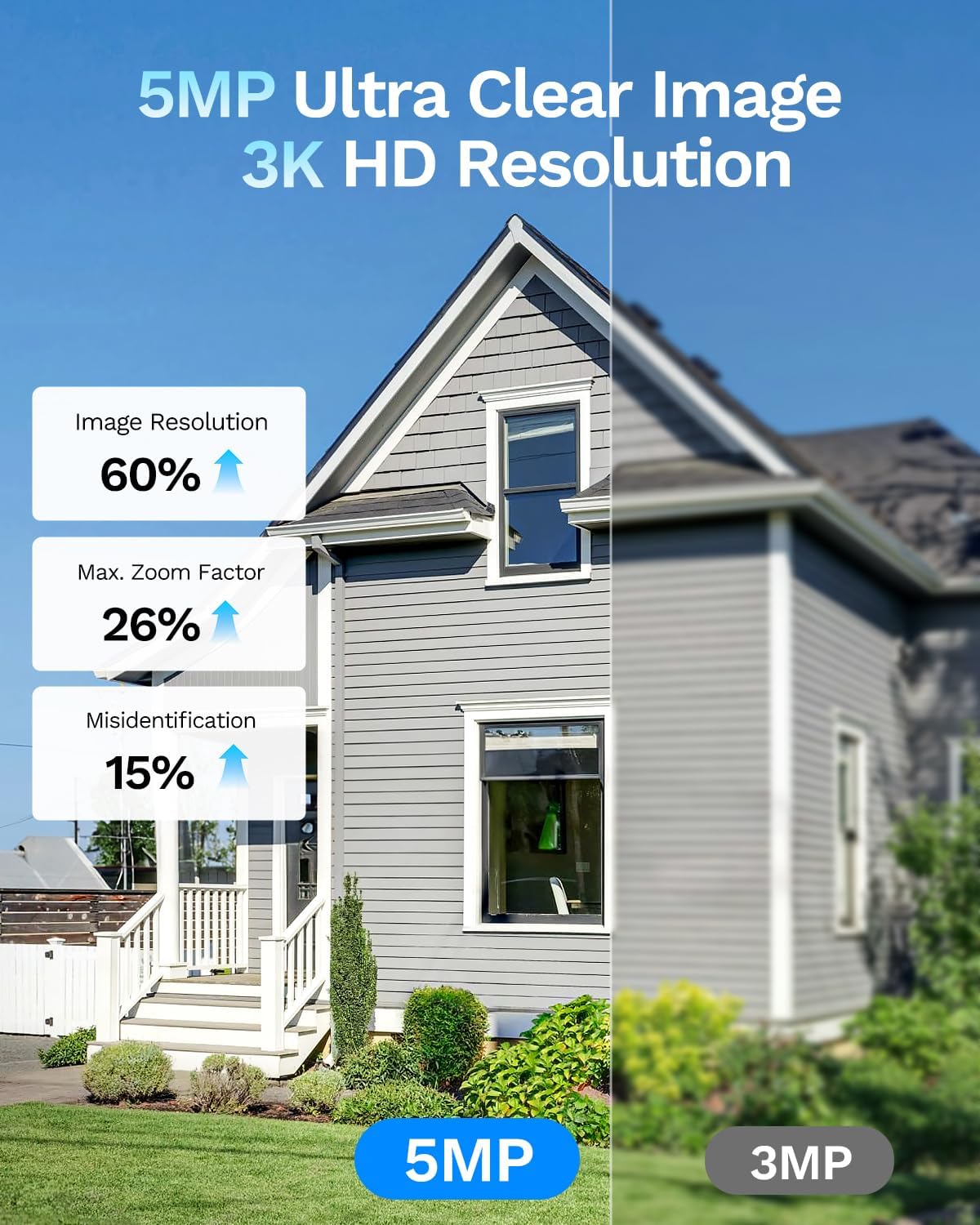
그림 4.1: 전면 view of the LongPlus 5MP 3K Window Camera, showing the lens and compact design.

그림 4.2: 측면 view of the camera, highlighting the USB power port and the reset button.
5. 설정
5.1. 앱 다운로드 및 등록
To begin, download the SV360 app and register an account. This app is essential for controlling and monitoring your camera.
Video 5.1: This video demonstrates the process of downloading the SV360 app, registering an account using email or phone number, and logging in. It also shows how to enable location permissions for the app.
5.2. Power On and Reset
Connect the camera to a power source using the provided USB cable. The camera will announce, "Please use the mobile app to configure the Wi-Fi network." If no announcement is heard, reset the camera by pressing and holding the reset button for 3 seconds until the announcement is made.
5.3. Wi-Fi and Bluetooth Connection
Ensure your smartphone's Wi-Fi and Bluetooth are enabled. Open the SV360 app, click the '+' button in the upper right corner, and select 'Add Device'. The app will automatically detect nearby devices via Bluetooth. Add your camera and follow the prompts to connect it to your 2.4GHz or 5GHz Wi-Fi network. Enter your Wi-Fi name and password, then name your camera.

Figure 5.3: Visual guide for connecting the camera to the SV360 app, including enabling Bluetooth and entering Wi-Fi credentials.
5.4. 카메라 장착
The camera features a peel-and-stick mount for easy installation on smooth surfaces like glass. No drilling is required.
- Clean the desired window surface thoroughly.
- Peel off the protective film from the quick-mount bracket.
- Firmly press the bracket onto the window.
- Attach the camera to the magnetic quick-mount bracket. Ensure the camera is oriented correctly (e.g., 'UP' indicator facing upwards).
Figure 5.4: The camera attaching magnetically to its quick-mount bracket on a window.

Figure 5.5: Various installation scenarios for the window camera, including windows, cupboards, fish tanks, and office glass walls.
6. 사용 설명서
6.1. 라이브 View
Open the SV360 app and select your camera from the device list to view the live feed. The 5MP 3K resolution provides clear and detailed images.

Figure 6.1: A visual comparison demonstrating the superior detail captured by the 5MP 3K resolution compared to 3MP.
6.2. 양방향 오디오
The camera supports two-way audio, allowing you to communicate with individuals on the other side of the window through the app.

Figure 6.2: Illustration of the two-way audio feature, enabling communication with visitors.
6.3. AI Person and Motion Detection
The camera utilizes an AI detection system to identify people and vehicles. When motion is detected, the camera sends instant alerts to your phone. You can also configure the camera to sound an alarm via the app.
Video 6.3: This video demonstrates the 5MP 3K window camera's features, including easy installation, anti-glare capabilities, AI human shape detection, and night vision. It shows how the camera detects motion and sends notifications.

그림 6.4: example of the phone push sound alarm feature, triggered by detected motion.
6.4. Blacklight Full Color Night Vision
The camera supports Blacklight full-color night vision, providing clear, color images even in low-light conditions, offering better visual evidence than traditional infrared black-and-white night vision.

Figure 6.5: Comparison illustrating the clarity and color retention of Blacklight Full Color night vision versus other night vision technologies.

Figure 6.6: Benefits of indoor installation for the window camera, including protection from damage, theft, and extreme weather.
6.5. 녹음 및 저장
The camera supports 24/7 recording. Recordings can be stored locally on a Micro SD card (up to 512GB, not included) or via optional U.S. cloud storage (subscription sold separately).

그림 6.7: 이상view of the camera's flexible storage options, including cloud and local SD card storage.
6.6. 원격 접속 및 공유
Access your camera's live feed and recordings remotely via your smartphone. You can also share camera access with up to 5 users simultaneously through the app.
7. 유지관리
7.1. 카메라 청소
To maintain optimal performance, regularly clean the camera lens and body with a soft, dry cloth. Avoid using harsh chemicals or abrasive materials.
7.2. 펌웨어 업데이트
Periodically check the SV360 app for available firmware updates. Keeping your camera's firmware updated ensures access to the latest features and security enhancements.
8. 문제 해결
| 문제 | 가능한 원인 | 해결책 |
|---|---|---|
| 카메라가 Wi-Fi에 연결되지 않음 | Incorrect Wi-Fi password, weak signal, 5GHz network not supported (if applicable) | Verify Wi-Fi password. Move camera closer to router. Ensure router supports 2.4GHz or 5GHz as required. Reset camera and try setup again. |
| 라이브 없음 view 앱에서 | Internet connection issue, camera offline | Check your home internet connection. Verify camera is powered on and connected to Wi-Fi. Restart the app. |
| 동작 감지가 작동하지 않음 | Detection settings incorrect, camera placement | Check motion detection sensitivity and zones in the app. Ensure camera view 깨끗하고 방해물이 없습니다. |
| 화질이 나쁘다 | Dirty lens, poor lighting, glare/reflection | Clean the camera lens. Ensure adequate lighting. Adjust camera angle to minimize glare. |
9. 사양
| 특징 | 세부 사항 |
|---|---|
| 모델명 | CDK1-W1X5-B-2 |
| 효과적인 스틸 해상도 | 5 MP |
| 비디오 캡처 해상도 | 3K, 5MP |
| 연결 기술 | 유선(전원), 무선(Wi-Fi, 블루투스) |
| 무선 기술 | 블루투스, Wi-Fi (2.4GHz 및 5GHz) |
| 특징 | 2-Way Audio, AI Person & Motion Detection, Siren |
| 실내 실외 사용 | 실내 |
| 마운트 유형 | 창 마운트 |
| 나이트 비전 | Night Color (Blacklight Full Color) |
| 나이트 비전 범위 | 33 피트 |
| 플래시 메모리 유형 | 마이크로SD |
| 플래시 메모리 지원 크기 최대 | 512GB (XNUMX기가바이트) |
| 전원 | 유선 전기(5볼트) |
| View잉 각도 | 118도 |
| 품목 치수 | 2.1 x 2.5 x 1.2 인치 |
| 인클로저 재료 | 아크릴로니트릴 부타디엔 스티렌(ABS) |
10. 보증 및 지원
Your LongPlus 5MP 3K Window Camera comes with a standard manufacturer's warranty. For specific warranty terms and conditions, please refer to the product packaging or contact LongPlus customer support.
For technical assistance, troubleshooting, or any product-related inquiries, please visit the official LongPlus website or contact their customer service team through the SV360 app.