
1. 제품 오버view
The DDPAI N5 Dual is a screenless dash camera system designed for vehicles, offering both front and rear recording capabilities. It captures high-definition video footage to provide evidence for accident disputes and insurance claims. The system includes a front camera, a rear camera, and a 64GB SD card for storage.

Image: The DDPAI N5 Dual dash camera, showcasing its compact design and connectivity with a smartphone application for view잉 및 제어.
주요 특징:
- 듀얼 녹음: Captures 2160P (4K) video from the front camera and 1080P video from the rear camera.
- Screenless Design: Compact form factor without an integrated screen, managed via a smartphone app.
- 내장형 스토리지: Features 32GB built-in eMMC storage for data security.
- 확장 가능한 스토리지: Supports an external TF card up to 512GB (card not included, but a 64GB SD card is provided with this product).
- 주차 모드: Offers 72-hour parking monitoring with radar motion detection (requires optional radar module and hardwire kit).
- 연결성: Equipped with 5GHz WiFi for fast data transfer to smartphones and built-in GPS for location tracking.
- 첨단 운전자 보조 시스템(ADAS): Provides smart voice reminders for front vehicle movement and fatigue driving.
- 야간 투시경: Utilizes AI ISP Night Vis 3.0 technology with F1.8 aperture and a 6-layer lens for enhanced low-light recording.
2. 설정 및 설치
2.1 대시캠 장착
- Clean the windshield area where the front camera will be mounted. Ensure it does not obstruct your view.
- Attach the front camera to the windshield using the provided adhesive mount.
- Route the power cable neatly along the windshield edge and down to the vehicle's power outlet (cigarette lighter or hardwire kit).
- 후방 카메라를 후방 유리창에 장착하여 선명한 시야를 확보합니다. view. Connect it to the front camera using the provided cable.

Image: Illustration of the dual recording capability, showing the wide-angle views of both the front (4K UHD) and rear (1080P) cameras.
2.2 전원 연결
- Connect the power cable to the dash cam and then to your vehicle's 12V power outlet.
- For 24-hour parking mode, a hardwire kit (ASIN: B0F21Z5V7D) is required and sold separately.
- For 72-hour parking mode with radar motion detection, an optional radar module (ASIN: B0D4YNL8R8) is also required and sold separately.
2.3 초기 설정 및 앱 연결
- Download the DDPAI app from your smartphone's app store (iOS or Android).
- Turn on your vehicle's ignition to power the dash cam.
- Open the DDPAI app and follow the on-screen instructions to connect to the dash cam's 5GHz WiFi network.
- 연결되면 다음을 수행할 수 있습니다. view 라이브 푸tage, adjust settings, and download recordings.
3. 사용 설명서
3.1 녹음 모드
- 루프 녹음: 블랙박스는 지속적으로 녹화하며 가장 오래된 영상을 덮어씁니다.tag저장 공간이 가득 찼을 때.
- 긴급 녹음: The built-in G-sensor detects sudden impacts or collisions and automatically locks the current video segment to prevent it from being overwritten.
- 주차 모니터링 : When properly hardwired and with optional radar module, the dash cam can monitor your vehicle while parked. Radar motion detection triggers recording when movement is detected around the vehicle.
3.2 GPS and ADAS Features
- GPS 추적 : The built-in GPS records your driving route, speed, and location data, which can be viewed via the DDPAI app.
- ADAS Voice Reminders: The system provides audio alerts for events such as the vehicle ahead starting to move (to prevent delayed starts) and fatigue driving reminders to enhance safety.
3.3 스토리지 관리
The DDPAI N5 Dual features 32GB of built-in eMMC storage for enhanced data security and reliability. Additionally, it supports an external TF (microSD) card up to 512GB for extended recording capacity. A 64GB SD card is included with this product.
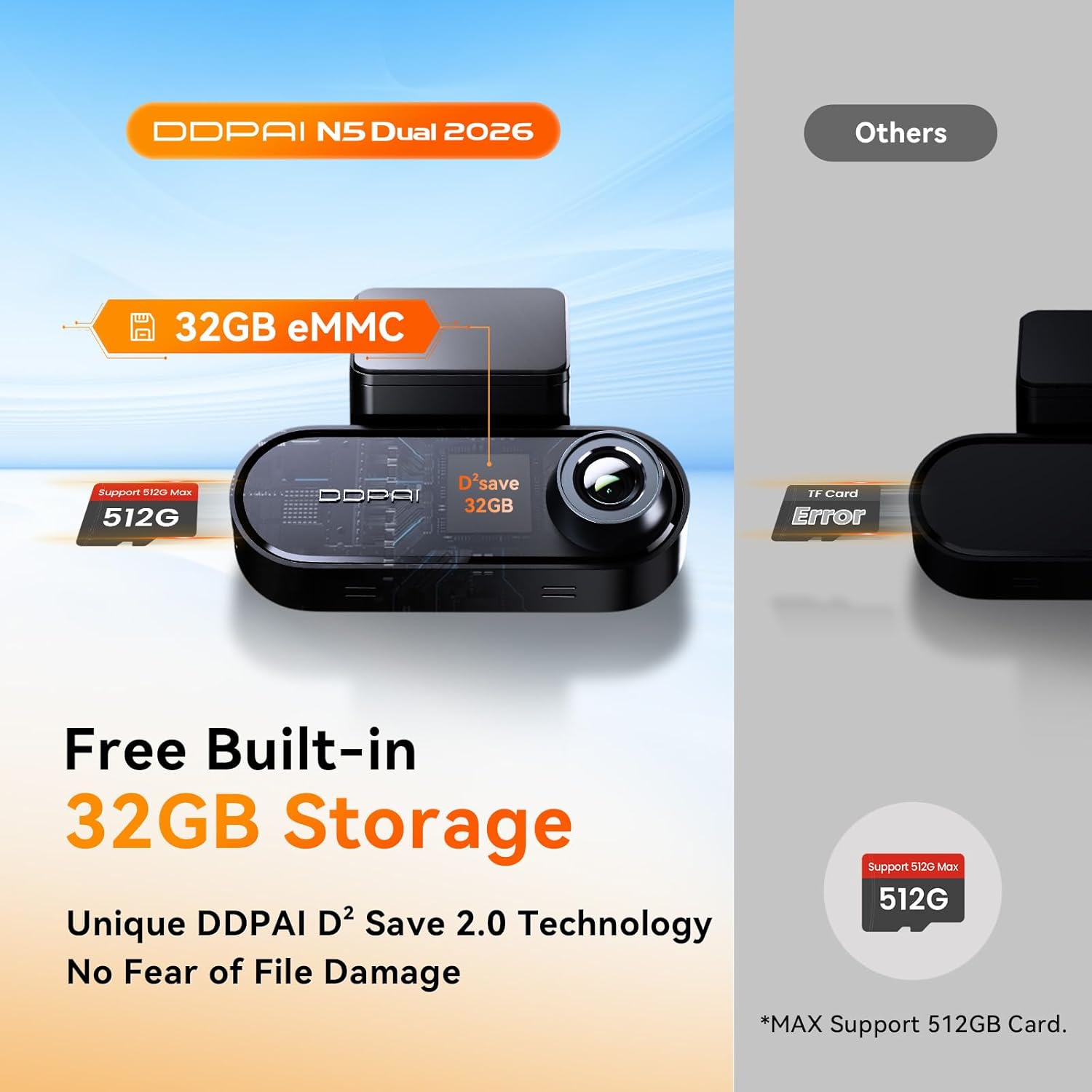
Image: Diagram illustrating the built-in 32GB eMMC storage and the capability to support an additional TF card up to 512GB.

Image: A 64GB SD card, which is included with the DDPAI N5 Dual dash cam for immediate use.
- To access or manage recordings, connect to the dash cam via the DDPAI app.
- 중요한 음식을 정기적으로 백업하세요tag손실을 방지하기 위해서입니다.
- Format the TF card periodically (e.g., monthly) through the app to maintain optimal performance and prevent data corruption.
4. 유지관리
4.1 청소
- 선명한 영상 품질을 위해 카메라 렌즈는 부드럽고 보풀 없는 천으로 닦아주세요.
- Keep the dash cam body clean and free from dust.
4.2 펌웨어 업데이트
- Check for firmware updates regularly through the DDPAI app.
- Perform updates over-the-air (OTA) via the app to ensure your dash cam has the latest features and bug fixes.
4.3 Storage Card Care
- Use high-quality TF cards from reputable brands to ensure reliable recording.
- Format the TF card regularly (e.g., once a month) using the dash cam's app to prevent data errors and extend the card's lifespan.
5. 문제 해결
- 대시캠 전원이 켜지지 않음: 블랙박스와 차량 전원 소켓의 전원 케이블 연결 상태를 확인하십시오. 차량 시동이 켜져 있는지 확인하십시오.
- 녹음 문제: Ensure a TF card is inserted and properly formatted. Check if the storage is full; if so, format the card or replace it.
- WiFi 연결 문제: Restart the dash cam and your smartphone. Ensure you are within range of the dash cam's WiFi signal.
- 낮은 비디오 품질: Clean the camera lenses. Ensure the dash cam is securely mounted and not vibrating. Check app settings for resolution.
- GPS가 작동하지 않음: 대시캠이 깨끗한지 확인하세요. view of the sky. GPS signal acquisition may take a few minutes after startup.
6. 사양
| 특징 | 사양 |
|---|---|
| 상표 | DDPAI |
| 모델 | N5 듀얼 |
| 전면 카메라 해상도 | 2160P (4K) |
| 후면 카메라 해상도 | 1080피 |
| Front Camera Wide Angle | 140° |
| 내장형 스토리지 | 32GB 메모리 |
| 외부 저장소 지원 | Up to 512GB TF card |
| SD 카드 포함 | 64GB SD 카드 |
| 와이파이 | 5GHz |
| GPS | 내장형 |
| 주차 모드 | 72H (with optional radar module and hardwire kit) |
| ADAS | Yes (Voice Reminders) |
| 나이트 비전 | AI ISP Night Vis 3.0, F1.8 Aperture, 6-Layer Lens |
7. 보증 및 지원
보증 정보 및 기술 지원에 대해서는 공식 DDPAI를 참조하세요. web사이트를 방문하거나 고객 서비스에 직접 문의하세요. 보증 청구를 위해 구매 증빙 자료로 구매 영수증을 보관하세요.