
소개
This manual provides comprehensive instructions for the INSIGNIA 4 ft Cat-6 Ethernet Cable (Grey). Designed for reliable and high-speed wired network connections, this cable is suitable for various applications including home, office, gaming, and streaming. Please read this manual carefully to ensure proper installation and optimal performance of your Ethernet cable.
제품 끝view
The INSIGNIA 4 ft Cat-6 Ethernet Cable (Grey) is engineered to deliver stable and fast internet connectivity. It features:
- Fast & Reliable Wired Internet Connection: Improves network stability for work, streaming, and gaming, offering smooth, consistent internet performance where Wi-Fi may be weak or unstable.
- High-Speed Cat-6 Standard: Supports data transfer rates up to 5 Gigabits Per Second, suitable for modern network demands.
- 내구성 있는 구조: Features corrosion-resistant RJ45 connectors and a robust cable design for long-lasting performance.
- 보편적 인 호환성 : Works with a wide range of devices including laptops, desktop PCs, gaming consoles (Xbox, PlayStation), smart TVs, routers, and streaming boxes.
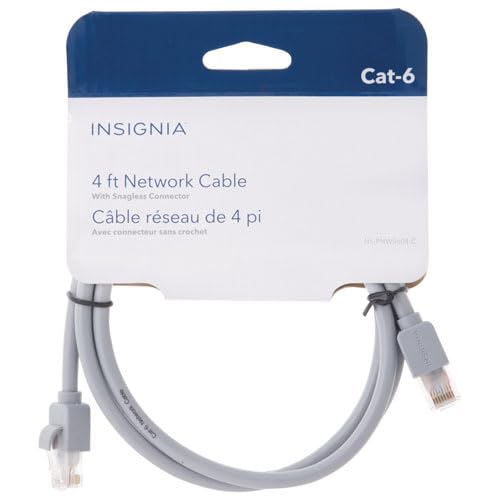
Image: Two RJ45 connectors of the INSIGNIA Cat-6 Ethernet cable. The connectors are grey with clear plastic clips, showing the internal wiring.
설치 지침
Connecting your INSIGNIA Cat-6 Ethernet cable is a straightforward process. Follow these steps for a secure connection:
- 포트 식별: Locate the Ethernet (RJ45) ports on your devices. These are typically rectangular with a small clip on one side. You will need one port on your internet source (e.g., router, modem) and one on your target device (e.g., computer, gaming console, smart TV).
- 첫 번째 끝 연결: Gently insert one end of the INSIGNIA Cat-6 Ethernet cable into an available Ethernet port on your router or modem. Ensure the clip clicks into place, indicating a secure connection.
- 두 번째 끝 연결: Insert the other end of the Ethernet cable into the Ethernet port on your target device. Again, ensure the clip clicks securely.
- 연결 확인: Most devices will automatically detect the wired connection. Look for an indicator light on the Ethernet port (if available) or check your device's network settings to confirm a successful wired connection.
메모: Do not force the connector into the port. If it does not fit easily, check the orientation of the connector and the port.
작동 지침
Once connected, the INSIGNIA Cat-6 Ethernet cable operates passively, providing a direct data link between your devices. No additional software or drivers are typically required for its function.
- 자동 감지: Modern operating systems and network devices are designed to automatically detect and utilize a wired Ethernet connection when available.
- 우선 순위 : Wired connections are generally prioritized over wireless (Wi-Fi) connections by most devices due to their superior speed and stability.
- 성능: For optimal performance, ensure both connected devices support Gigabit Ethernet (1000 Mbps) or higher, to fully utilize the Cat-6 cable's capabilities.
유지
To ensure the longevity and optimal performance of your INSIGNIA Cat-6 Ethernet cable, follow these simple maintenance guidelines:
- 굽힘을 피하십시오: Do not excessively bend, crimp, or tightly coil the cable, as this can damage the internal wires and reduce performance.
- 커넥터 보호: Keep the RJ45 connectors clean and free from dust or debris. Avoid pulling the cable by the wire; always grasp the connector when plugging or unplugging.
- 적절한 보관: When not in use, store the cable loosely coiled in a dry, cool place away from direct sunlight or extreme temperatures.
- 물리적 검사: Periodically inspect the cable and connectors for any signs of wear, fraying, or damage. Replace the cable if significant damage is observed.
문제 해결
If you encounter issues with your wired network connection, consider the following troubleshooting steps:
| 문제 | 가능한 해결책 |
|---|---|
| 인터넷에 연결되지 않았습니다. |
|
| 인터넷 속도가 느립니다. |
|
| 연결이 간헐적입니다. |
|
명세서
| 특징 | 세부 사항 |
|---|---|
| 상표 | INSIGNIA |
| 모델 | 4 ft Cat-6 Ethernet Cable (Grey) |
| 케이블 유형 | Ethernet (Cat-6) |
| 커넥터 유형 | RJ45 (수-수) |
| 길이 | 4 피트 |
| 데이터 전송 속도 | 최대 초당 5기가비트 |
| 호환 장치 | Laptop, Desktop PC, Router, Modem, Gaming Consoles (Xbox, PlayStation), Smart TVs |
| 품목 무게 | 70그램 |
| 한국어: | 600603276934 |
| ASIN | B0G2QXV9CG |
보증 및 지원
This INSIGNIA product comes with a 30일 한정 보증. For warranty claims or technical support, please refer to the manufacturer's official web해당 웹사이트를 방문하거나 고객 서비스 센터에 문의하십시오. 보증 적용을 위해 구매 영수증을 보관하십시오.
제조업체: INSIGNIA
추가 지원을 받으려면 다음을 방문하세요. 아마존에서 INSIGNIA 스토어를 만나보세요.