
소개
This manual provides detailed instructions for the Saitake Wireless Arcade Fight Stick Joystick. It covers product features, setup, operation, connection methods, and troubleshooting to ensure optimal performance across various platforms including PC, Android, iOS, Nintendo Switch, PS3, and PS4.
제품 끝view
비디오: 오버view of the Saitake Arcade Fight Stick, showcasing its design, joystick, buttons, and key features.
주요 특징
- 다중 플랫폼 호환성: Compatible with Windows PC, Android, iOS, Nintendo Switch 1/2, PS3, and PS4.
- Three Connection Methods: Supports Bluetooth, 2.4GHz wireless (with included receiver), and wired (Type-C) connections.
- 일체형 디스플레이 화면: A 1.9-inch functional display screen shows function options, volume, lighting effects, brightness, and language settings.
- 3.5mm 헤드폰 잭 : For audio output and communication.
- 터보 기능: Equipped with standard turbo and upgraded auto turbo modes for rapid input execution.
- 매크로 기능: Customize button mappings and create macro commands with up to 18 keystrokes, including trigger timestamps.
- 고정밀 조이스틱: Features an adjustable RGB light ring with 4 modes and 7 colors.
- 로우프로file 빨간색 스위치: Buttons utilize low-profile red switches for light pressure and quick response.
- 인체공학적 디자인: Designed for comfortable and extended gaming sessions.
제품 레이아웃 및 버튼 기능
Familiarize yourself with the layout and functions of the arcade fight stick's buttons and controls.

Image: Detailed diagram of the Saitake Arcade Fight Stick showing the location and labels of all buttons and features.
- A: 메뉴 옵션
- B: Joystick Function Option
- C: 조종간
- D: 화면 디스플레이
- E: 터보 버튼
- F: 선택 버튼
- G: 시작 버튼
- H: 홈 버튼
- I: 연결 옵션
- J: Touch Panel (for PS4 platform)
- K: Earphone & Microphone Option
- L: LSB 버튼
- M: RSB 버튼
- N: LB 버튼
- O: LT 버튼
- P: 이어폰 소켓
- Q: MACRO Button
- R: 단추
- S: X 버튼
- T: B 버튼
- U: Y 버튼
- V: RT 버튼
- W: RB 버튼
설정 및 연결
장치 충전하기
The arcade stick has a built-in 1000mAh rechargeable lithium battery. Connect the included USB Type-C cable to the device and a power source (e.g., computer USB port, USB wall adapter) to charge. The display screen will indicate charging status.
연결 방법
The Saitake Arcade Fight Stick supports three primary connection methods:

Image: Visual representation of the Bluetooth switch, 2.4G receiver, and Type-C wired connection port.
- 블루투스 연결 :
- Ensure the arcade stick is powered on and in Bluetooth pairing mode (refer to the display screen for status).
- On your device (Android, iOS, Switch, PS3, PS4, PC with Bluetooth), search for available Bluetooth devices.
- Select "Saitake Arcade Stick" to pair.
- 2.4GHz 무선 연결:
- Locate the 2.4GHz receiver in the hidden compartment on the back of the arcade stick.
- Plug the 2.4GHz receiver into a USB port on your PC, Switch dock, or PS3/PS4 console.
- 아케이드 스틱은 수신기에 자동으로 연결되어야 합니다.
- 유선 연결:
- Connect the USB Type-C cable from the arcade stick to a USB port on your PC, Switch dock, or PS3/PS4 console.
- The device will automatically detect the wired connection.
다중 플랫폼 호환성
The Saitake Arcade Fight Stick is designed for broad compatibility. The image below illustrates the supported systems.

Image: Icons representing Android, iOS, PC, Nintendo Switch, PS3, and PS4, indicating multi-system support.
작동 지침
일반적인 사용
Once connected, the arcade stick functions as a standard controller for compatible games. Use the joystick for directional input and the action buttons for in-game commands. The 1.9-inch display screen provides real-time information and allows for various adjustments.
터보 기능
The TURBO function allows for rapid, repeated input of a button press. This can be useful in games requiring fast button mashing.
- Standard Turbo: 를 누르세요 터보 button and the desired action button simultaneously to activate. The button will now rapidly repeat its input when held down.
- 자동 터보: Some modes may offer an auto-turbo feature where the button repeats without needing to be held. Refer to the on-screen display for specific settings.
- 속도 조정: The display screen and encoder allow for adjusting the turbo speed settings.
- 터보 비활성화: 를 누르세요 터보 button and the action button again to deactivate.
매크로 기능
The MACRO function allows you to record a sequence of up to 18 keystrokes and assign them to a single button for complex command execution.
- 매크로 녹화:
- 를 누르세요 매크로 button to enter recording mode. The display screen will indicate recording status.
- Perform the desired sequence of button presses and joystick movements.
- 를 누르세요 매크로 버튼을 다시 눌러 녹음을 중지합니다.
- Assign the recorded macro to a specific button by pressing that button.
- Executing a Macro: Press the assigned button to execute the recorded sequence.
- 매크로 지우기: Refer to the display screen options or the full manual for instructions on clearing recorded macros.

Image: Visual explanation of the Turbo and Macro functions, highlighting their benefits for efficient gaming.
Display Screen and Audio Jack
- 1.9-inch Functional Display Screen: Use the encoder and buttons near the screen to navigate menus and adjust settings such as volume, lighting effects, brightness, and language. The screen also provides status updates.
- 3.5mm 헤드폰 잭 : Located on the side of the unit, this jack allows you to connect headphones or a headset for in-game audio and voice chat (if supported by the connected platform).
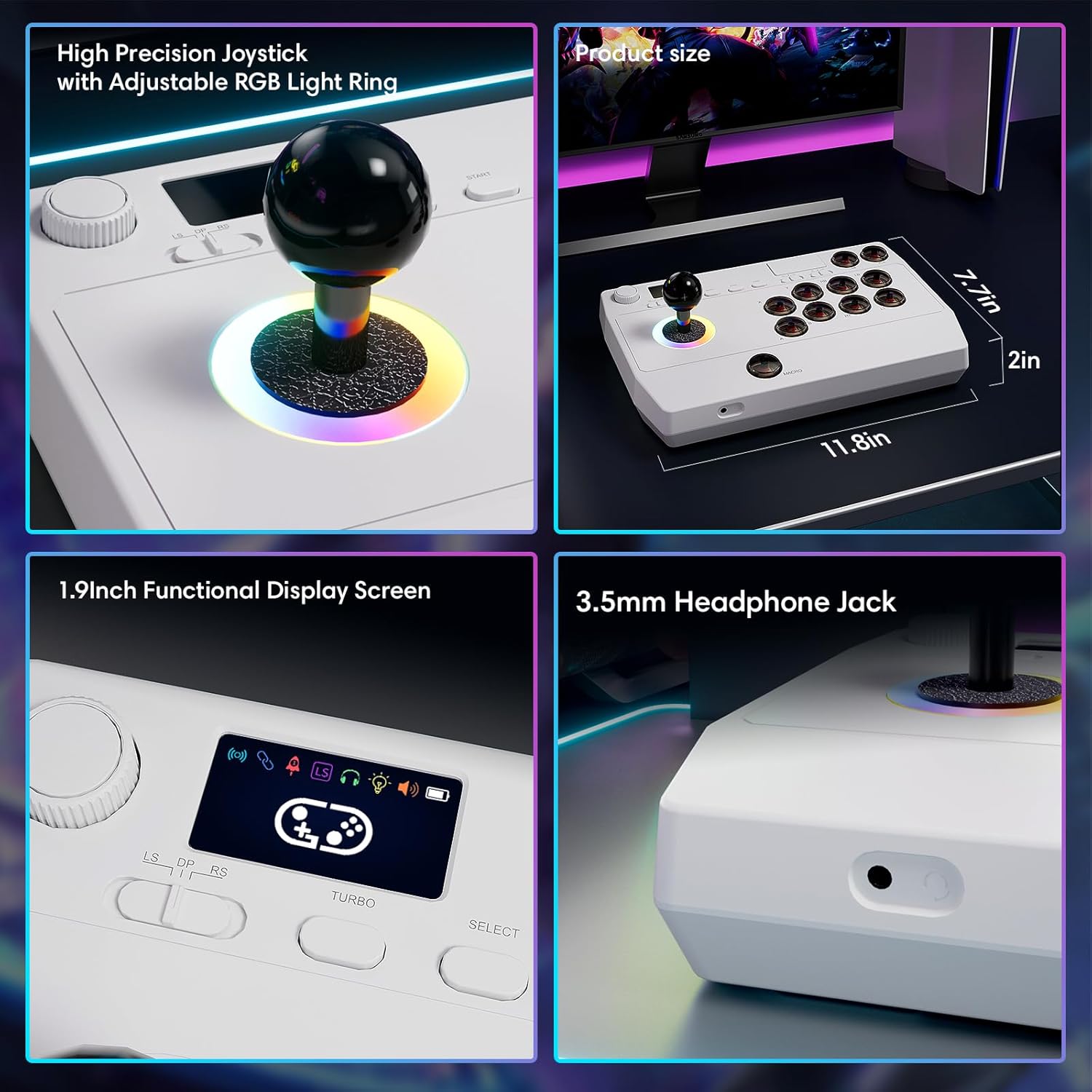
이미지: 클로즈업 views of the high-precision joystick with RGB lighting, the 1.9-inch functional display screen, and the 3.5mm headphone jack.
유지
- 부드럽고 마른 천으로 닦아 장치를 깨끗하게 유지하십시오.
- 극한의 온도, 습도 또는 직사광선에 장치를 노출하지 마십시오.
- Do not attempt to disassemble the device, as this may void the warranty.
- Store the 2.4GHz receiver in its designated compartment when not in use to prevent loss.
문제 해결
- 기기의 전원이 켜지지 않습니다:
- 기기가 완전히 충전되었는지 확인하십시오. USB Type-C 케이블을 사용하여 전원에 연결하십시오.
- 무선으로 연결할 수 없습니다:
- For Bluetooth, ensure the device is in pairing mode and your host device's Bluetooth is enabled.
- For 2.4GHz, ensure the receiver is securely plugged into a USB port and the arcade stick is in 2.4GHz mode.
- Try restarting both the arcade stick and the host device.
- Buttons or joystick are unresponsive:
- Ensure the device is properly connected (wired or wireless).
- Test the device on a different game or platform to rule out software issues.
- Check for any physical obstructions or damage to the buttons or joystick.
- Audio issues with 3.5mm jack:
- 헤드폰이 완전히 꽂혀 있는지 확인하십시오.
- Check the volume settings on both the arcade stick's display and the host device.
- Test with a different pair of headphones.
명세서
| 모델명 | 아케이드 스틱 |
| 상표 | 사이타케 |
| 호환 장치 | Android, iOS, Nintendo Switch 1/2, PC, PlayStation 3/4 |
| 컨트롤러 유형 | 조종간 |
| 연결 기술 | Bluetooth, USB (2.4GHz wireless, Wired Type-C) |
| 추가 기능 | Ergonomic, Headphone Jack, Portable, Wireless, 1.9-inch Display Screen, TURBO Function, Macro Function, RGB Lighting |
| 하드웨어 플랫폼 | Desktop, Gaming Console, Laptop, Smartphone, Tablet, Television |
| 전원 | 배터리 구동식 (1000mAh 리튬 배터리 내장) |
| 품목 치수 | 11.61 x 0.71 x 7.68 인치 |
| 색상 | 하얀색 |
보증 및 지원
The Saitake Wireless Arcade Fight Stick Joystick comes with a 1년 보증 구매일로부터.
For technical support, troubleshooting assistance, or warranty claims, please contact Saitake customer service through their official web제품을 구매하신 사이트 또는 판매점에 방문해 주십시오. 구매 영수증과 제품 모델 정보를 준비해 주시기 바랍니다.