
1. 서론
The ICUIXIAN 16x16 HDMI Matrix Switch is a professional device designed for switching and distributing high-resolution HDMI digital signals. It allows you to select any of 16 HDMI input signals and route them to any of 16 display devices. This matrix switch supports HDMI 1.4a standard, EDID management, and resolutions up to 1080p@60Hz.
주요 특징은 다음과 같습니다.
- 1080P@60Hz Input/Output support
- High-bandwidth chip architecture
- Arbitrary switching between inputs and outputs
- HDMI signal distribution
- 고급 EDID 관리
- Integrated liquid crystal display for status
- Embedded audio support
- Electrostatic discharge (ESD) protection
- 전원 끄기 메모리 기능
- Support for long-distance transmission
- Multiple control methods: Web GUI, RS-232, IR remote, and front panel buttons

Figure 1: Quick overview of product features, including 1080P support, high-bandwidth chips, arbitrary switching, HDMI distribution, EDID management, and multiple control methods.
2. 제품 오버view
The ICUIXIAN 16x16 HDMI Matrix Switch features 16 HDMI input ports and 16 HDMI output ports, along with various control interfaces for flexible integration into your audio-visual system.

Figure 2: Front and Rear Panel Layout. The front panel includes an LCD display and control buttons. The rear panel features 16 HDMI inputs, 16 HDMI outputs, a DC 5V power input, RS-232 IN/OUT ports, and an RJ45 LAN port.
2.1 전면 패널
- LCD 디스플레이: 현재 입력/출력 상태 및 메뉴 옵션을 표시합니다.
- 제어 버튼: For local switching, menu navigation, and EDID settings.
- IR 수신기 : 원격 제어 명령용입니다.
2.2 후면 패널
- HDMI 입력 1-16: HDMI 소스 기기(예: 블루레이 플레이어, PC, 게임 콘솔)를 연결하세요.
- HDMI 출력 1-16: Connect your HDMI display devices (e.g., TVs, projectors, monitors).
- DC 5V : 전원 입력 포트.
- RS-232 IN/OUT: Serial communication ports for control via a computer or control system.
- RJ45(랜): 이더넷 포트 Web GUI 제어.
3. 설정 및 설치
Follow these steps to set up your ICUIXIAN 16x16 HDMI Matrix Switch:
- 전원 끄기 : Ensure all devices (sources, displays, and the matrix switch) are powered off before making connections.
- HDMI 소스 연결: Connect your HDMI source devices (e.g., DVD players, TV boxes, computers) to the HDMI IN 1-16 ports on the rear panel of the matrix switch using high-quality HDMI cables.
- HDMI 디스플레이 연결: Connect your HDMI display devices (e.g., TVs, projectors) to the HDMI OUT 1-16 ports on the rear panel of the matrix switch using high-quality HDMI cables.
- 제어 케이블 연결(선택 사항):
- For RS-232 control, connect an RS-232 cable from your control computer or system to the RS-232 IN port on the matrix switch.
- 을 위한 Web GUI control, connect an Ethernet cable from your network router/switch to the RJ45 (LAN) port on the matrix switch.
- 전원 연결: Connect the provided DC 5V power adapter to the DC 5V port on the matrix switch, then plug the adapter into a power outlet.
- 전원 켜기: Power on the matrix switch, then power on your display devices, and finally your source devices.

Figure 3: Connection Diagram. Illustrates how to connect up to 16 HDMI source devices to the input ports and assign them to any of the 16 HDMI displays independently.
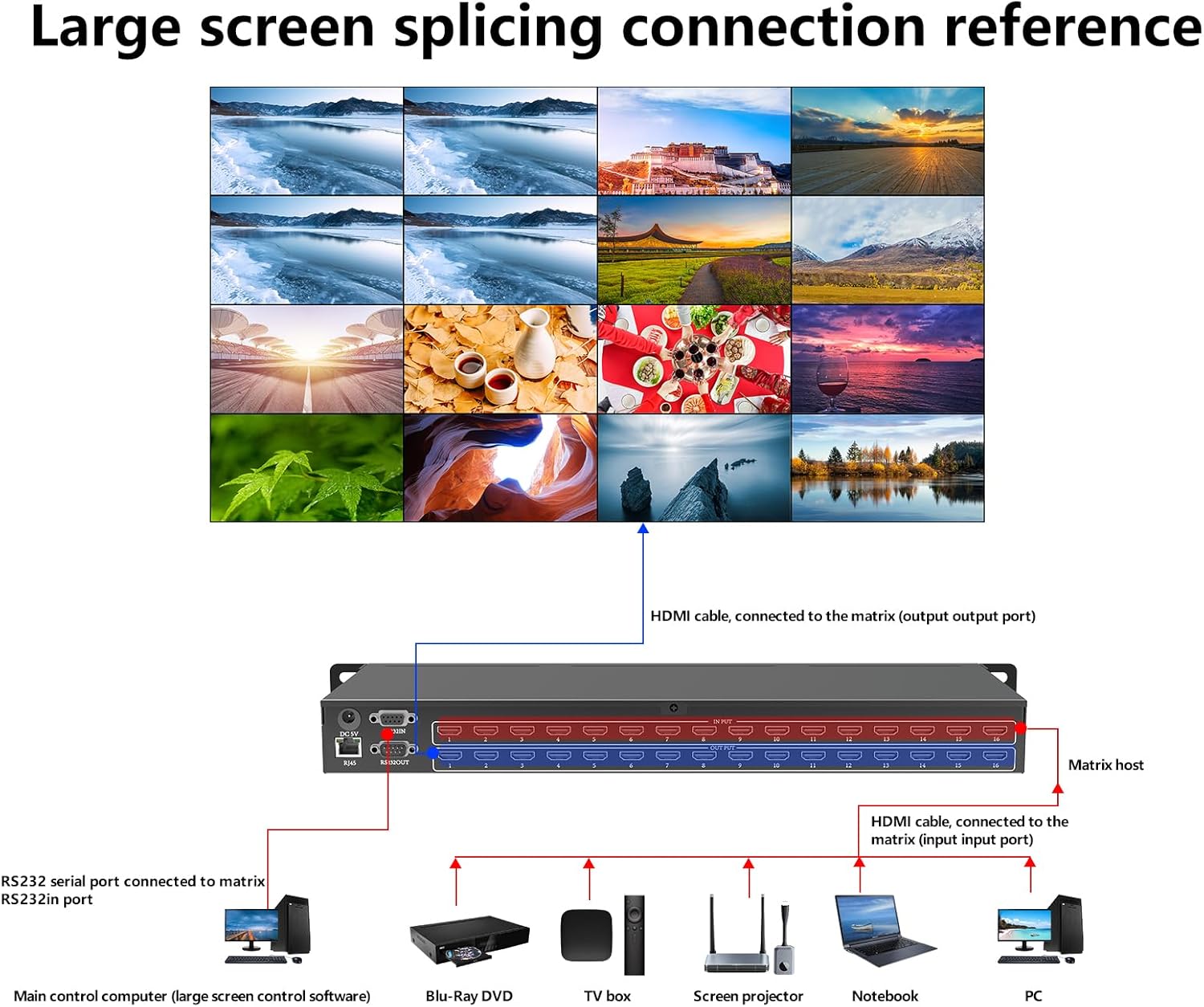
Figure 4: Large Screen Splicing Connection Reference. This diagram shows a typical setup for connecting various sources to the matrix and distributing signals to multiple displays, including a main control computer for management.
4. 사용 설명서
The ICUIXIAN 16x16 HDMI Matrix Switch offers multiple control methods for flexible operation.
4.1 제어 방법
You can control the matrix switch using the following methods:
- Web GUI 제어: 장치의 web interface via a browser on a computer, mobile phone, or tablet connected to the same network. No software installation is required.
- RS-232 제어: Use RS-232 commands from a control system or computer for integration into professional setups.
- IR 원격 제어 : Use the included infrared remote control for convenient local operation.
- 전면 패널 버튼: Directly switch inputs and outputs, and navigate settings using the buttons on the front panel.

Figure 5: Four Convenient Switching Methods. This image details the various ways to control the matrix switch, including Web GUI, RS-232, IR remote, and front panel buttons.
4.2 입력/출력 전환
The matrix allows for flexible routing of any input to any output. You can configure various display scenarios:
- Independent Display: Each display shows a different input source.
- Shared Input: Multiple displays show the same input source.
- 부분 공유: A group of displays share one input, while others show different inputs.

Figure 6: Various Screen Configurations. This image demonstrates different ways to configure input-to-output routing, from individual displays to shared content across multiple screens.
4.3 EDID 관리
The matrix switch supports EDID management, which is crucial for ensuring compatibility between source devices and displays. It features integrated proactive management and allows you to set up to 32 scenes for quick access and switching with a single button. This includes real-time device information display, rapid switching of input and output signals, and the ability to retrieve and save preview 계획.
4.4 Audio and Video Output
The device supports lossless audio and video copy output from various HDMI input devices, ensuring high-quality signal distribution to multiple outputs.

Figure 7: Audio and Video Copy Output. This diagram illustrates how various HDMI source devices can be connected to the matrix for seamless audio and video distribution.
5. 유지관리
To ensure the longevity and optimal performance of your ICUIXIAN 16x16 HDMI Matrix Switch, follow these maintenance guidelines:
- 청소: 기기 외부를 닦을 때는 부드럽고 마른 천을 사용하십시오. 액체 세척제나 용제는 마감재나 내부 부품을 손상시킬 수 있으므로 사용하지 마십시오.
- 통풍: 기기에 적절한 통풍이 이루어지도록 하십시오. 통풍구를 막지 마십시오.
- 환경: Operate the device in a cool, dry environment, away from direct sunlight, excessive heat, humidity, and dust.
- 힘: 기기를 장기간 사용하지 않을 때는 전원 어댑터를 분리하십시오.
- 케이블 관리 : Ensure all cables are securely connected and not under strain. Avoid bending HDMI cables sharply.
6. 문제 해결
If you encounter issues with your ICUIXIAN 16x16 HDMI Matrix Switch, refer to the following troubleshooting tips:
6.1 비디오 출력 없음
- 연결 확인: Ensure all HDMI cables are securely connected to both the source devices, the matrix switch, and the display devices.
- 힘: 매트릭스 스위치와 연결된 모든 장치의 전원이 켜져 있는지 확인하십시오.
- 입력/출력 선택: Confirm that the correct input is selected for the desired output on the matrix switch.
- 케이블 품질: Try using different, high-quality HDMI cables, especially for longer runs.
- 해상도 호환성: Ensure the output resolution of the source device is compatible with the display device. The matrix supports up to 1080p@60Hz.
- EDID 설정: Adjust EDID settings if there are compatibility issues. Refer to the EDID management section for details.
6.2 비디오 품질이 좋지 않음
- 케이블 품질: Use certified high-speed HDMI cables.
- 케이블 길이: Excessive cable length can degrade signal quality. Consider using HDMI extenders if necessary.
- Source/Display Settings: Check the resolution and refresh rate settings on your source and display devices.
6.3 제어 문제
- IR 리모트: Ensure there are no obstructions between the remote and the IR receiver on the front panel. Check battery levels.
- Web GUI/LAN: Verify network connectivity. Ensure the matrix switch has an IP address and is accessible on the network. Check firewall settings on your control device.
- RS-232 : Confirm correct cable wiring and serial port settings (baud rate, data bits, parity, stop bits) on your control system.
7. 사양
| 특징 | 사양 |
|---|---|
| 상표 | 이쿠시안 |
| 모델 번호 | 16x16 Matrix DC |
| 색상 | 검은색 |
| 포트 수 | 16 (Input) x 16 (Output) |
| 호환 장치 | 프로젝터, 텔레비전 |
| 케이블 유형 | HDMI |
| Analog RGB Input | HDMI |
| 품목 무게 | 3 킬로그램 |
| Item Dimensions (Depth x Width x Height) | 48P x 18l x 4H cm (Note: 'P' likely refers to Depth, 'l' to Width, 'H' to Height) |
| HDMI 표준 | HDMI 1.4a |
| 해결 지원 | Up to 1080p@60Hz, 1080P 3D@60Hz |
| HDCP 지원 | 예 |
| EDID 관리 | Yes, with 32 scene presets |
| 제어 인터페이스 | Web GUI, RS-232, IR, Front Panel Buttons |
8. 보증 및 지원
ICUIXIAN offers a warranty and friendly customer service for this product. If you encounter any rare issues or have questions, please contact our professional customer service team. We are committed to resolving all problems for you.
For support, please refer to the contact information provided with your purchase or on the official ICUIXIAN web대지.


