
소개
이 매뉴얼은 귀하의 제품을 안전하고 효과적으로 사용하기 위한 포괄적인 지침을 제공합니다. AMPBANK M256 Thermal Camera. The M256 is a compact thermal imager designed for use with Android smartphones, tablets, and PCs, offering a 256x192 IR resolution and a temperature range of -4°F to 842°F (-20°C to 450°C). Please read this manual thoroughly before operating the device.
안전 정보
부상이나 장치 손상을 방지하려면 항상 다음 안전 예방 조치를 준수하세요.
- 카메라를 태양이나 레이저와 같은 강한 열원에 직접 향하게 하지 마십시오. 센서가 손상될 수 있습니다.
- 장치를 극한의 온도, 습도 또는 부식성 환경에 노출시키지 마십시오.
- 장치를 떨어뜨리거나 강한 충격을 가하지 마십시오.
- Use only the provided accessories or those approved by AMPBANK.
- 기기를 어린이의 손이 닿지 않는 곳에 보관하세요.
- Refer to local regulations for proper disposal of electronic devices.
패키지 내용
패키지에 모든 품목이 들어 있는지 확인하세요.
- 1 개 AMPBANK M256 열화상 카메라
- 1 x Multifunctional Adapter Cable (19.7-inch / 50cm USB extension cable)
- 1 x 청소용 천
- 1 x 빠른 사용자 가이드
- 1 x 운반 가방
- 1 x 포장 상자

이미지: 내용물 AMPBANK M256 Thermal Camera package, including the camera, adapter cable, cleaning cloth, quick user guide, carrying bag, and packing box.
제품 끝view
그만큼 AMPBANK M256 is a compact, plug-and-play thermal imaging camera designed to extend the capabilities of your Android smartphone or PC. It features a USB-C connector for direct attachment to compatible devices.

이미지: 앞면 view 의 AMPBANK M256 Thermal Camera, showing its compact green and black design with a USB-C connector.
주요 특징:
- 고해상도: 선명한 열화상 이미지를 위한 256x192 IR 해상도.
- 광범위한 온도 범위: -4°F에서 842°F(-20°C에서 450°C)까지 측정됩니다.
- 낮은 전력 소모: Operates efficiently at 0.35W.
- 소형 및 휴대성: Weighs only 30g, easily fits in a pocket.
- 다양한 연결성: Compatible with Android smartphones/tablets and PCs via USB-C.
설정
1. App Installation (Android)
- Locate the "ThermCam" application on the Google Play Store.
- Download and install the application on your Android smartphone or tablet.
- Ensure your device supports OTG (On-The-Go) functionality for external device connection.

Image: Screenshot showing the ThermCam app available on Google Play, indicating where to download the required software for the thermal camera.
2. 장치 연결
- For direct connection: Plug the USB-C connector of the M256 thermal camera directly into the USB-C port of your Android smartphone or tablet.
- For extended connection: Use the provided 19.7-inch (50cm) USB extension cable. Connect one end to your smartphone/tablet and the other end to the M256 camera. This offers greater flexibility during use.
- Once connected, open the "ThermCam" app. The app should automatically detect the camera and display the thermal image.

Image: A hand holding a smartphone with the AMPBANK M256 Thermal Camera connected to its USB-C port, displaying a thermal image on the phone screen.

이미지: AMPBANK M256 Thermal Camera connected to a laptop and a tablet using the 19.7-inch USB extension cable, demonstrating its versatility.
3. PC 소프트웨어 설치
- For PC usage, download the "TCView 2.0" software from the official AMP은행 web대지.
- Windows PC에 소프트웨어를 설치하세요.
- Connect the M256 camera to your PC using the USB-C extension cable.
- Launch the TCView 2.0 software to begin thermal imaging on your PC.
작업
1. 기본 온도 측정
- Once the app is open and the camera is connected, the thermal image will appear on your screen.
- The app displays real-time temperature readings.
- Adjust the camera's position to focus on the area of interest.

Image: A person using the AMPBANK M256 Thermal Camera with a smartphone to inspect a wall, showing the thermal image and temperature readings on the phone screen.
2. Measurement Modes and Color Palettes
- The ThermCam app offers various measurement modes, including 점, 선, 그리고 비행기, for precise temperature monitoring.
- Select from 10 different color palettes to visualize temperature changes. Different palettes can highlight specific temperature variations more clearly.

Image: A smartphone screen displaying various color palettes and measurement settings within the ThermCam app, demonstrating customization options for thermal imaging.
3. 3D Thermal Analysis
- Utilize the advanced 3D editing features within the app or PC software for detailed temperature analysis from multiple perspectives.
- This feature assists in identifying subtle temperature anomalies and patterns.
4. 스마트 알림
- Configure smart alerts for high and low temperatures. The app will notify you when temperatures exceed or fall below predefined thresholds.
- This is useful for monitoring critical equipment or areas.
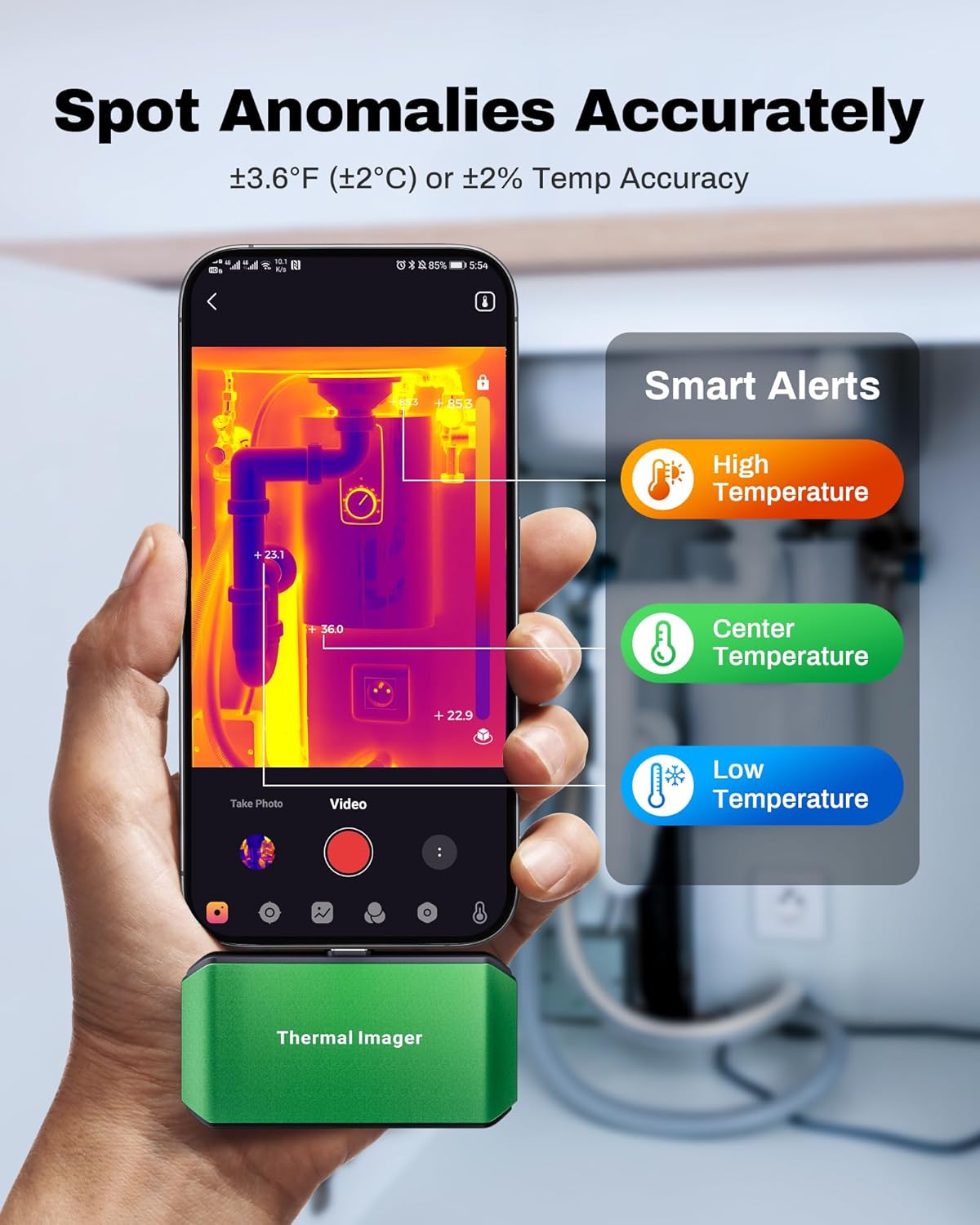
Image: A smartphone screen showing the ThermCam app with "Smart Alerts" for high, center, and low temperatures, indicating the camera's ability to detect anomalies.
5. 사진 및 비디오 촬영
- 앱을 통해 열화상 정지 이미지를 캡처하거나 열화상 비디오를 직접 녹화할 수 있습니다.
- These captures can be used for documentation, analysis, or sharing.

Image: Screenshots from the ThermCam app demonstrating options for video recording and photo capturing of thermal images.
6. Generating Professional Reports
- The ThermCam app and TCView 2.0 software allow you to generate professional field reports.
- Customize data, add watermarks, and adjust settings for seamless sharing of your thermal analysis.

Image: A smartphone screen displaying the ThermCam app's interface for generating professional reports, including options to customize data and share.
유지
- 청소: Use the provided cleaning cloth to gently wipe the camera lens and body. Do not use abrasive cleaners or solvents.
- 저장: When not in use, store the thermal camera in its protective carrying bag to prevent dust and damage. Store in a cool, dry place away from direct sunlight.
- 소프트웨어 업데이트: Regularly check the Google Play Store or AMP은행 website for updates to the ThermCam app or TCView 2.0 software to ensure optimal performance and access to new features.
문제 해결
| 문제 | 가능한 원인 | 해결책 |
|---|---|---|
| Camera not detected by smartphone/PC. |
|
|
| 온도 판독값이 부정확합니다. |
|
|
| 앱이 충돌하거나 정지됩니다. |
|
|
명세서
| 특징 | 세부 사항 |
|---|---|
| 모델 | M256 |
| IR 해상도 | 256x192 픽셀 |
| 온도 범위 | -4°F ~ 842°F(-20°C ~ 450°C) |
| 온도 정확도 | ±3.6°F (±2°C) or ±2% |
| 열 감도(NETD) | <40mK |
| 새로 고침 빈도 | 25Hz |
| 전력 소비 | 0.35와트 |
| 연결성 | USB-C |
| 호환성 | Android Smartphones/Tablets, Windows PC |
| 치수 | 2.8 x 1.65 x 0.55인치(70 x 44 x 14mm) |
| 무게 | 30g(0.07파운드) |
| 제조업체 | AMP은행 |

Image: A visual summary of the AMPBANK M256 Thermal Camera's key features and specifications, including resolution, temperature range, and power consumption.
보증 및 지원
AMPBANK products are designed for reliability and performance. For warranty information, technical support, or service inquiries, please refer to the official AMP은행 web사이트 또는 고객 서비스 부서에 문의하십시오.
보증 청구를 위해 구매 증명서를 보관하십시오.
온라인 리소스: 방문하세요 AMPBANK Store on Amazon 추가 제품 정보 및 지원은 여기를 참조하세요.