
1. 서론
This manual provides essential information for setting up, operating, maintaining, and troubleshooting your Ulefone RugKing 2 Pro Rugged Phone. Please read it carefully to ensure optimal performance and longevity of your device.
1.1. 제품 오버view
Video: Ulefone RugKing 2 Pro Product Overview. 이 영상은 일반적인 내용을 제공합니다.view 휴대폰의 기능과 디자인.
1.2. 상자 안에 무엇이 들어있나요?
- 1x Ulefone RugKing 2 Pro Phone
- AC 전원 충전기 1개 (100~240V)
- 1x USB-A to Type-C Data Cable (100cm)
- 1x Protective film (Pre-installed)
- 1x Tempered glass screen protector
- 1x Pry Opener
- 1x 라니어드
- 1x Multi-language user manual

Image: The complete package contents of the Ulefone RugKing 2 Pro, including the phone, charger, cable, screen protector, pry opener, lanyard, and user manual.
Note: Additional accessories like the Desk Charging Dock, Armor Case, Bike Mount, and Car Mount are sold separately.
2. 설정
2.1. SIM 카드 및 MicroSD 카드 설치
The Ulefone RugKing 2 Pro supports two Nano SIM cards and one MicroSD card for expandable storage up to 2TB. Follow these steps to install them:
- 휴대폰 측면에서 SIM 카드 트레이를 찾으세요.
- Use the provided pry opener to gently open the SIM card tray.
- Carefully place your Nano SIM cards and MicroSD card into the designated slots on the tray. Ensure they are correctly oriented.
- Slide the tray back into the phone until it is securely closed.
Video: Ulefone RugKing 2 Pro Unboxing Video. This video demonstrates the unboxing process, including the installation of SIM and MicroSD cards.
2.2. 초기 전원 켜기 및 충전
To power on your device, press and hold the power button located on the side of the phone until the Ulefone logo appears. For initial charging, connect the provided USB-A to Type-C cable to the phone and the AC power charger to a wall outlet. The phone also supports dock charging with a separately sold accessory.

Image: The Ulefone RugKing 2 Pro placed on its dedicated desk charging dock, indicating charging functionality.
3. 사용 설명서
3.1. 기본 기능
- 전원 켜기/끄기: 전원 버튼을 길게 누르세요.
- 볼륨 조절: Use the volume up/down buttons on the side.
- 맞춤 키: The programmable custom key can be configured for single click, double click, or long press actions.
- 얼굴 인식 잠금 해제: Set up face recognition for quick and secure unlocking.

Image: A visual summary of additional features like NFC, GPS, Face Unlock, Custom Key, and the charging dock.
3.2. 카메라 작동
The RugKing 2 Pro features a 13MP rear camera and a 5MP front camera. Open the camera application to capture photos and videos. Various modes and settings are available within the app.

Image: Demonstrates the 13MP rear camera capturing a landscape and the 5MP front camera taking a group selfie.
3.3. AI Assistant Features (Ulefone AI Pro & Google Gemini)
Leverage the integrated AI capabilities for enhanced productivity:
- AI Recording Summary: Automatically transcribes and summarizes recordings.
- AI Writing Assist: Provides smart formatting, translation, style rewriting, and proofreading.
- Ulefone Screen Search: Circle or select content on your screen to search for information.
- AI Calculator: Supports handwriting calculation for mathematical problems.

Image: Visual representation of the Ulefone AI Pro features, showcasing AI Recording Summary, AI Writing Assist, Ulefone Screen Search, and AI Calculator.
3.4. Water-Lock Mode
Activate Water-Lock mode to disable the touchscreen in wet conditions, preventing accidental touches. This is useful when using the phone near water or in the rain.

Image: The Ulefone RugKing 2 Pro on a bike in the rain, demonstrating the Water-Lock Mode feature.
3.5. 내장 손전등
The phone includes a powerful 110 Lumens flashlight. It can be activated via a dedicated button or through the quick settings panel for use in low-light environments.

Image: The Ulefone RugKing 2 Pro's flashlight in action, highlighting its utility in outdoor settings.
3.6. 연결성 및 내비게이션
- 듀얼 4G: Supports two 4G SIM cards simultaneously.
- NFC : 비접촉식 결제 및 데이터 전송을 위해.
- GPS: 정확한 내비게이션을 위해 GPS, GLONASS, BeiDou 및 Galileo가 통합되어 있습니다.
- 헤드셋 없이 즐기는 FM 라디오: Enjoy FM radio without needing a headset as an antenna.
4. 유지관리
4.1. 내구성 특징
The Ulefone RugKing 2 Pro is designed for rugged environments, featuring IP68/IP69K water and dust resistance and MIL-STD-810H certification for drop resistance. The 5.45" HD+ Corning Gorilla Glass screen provides enhanced protection against scratches and impacts.
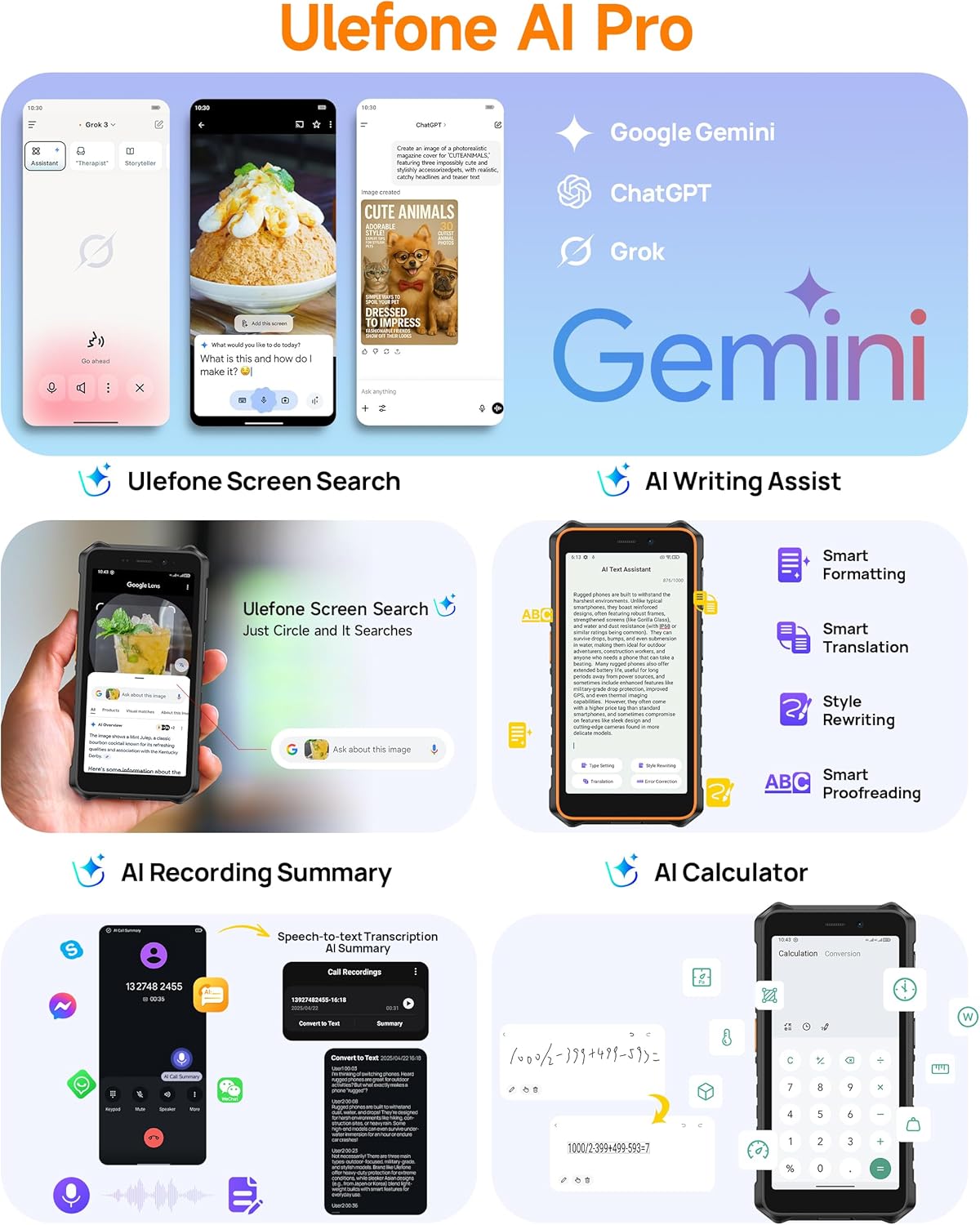
Image: Demonstrates the extreme durability of the Ulefone RugKing 2 Pro, highlighting its water, dust, and drop resistance.
Video: Ulefone RugKing 2 Pro Design. This video showcases the phone's robust design and various color accents.
4.2. 기기 청소
휴대폰을 청소하려면 부드러운 천으로 닦으세요.amp cloth. For stubborn dirt, use a mild soap solution and rinse thoroughly with clean water. Ensure all ports are securely closed before cleaning to maintain water resistance.
5. 문제 해결
5.1. 일반적인 문제
- 전화가 켜지지 않습니다: 배터리가 충전되어 있는지 확인하세요. 충전기에 연결한 후 다시 시도해 보세요.
- 터치스크린이 반응하지 않음: If in wet conditions, check if Water-Lock mode is active. If not, restart the device.
- SIM 카드가 감지되지 않았습니다. Ensure the SIM card is correctly inserted and the tray is fully closed. Verify that your carrier is supported (Note: Not compatible with AT&T or Cricket).
- 네트워크 신호가 약함: Move to an open area. Check with your service provider for network coverage in your location.
For further assistance, please refer to the official Ulefone support channels.
6. 사양
| 특징 | 세부 사항 |
|---|---|
| 상표 | 울레폰 |
| 모델명 | RugKing 2 Pro |
| 운영 체제 | 안드로이드 15 |
| 설치된 RAM 메모리 크기 | 8GB(물리적 4GB + 가상 4GB) |
| 메모리 저장 용량 | 128GB(MicroSD를 통해 최대 2TB까지 확장 가능) |
| 화면 크기 | 5.45 Inches HD+ Corning Gorilla Glass |
| 해결 | 720 x 1440 픽셀 (HD+) |
| 새로 고침 빈도 | 90Hz |
| 최대 밝기 | 650니트 |
| 후면 카메라 | 13 MP |
| 전면 사진 센서 해상도 | 5 MP |
| 배터리 용량 | 4500mAh |
| 통화 시간 | 20시간 |
| 대기 시간 | 315시간 |
| 방수 레벨 | IP68/IP69K 방수 |
| 내구성 인증 | MIL-STD-810H 인증 |
| SIM 카드 슬롯 수 | Dual SIM (Nano) |
| 연결 기술 | Bluetooth, NFC, USB Type-C, Wi-Fi, 4G LTE |
| 지원되는 위성 항법 시스템 | BeiDou, GLONASS, GPS, Galileo |
| 추가 기능 | Built-In Flashlight (110 Lumens), Custom Key, Outdoor Toolbox, Gloves Mode, Face Unlock, Widevine L1 Certified |
| 품목 치수 | 6.26 x 3.15 x 0.62 인치 |
7. 옵션 액세서리
Enhance your Ulefone RugKing 2 Pro experience with these separately sold accessories:
- Desk Charging Dock: 편리한 충전을 위해.
- 아머 케이스: Provides additional protection and mounting options.
- Armor Mount Pro (Bike Mount): Securely attach your phone to a bicycle.
- Armor Mount Next-Gen (Car Mount): Universal car mount for dashboard and windshield.
Video: Ulefone RugKing 2 Pro Accessory Ecosystem Showcase. This video demonstrates various optional accessories and their use cases.
8. 보증 및 지원
Ulefone provides a 12개월 제조사 보증 서비스 in the US for the RugKing 2 Pro. For any questions or issues regarding your product, please contact Ulefone Direct - US customer service. They are available to assist you.
자세한 내용은 다음을 방문하세요. 아마존에서 Ulefone 스토어를 찾아보세요.