
소개
This manual provides detailed instructions for the LICHIFIT Bluetooth Remote Control. This versatile remote is designed for use with DJI OSMO 360, DJI OSMO Action 5 Pro, DJI OSMO Action 4 cameras, and a wide range of Android and iPhone mobile devices. It enables convenient control over camera functions, including shooting, zooming, and instant wake-up, from a distance.
패키지 내용
아래 나열된 모든 품목이 패키지에 포함되어 있는지 확인하세요.
- 1 x 블루투스 원격 제어
- 1 x Strap Base
- 2 x Elastic Straps
- 1 x 손목 스트랩
- 1 x Connecting Rope for Fishing Rod
- 1 x USB 충전 케이블

명세서
| 모델 번호 | B0FXGKHGS5 |
| 상표 | 리치핏 |
| 연결 기술 | 블루투스 |
| 호환 장치 | DJI OSMO 360, DJI OSMO Action 5 Pro, DJI OSMO Action 4, Android phones, iPhones |
| Maximum Range (Camera) | 30미터(98피트) |
| Maximum Range (Mobile Phone) | 25미터(82피트) |
| 배터리 수명 | 한 번 충전으로 최대 30시간 |
| 충전 유형 | Type-C (Rechargeable, built-in) |
| 버튼의 수 | 4 |
| 특별 기능 | Instant Wake-up, Long-distance Control |

설정
1. 리모컨 페어링
- 리모컨이 충전되어 있는지 확인하세요.
- Turn on your DJI camera or enable Bluetooth on your mobile phone.
- On the remote, press and hold the 'A' button until the indicator light flashes, indicating pairing mode.
- On your camera or phone, search for Bluetooth devices and select the LICHIFIT remote control to pair.
- Once paired, the indicator light will stop flashing and remain solid or turn off, depending on the device.
2. Attachment Methods
The remote control offers multiple ways to attach it for convenience during various activities:
- 핸들바 장착: Use the strap base and elastic straps to secure the remote to bicycle handlebars or similar poles.
- Wrist Wear: Attach the remote to the wrist strap and wear it for easy access during activities. The wrist strap is adjustable to fit most users.
- Fishing Rod Attachment: Utilize the connecting rope to secure the remote to a fishing rod, allowing for remote control while fishing.
- Selfie Stick Mounting: The elastic straps can also be used to attach the remote to a selfie stick.

작동 지침
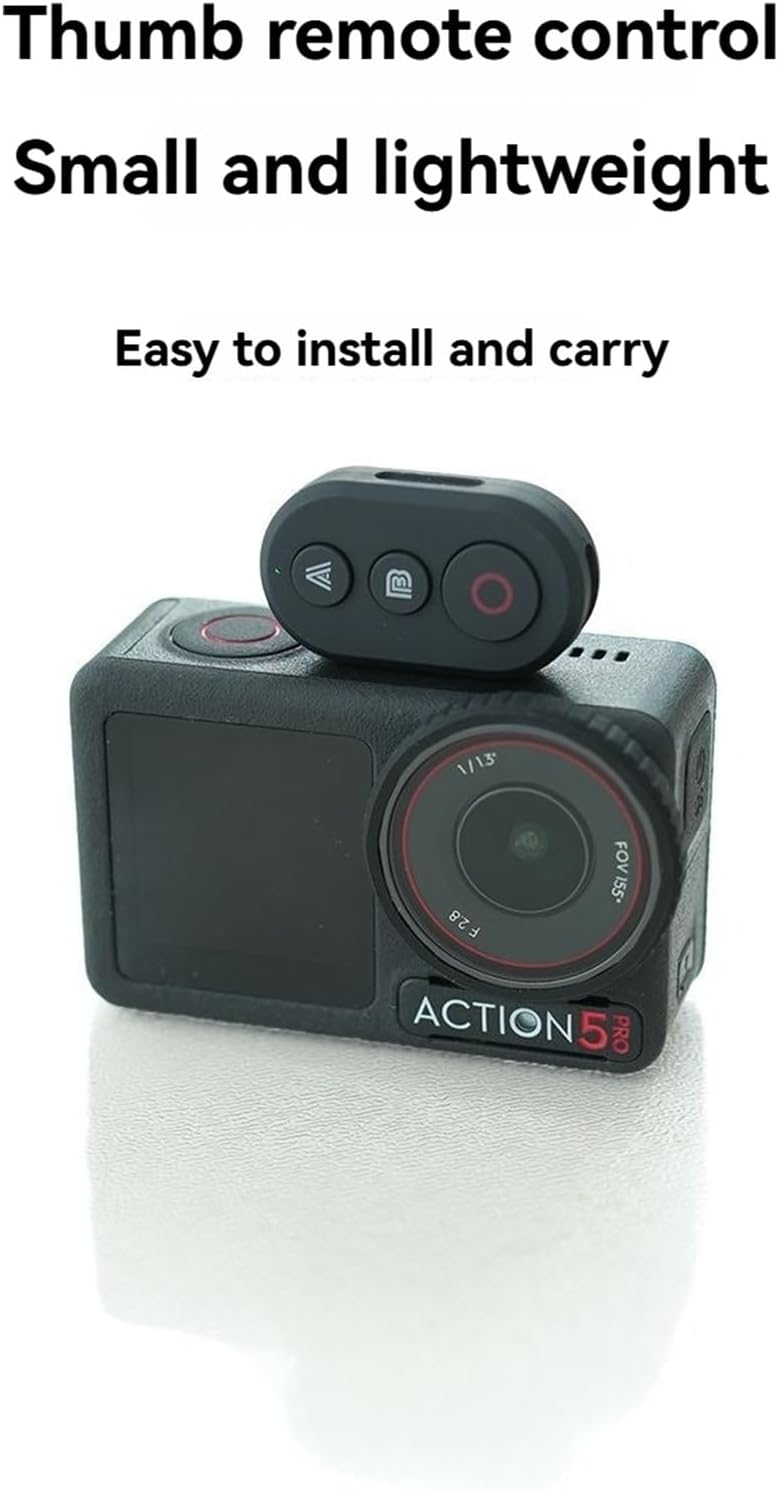
1. 버튼 기능 이상view

- 'A' 버튼: Primarily used for waking up the camera or device from sleep mode without initiating a shot. When controlling a mobile phone, this button typically functions as 'Zoom In'.
- 'B' Button: Used to wake up the camera and immediately begin shooting. It can also be used for main mode switching or marking. When controlling a mobile phone, this button typically functions as 'Zoom Out'.
- Red Circular Button: The main shooting button for both cameras and mobile phones.
- Three-color Indicator Light: 리모컨의 상태(예: 페어링, 연결됨, 배터리 부족)에 대한 시각적 피드백을 제공합니다.
2. Instant Wake-up and Shooting
The remote control features an instant wake-up function for your camera:
- If the camera is in a dormant state, pressing the 'B' 버튼 will wake up the camera and immediately start recording or taking photos.
- 누르기 'A' 버튼 will only wake up the camera without initiating a shot, allowing you to prepare before recording.

3. Mobile Phone Control
The remote control supports most Android phones and iPhones for taking photos and zooming:
- 'A' 버튼: 확대
- 'B' Button: 축소
- Red Circular Button: Take Photo / Start Recording

4. 리모컨 충전하기
The remote control features a built-in rechargeable battery and supports Type-C charging.
- Connect the provided USB charging cable to the Type-C port on the remote control and to a standard USB power source.
- 충전 표시등은 충전 상태를 나타냅니다(예: 충전 중에는 빨간색으로 켜지고, 완전히 충전되면 꺼집니다).
- The remote can be used while it is charging.

유지
- Keep the remote control dry. Do not expose it to moisture or liquids.
- Clean the remote with a soft, dry cloth. Avoid using harsh chemicals or abrasive cleaners.
- 사용하지 않을 때에는 리모컨을 서늘하고 건조한 곳에 보관하십시오.
- 리모컨을 떨어뜨리거나 강한 충격을 가하지 마십시오.
문제 해결
리모컨이 페어링되지 않습니다.
- 리모컨이 충전되어 있는지 확인하세요.
- Make sure the remote is in pairing mode (indicator light flashing).
- Verify Bluetooth is enabled on your camera or mobile phone.
- Move the remote closer to the device you are trying to pair with.
- Restart both the remote and the device, then attempt pairing again.
리모컨으로 기기를 제어할 수 없습니다.
- Confirm the remote is successfully paired and connected to your device.
- 리모컨의 배터리 잔량을 확인하세요.
- Ensure the device (camera or phone) is within the operational range (30m for camera, 25m for phone).
- Some camera or phone settings might interfere with remote control. Consult your device's manual.
표시등이 작동하지 않음:
- The battery may be completely depleted. Charge the remote.
- If the remote is fully charged and still unresponsive, contact customer support.
보증 및 지원
Specific warranty information for this product is not provided in the available documentation. For warranty claims, technical support, or further assistance, please refer to the seller or manufacturer's official web해당 웹사이트를 방문하거나 고객 서비스 센터에 직접 문의하세요.