

1. 서론
This manual provides instructions for the installation, operation, and maintenance of your Roinvou 4+128G Android 15 Car Radio. Please read this manual thoroughly before using the product to ensure proper functionality and safety. This device is designed to enhance your driving experience with advanced multimedia and connectivity features.
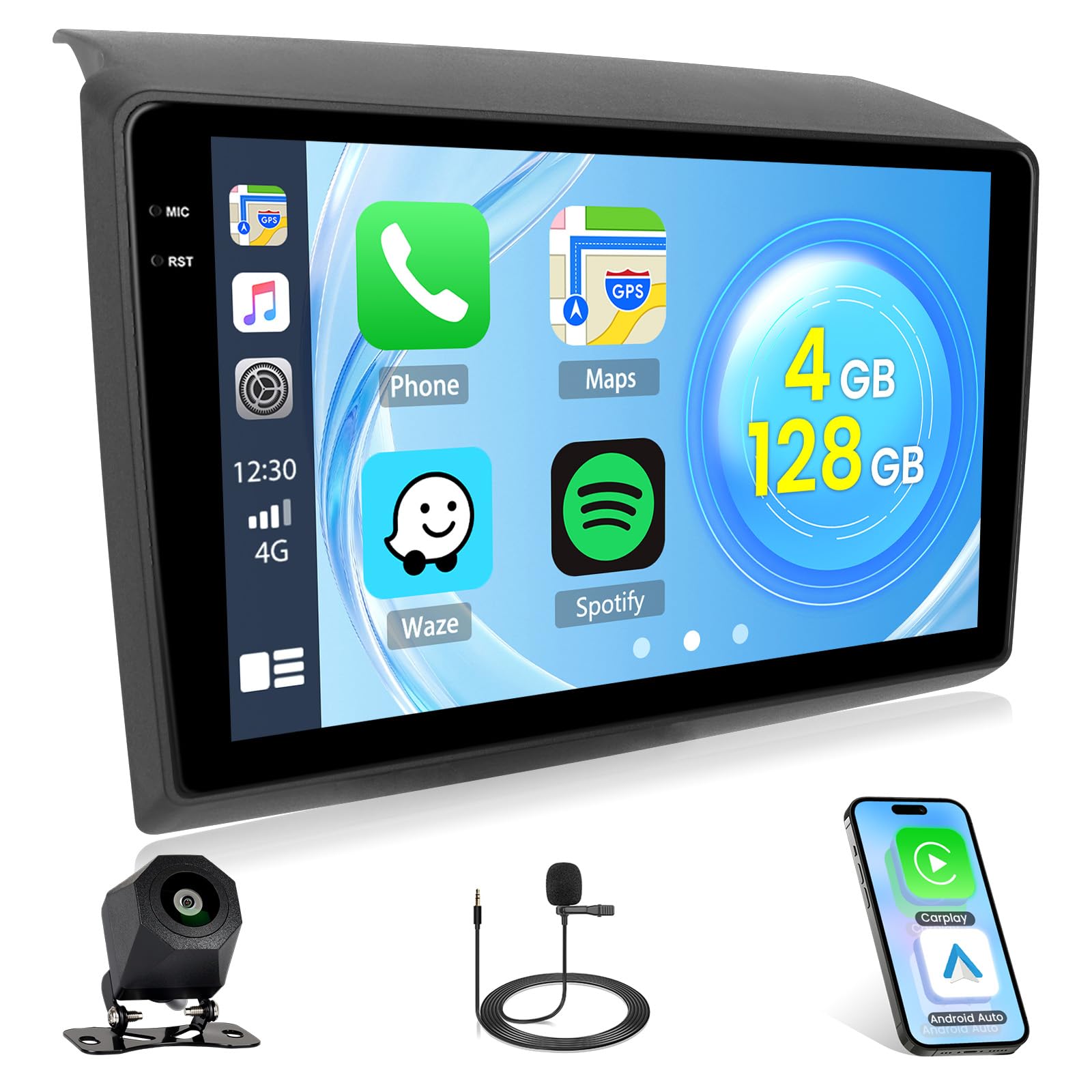
Image: Roinvou 4+128G Android 15 Car Radio with 9-inch Incell screen.
2. 차량 호환성
This Roinvou car radio is compatible with Fiat Ducato, Peugeot Boxer, and Citroen Jumper models manufactured between 2006 and 2023. It is crucial to verify your vehicle's dashboard console matches the compatible configurations shown below before installation.

Image: Diagram showing compatible (A: Fit) and incompatible (B: Not Fit) car dashboard consoles for installation.
Please check your car's central console against the images provided. If your console matches Figure A, the product is compatible. If it matches Figure B, it is not compatible.
3. 상자 안에 무엇이 들어있나요?
패키지를 열 때 다음 품목이 모두 들어 있는지 확인하세요.
- Roinvou Android Car Radio (9-inch Incell Screen)
- 듀얼 전원 케이블
- USB 어댑터 케이블
- 라디오 안테나
- CANbus 디코더
- RCA 케이블 세트
- 후면 카메라 입력 케이블
- GPS 안테나
- 듀얼 USB 케이블
- 뒤쪽 View 카메라
- 외부 마이크
- 설치 액세서리
- 사용 설명서 (본 문서)
- 설치 도구

이미지: 제품 패키지에 포함된 모든 구성품을 시각적으로 나타낸 그림.
4. 설정 및 설치
전문가의 설치를 권장합니다. 설치를 시작하기 전에 차량의 전원을 차단하세요.
4.1. 설치 전 확인
Before installing the unit, compare your car's original radio and wiring harness with the provided components to ensure compatibility. Pay close attention to the power cord interface.

Image: Detailed wiring diagram showing connections for power, RCA, rear camera, and GPS antenna. Includes a note to check power cord interface compatibility.
4.2. 설치 단계
- 기존 라디오를 제거하세요: Carefully remove your vehicle's existing radio unit and trim panels using the provided installation tool.
- 배선 하네스 연결: Connect the dual power cable, USB adapter cable, radio antenna, and RCA cables to the corresponding ports on the new Roinvou unit and your vehicle's wiring harness.
- CANbus Connection (if applicable): If your vehicle requires a CANbus decoder, connect it as per the instructions. Ensure the CANbus is connected before powering on the machine.
- GPS Antenna Installation: GPS 안테나를 깨끗한 곳에 설치하세요. view of the sky, typically on the dashboard or under the windshield. Connect the GPS antenna cable to the unit.
- 뒤쪽 View 카메라 설치 :
후면 설치 view camera at the back of your vehicle. Connect the camera's power cable to the reverse light power source and the video signal cable to the rear camera input on the main unit. The white plug must be connected to the car radio, or you may experience issues with Bluetooth and Wi-Fi signals.

Image: Diagram illustrating the wiring connections for the backup camera, including power and video signal lines.
- 외부 마이크 연결: Connect the external microphone to the designated port on the unit for improved call quality.
- 테스트 기능: Before fully reassembling the dashboard, temporarily connect the vehicle's power and test all functions of the radio, including audio, touchscreen, GPS, Bluetooth, and camera.
- 장치 보안: Once all functions are verified, secure the Roinvou unit into the dashboard and reattach all trim panels.

Image: Comparison of a car dashboard before and after the Roinvou car radio installation, showing a seamless fit.
5. 사용 설명서
Your Roinvou car radio features an intuitive Android 15 operating system with a responsive Incell touchscreen.
5.1. 기본 동작
- 전원 켜기/끄기: Press and hold the power button to turn the unit on or off. A short press typically mutes or unmutes audio.
- 볼륨 조절: 실제 버튼이나 화면 컨트롤을 사용하여 볼륨을 조절하세요.
- 홈 화면: 홈 아이콘을 탭하면 애플리케이션의 메인 화면으로 돌아갑니다.
- 항해: Swipe left or right on the screen to access different app pages.

Image: Digital interface of the car stereo system displaying icons for CAR, IPS, Bluetooth, and other vehicle system functions.
5.2. 무선 CarPlay 및 Android Auto
Connect your iPhone or Android smartphone wirelessly to access navigation, calls, messages, and music directly on the car radio screen.
- 스마트폰에서 Bluetooth와 Wi-Fi가 활성화되어 있는지 확인하세요.
- On the car radio, navigate to the CarPlay or Android Auto application.
- 화면의 안내에 따라 기기를 페어링하세요.

Image: Display showing the interface for Wireless CarPlay and Android Auto, with icons for GPS, Music, Calls, and Messages.
5.3. GPS 내비게이션
The unit supports GPS, BeiDou, Glonass, and Galileo satellite systems for accurate navigation. You can use pre-installed maps or download additional navigation apps.

Image: Visual representation of GPS navigation capabilities, including online and offline map options, supporting GPS, BeiDou, Glonass, and Galileo.
5.4. 블루투스 연결
Pair your smartphone via Bluetooth for hands-free calling and audio streaming. The external microphone ensures clear communication.

Image: Display showing Bluetooth interface for phone calls and music playback, highlighting improved sound quality.
5.5. FM/RDS 라디오 및 EQ 설정
Access your favorite radio stations with the built-in FM/RDS tuner. Customize your audio experience using the equalizer (EQ) settings for optimal sound quality.

Image: Digital radio interface showing FM/RDS tuner with preset stations, EQ settings, and search functions.
5.6. Wi-Fi Connectivity and Apps
Connect to Wi-Fi for internet access, allowing you to download apps, stream content, and stay updated. The unit supports 5G Wi-Fi for fast internet speeds.

Image: Illustration of 5G WiFi connectivity and compatibility with various internet applications like YouTube, Netflix, and social media.
5.7. Split Screen and User Interface Customization
Utilize the split-screen function to run two applications simultaneously, such as navigation and music. The unit also offers multiple user interface options for personalization.

Image: Display demonstrating split-screen functionality for simultaneous app use and various customizable user interface themes.
5.8. 스티어링 휠 제어(SWC)
The unit supports steering wheel controls for convenient and safe operation. Configuration may vary depending on whether your vehicle has a CANbus decoder.
- Without CANbus Decoder: Connect the steering wheel control wires (Key1/Key2) in the power cable to the corresponding port or wire of your original car. Then, go to "Steering Wheel Key" in the settings to manually match and activate button functions.
- With CANbus Decoder: Connect the CANbus before powering on the machine. Navigate to Apps > Settings > Factory Settings (1234) > CAN Settings. Select the brand of the CANbus decoder and then the matching model and year according to your vehicle's actual situation to ensure SWC works correctly.

Image: Illustration of steering wheel controls and instructions for configuring them with or without a CANbus decoder.
5.9. 후면 View 카메라
포함된 후면 view 이 카메라는 선명한 광각을 제공합니다. view for safer parking and reversing, with both day and night vision capabilities.

Image: Split image showing the clear view provided by the rear view camera during both day and night conditions.
6. 유지관리
- 청소: 부드럽고 마른 천을 사용하여 화면과 기기 외부를 닦으세요. 연마성 세척제나 용제는 사용하지 마세요.
- 소프트웨어 업데이트: Periodically check for software updates through the unit's settings or the Roinvou official web최적의 성능과 새로운 기능에 대한 액세스를 보장하기 위해 사이트를 사용합니다.
- 환경 조건: 본 제품을 극한의 온도, 장시간 직사광선 또는 과도한 습기에 노출시키지 마십시오.
7. 문제 해결
문제가 발생하면 다음의 일반적인 문제와 해결 방법을 참조하세요.
| 문제 | 가능한 원인 | 해결책 |
|---|---|---|
| 장치의 전원이 켜지지 않습니다. | 잘못된 배선, 퓨즈 끊김, 차량 전원 문제. | 전원 케이블 연결 상태를 확인하고, 차량 퓨즈를 점검하고, 차량 배터리가 충전되어 있는지 확인하십시오. |
| 소리가 나지 않습니다. | 볼륨이 음소거되었거나, 스피커 선이 분리되었거나, 오디오 설정이 잘못되었습니다. | Check volume level, verify speaker connections, adjust audio output settings. |
| 터치스크린이 응답하지 않습니다. | 소프트웨어 오류, 화면 손상. | 기기를 재시작하십시오. 문제가 지속되면 고객 지원팀에 문의하십시오. |
| CarPlay/Android Auto가 연결되지 않습니다. | Bluetooth/Wi-Fi가 꺼져 있고, 페어링이 잘못되었으며, 휴대폰과 호환되지 않습니다. | Ensure phone's Bluetooth/Wi-Fi is on, re-pair device, check phone compatibility. Ensure white plug for Wi-Fi/Bluetooth is connected. |
| 후방 카메라가 표시되지 않습니다. | Incorrect wiring, camera power issue, camera faulty. | Verify rear camera input cable connection, check camera power supply, ensure reverse gear is engaged. |
| 스티어링 휠 컨트롤이 작동하지 않습니다. | Incorrect SWC wiring, CANbus not configured. | Check SWC wire connections. If using CANbus, ensure it's correctly configured in Factory Settings. |
For issues not listed here or if troubleshooting steps do not resolve the problem, please contact Roinvou customer support.
8. 사양
| 특징 | 세부 사항 |
|---|---|
| 상표 | 로인부 |
| 모델 번호 | B0FX4PBKYC |
| 운영 체제 | 안드로이드 15 |
| RAM + 저장공간 | 4GB RAM + 128GB 스토리지 |
| 화면 유형 | 9-inch Incell Touchscreen |
| 해결 | 1280 x 720 |
| 연결 기술 | 블루투스, USB, Wi-Fi |
| 무선 기술 | 블루투스 |
| 특별 기능 | Wireless CarPlay, Android Auto, Mirror Link, EQ, FM/RDS, GPS, SWC, Rear Camera Support |
| 호환 장치 | 스마트폰 |
| 커넥터 유형 | USB Type-A, RCA |
| 오디오 출력 모드 | 스테레오 재생 |
| 서라운드 사운드 채널 | 4 |
| 출력 전력 | 45 와트 |
| 비디오 인코딩 | MKV/RMVB/AVI/MP4/MDV |
| Internet Applications | CarPlay, 안드로이드 오토 |
| 패키지 크기 | 44 x 28 x 10.5cm; 3kg |
| 제조업체 부품 번호 | Roinvou-A7942A4294H6MI2EU31D |
| 소프트웨어 업데이트는 다음 날짜까지 보장됩니다. | 알려지지 않은 |
9. 보증 및 지원
9.1. 제품 보증
This Roinvou product comes with a 24개월 보증 구매일로부터 정상적인 사용 중에 발생한 제조상의 결함 및 오작동을 보장합니다.
9.2. 고객 지원
Roinvou offers lifetime online support for all inquiries. Our team aims to respond to all questions within 24 hours. If you have any questions or require assistance, please contact us:
- 이메일: roinvouservices@163.com
- 아마존 플랫폼: You can also reach us through the Amazon platform by clicking "Ask a question" on our seller page.

Image: Visual representation of customer support options, including email and Amazon seller contact.