
1. 서론
Thank you for choosing the Reobiux A20H-1P Dual Lens 6MP Wi-Fi Outdoor Security Camera. This manual provides essential information for setting up, operating, and maintaining your security camera. Please read it thoroughly before use to ensure proper functionality and safety. This camera is designed to provide comprehensive surveillance for your home, garden, garage, or office with advanced features like dual lenses, 2.5K resolution, 360° PTZ, and smart detection.
2. 제품 오버view
2.1 주요 특징
- 듀얼 렌즈 및 5배 줌: Equipped with a dual-lens PTZ platform, supporting 360° rotation and dynamic tracking for complete coverage without blind spots.
- 2.5K 해상도 및 컬러 야간 투시 기능: Features 2.5K resolution and 14 white LEDs plus dual infrared light sources, ensuring clear color images even in low light conditions up to 30 meters.
- AI Detection & Auto Tracking: Automatically tracks movement when an intruder triggers the alarm, sending real-time alerts to your smartphone.
- Two-Way Audio & Active Alarm: Supports remote real-time communication, allowing interaction with visitors or deterring intruders with bright light flashes and an 80dB siren.
- 2.4G/5G Wi-Fi 및 듀얼 스토리지: Offers fast wired or wireless connection (2.4G/5G Wi-Fi) and supports storage on a Micro SD card (up to 128GB, not included) or cloud service (subscription required).
2.2 패키지 내용
다음 품목이 패키지에 포함되어 있는지 확인하세요.
- Reobiux Outdoor Camera (A20H-1P) x 1
- 사용설명서 x 1
- Installation Template/View x 1
- 1.6m 전원 케이블 x 1
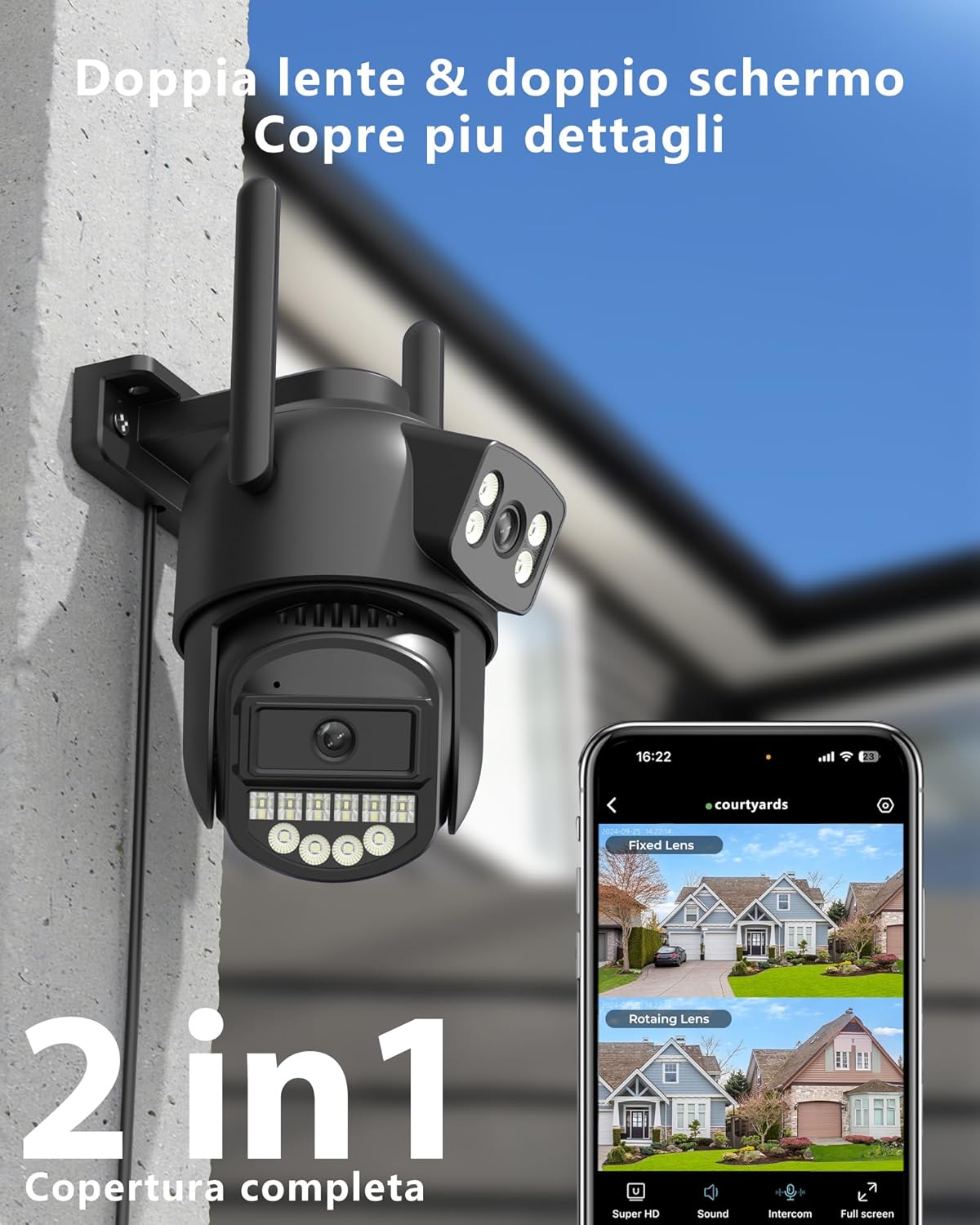
Image: Reobiux A20H-1P Dual Lens 6MP Wi-Fi Outdoor Security Camera, showing its dual lens design and antennas.

Image: Illustration of the dual lens system providing comprehensive security for a property, highlighting 3MP+3MP resolution.
3. 설정 가이드
3.1 앱 다운로드 및 설치
To use your Reobiux camera, you need to download the 오캄 프로 앱 on your smartphone or tablet. The app is available on both Google Play Store and Apple App Store.
- Scan the QR code provided in the quick start guide or search for "O-KAM Pro" in your device's app store.
- 앱을 다운로드하고 설치하세요.
- 새 계정을 등록하거나 이미 계정이 있는 경우 로그인하세요.

Image: Screenshots of the O-KAM Pro app interface, indicating compatibility with Google Play and App Store.
3.2 카메라 연결
Your camera supports both 2.4GHz and 5GHz Wi-Fi networks, as well as a wired Ethernet connection for flexible installation.
- 전원 켜기: Connect the camera to a power source using the provided 1.6m power cable. The camera will initiate its self-test and indicator lights will flash.
- 앱에 장치 추가: Open the O-KAM Pro App, tap the "+" icon to add a new device. Follow the on-screen instructions.
- Wi-Fi 연결: Select your 2.4GHz or 5GHz Wi-Fi network and enter the password. Ensure your phone is connected to the same network during setup. The camera will connect automatically.
- 이더넷 연결(선택 사항): If you prefer a wired connection, connect an Ethernet cable from your router to the camera's RJ45 port. The app will detect the camera automatically.
- 설정 완료: Once connected, name your camera and set up any initial preferences.

Image: Diagram illustrating the coverage differences between 2.4GHz (wider coverage, lower speed) and 5GHz (reduced coverage, faster speed) Wi-Fi, and the camera's Ethernet port.
3.3 카메라 장착
Use the provided installation template and screws to securely mount the camera in your desired outdoor or indoor location. Ensure the camera has a clear field of view and is within Wi-Fi range or near an Ethernet port.
- Choose a mounting location that offers optimal surveillance and protection from direct impact.
- Use the installation template to mark drill holes.
- Drill the holes and insert wall anchors if necessary.
- Secure the camera bracket with screws.
- 필요에 따라 카메라 각도를 조정하세요.
4. 사용 설명서
4.1 라이브 View 및 PTZ 제어
Once connected, open the O-KAM Pro App to access the live view of your camera. The app displays both fixed and rotating lens views.
- 고정 렌즈 View: Provides a static overview of a specific area.
- 회전 렌즈 View: Allows you to pan (horizontal) and tilt (vertical) the camera remotely for a 360° panoramic view. Use the directional controls in the app.
- 디지털 줌: Pinch to zoom on the live feed to magnify details up to 5x.

이미지: 분할 view showing the fixed lens capturing a child playing in a garden and the PTZ lens focusing on a car, demonstrating 2.5K resolution.

Image: A car with an enlarged view of its license plate, illustrating the 2.5K resolution and 5x digital zoom capability for clear detail identification.
4.2 야간 투시 모드
이 카메라는 뛰어난 야간 투시 기능을 제공합니다.
- 적외선 나이트 비전: Automatically activates in low light, providing clear black and white images.
- 컬러 나이트 비전: Utilizes the 14 white LEDs to illuminate the area, providing full-color video even in complete darkness. This mode can be activated manually or set to trigger upon motion detection.

Image: Split image showing a garage and patio in daylight on one side and in black and white night vision on the other, highlighting the 30m maximum night vision distance with 14 LEDs.

Image: Three panels comparing a house exterior in daylight, infrared night vision (black and white), and color night vision, demonstrating the camera's versatile night view옵션.
4.3 양방향 오디오
내장 마이크와 스피커를 통해 실시간 양방향 통신이 가능합니다.
- 앱에서 마이크 아이콘을 탭하면 카메라를 통해 말할 수 있습니다.
- 카메라 주변의 오디오를 휴대전화로 들어보세요.

Image: A delivery person at a door, with speech bubbles indicating two-way audio communication via the camera.
4.4 Smart Detection and Alarms
The camera features advanced AI for person and vehicle recognition, reducing false alarms.
- Human/Vehicle Detection: The camera can differentiate between humans, vehicles, and other moving objects.
- 자동 추적 : When a person is detected, the camera's rotating lens will automatically follow their movement.
- 소리와 빛을 이용한 경보: Upon detection, the camera can emit bright light flashes and an 80dB siren to deter intruders.
- 실시간 알림: 움직임이 감지되면 스마트폰으로 즉시 알림을 받으세요.

Image: A child on a skateboard, with an overlay highlighting AI person recognition and automatic tracking with 99% precision.

Image: An intruder being deterred by the camera's sound and light alarm, indicating an 80dB siren.

Image: A person reacting to a camera's alarm and light, with a smartphone notification showing an alert, illustrating immediate notification and active defense.

Image: Multiple blurred figures of intruders being followed by the camera's automatic tracking feature, with a red tracking box.
4.5 기록 및 저장
이 카메라는 24시간 연속 녹화와 이벤트 트리거 녹화를 지원합니다.
- 마이크로 SD 카드 : Insert a Micro SD card (up to 128GB, not included) into the designated slot. The app will automatically overwrite older recordings when the card is full.
- 클라우드 스토리지: Subscribe to the cloud storage service via the O-KAM Pro App for secure, off-site storage of your recordings.
- 재생: 기록된 foo에 액세스tag앱의 재생 기능을 통해.

Image: A close-up of the camera's SD card slot, with icons indicating 24/7 recording, Micro SD card storage (up to 128GB), and cloud storage options.
4.6 가족과 공유하기
You can share access to your camera with family members through the O-KAM Pro App, allowing multiple users to view 실시간 영상을 시청하고 알림을 받으세요.
- 앱에서 카메라 설정으로 이동하여 "기기 공유" 옵션을 찾으세요.
- Invite family members by entering their O-KAM Pro account details.
- They will receive an invitation to view 카메라.

Image: A colorful world map with circular images of people using smartphones, and a smartphone displaying camera feeds, illustrating the family sharing feature.
5. 유지관리
Regular maintenance ensures optimal performance and longevity of your Reobiux camera.
- 청소: 카메라 렌즈와 본체를 부드러운 천으로 살살 닦아주세요.amp cloth. Avoid using harsh chemicals or abrasive materials that could scratch the lenses.
- 전원 연결: Periodically check the power cable for any signs of wear or damage. Ensure it is securely connected.
- 와이파이 신호: Monitor the Wi-Fi signal strength in the app to ensure a stable connection. If the signal is weak, consider repositioning the camera or your Wi-Fi router.
- SD 카드 관리 : If using an SD card, ensure it is functioning correctly. The camera automatically overwrites old data, so manual deletion is generally not required unless you wish to clear specific footage.
- 펌웨어 업데이트: Check the O-KAM Pro App regularly for firmware updates. Keeping your camera's firmware up-to-date ensures you have the latest features and security enhancements.
6. 문제 해결
Reobiux 카메라 사용 중 문제가 발생하면 다음 일반적인 문제 및 해결 방법을 참조하십시오.
| 문제 | 가능한 해결책 |
|---|---|
| 카메라가 Wi-Fi에 연결되지 않음 | Ensure your Wi-Fi network is 2.4GHz or 5GHz. Check Wi-Fi password. Move camera closer to router. Restart camera and router. |
| 화질이 나쁘다 | Clean the camera lens. Ensure sufficient lighting. Check network stability. Adjust resolution settings in the app. |
| 모션 감지 알림 없음 | Verify motion detection settings are enabled in the app. Adjust sensitivity. Ensure camera has a clear view of the detection area. Check app notification settings on your phone. |
| 양방향 오디오가 작동하지 않음 | Check microphone and speaker permissions for the app on your phone. Ensure camera's microphone and speaker are not obstructed. Adjust volume settings. |
| SD 카드가 녹화되지 않습니다 | Ensure the SD card is inserted correctly and is not full. Format the SD card through the app (this will erase all data). Try a different compatible SD card. |
| 카메라 오프라인 | Check power supply. Verify Wi-Fi or Ethernet connection. Restart camera. If using Wi-Fi, check router status. |
For further assistance, please refer to the in-app help section or contact Reobiux customer support.
7. 사양
| 특징 | 세부 사항 |
|---|---|
| 상표 | 레오비우 |
| 모델명 | A20H |
| 연결 기술 | 2.4/5G WIFI, Wired (Ethernet), Onvif, Rtsp |
| 특별 기능 | Dual Lens, Local Recording, HD Resolution, PTZ Technology, Night Vision |
| 사용환경 | 야외, 실내 |
| 호환 장치 | 데스크탑, 노트북, 스마트폰, 태블릿 |
| 방수 레벨 | IP66 (방수) |
| 폼 팩터 | 총알 |
| 제어 방법 | 앱 |
| 비디오 캡처 해상도 | 2.5K |
| 비디오 인코딩 | H.265 |
| 나이트 비전 범위 | 30 미터 |
| 야간 투시경 유형 | 밤의 색깔 |
| IR LED 수 | 14 |
| 지원되는 최대 플래시 메모리 용량 | 128GB(마이크로SD) |
| 전원 공급 장치 | 유선 전기 |
| 권tage | 12볼트 |
| 왓tage | 5 와트 |
| 필요한 배터리 | 아니요 |
| View잉 각도 | 270도 (PTZ) |
| 초점 유형 | 자동 초점 |
| 줌 타입 | 디지털 줌 |
| 줌 비율 | 5x |
| 광센서 기술 | CMOS |
| 품목 치수 | 12 x 12 x 10cm |
| 원산지 | 중국 |

Image: The Reobiux A20H-1P camera mounted outdoors in the rain, highlighting its IP66 waterproof rating.

Image: A diagram illustrating the IP66 waterproof rating, showing the camera functioning normally in temperatures from -30°C to +50°C and in rainy conditions.
8. 보증 및 지원
Reobiux is committed to providing reliable products and excellent customer service.
- 보증: Your Reobiux A20H-1P camera comes with a standard manufacturer's warranty. Please refer to the product packaging or the Reobiux official web구체적인 보증 약관은 해당 사이트에서 확인하세요.
- 고객 지원: Reobiux offers real-time chat support and aims to respond to all messages within 24 hours during business days.
- 온라인 리소스: 방문하세요 Reobiux Store on Amazon or the official Reobiux website for FAQs, updated manuals, and additional support.

Image: An illustration of a customer service representative with a headset and laptop, symbolizing 24/7 availability and quick response times for support.