
1. 서론
This manual provides detailed instructions for the installation, operation, and maintenance of your ZSUS X99-8D4 Motherboard Set Kit. This kit includes the ZSUS X99-8D4 motherboard, an Intel Xeon E5 2650 V4 CPU, and 16GB (1x16GB) of DDR4 2133MHz memory. Please read this manual thoroughly before proceeding with installation to ensure proper setup and optimal performance.
2. 제품 오버view
The ZSUS X99-8D4 motherboard is designed for high-performance computing, supporting Intel LGA2011-3 processors and DDR4 memory. It features an NVMe M.2 slot for high-speed storage and Gigabit Ethernet for reliable network connectivity.
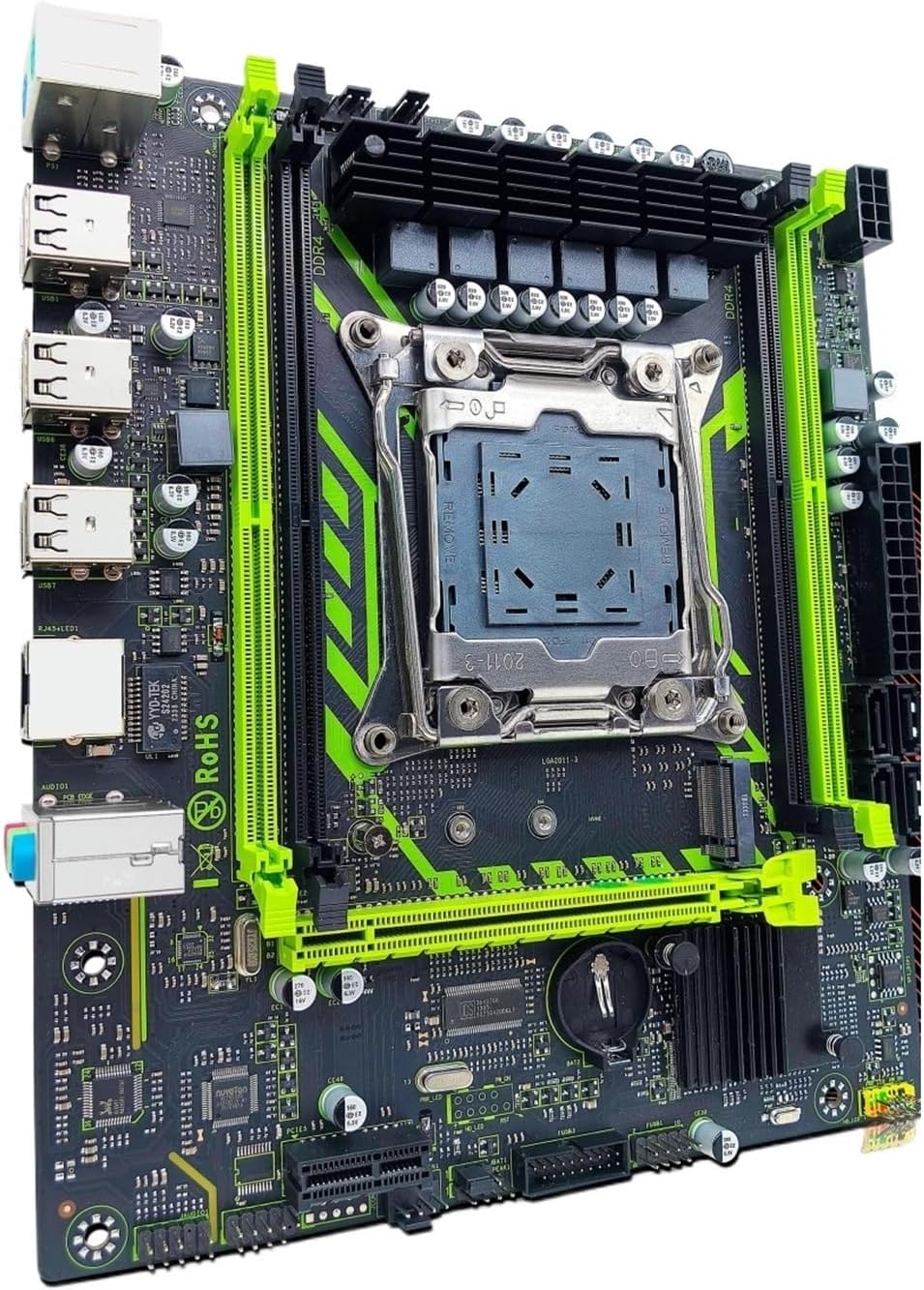
그림 2.1: ZSUS X99-8D4 Motherboard Set Kit. This image displays the complete motherboard kit, including the motherboard, CPU, and RAM, ready for installation.
주요 특징:
- CPU 지원: LGA2011-3 socket for Intel Xeon E5 V3/V4 series processors.
- 메모리: 4x DDR4 memory slots, supporting up to 128GB of RAM.
- 저장: NVMe M.2 slot (2280 form factor) for high-speed SSDs, and multiple SATA 2.0 ports.
- 확장: 1x PCIe x16 slot (PCI-E 3.0) for graphics cards, 1x PCIe x1 slot.
- 네트워킹: Integrated Gigabit Ethernet (1000Mbps).
- USB: Multiple USB 2.0 ports.
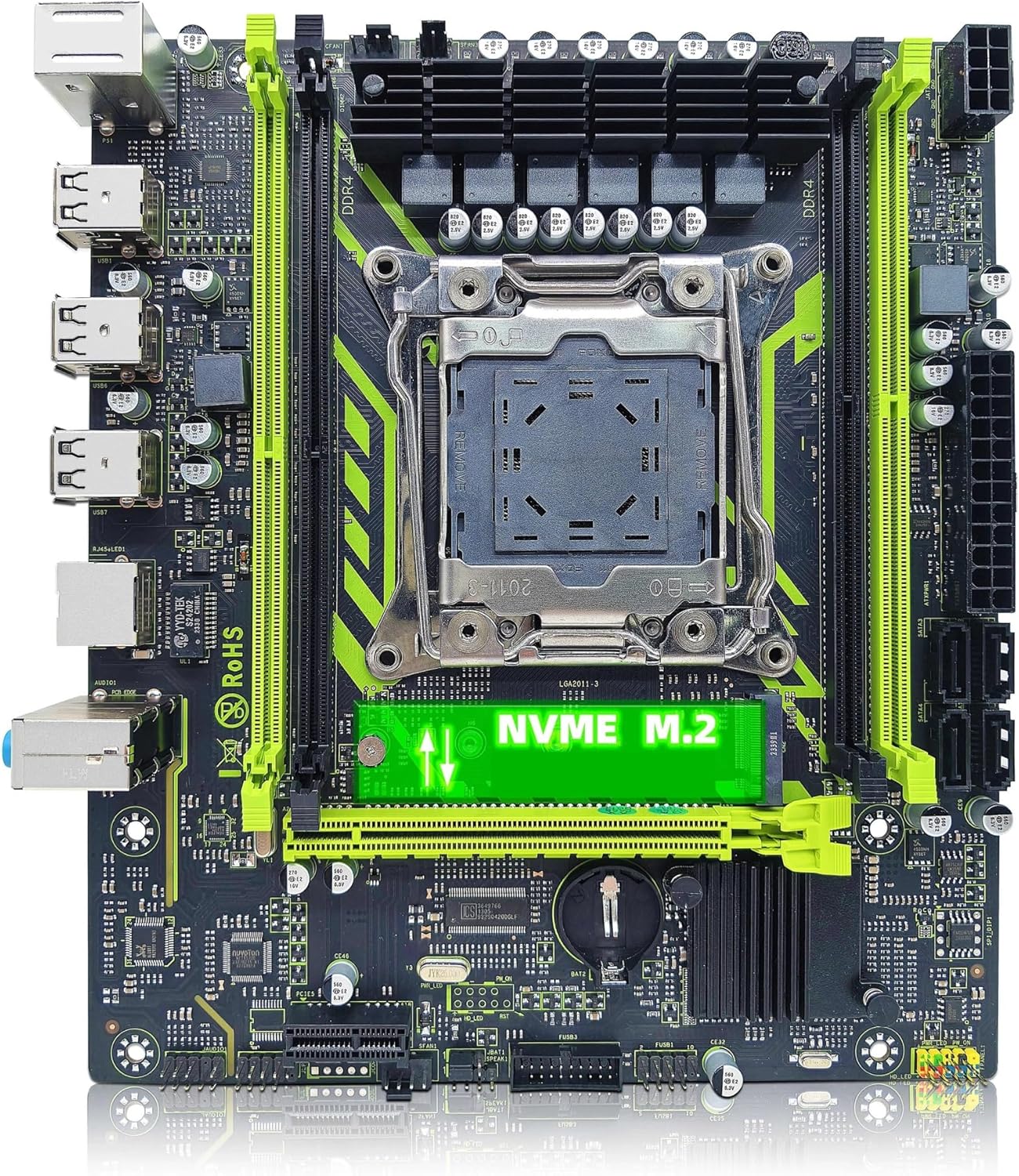
그림 2.2: ZSUS X99-8D4 Motherboard highlighting the NVMe M.2 slot. This image shows the motherboard with the NVMe M.2 slot clearly visible, indicating its location for SSD installation.
3. 설정 및 설치
설치를 시작하기 전에 시스템 전원이 꺼져 있고 전원 플러그가 뽑혀 있는지 확인하십시오. 정전기 방전(ESD)으로 인한 부품 손상을 방지하기 위해 정전기 방지 손목 스트랩을 착용하십시오.
3.1 풀기 및 검사
Carefully remove all components from their packaging. Verify that all items listed in your kit are present and undamaged. The kit typically includes the motherboard, CPU, RAM, I/O shield, and SATA cable.
3.2 마더 보드 설치
- 컴퓨터 케이스의 뒤쪽 개구부에 I/O 실드를 설치합니다.
- Align the motherboard with the standoffs inside your computer case.
- Secure the motherboard with screws, ensuring it is firmly seated and not touching any metal parts of the case directly.

그림 3.1: ZSUS X99-8D4 Motherboard with dimensions. This image illustrates the physical dimensions of the motherboard, showing a width of 215mm and a length of 190mm, which is useful for case compatibility.
3.3 CPU 설치(Intel Xeon E5 2650 V4)
- 메인보드에서 LGA2011-3 CPU 소켓을 찾으십시오.
- 레버를 아래쪽으로 밀고 바깥쪽으로 빼서 CPU 소켓 고정 장치를 엽니다.
- Carefully place the Intel Xeon E5 2650 V4 CPU into the socket, aligning the gold triangle on the CPU with the corresponding mark on the socket. Do not force the CPU into place.
- 고정 장치를 닫아 CPU를 고정합니다.
- CPU 상단에 써멀 페이스트를 얇고 고르게 바르십시오.
- 제조업체의 지침에 따라 CPU 쿨러를 설치하세요.
3.4 RAM 설치 (DDR4)
- 마더보드에서 DDR4 메모리 슬롯 4개를 찾으세요.
- 메모리 슬롯 양쪽 끝에 있는 클립을 엽니다.
- Align the notch on the 16GB DDR4 memory module with the key in the memory slot.
- 클립이 제자리에 고정될 때까지 메모리 모듈의 양쪽 끝을 단단히 누릅니다.
3.5 NVMe M.2 SSD Installation
- Locate the NVMe M.2 slot on the motherboard.
- M.2 스탠드오프 나사를 제거합니다.
- M.2 SSD를 30도 각도로 슬롯에 삽입합니다.
- SSD를 아래로 눌러 스탠드오프 나사로 고정하십시오.
3.6 그래픽 카드 및 기타 PCIe 장치
- 그래픽 카드용 PCIe x16 슬롯을 찾으십시오.
- 슬롯 끝에 있는 고정 클립을 엽니다.
- 그래픽 카드를 슬롯에 맞춰 놓고 딸깍 소리가 나면서 제자리에 고정될 때까지 세게 누르십시오.
- 그래픽 카드를 나사로 케이스에 고정합니다.
- Install any other PCIe x1 expansion cards as needed.
3.7 전원 공급 장치 연결
- 전원 공급 장치의 24핀 ATX 전원 커넥터를 마더보드에 연결합니다.
- Connect the 8-pin CPU power connector (and 4-pin if available/needed) to the corresponding sockets near the CPU.
- SATA 전원 케이블을 저장 장치에 연결하십시오.
3.8 전면 패널 및 주변 장치 연결
- Connect the front panel headers (Power SW, Reset SW, HDD LED, Power LED) to the designated pins on the motherboard. Refer to the motherboard diagram for correct pin assignments.
- Connect USB 2.0 headers from your case to the motherboard.
- 전면 패널 오디오 헤더를 연결합니다.
- Connect SATA data cables from your storage devices to the SATA 2.0 ports on the motherboard.

그림 3.2: ZSUS X99-8D4 Motherboard with labeled ports and connectors. This image provides a detailed layout of the motherboard, indicating the locations of the CPU socket, DDR4 slots, PCIe slots, SATA ports, USB headers, and power connectors.

그림 3.3: ZSUS X99-8D4 Motherboard I/O Shield and SATA Cable. This image shows the included I/O shield for the rear panel and a SATA data cable, essential accessories for system assembly.
4. 사용 설명서
4.1 첫 번째 부팅
- After all connections are made, connect your monitor, keyboard, and mouse.
- Plug in the power cord and turn on your power supply.
- 컴퓨터 케이스의 전원 버튼을 누르세요.
- 시스템이 켜지고 BIOS/UEFI 시작 화면이 표시됩니다.
4.2 BIOS/UEFI 설정
During the initial boot, press the designated key (usually 델 or F2) to enter the BIOS/UEFI setup utility. Here you can configure boot order, system time, and other hardware settings. Ensure your storage device with the operating system is set as the primary boot device.
4.3 드라이버 설치
After installing your operating system, install the necessary drivers for the motherboard chipset, LAN, and audio. These drivers are typically provided on a CD/DVD or can be downloaded from the manufacturer's website. Installing the correct drivers ensures optimal performance and stability.
5. 유지관리
5.1 청소
Regularly clean your computer's interior to prevent dust buildup, which can lead to overheating. Use compressed air to remove dust from fans, heatsinks, and motherboard components. Ensure the system is powered off and unplugged before cleaning.
5.2 BIOS 업데이트
정기적으로 제조업체를 확인하십시오 webBIOS/UEFI 업데이트 사이트입니다. 업데이트를 통해 시스템 안정성을 향상시키고, 새로운 하드웨어 지원을 추가하거나, 버그를 수정할 수 있습니다. 마더보드 손상을 방지하기 위해 업데이트 지침을 주의 깊게 따르십시오.
6. 문제 해결
이 섹션에서는 일반적으로 발생할 수 있는 문제에 대해 설명합니다.
6.1 전원 없음 / 부팅 안 됨
- Check all power connections: 24-pin ATX, 8-pin CPU, and power button header.
- 전원 공급 스위치가 'ON' 위치에 있는지 확인하세요.
- 가능하다면 다른 시스템이나 전원 공급 장치 테스터를 사용하여 전원 공급 장치를 테스트하십시오.
6.2 디스플레이 없음
- Ensure your monitor is connected to the graphics card (not the motherboard's I/O if no integrated graphics are present).
- 그래픽 카드와 메모리 모듈을 다시 장착하세요.
- 다른 디스플레이 케이블이나 모니터를 사용해 보세요.
6.3 Memory Errors
- Ensure memory modules are fully seated in their slots.
- Try booting with one memory module at a time to identify a faulty stick or slot.
- Verify memory compatibility with the motherboard.
6.4 시스템 불안정성/충돌
- CPU와 GPU 온도가 안전 작동 범위 내에 있는지 확인하십시오.
- 모든 드라이버가 최신 상태인지 확인하세요.
- 메모리 진단 도구를 실행하여 RAM 오류를 확인하세요.
7. 사양
| 특징 | 사양 |
|---|---|
| 모델 | ZSUS X99-8D4 |
| CPU 소켓 | LGA 2011-3 |
| Supported CPU | Intel Xeon E5 V3/V4 series (e.g., E5 2650 V4 included) |
| 메모리 유형 | DDR4 |
| 메모리 슬롯 | 4 |
| 최대 메모리 용량 | 128GB (XNUMX기가바이트) |
| 저장 인터페이스 | M.2 (NVMe 2280), SATA 2.0 |
| PCIe x16 슬롯 | 1 (PCI-E 3.0) |
| PCIe x1 슬롯 | 1 |
| LAN 속도 | 1000Mbps (기가비트 이더넷) |
| USB 포트 | 6 x USB 2.0 (rear I/O) |
| 오디오 포트 | 3 x Jacks |
| 폼 팩터 | ATX (approx. 215mm x 190mm) |
| 인증 | RoHS, CE |
8. 보증 및 지원
보증 정보 및 기술 지원에 대해서는 구매 시 제공된 설명서를 참조하시거나 판매자에게 직접 문의하십시오. 보증 청구를 위해 구매 증빙 자료를 보관하십시오.