
1. 서론
Thank you for choosing the AULA F3018 Mechanical Keyboard. This keyboard is designed for high-level mechanical performance and robust construction, offering precision for gaming and comfort for typing. It features Blue switches for a tactile and audible click, an ABNT2 layout with 'Ç' for Brazilian Portuguese compatibility, and full RGB lighting with multiple customizable effects. The reinforced braided cable enhances durability and ensures a stable connection. This manual provides essential information for setup, operation, and maintenance of your keyboard.
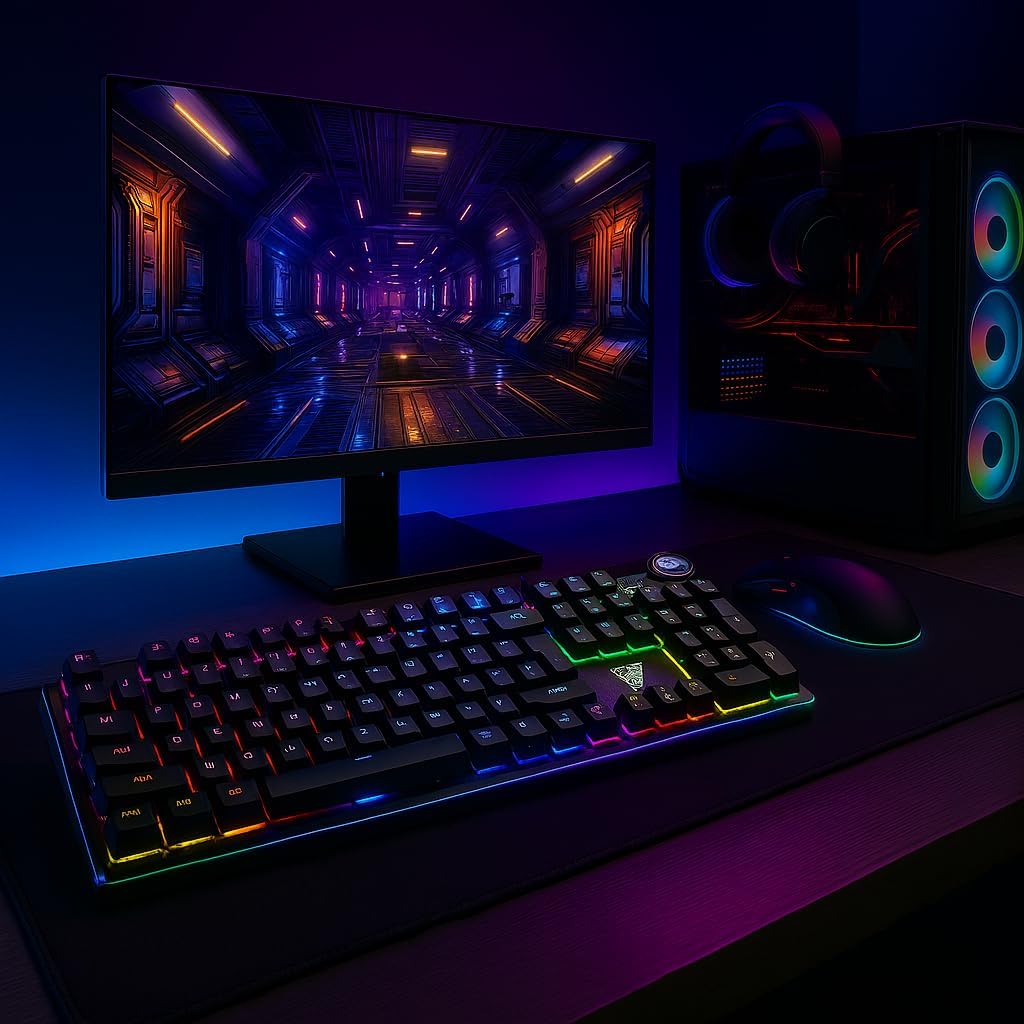
Image 1.1: AULA F3018 Mechanical Keyboard in a typical desktop setup, showcasing its RGB lighting and full-size design.
2. 패키지 내용
패키지에 모든 품목이 들어 있는지 확인하세요.
- AULA F3018 기계식 키보드
- USB 케이블(부속)
- 사용 설명서 (본 문서)
3. 설정
Follow these steps to connect your AULA F3018 Mechanical Keyboard:
- 키보드 풀기: 키보드를 포장에서 조심스럽게 꺼내세요.
- 컴퓨터에 연결: Insert the USB connector of the keyboard's reinforced cable into an available USB port on your computer (PC, Notebook, or MacBook). The keyboard supports USB 2.0 and USB 3.0 ports.
- 드라이버 설치: 이 키보드는 플러그 앤 플레이 방식입니다. 운영 체제가 필요한 드라이버를 자동으로 감지하고 설치합니다. 기본 기능을 사용하기 위해 추가 소프트웨어를 설치할 필요가 없습니다.
- 연결 확인: Once connected, the keyboard's RGB lighting should illuminate, indicating a successful connection. You can now begin using your keyboard.

이미지 3.1: 각도 view of the AULA F3018 keyboard, highlighting the durable, reinforced USB cable for connection.
4. 사용 설명서
4.1. 기본 기능
The AULA F3018 is a full-size ABNT2 layout keyboard with 108 keys, providing all standard typing and navigation functions.
4.2. RGB 조명 제어
The keyboard features full RGB backlighting with multiple effects. Use the following key combinations to control the lighting:
- Fn + [키]: Specific keys may have secondary functions for lighting control. Refer to the keycaps for symbols indicating lighting adjustments.
- 조명 모드: Cycle through various lighting effects and patterns.
- 밝기 조정: 백라이트의 밝기를 높이거나 낮추세요.
- 속도 조정 : 동적 조명 효과의 속도를 변경하세요.

Image 4.1: The AULA F3018 keyboard illuminated with vibrant RGB lighting, demonstrating customizable visual effects.
4.3. 멀티미디어 제어
The keyboard includes dedicated multimedia keys and a volume control knob for convenient media management:
- 볼륨 노브: Rotate the knob clockwise to increase volume, counter-clockwise to decrease volume. Press the knob to mute/unmute audio.
- 멀티미디어 전용 키: Located above the numeric keypad, these keys provide quick access to functions like Play/Pause, Stop, Previous Track, and Next Track.

이미지 4.2: 상세 view of the volume control knob and adjacent multimedia keys on the AULA F3018 keyboard.
5. 유지관리
적절한 유지관리는 키보드의 수명과 최적의 성능을 보장합니다.
- 청소: 부드럽고 마른 천으로 키보드 표면을 닦으십시오. 키 사이의 먼지와 이물질은 압축 공기를 사용하십시오. 강한 화학 약품이나 연마재는 사용하지 마십시오.
- 유출 방지: While the keyboard is moisture-resistant, avoid direct liquid spills. In case of a spill, immediately disconnect the keyboard and allow it to dry completely before reconnecting.
- 케이블 관리: Do not bend or twist the reinforced cable excessively. Store it neatly to prevent damage.
- 저장: 장시간 사용하지 않을 경우 키보드를 직사광선과 극한의 온도를 피해 깨끗하고 건조한 곳에 보관하세요.
6. 문제 해결
AULA F3018 키보드 사용 중 문제가 발생하면 다음의 일반적인 문제 및 해결 방법을 참조하십시오.
- 키보드가 응답하지 않음:
- USB 케이블이 키보드와 컴퓨터에 모두 단단히 연결되어 있는지 확인하세요.
- 키보드를 컴퓨터의 다른 USB 포트에 연결해보세요.
- 컴퓨터를 다시 시작하세요.
- 다른 컴퓨터에서 키보드를 테스트하여 컴퓨터 특정 문제인지 확인하세요.
- RGB 조명이 작동하지 않음:
- Check if the lighting is turned off or set to minimum brightness using the keyboard's lighting control functions (e.g., Fn + [Key]).
- 키보드가 제대로 연결되고 전원이 공급되는지 확인하세요.
- 키가 등록되지 않거나 두 번 입력됨:
- 해당 키에 남아 있는 이물질을 제거하기 위해 압축 공기를 사용하여 청소하십시오.
- If the issue persists, it might indicate a hardware fault. Contact customer support.
- 멀티미디어 키가 작동하지 않습니다:
- Ensure your operating system's media player is active and in focus.
- 소프트웨어 또는 드라이버와의 충돌 여부를 확인하십시오.
7. 사양
| 특징 | 설명 |
|---|---|
| 모델명 | AULA F3018 기계식 키보드 |
| 모델 번호 | F3018 |
| 상표 | AULA (일반명) |
| 스위치 유형 | Tactile Blue Switch |
| 키보드 레이아웃 | ABNT2 (Portuguese) |
| 키의 개수 | 108 |
| 연결성 | Wired (USB, USB 2.0, USB 3.0) |
| 백라이트 | Full RGB, Adjustable |
| 호환 장치 | MacBook, Notebook, PC |
| 재료 | 아크릴로니트릴 부타디엔 스티렌(ABS) |
| 색상 | 검은색 |
| 치수(길이 x 너비 x 높이) | 44cm x 14cm x 3cm |
| 방수 레벨 | 습기 방지 |
| 추천 용도 | Gaming, Personal, Programming |
| 포함된 구성 요소 | USB 케이블 |
| 원산지 | 중국 |

Image 7.1: Dimensions of the AULA F3018 Mechanical Keyboard, showing its length, width, and height.

Image 7.2: Key features of the AULA F3018 keyboard, including switch type, layout, and connectivity.
8. 보증 및 지원
The AULA F3018 Mechanical Keyboard comes with a 30-day seller warranty 구매일로부터. 본 보증은 정상적인 사용 중 발생한 제조상의 결함에 적용됩니다.
For technical support, warranty claims, or any questions regarding your product, please contact your retailer or the seller directly. Please retain your proof of purchase for warranty validation.