
소개
This manual provides essential information for the setup, operation, and maintenance of your Alesis Nitro Ultimate Electric Drum Set, including the Gibraltar Hi-Hat Stand. The Nitro Ultimate kit is a nine-piece electronic drum set designed to offer an authentic drumming experience with mesh pads and a versatile sound module.
The kit features dual-zone mesh pads, a stand-mounted movable hi-hat, and a drum module with 640 authentic BFD sounds and 52 pre-configured kits. It also includes Bluetooth connectivity and access to educational resources like Drumeo lessons and BFD Player software.

Image: A drummer performing on the Alesis Nitro Ultimate kit, highlighting its authentic feel and sound capabilities.
제품 끝view 동영상
비디오: 자세한 내용view of the Alesis Nitro Ultimate Electric Drum Set, demonstrating its features and components. (Duration: 5:42)
상자 안에 무엇이 들어있나요?
조립을 시작하기 전에 아래 나열된 모든 구성품이 패키지에 포함되어 있는지 확인하십시오.
- Alesis Nitro Ultimate Drum Module
- 10-inch Dual-Zone Mesh Snare Pad with metal hoops
- Three (3) 8-inch Dual-Zone Mesh Tom Pads with metal hoops
- 8-inch Mesh Kick Tower Pad
- 킥 페달
- Three (3) 10-inch Dual-Zone Cymbal Pads with choke (one ride, two crashes)
- 10-inch Stand-Mounted Movable Hi-Hat Controller
- Gibraltar Medium Weight, Double-Braced Hi-Hat Stand
- 4-Post Adjustable Steel Rack with locking clamps
- 드럼 스틱
- 드럼 키
- Connection Cables (snake cable for pads/cymbals, power supply)

Image: The Alesis Nitro Ultimate kit fully assembled, showing the various components and accessories included.

Image: A detailed diagram of the Alesis Nitro Ultimate kit, labeling each drum and cymbal component.
설치 지침
Follow these steps to assemble your Alesis Nitro Ultimate Electric Drum Set.
- 랙 조립: Unfold the 4-post steel rack and secure all locking clamps. Adjust the height and position of the rack arms to your preference.
- Mount the Pads and Cymbals: Attach the snare, tom pads, and kick tower to the rack using the provided clamps. Mount the cymbal pads (ride, crashes) to their respective arms.
- Install the Hi-Hat Stand: Place the Gibraltar Hi-Hat Stand in the desired position. Mount the 10-inch movable hi-hat controller onto the hi-hat stand.
- 드럼 모듈을 연결합니다: Securely attach the Alesis Nitro Ultimate Drum Module to the rack.
- 케이블 연결: Use the included snake cable to connect all drum pads and cymbal pads to the corresponding inputs on the drum module. Ensure each connection is firm.
- 전원 연결: Connect the power adapter to the drum module's power input and then to a power outlet.
- 오디오 출력: For sound, connect headphones to the 1/8-inch stereo headphone output or connect external speakers/amplifier to the 1/4-inch TRS main outputs.

Image: A visual guide to the main components of the Alesis Nitro Ultimate kit, useful for assembly.
연결 다이어그램

Image: The rear panel of the Nitro Ultimate Drum Module, detailing all connection ports for power, USB, triggers, and audio.
작동 지침
This section covers the basic operation of your Alesis Nitro Ultimate Drum Module.
드럼 모듈 오버view
The Nitro Ultimate Drum Module is the central control unit for your drum set. It features a clear display, navigation buttons, and dedicated controls for various functions.
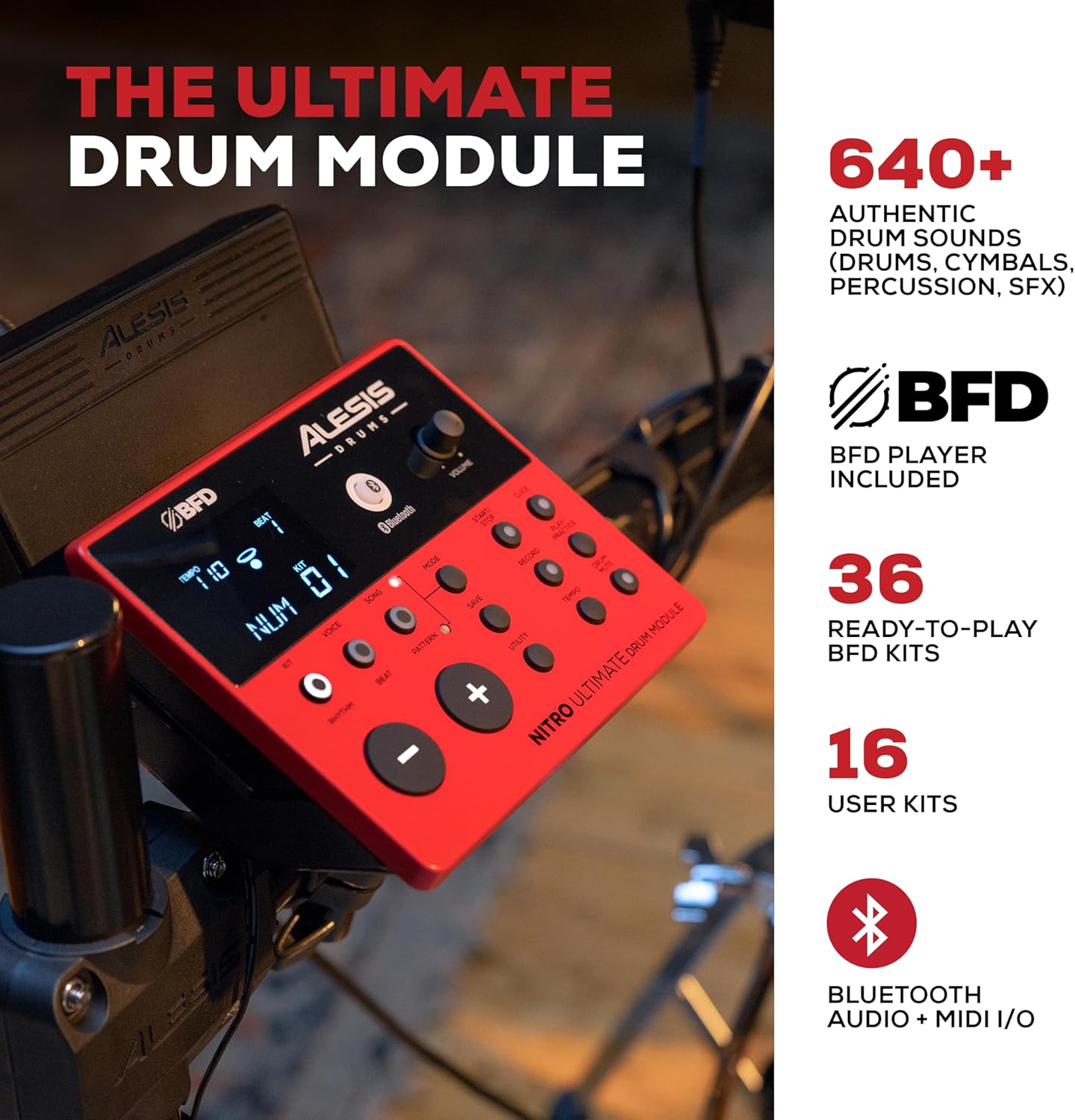
Image: The Alesis Nitro Ultimate Drum Module, showing its interface and controls.
기본 동작
- 전원 켜기/끄기: 모듈의 전원 버튼을 눌러 장치를 켜거나 끕니다.
- 키트 선택: Use the 'Kit' buttons to navigate through the 52 pre-set drum kits or your 16 user kits.
- 볼륨 조절: Adjust the main volume using the dedicated knob on the module.
- 템포 조정: Use the 'Tempo' button and navigation controls to set the desired tempo for practice or songs.
고급 기능
- 블루투스 연결: The module supports Bluetooth audio and MIDI I/O. Pair your device to stream audio or send/receive MIDI data wirelessly.
- USB 미디 Connect the module to a computer via USB for MIDI recording with virtual instruments or recording software.
- 보조 입력: Use the 1/8-inch stereo auxiliary input to connect an external audio device (e.g., smartphone, MP3 player) and play along with your favorite tracks.
- 내장 도구: Utilize the integrated sequencer, recorder, and metronome functions for practice and performance.

Image: The Alesis Nitro Ultimate kit in use, illustrating its educational and practice tools.
소프트웨어 통합
Your Nitro Ultimate kit includes access to Drumeo lessons and BFD Player software.
- Drumeo: Access 90 days of interactive drum lessons from various instructors to enhance your skills.
- BFD 플레이어: This virtual drum instrument includes the BFD Player Core Library and Dark Mahogany expansion pack, offering a wide range of high-quality drum sounds and mixing options for recording and performance.

Image: A tablet showing the Drumeo application, demonstrating the integration of learning tools with the drum kit.

Image: A laptop running BFD Player software, showcasing the high-quality drum kits, grooves, and mixing options available.
유지
적절한 유지관리는 드럼 세트의 수명과 최적의 성능을 보장합니다.
- 청소: Use a soft, dry cloth to wipe down the drum module, pads, and cymbals. Avoid abrasive cleaners or solvents.
- 메쉬 헤드 장력: The mesh heads are tension-adjustable. Use the included drum key to adjust the tension for your preferred feel. Do not overtighten.
- 케이블 관리 : Ensure all cables are neatly routed and secured to prevent damage or accidental disconnection.
- 저장: 장기간 사용하지 않을 경우 드럼 세트를 깨끗하고 건조한 곳에 보관하고 극한 온도는 피하십시오.

Image: A close-up of an Alesis mesh head, emphasizing its design for quiet and responsive play.
문제 해결
If you encounter issues with your Alesis Nitro Ultimate Electric Drum Set, refer to the following common problems and solutions.
| 문제 | 가능한 원인 | 해결책 |
|---|---|---|
| 헤드폰/스피커에서 소리가 나지 않습니다. | Volume too low; incorrect cable connection; module not powered on. | Check module volume, external speaker volume, and headphone connection. Ensure power is on. Verify audio cables are correctly inserted into the module's output. |
| Pads not triggering sounds. | Loose cable connection; incorrect pad sensitivity settings. | Ensure all pad cables are securely connected to the module's trigger inputs. Check the module's sensitivity settings for each pad and adjust if necessary. |
| 블루투스 장치가 연결되지 않습니다. | Module not in pairing mode; device too far; interference. | Ensure the module's Bluetooth is enabled and in pairing mode. Move the device closer to the module. Try restarting both the module and your Bluetooth device. |
| 패드 반응이 일정하지 않습니다. | Mesh head tension uneven; worn drum sticks; sensitivity settings. | Adjust mesh head tension evenly using the drum key. Ensure you are using appropriate drum sticks. Review and adjust pad sensitivity and threshold settings in the module. |
명세서
| 특징 | 세부 사항 |
|---|---|
| 모델명 | Nitro Ultimate |
| 상표 | 알레시스 |
| 구성 설정 | 9피스 전자 드럼 세트 |
| 스네어 패드 | 10-inch Dual-Zone Mesh |
| 톰 패드 | Three (3) 8-inch Dual-Zone Mesh |
| 킥패드 | 8-inch Mesh Kick Tower with Pedal |
| 심벌즈 패드 | Three (3) 10-inch Dual-Zone with Choke (1 Ride, 2 Crash) |
| 안녕 모자 | 10-inch Stand-Mounted Movable Controller |
| 하이햇 스탠드 | Gibraltar Medium Weight, Double-Braced |
| 드럼 모듈 | Nitro Ultimate Module (640+ sounds, 52 kits, 16 user kits) |
| 연결성 | Bluetooth Audio + MIDI I/O, USB MIDI, DB25-pin snake cable input, 2x 1/4-inch TRS Main Outs, 1/8-inch TRS Stereo Aux In, 1/8-inch Stereo Headphone Out |
| 고문 | 4-Post Adjustable Steel Rack |
| 재료 유형 | 금속, 실리콘 |
| 색상 | 빨간색 |
| 무게 | 약 46.9파운드(21.27kg) |
보증 및 지원
자세한 보증 정보 및 기술 지원은 Alesis 공식 웹사이트를 참조하십시오. web사이트를 방문하거나 고객 서비스에 직접 문의하세요. 보증 청구에 대비해 구매 증빙 자료로 구매 영수증을 보관하세요.
Online resources, including FAQs and additional documentation, may be available on the Alesis support page.