
1. 서론
The LAMTTO 2-in-1 Wireless CarPlay and Android Auto Adapter converts your vehicle's wired CarPlay or Android Auto system into a wireless solution. This device allows for convenient access to navigation, music, phone calls, and voice assistants like Siri or Google Assistant without the need for a physical cable connection to your smartphone.
패키지 내용:
- 1 x 2-in-1 Wireless CarPlay and Android Auto Adapter
- USB-A-USB-C 어댑터 1개
- 1 x 사용자 설명서
2. 안전 정보
중요 안전 지침:
- When operating this wireless adapter, interference with other nearby wireless devices may occur.
- Ensure compliance with battery handling instructions (if applicable to connected devices).
- 장치를 극단적인 온도나 습도에 노출시키지 마십시오.
3. 제품 오버view
The LAMTTO 2-in-1 adapter features a high-performance 5.8 GHz chip for faster processing and a stable connection. Its compact design allows for discreet installation, maintaining a tidy vehicle interior. The device supports both USB-A and USB-C ports for flexible connectivity.

Figure 3.1: Compact design of the LAMTTO adapter.

Figure 3.2: Internal components and connection speed.
4. 설정 가이드
The adapter offers a simple Plug & Play setup process. No applications or drivers are required.
- 어댑터를 연결하십시오: Plug the adapter into your car's USB data port (either USB-A or USB-C, using the provided adapter if necessary).
- Activate Bluetooth and Wi-Fi: 스마트폰에서 Wi-Fi와 블루투스를 모두 켜세요.
- 블루투스와 페어링: Open your smartphone's Bluetooth interface, search for the adapter's Bluetooth name, and select "Connect."
- 자동 재연결: After the initial connection, the device will automatically connect to your vehicle each time you start the car.
메모: The connection method for both CarPlay and Android Auto is identical.

Figure 4.1: Step-by-step setup and control methods.
5. 사용 설명서
Once connected, the adapter enables wireless access to your smartphone's features through your car's infotainment system. You can control functions using the car's original controls.
- 음성 제어: 손을 사용하지 않고 작동하려면 Siri 또는 Google 어시스턴트를 활용하세요.
- 항해: Access map applications like Waze or Apple Maps.
- 음악 재생: Stream music from apps like Spotify.
- 전화통화: Make and receive calls directly through the car's system.
- 차량 제어 장치: The adapter integrates seamlessly with your car's steering wheel buttons, touchscreen, and factory knobs.
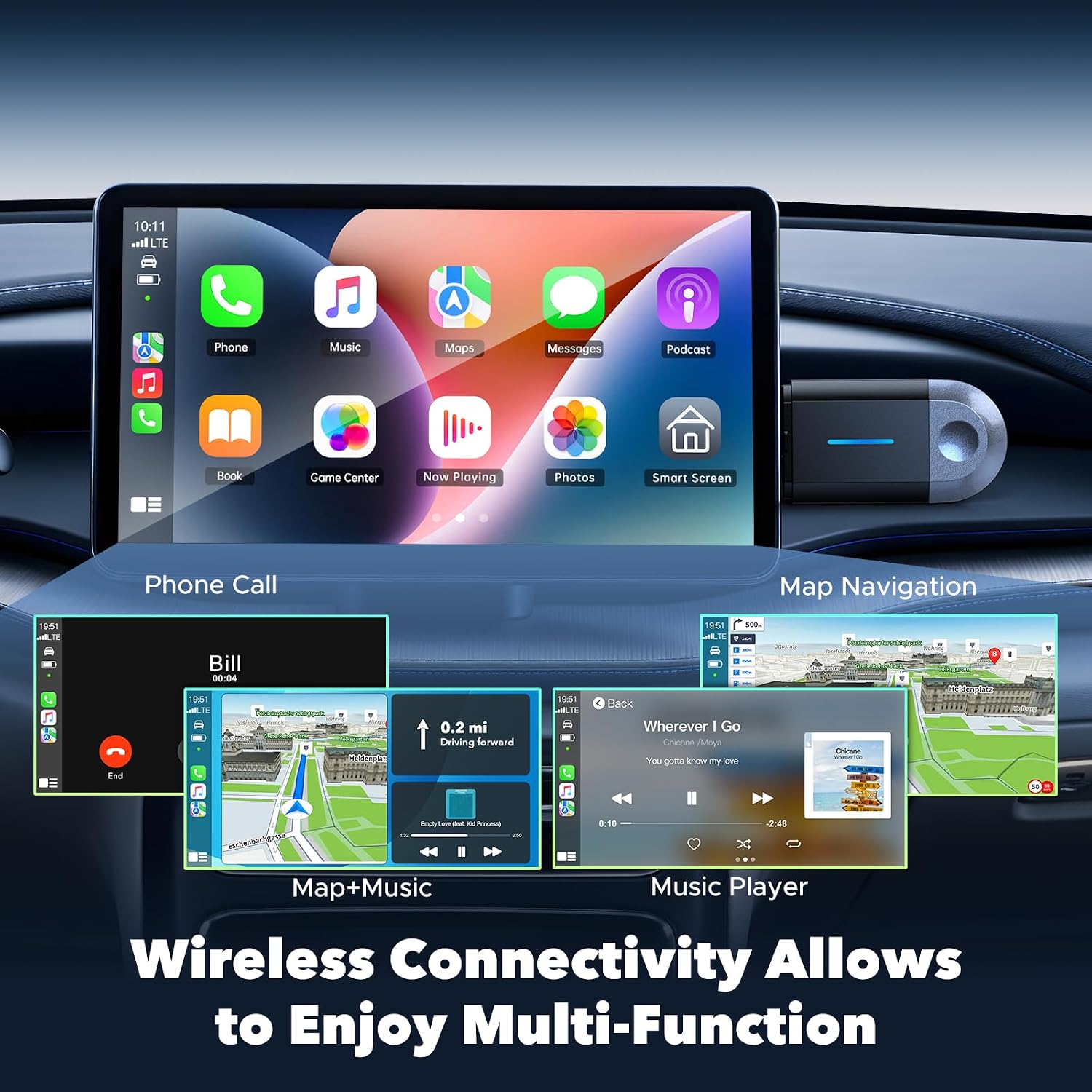
Figure 5.1: Wireless multi-function display on car screen.
6. 펌웨어 업데이트(OTA)
The adapter supports Over-The-Air (OTA) firmware updates to ensure optimal performance and compatibility. To update the firmware:
- Connect your smartphone to the adapter's Wi-Fi network.
- Open a mobile browser on your smartphone.
- 주소를 입력하세요 192.168.1.101 in the browser's address bar.
- 화면의 지시에 따라 사용 가능한 업데이트가 있는지 확인하고 설치하세요.

Figure 6.1: OTA firmware update interface.
7. 호환성
The LAMTTO 2-in-1 Wireless CarPlay and Android Auto Adapter is designed for wide compatibility.
- 스마트 폰 호환성 : Supports iPhone 8 or newer (iOS 11+) and Android phones with Android 11+.
- 차량 호환성: Compatible with over 98% of vehicles equipped with factory-wired Apple CarPlay and Android Auto from the year 2016 onwards. This includes brands such as Ford, Audi, Toyota, VW, and more.
- 호환되지 않는 차량: Not compatible with BM-W, Ben-z, or Tes-la vehicles. Not compatible with Huawei phones.

Figure 7.1: Device and vehicle compatibility overview.
8. 문제 해결
If the device experiences abnormal operation:
- Perform a restart by unplugging the adapter and then reinserting it into the car's USB port.
- Ensure your smartphone's Wi-Fi and Bluetooth are active and properly paired.
- Check for any available firmware updates as described in Section 6.
9. 사양
| 특징 | 사양 |
|---|---|
| 상표 | 람토 |
| 모델명 | carplay wireless adapter |
| 연결 기술 | Bluetooth, 802.11ac (5.8 GHz WLAN) |
| 전원 | Corded Electric (via car's USB port) |
| 재료 | 플라스틱 |
| 제품 무게 | 20그램 |
| 색상 | 검은색 |
| 호환 장치 | Smartphones with iOS 10+ and Android 11+ |
| 장착 유형 | Wall Mount (refers to compact, discreet placement) |
| 설치 유형 | 무선 전화 |
| 커넥터 유형 | USB Type C (with included USB-A adapter) |
| 제어 방법 | 목소리 |
| 오디오 출력 유형 | 블루투스, 보조 |
| 오디오 출력 모드 | 스테레오 재생 |
| 지원되는 형식 | 블루투스 5.3, IEEE 802.11ac |
| 지원되는 응용 프로그램 | Spotify, Waze, Apple Maps, other CarPlay/Android Auto compatible audio apps |
10. 보증 및 지원
The LAMTTO 2-in-1 Wireless CarPlay and Android Auto Adapter comes with a 24-month warranty. For any product inquiries or technical assistance, please contact customer support. Support is available 24/7.