
소개
This manual provides essential instructions for the safe and efficient operation of your Generic Portable Bluetooth Speaker with Solar Charging, Model B0FVMB2F8H. Please read this manual thoroughly before using the product and retain it for future reference.
안전 정보
- Do not expose the speaker to extreme temperatures or direct sunlight for prolonged periods when not in use, especially the solar panel.
- 스피커를 떨어뜨리거나 강한 충격을 주지 마십시오.
- 스피커를 직접 분해, 수리 또는 개조하지 마십시오. 수리가 필요할 경우 자격을 갖춘 서비스 담당자에게 문의하십시오.
- Keep the speaker away from water and liquids, despite its waterproof design, to prevent damage to internal components.
- 지정된 충전 케이블과 전원 어댑터만 사용하십시오.
- 어린이의 손이 닿지 않는 곳에 보관하세요.
패키지 내용
다음 품목이 패키지에 포함되어 있는지 확인하세요.
- Portable Bluetooth Speaker (Model B0FVMB2F8H)
- USB 충전 케이블
- 빠른 시작 가이드
제품 끝view
Familiarize yourself with the components of your speaker:
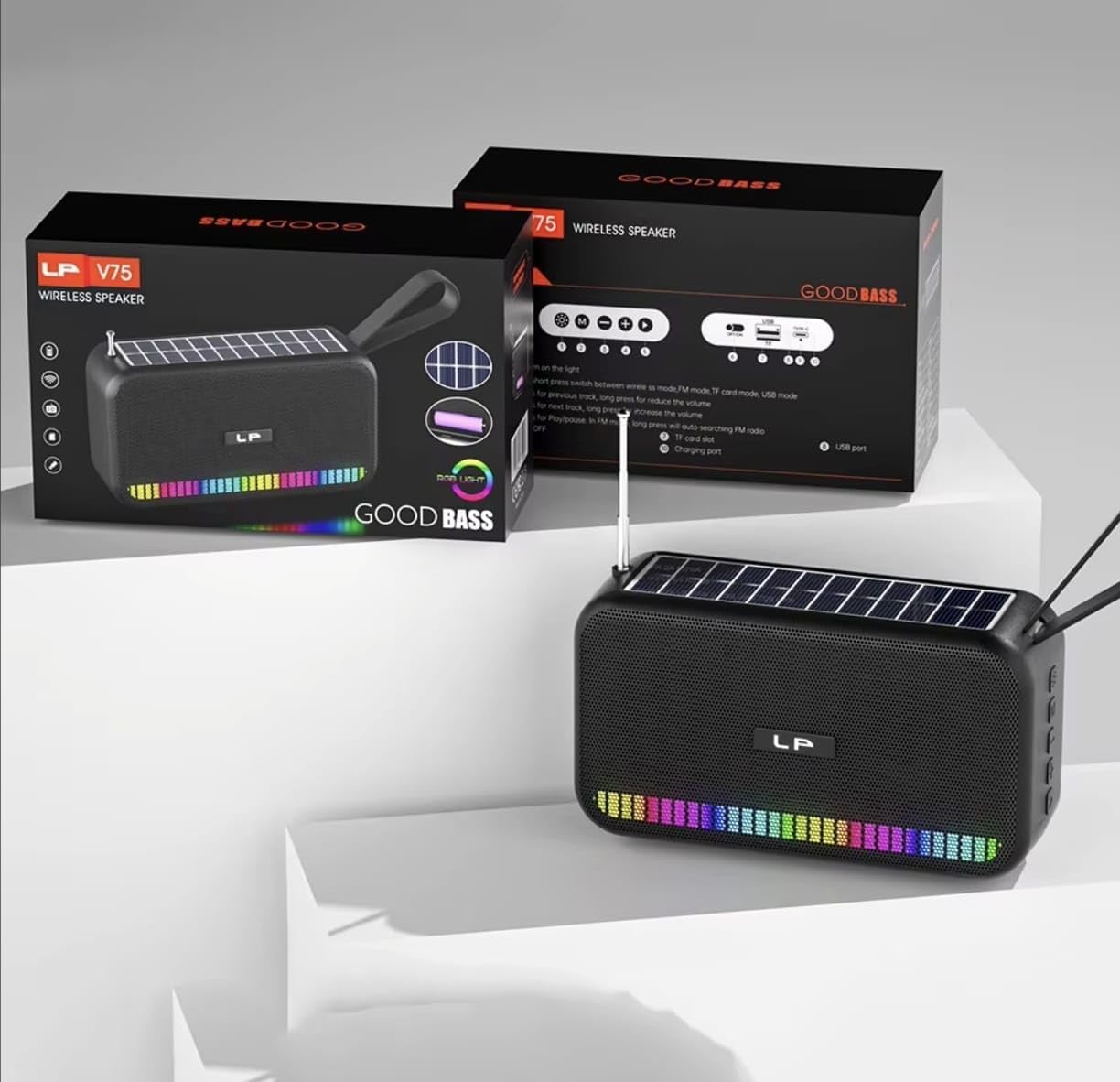
영상: 앞쪽 view of the portable Bluetooth speaker, highlighting its solar panel, LED light display, and overall dimensions (approximately 170.5mm length, 95mm height, 60mm width).
- 태양광 패널: 태양광 충전을 위해 상단 표면에 위치해 있습니다.
- LED 조명 디스플레이: Front-facing lights that synchronize with music.
- 제어 버튼: (Details not provided, assuming standard buttons for power, volume, mode, play/pause).
- USB 포트: For charging and USB drive playback.
- TF 카드 슬롯 : TF 카드 재생용입니다.
- 충전 포트: For USB cable charging.
- 안테나: Extendable for FM radio reception.
- 운반 스트랩: 휴대성을 위해서.

영상: 뒤쪽 view of the portable Bluetooth speaker, showing the battery compartment open with a rechargeable battery inserted. Also visible are the USB and charging ports.
설정
1. 스피커 충전
Your speaker offers two charging methods:
- 태양열 충전: Place the speaker with the solar panel facing direct sunlight. The charging indicator light will illuminate. Solar charging is ideal for maintaining battery life outdoors but may be slower than USB charging.
- USB 충전: Connect the provided USB charging cable to the speaker's charging port and the other end to a USB power adapter (not included) or a computer's USB port. The charging indicator light will show charging status. A full charge typically takes several hours.
최적의 배터리 성능을 위해 처음 사용하기 전에 스피커가 완전히 충전되었는지 확인하십시오.
2. 전원 켜기 / 끄기
- 전원을 켜려면: 전원 버튼을 길게 누릅니다(일반적으로 ⏻ or 켜짐/꺼짐) for approximately 3 seconds until you hear an audible prompt or see the LED lights activate.
- 전원을 끄려면: Press and hold the Power button again for approximately 3 seconds until the speaker powers down.
작동 지침
1. 블루투스 모드
- 블루투스 모드 진입: Upon powering on, the speaker typically defaults to Bluetooth mode. If not, press the "M" (Mode) button until you hear the "Bluetooth Mode" prompt. The LED indicator will flash, indicating it's ready for pairing.
- 편성:
- 기기(스마트폰, 태블릿 등)에서 Bluetooth를 활성화하세요.
- 검색 available Bluetooth devices. The speaker will appear as "B0FVMB2F8H" or a similar name.
- Select the speaker from the list to connect. Once paired, you will hear a confirmation sound, and the LED indicator will stop flashing.
- 재생 제어:
- 재생/일시 중지: 재생/일시정지 버튼(⏸).
- 다음 트랙: Press the "Next" button (⏭).
- 이전 트랙 : Press the "Previous" button (⏮).
- 볼륨 업: Long press the "Next" button or use a dedicated Volume Up button.
- 볼륨 작게 : Long press the "Previous" button or use a dedicated Volume Down button.
2. FM 라디오 모드
- Enter FM Mode: Press the "M" (Mode) button repeatedly until you hear the "FM Radio" prompt.
- 안테나 확장: 더 나은 수신을 위해 망원 안테나를 완전히 펼치세요.
- 자동 스캔: 재생/일시정지 버튼을 길게 누르세요.⏸) to automatically scan and save available FM stations. The speaker will cycle through frequencies and store them.
- 교환국: Use the "Next" (⏭) and "Previous" (⏮) buttons to navigate through the saved stations.
3. USB/TF 카드 재생
- 미디어 삽입: Insert a USB flash drive into the USB port or a TF (MicroSD) card into the TF card slot. The speaker will automatically detect the media and switch to the corresponding playback mode.
- 재생 제어: Use the Play/Pause, Next, and Previous buttons for controlling playback, similar to Bluetooth mode.
4. LED Light Display
The speaker features dynamic RGB LED lights that can synchronize with your music. Specific controls for the LED lights (e.g., changing patterns, turning off) are not detailed in the product information, but they typically activate automatically with audio playback. If there is a dedicated light button, press it to cycle through modes or turn off the lights.
5. 핸즈프리 통화
스마트폰에 Bluetooth로 연결하면 스피커를 핸즈프리 통화로 사용할 수 있습니다.
- 전화 받기: 재생/일시정지 버튼(⏸) 걸려오는 전화를 한 번 받습니다.
- 통화 종료: 재생/일시정지 버튼(⏸) once to end an ongoing call.
- 전화 거부: 재생/일시정지 버튼을 길게 누르세요.⏸수신 전화를 거절하는 것.
유지
- 청소: 부드럽고 마른 천을 사용하여 스피커 표면을 닦으세요. 연마성 세제, 알코올 또는 화학 용제는 사용하지 마세요.
- 태양광 패널: 효율적인 충전을 위해 태양광 패널을 깨끗하게 유지하고 먼지나 이물질이 없도록 하십시오.
- 저장: When not in use for extended periods, store the speaker in a cool, dry place. It is recommended to fully charge the battery every 3 months to prolong its lifespan.
문제 해결
| 문제 | 가능한 원인 | 해결책 |
|---|---|---|
| 스피커의 전원이 켜지지 않습니다. | 배터리가 부족합니다. | Charge the speaker using the USB cable or place it in direct sunlight. |
| 블루투스로 페어링할 수 없습니다. | 장치에서 Bluetooth가 활성화되어 있지 않습니다. 스피커가 페어링 모드가 아닙니다. 장치에서 너무 멀리 떨어져 있습니다. | Ensure Bluetooth is on and the speaker is in pairing mode. Move device closer to speaker (within 10 meters). Forget previous pairings on your device and try again. |
| 소리가 나지 않거나 볼륨이 작습니다. | 스피커 또는 연결된 장치의 볼륨이 너무 낮습니다. 잘못된 모드가 선택되었습니다. | Increase volume on both the speaker and your connected device. Ensure the correct mode (Bluetooth, FM, USB, TF) is selected. |
| FM 라디오 수신 상태가 좋지 않습니다. | 안테나가 확장되지 않았습니다. 신호가 약합니다. | Fully extend the telescopic antenna. Try repositioning the speaker for better signal reception. |
| USB/TF 카드가 재생되지 않습니다. | 잘못된 file 포맷 오류; 카드/드라이브가 올바르게 삽입되지 않았습니다; 미디어가 손상되었습니다. | 오디오 확인 files are in a compatible format (e.g., MP3). Reinsert the USB drive or TF card. Try a different USB drive or TF card. |
명세서
| 모델 번호: | B0FVMB2F8H |
| 연결 기술 : | 블루투스 |
| 전원: | 태양광, USB |
| 지원되는 라디오 대역: | FM(87.5~108MHz) |
| 특별 기능: | Solar charging, LED light display, Multi-playback options (Bluetooth, FM Radio, USB, TF card) |
| 호환 장치: | Bluetooth devices, USB devices, TF cards, FM radio signals |
| 디스플레이 유형: | 주도의 |
| 색상: | 검은색 |
| 제조업체: | 중국 |
보증 및 지원
이 제품에는 다음이 포함되어 있습니다. 15일 보증 구매일로부터 적용됩니다. 이 보증은 제조상의 결함에 한해 적용됩니다. 오용, 사고, 무단 개조 또는 정상적인 마모로 인한 손상은 보증 대상에서 제외됩니다.
For warranty claims or technical support, please refer to the contact information provided by your retailer or the seller "CLASSYSA" on Amazon. Please retain your proof of purchase for warranty validation.