
H24-2201-B
Generic H24-2201-B 39.4" Drawer Computer Desk with USB Charger User Manual
Model: H24-2201-B
소개
This manual provides essential information for the assembly, operation, and maintenance of your Generic H24-2201-B 39.4" Drawer Computer Desk with USB Charger. Please read these instructions carefully before assembly and use to ensure safe and efficient operation.
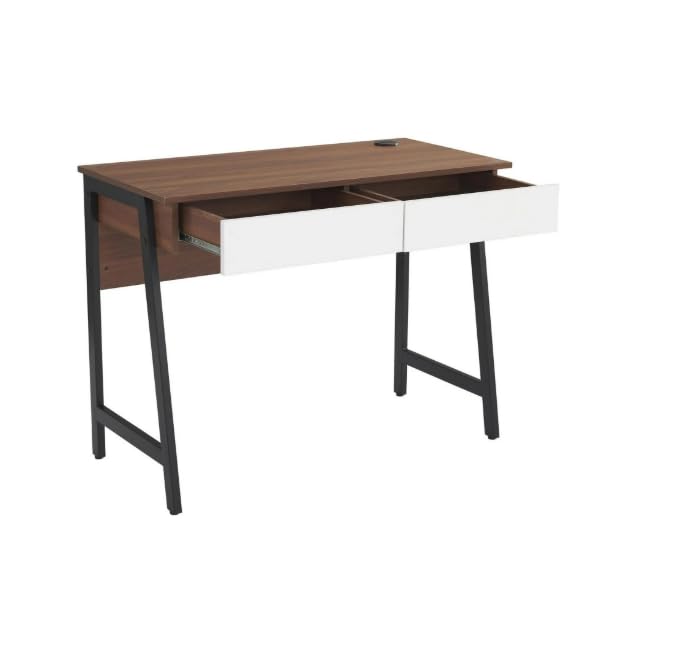
Image: The Generic H24-2201-B computer desk in walnut finish, featuring two white drawers and sturdy black metal legs. This image provides an overall view of the desk's design and dimensions.
안전 정보
It is crucial to follow all safety guidelines to prevent injury or damage to the product. Please observe the following:
- 항상 제공된 지침에 따라 책상을 조립하세요.
- 무게 제한을 초과하지 마십시오. 88파운드(40kg). Overloading can compromise the desk's stability and structural integrity.
- 책상이 넘어지는 것을 방지하기 위해 안정적이고 수평인 표면에 놓으세요.
- 책상을 직사광선, 화염 및 과도한 습기로부터 멀리 두십시오.
- Avoid placing heavy objects on the edges of the desk to prevent damage or instability.
- 모든 고정 장치가 단단히 조여져 있는지 주기적으로 확인하십시오.
패키지 내용
조립을 시작하기 전에 아래 나열된 모든 구성품이 포함되어 있고 손상되지 않았는지 확인하세요. 부품이 누락되었거나 손상된 경우 고객 지원 센터에 문의하세요.
- 1 x Desk Top (with integrated USB charger)
- 2 x Drawer Units
- 2 x Metal Leg Frames
- 1 x 후면 패널
- 조립용 하드웨어(나사, 볼트, 육각 렌치 등)
- 사용 설명서
Note: All necessary assembly tools are included.
설정 및 조립
이 책상은 조립이 필요합니다. 조립을 권장합니다. 두 사람 assemble the desk to ensure stability and ease of construction. Please follow the steps below carefully.
- 구성 요소 풀기: 포장에서 모든 부품을 조심스럽게 꺼내어 긁힘을 방지하기 위해 깨끗하고 부드러운 표면(예: 담요 또는 카펫) 위에 펼쳐 놓으십시오.
- 다리 프레임을 부착하세요: Secure the metal leg frames to the underside of the desk top using the provided screws and Allen wrench. Ensure all connections are tight.
- 서랍 설치: Assemble the two drawer units according to their individual instructions. Once assembled, slide them into the designated slots under the desk top. Ensure the smooth sliding rails are properly aligned.
- 뒷면 패널 부착: Secure the back panel to the rear of the desk structure. This adds stability and finishes the desk's appearance.
- 최종 확인: Once assembled, gently lift and move the desk to its desired location. Verify that all screws are tightened and the desk is stable.
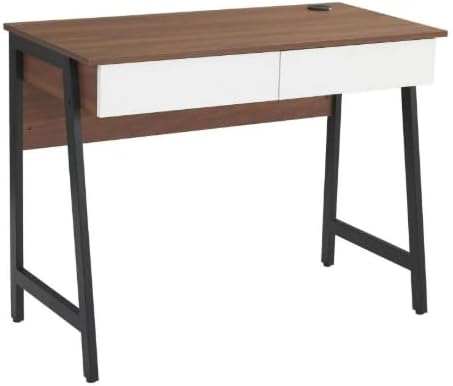
이미지: 조립된 view of the computer desk, highlighting the integration of the desk top, drawers, and metal leg structure. This image can serve as a visual reference during assembly.
작동 지침
USB 충전 포트 사용
Your desk is equipped with a built-in USB charging port for convenient device charging.
- 전원 연결: Ensure the desk's power cord (if applicable, usually from the USB hub) is securely plugged into a functional wall outlet.
- 플러그인 장치: Connect your USB-compatible devices (e.g., smartphones, tablets, smartwatches) to the USB ports located on the desk surface.
- 충전 표시: Your device should indicate that it is charging. If not, check the power connection and the USB cable.

이미지: 자세한 view of the circular USB charging hub embedded in the desk's surface. It features three USB ports, allowing multiple devices to be charged simultaneously.
보관 서랍 사용하기
The two integrated drawers provide convenient storage for your office supplies and personal items.
- 열기/닫기: Gently pull the drawer handle to open and push to close. The smooth sliding rails ensure easy operation.
- 중량 제한: Avoid overloading the drawers to ensure smooth operation and prevent damage to the drawer slides.
유지
적절한 관리를 통해 책상의 수명을 연장하고 외관을 유지할 수 있습니다.
- 청소: 광고로 깨끗이 닦아내세요amp 깨끗한 천으로 닦아주세요. 잘 지워지지 않는 얼룩은 순한 비눗물에 적신 후 즉시 물기를 제거해주세요.
- 가혹한 화학 물질을 피하세요: Do not use abrasive cleaners, strong detergents, or solvents, as these can damage the wood grain laminate finish.
- 유출: Promptly wipe up any spills to prevent water damage or staining. The scratch-resistant and waterproof finish offers protection, but immediate cleaning is recommended.
- 패스너: 정기적으로 모든 나사와 볼트를 점검하고 조여 책상이 안정적으로 유지되는지 확인하세요.
문제 해결
책상에 문제가 발생하면 다음의 일반적인 문제와 해결 방법을 참조하세요.
- 책상이 흔들린다:
- 모든 조립 나사와 볼트가 단단히 조여졌는지 확인하십시오.
- Verify the desk is placed on a level surface. Adjust floor glides if present, or use shims if necessary.
- 서랍이 부드럽게 미끄러지지 않습니다.
- 서랍 레일에 이물질이 있는지 확인하십시오.
- Ensure the drawers are not overloaded.
- 조립 시 서랍 레일이 올바르게 설치되었는지 확인하십시오.
- USB 포트가 충전되지 않음:
- Confirm the desk's power cord (for the USB hub) is firmly plugged into a working electrical outlet.
- 케이블이나 기기 문제를 배제하기 위해 다른 USB 케이블이나 기기를 사용해 보세요.
- Ensure the USB hub connection within the desk is secure (if accessible).
명세서
| 모델 번호 | H24-2201-B |
| 상표 | 일반적인 |
| 치수(D x W x H) | 48D x 100W x 76H 센티미터 (18.9"D x 39.4"W x 29.9"H) |
| 무게 | 37.4파운드(17kg) |
| 재료 | MDF, PB, Metal |
| 마무리 유형 | Wood Grain Laminate |
| 색상 | Walnut (with white drawers) |
| 최대 중량 용량 | 88파운드(40kg) |
| 서랍 수 | 2 |
| 특별 기능 | Built-in USB Charging Port, Scratch-Resistant & Waterproof Surface, Smooth Drawer Operation, Space-Saving Design |
| 조립이 필요합니다 | 네 (추천인원 2명) |
| 포함된 조립 도구 | 예 |
보증 및 지원
보증 정보: Warranty is not included with this product. Please contact the seller directly for any warranty-related inquiries or support.
고객 지원: For any questions, missing parts, or assistance with assembly or operation, please contact the seller directly via Amazon messaging. Provide your order number and a detailed description of the issue for prompt assistance.
Manufacturer Contact Information: Not applicable. Please contact the seller directly via Amazon messaging.
Ask a question about this manual
Ask about setup, troubleshooting, compatibility, parts, safety, or missing instructions. Manuals+ will review the question and use this page’s manual context to help answer it.