
1. 서론
The Skyking WORKZONE 36TRMS Digital Clamp Meter is a portable, stable, and versatile instrument designed for accurate electrical measurements. Featuring a 6000-count LCD display, auto-ranging capabilities, and overload protection, this meter is suitable for a wide range of applications, from home electrical needs to professional use. It can measure AC/DC Voltage, AC/DC Current, Resistance, Capacitance, Frequency, Duty Cycle, Temperature, and includes Non-Contact AC Voltage (NCV) detection, diode, and continuity test functions.
2. 안전 정보
전기 시험 장비를 사용할 때는 항상 안전 수칙을 준수하십시오. 그렇지 않을 경우 감전, 부상 또는 측정기나 시험 대상 장비의 손상이 발생할 수 있습니다.
- 사용하기 전에 계량기가 제대로 작동하는지 확인하십시오.
- 어떠한 범위에서도 최대 입력 값을 초과하지 마십시오.
- 보안경과 절연 장갑과 같은 적절한 개인 보호 장비(PPE)를 착용하십시오.
- Disconnect power to the circuit before making resistance, capacitance, or continuity measurements.
- Be cautious when working with live circuits. Avoid contact with bare conductors.
- 미터기가 손상된 것처럼 보이거나 배터리 덮개가 제대로 닫히지 않은 경우 사용하지 마십시오.
3. 패키지 내용
패키지에 모든 품목이 들어 있는지 확인하세요.
- WORKZONE 36TRMS Digital Clamp 미터
- 테스트 리드(빨간색 및 검은색)
- 온도 프로브
- AAA Batteries (Pre-installed or separate)
- 사용 설명서(본 문서)

This image displays the Skyking WORKZONE 36TRMS Digital Clamp Meter along with its included test leads (red and black) and a white temperature probe. The clamp meter itself is red and black, showing the rotary dial, LCD screen, and input jacks.
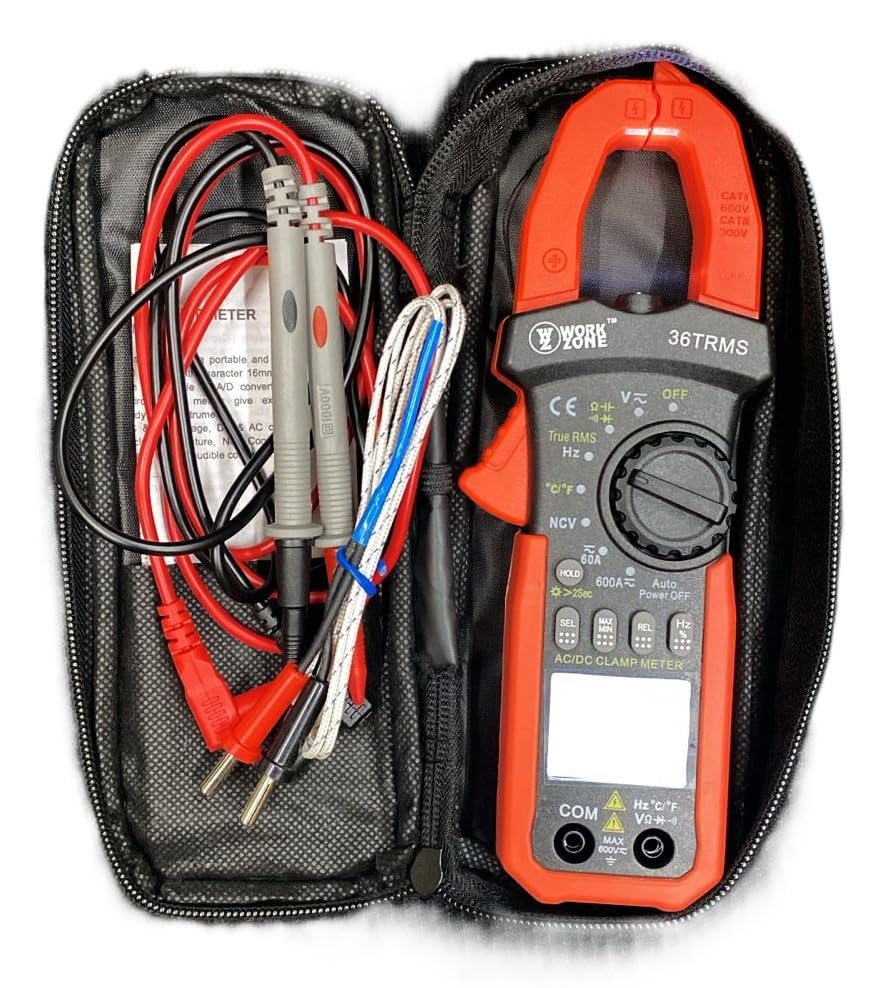
The Skyking WORKZONE 36TRMS Digital Clamp Meter, test leads, and temperature probe neatly organized within a black zippered carrying case. This illustrates how the product and its accessories are stored and transported.
4. 제품 오버view
The WORKZONE 36TRMS Digital Clamp 이 계측기는 포괄적인 전기 테스트를 위한 다양한 기능을 제공합니다.
- 6000 counts digit LCD monitor with 16mm character height.
- Auto-range and auto power-off function (after 15 minutes of inactivity).
- Clamp opening size: 26mm for non-invasive current measurement.
- Measures DC Voltage (600mV~600V) and AC Voltage (6V~600V).
- Measures DC Current (60A~600A) and AC Current (True RMS) (60A~600A).
- Measures Resistance (600Ω~60MΩ) and Capacitance (6nF~60mF).
- Measures Frequency (9.999Hz~9.999MHz) and Duty Cycle (0.1%~99.9%).
- Temperature measurement: -20~1000°C / -4~1832°F.
- 비접촉 AC Voltage (NCV) detection for safety.
- Diode and audible continuity test functions.
- Data hold function to freeze readings.
- Backlight for easy reading in dark environments.
- Relative measurement (REL) function for zeroing readings.

A detailed close-up of the Skyking WORKZONE 36TRMS Digital Clamp Meter. The image highlights the rotary switch with various measurement functions, the LCD display showing '0.000', function buttons (HOLD, SEL, MAX/MIN, REL, Hz), and the input jacks at the bottom.
5. 설정
5.1 배터리 설치
- The meter requires 2x 1.5V 'AAA' batteries.
- 측정기 뒷면에서 배터리 덮개를 찾으세요.
- Open the cover, insert the batteries observing correct polarity (+ and - markings).
- 배터리 덮개를 단단히 닫으세요.
5.2 전원 켜기/끄기
- To power on the meter, rotate the rotary switch from the 'OFF' position to any desired measurement function.
- To power off, rotate the switch back to the 'OFF' position.
- The meter features an auto power-off function after approximately 15 minutes of inactivity to conserve battery life.
5.3 테스트 리드 연결
- 권용tage, resistance, capacitance, frequency, duty cycle, diode, and continuity measurements, insert the red test lead into the 'VΩHz°C' input jack.
- 검은색 테스트 케이블을 'COM' 입력 잭에 꽂으세요.
- Ensure test leads are fully inserted and securely connected.
6. 사용 설명서
6.1 DC/AC 볼륨tage 측정
- Rotate the rotary switch to 'V~' for AC VoltagDC Vol의 경우 e 또는 'V-'tage.
- 테스트 리드를 테스트 중인 회로나 부품에 병렬로 연결합니다.
- vol을 읽어보세요tagLCD 디스플레이의 e 값.
6.2 AC/DC 전류 측정(Clamp 턱)
- Rotate the rotary switch to '60A~' or '600A~' for AC Current, or '60A-' or '600A-' for DC Current.
- cl을 누르세요amp trigger to open the jaws and clamp 도체 하나를 중심으로 고정합니다. 도체가 집게 중앙에 위치하도록 하십시오.
- LCD 디스플레이의 현재 값을 읽습니다.
6.3 저항 측정
- Rotate the rotary switch to 'Ω'.
- 측정 전에 회로 또는 부품의 전원이 차단되었는지 확인하십시오.
- 측정할 부품에 테스트 리드를 연결합니다.
- LCD 디스플레이에서 저항값을 읽으세요.
6.4 커패시턴스 측정
- Rotate the rotary switch to 'F'.
- 측정기 손상을 방지하기 위해 테스트 전에 콘덴서가 완전히 방전되었는지 확인하십시오.
- 테스트 리드를 커패시터 단자에 연결하십시오.
- LCD 디스플레이의 커패시턴스 값을 읽습니다.
6.5 주파수/듀티 사이클 측정
- Rotate the rotary switch to 'Hz'.
- 테스트 리드를 신호 소스에 연결합니다.
- Press the 'Hz' button to toggle between Frequency (Hz) and Duty Cycle (%) display.
6.6 온도 측정
- Rotate the rotary switch to '°C/°F'.
- Connect the temperature probe to the input jacks.
- 측정하려는 물체에 프로브 끝을 대십시오.
- Press the '°C/°F' button to switch between Celsius and Fahrenheit units.
6.7 다이오드 테스트
- Rotate the rotary switch to 'Diode/Continuity'.
- 빨간색 테스트 리드를 다이오드의 양극에, 검은색 테스트 리드를 음극에 연결하십시오.
- 디스플레이에는 앞으로 나오는 볼륨이 표시됩니다.tage drop. Reverse the leads; the display should show 'OL' for an open circuit.
6.8 연속성 테스트
- Rotate the rotary switch to 'Diode/Continuity'.
- 테스트 리드를 회로 또는 부품에 연결하십시오.
- An audible buzzer will sound if continuity is detected (typically resistance below approximately 50Ω).
6.9 비접촉 AC 전압tage(NCV) 검출
- Rotate the rotary switch to 'NCV'.
- Bring the NCV sensor (located at the top of the clamp meter) close to an AC voltag출처.
- The meter will emit an audible beep and the NCV indicator light will flash if AC voltage가 감지되었습니다.
6.10 데이터 홀드 기능
- Press the 'HOLD' button to freeze the current reading on the display. Press again to release the hold.
- Long press the 'HOLD' button to activate the backlight for improved visibility in low-light conditions.
6.11 상대 측정(REL)
- In a measurement mode, press the 'REL' button to zero the current reading. Subsequent measurements will be displayed relative to this zero point.
- Press the 'REL' button again to exit relative mode.
7. 유지관리
7.1 청소
- 미터를 닦으세요asing는 부드러운 d로 발음합니다.amp 옷감.
- Do not use abrasive cleaners, solvents, or harsh chemicals, as these may damage the casing 또는 디스플레이.
7.2 배터리 교체
- When the low battery indicator appears on the LCD, replace the batteries promptly to ensure accurate readings.
- 5.1절에 설명된 배터리 설치 단계를 따르십시오.
- 사용한 배터리는 현지 규정에 따라 폐기하십시오.
7.3 보관
- 장시간 사용하지 않을 경우, 측정기를 서늘하고 건조한 곳에 보관하세요.
- 직사광선, 극심한 온도 변화 및 높은 습도를 피하십시오.
- It is recommended to remove batteries if storing for a very long time to prevent leakage.
8. 문제 해결
- 디스플레이가 없거나 희미함: Check battery installation. If the low battery indicator is on, replace the batteries.
- 잘못된 판독: Ensure the correct function is selected for the measurement. Verify test lead connections are secure and in the correct input jacks. For resistance or capacitance, ensure the circuit is de-energized. For current, ensure only a single conductor is clamped within the jaws.
- "OL" 디스플레이: This indicates an over-range condition or an open circuit. If measuring resistance, it means the resistance is too high or the circuit is open. If measuring voltage or current, the value exceeds the selected range; switch to a higher range if available.
- 연속성 비프음 없음: The resistance of the circuit or component is too high, or there is an open circuit.
9. 사양
| 매개변수 | 값 |
|---|---|
| 상표 | Skyking |
| 모델 번호 | Workzone 36 TRMS |
| 측정 유형 | 디지털 Clamp 미터 |
| 표시하다 | 6000 counts digit LCD |
| Clamp 개구부 크기 | 26mm |
| DC 볼륨tag및 범위 | 600mV ~ 600V |
| AC 볼륨tag및 범위 | 6V ~ 600V |
| DC 전류 범위 | 60A ~ 600A |
| AC Current Range (True RMS) | 60A ~ 600A |
| 저항 범위 | 600Ω ~ 60MΩ |
| 용량 범위 | 6nF ~ 60mF |
| 주파수 범위 | 9.999Hz ~ 9.999MHz |
| 듀티 사이클 | 0.1% ~ 99.9% |
| 온도 범위 | -20°C ~ 1000°C / -4°F ~ 1832°F |
| 범위 초과 표시 | "올" |
| 음극성 표시 | Automatic "-" display |
| 배터리 부족 표시 | 예 |
| 자동 전원 끄기 | 약 15분 |
| 전원 공급 장치 | 2 x 1.5V "AAA" batteries |
| 작동 온도 | 0°C ~ 40°C (relative humidity <85%) |
| 보관 온도 | -10°C ~ 50°C (relative humidity <85%) |
| Guaranteed Precision Temp. | 23±5°C (relative humidity <70%) |
| 치수(높이 x 너비 x 깊이) | 207 x 75 x 37mm |
| 무게 | 약 280g(배터리 포함) |
| 안전 등급 | CAT II 600V or CAT III 300V |
10. 보증 및 지원
For warranty information or technical support regarding your Skyking WORKZONE 36TRMS Digital Clamp Meter, please contact Skyking Instruments directly. Refer to your purchase documentation or the manufacturer's official website for specific warranty terms, conditions, and contact details.