
1. 서론
The ASUS ROG Strix GS-BE12000 is a high-performance tri-band WiFi 7 router designed for demanding network environments, including gaming, streaming, and smart home integration. This manual provides essential information for setting up, operating, maintaining, and troubleshooting your router to ensure optimal performance and security.

이미지: 이상view of the ASUS ROG Strix GS-BE12000 Router highlighting its design and key features.
2. 패키지 내용
제품 패키지에 모든 품목이 들어 있는지 확인하세요.
- ASUS ROG Strix GS-BE12000 Tri-Band Gaming Router
- 전원 어댑터
- RJ-45 케이블
- 빠른 시작 가이드
- 보증 카드
3. 설정
Follow these steps for initial setup of your ASUS ROG Strix GS-BE12000 router:
- 라우터 연결:
- Connect the power adapter to the router's DC-in port and plug it into a power outlet.
- Connect one end of the provided RJ-45 cable to your modem's LAN port and the other end to the router's 2.5G WAN port.
- Optionally, connect your computer to one of the router's LAN ports using an Ethernet cable for initial configuration.
- 전원 켜기: Press the power button on the router. Wait for the indicator lights to stabilize, typically indicating a successful connection.
- 초기 구성:
- 열기 web 연결된 컴퓨터 또는 모바일 기기의 브라우저.
- Navigate to the router's default IP address (usually
router.asus.comor192.168.1.1). - Follow the on-screen instructions in the Quick Internet Setup wizard to configure your internet connection, Wi-Fi network name (SSID), and password.

이미지: 후면 view of the router displaying the 2.5G WAN port and multiple 2.5G LAN ports for wired connections.
4. 사용 설명서
4.1. Wi-Fi 7 Tri-Band Connectivity
The GS-BE12000 supports Wi-Fi 7 (802.11be) with tri-band operation (2.4 GHz, 5 GHz, and 6 GHz) for maximum throughput and reduced latency. It features 320 MHz channels on the 6 GHz band, Multi-Link Operation (MLO), and 4K-QAM for enhanced performance.

Image: Visual representation of Wi-Fi 7 tri-band capabilities, including 6 GHz, 5 GHz, and 2.4 GHz speeds, MLO, and 4K-QAM.
4.2. 유선 연결
The router offers a robust wired capacity of up to 20G, featuring one 2.5G WAN port and seven 2.5G LAN ports. This allows for high-speed connections to multiple devices, ideal for gaming consoles, PCs, and network-attached storage (NAS).

Image: Diagram detailing the router's wired ports, including 2.5G WAN, 2.5G LAN, and dedicated gaming ports.
4.3. Game Acceleration and ROG Gaming Network
Utilize the ROG-exclusive Gaming Network for one-tap SSID game acceleration. This feature streamlines advanced network settings to prioritize gaming traffic, ensuring low ping and reduced lag. The Smart Home Master function allows for easy setup of subnetworks for IoT devices and VPNs.

Image: User interface showing options for ROG Exclusive Gaming Network and Smart Home Master for network management.
4.4. AiMesh 호환성
The GS-BE12000 is AiMesh compatible, allowing you to create a seamless whole-home mesh Wi-Fi system by adding other AiMesh-compatible ASUS routers. This extends coverage and eliminates Wi-Fi dead zones.

Image: Diagram showing how AiMesh extends Wi-Fi coverage throughout a multi-room environment.
5. 유지관리
정기적인 유지 관리는 라우터의 수명 연장과 최적의 성능을 보장합니다.
- 펌웨어 업데이트: Regularly check for and install the latest firmware updates via the ASUS Router app or web 인터페이스. 펌웨어 업데이트에는 성능 향상, 보안 패치 및 새로운 기능이 포함되는 경우가 많습니다.
- 물리적 청소: Keep the router in a well-ventilated area. Periodically clean dust from the vents and surfaces using a soft, dry cloth. Avoid using liquid cleaners.
- 다시 시작: 네트워크 문제가 발생하면 라우터를 전원 콘센트에서 30초 동안 뽑아서 다시 시작한 다음 다시 꽂아보세요.
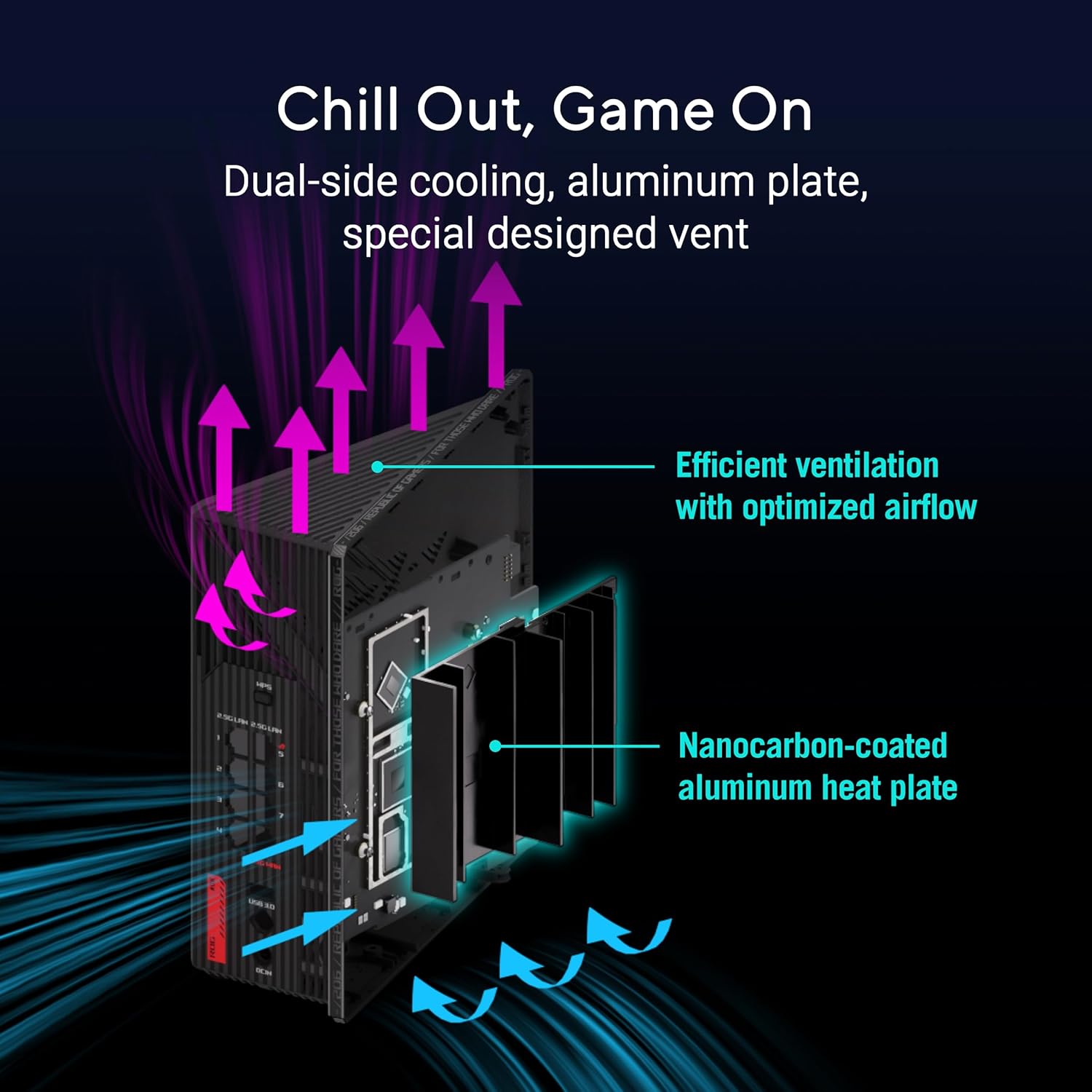
이미지: 내부 view of the router highlighting its dual-side cooling and nanocarbon-coated aluminum heat plate for efficient heat dissipation.
6. 문제 해결
라우터에 문제가 발생하면 다음의 일반적인 해결 방법을 참조하십시오.
- 인터넷에 연결되지 않음:
- 모든 케이블 연결(전원, WAN, LAN)이 단단히 연결되어 있는지 확인하십시오.
- 모뎀과 라우터를 다시 시작하세요.
- 인터넷 서비스 제공업체(ISP)의 연결 상태를 확인하십시오.
- 느린 Wi-Fi 속도:
- 기기가 적절한 Wi-Fi 대역(빠른 속도를 원하면 6GHz 또는 5GHz)에 연결되어 있는지 확인하세요.
- 라우터를 다른 전자 장치에서 멀리 옮겨서 간섭을 줄이세요.
- 라우터의 펌웨어와 장치 드라이버를 업데이트하세요.
- Wi-Fi Drops:
- Check for physical obstructions or distance from the router. Consider using AiMesh nodes for extended coverage.
- Ensure the router is placed centrally in your home.
For more detailed troubleshooting or advanced issues, consult the official ASUS support web사이트를 방문하거나 고객 지원팀에 문의하세요.
7. 사양
| 특징 | 설명 |
|---|---|
| 상표 | 아수스 |
| 모델명 | GS-BE12000 |
| 주파수 대역 클래스 | 3대역(2.4GHz, 5GHz, 6GHz) |
| 무선 표준 | WiFi 7 (802.11be), WiFi 6 (802.11ax) |
| 데이터 전송 속도 | 최대 12000Mbps |
| Wired Capacity | Up to 20G (1x 2.5G WAN, 7x 2.5G LAN) |
| CPU | 2.0GHz 쿼드코어 |
| 숫양 | 2GB (XNUMX기가바이트) |
| 안테나 | 8 내부 안테나 |
| 적용 범위 | 최대 3000제곱피트 |
| 보안 프로토콜 | AiProtection Pro, WPA/WPA2/WPA3 Personal/Enterprise |
| 제어 방법 | 앱, 푸시 버튼 |
| 치수(길이 x 너비 x 높이) | 8.9인치 길이 x 3.5인치 너비 x 8.9인치 높이 |
| 품목 무게 | 2.04 파운드 |
8. 보증 및 지원
The ASUS ROG Strix GS-BE12000 comes with a 3년 보증 from the manufacturer. For warranty claims, technical support, or additional product information, please visit the official ASUS support web웹사이트 또는 ASUS 스토어.
ASUS 스토어: 아마존의 ASUS 스토어를 방문하세요