
소개
This manual provides essential information for setting up, operating, and maintaining your TCL 32S5K 32-inch HD QLED Google Smart TV. Please read this manual thoroughly before using your television to ensure safe and optimal performance. Keep this manual for future reference.
안전 정보
화재, 감전, 부상 위험을 줄이려면 이 TV를 사용할 때 항상 기본 안전 예방 조치를 준수하십시오. TV를 비나 습기에 노출시키지 마십시오. TV 뚜껑을 열지 마십시오.asing; refer all servicing to qualified personnel. Ensure proper ventilation and avoid placing the TV near heat sources. Use only the power cord and accessories specified by the manufacturer.
패키지 내용
패키지에 모든 품목이 들어 있는지 확인하세요.
- TCL 32S5K 32-inch HD QLED Google Smart TV
- 원격 제어
- 전원 코드
- TV 스탠드 (2개) 및 나사
- 빠른 시작 가이드
- 보증 카드
설정
물리적 설치
스탠드 설치: Place the TV screen-down on a soft, flat surface. Attach the two stand pieces to the designated slots on the bottom of the TV using the provided screws. Ensure the stand is securely fastened.
벽면 장착: If wall-mounting, ensure you use a VESA-compatible wall mount (not included) and follow the wall mount manufacturer's instructions. Disconnect the power cord before mounting.
장치 연결
Connect your external devices to the appropriate ports on the TV. Refer to the image below for port locations and types.

Figure 1: Rear and Side Connectivity Ports. This image illustrates the various input and output ports available on the TCL 32S5K Smart TV, including USB 2.0, LAN, Antenna/Cable In, Digital Audio Out (Optical), HDMI 1, HDMI 2, and AV In adapter.
- HDMI Ports (1, 2): 블루레이 플레이어, 게임 콘솔, 케이블/위성 셋톱박스 또는 기타 HDMI 지원 기기를 연결하세요.
- USB 2.0 포트 : 미디어 재생을 위해 USB 저장 장치를 연결하세요.
- LAN 포트: 유선 인터넷 연결을 위해 이더넷 케이블을 연결합니다.
- 안테나/케이블 입력: 안테나나 케이블 TV 신호를 연결하세요.
- 디지털 오디오 출력(광): Connect to an external audio receiver or soundbar for digital audio.
- AV 입력 어댑터: 제공된 어댑터를 사용하여 컴포지트 비디오 및 스테레오 오디오 출력을 지원하는 구형 장치를 연결하십시오.
초기 전원 켜기 및 Google TV 설정
After connecting all necessary cables, plug the power cord into an electrical outlet. Press the power button on the remote control or on the TV. Follow the on-screen instructions to complete the initial setup, which includes selecting your language, connecting to a Wi-Fi network, and signing in to your Google account to access Google TV features.
운영
원격 제어 기능
The remote control allows you to navigate the Google TV interface, adjust volume, change channels, access apps, and control playback. Familiarize yourself with the button layout for easy operation.
구글 TV 인터페이스
Google TV organizes your favorite movies, shows, and live TV from across your apps and subscriptions. Use the remote to browse recommendations, search for content, and manage your watch list. Access the Google Play Store to download additional applications.
연결 기능
- 와이파이: Connects your TV to your home wireless network for internet access and streaming.
- 블루투스: Pair Bluetooth-enabled devices such as headphones or game controllers for a personalized experience.
- Googlecast (Chromecast built-in): Cast content from your compatible mobile devices or computer directly to your TV screen.
영상 및 사운드 설정
Your TCL 32S5K TV features QLED technology, Full HD resolution, HDR10 support, and Dolby Audio for an enhanced viewing and listening experience. Adjust picture modes (e.g., Standard, Vivid, Movie) and sound modes (e.g., Standard, Music, Movie) through the TV settings menu to suit your preferences.

Figure 2: Image Quality Features. This image highlights the key display technologies of the TCL 32S5K Smart TV, including QLED for vibrant colors, FHD (Full High Definition) for clear resolution, and HDR10 for enhanced contrast and brightness.
유지
TV 청소
청소하기 전에는 항상 TV 플러그를 뽑으세요. 부드럽고 마른 천으로 화면과 캐비닛을 닦으세요. 잘 지워지지 않는 얼룩은 가볍게 닦아주세요.ampen the cloth with water or a mild, non-abrasive screen cleaner. Never spray cleaner directly onto the screen or allow liquids to enter the TV's openings.
소프트웨어 업데이트
Google TV는 자동 소프트웨어 업데이트를 받을 수 있습니다. 성능 향상 및 새로운 기능 추가를 위한 업데이트를 받으려면 TV가 인터넷에 연결되어 있는지 확인하세요. TV 설정 메뉴에서 수동으로 업데이트를 확인할 수도 있습니다.
문제 해결
TV에 문제가 발생하면 다음의 일반적인 해결책을 참조하세요.
- 전원 없음: TV와 콘센트에 전원 코드가 제대로 꽂혀 있는지 확인하세요. 다른 콘센트에 꽂아 보세요.
- 사진 없음/사진 품질이 나쁨: Ensure all cables are correctly connected. Check the input source. Adjust picture settings. If using an antenna, check signal strength.
- 소리가 나지 않음/소리가 나쁨: Check volume levels and mute settings. Ensure external audio devices are properly connected and selected as the audio output.
- 원격 제어가 작동하지 않음: 배터리를 교체하세요. 리모컨과 TV IR 센서 사이에 장애물이 없는지 확인하세요.
- 네트워크 연결 문제: Restart your router and modem. Reconnect to the Wi-Fi network in the TV settings. For wired connections, ensure the Ethernet cable is properly connected.
- Google TV Slow/Unresponsive: Restart the TV by unplugging it for a few minutes and plugging it back in. Clear cache for problematic apps in settings.
문제가 지속될 경우 TCL 지원팀에 문의하십시오. web사이트를 방문하거나 고객 서비스에 문의하세요.
명세서
Below are the technical specifications for the TCL 32S5K Smart TV:
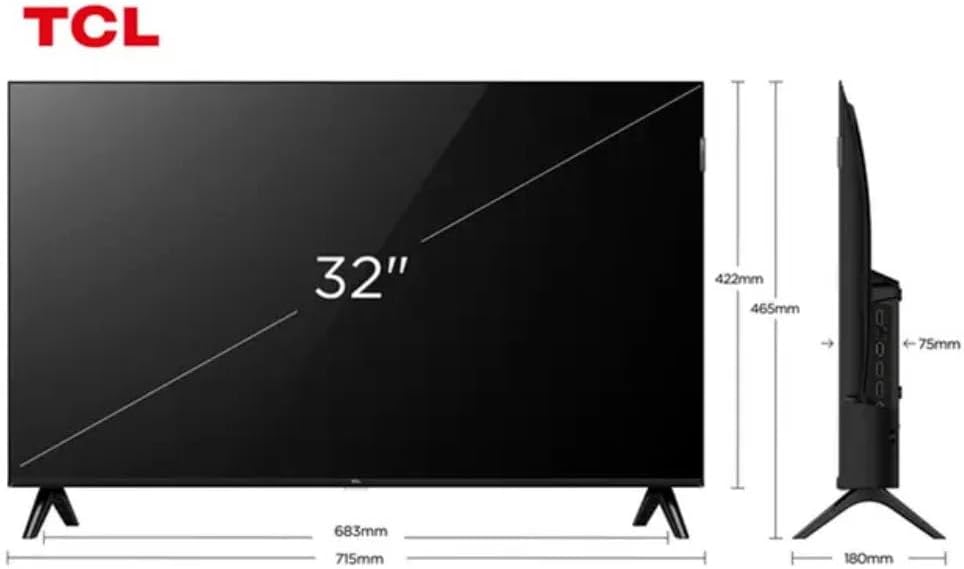
Figure 3: TV Dimensions. This image provides a detailed diagram of the TCL 32S5K Smart TV's physical dimensions, including screen size (32 inches), width (715mm), height (422mm without stand, 465mm with stand), and depth (75mm).
| 특징 | 설명 |
|---|---|
| 모델명 | 32S5K |
| 화면 크기 | 32 인치 |
| 디스플레이 기술 | QLED |
| 해결 | 1080p(풀 HD) |
| 새로 고침 빈도 | 60Hz |
| 연결성 | 블루투스, 이더넷, HDMI, USB, Wi-Fi |
| 총 HDMI 포트 | 2 |
| 특별 기능 | Integrated Speaker, Google TV, Googlecast Integrated, HDR10, Dolby Audio |
| 제품 크기(D x W x H) | 7.6P x 71.6L x 42.3A centimeters (approx. 3 x 28.2 x 16.7 inches) |
| 제조업체 | 티씨엘 |
| 원산지 | 브라질 |
보증 및 지원
보증 정보
The TCL 32S5K Smart TV comes with a 1년 제조사 보증. This warranty covers defects in materials and workmanship under normal use. Please retain your proof of purchase for warranty claims. For specific terms and conditions, refer to the warranty card included in your package or visit the official TCL web대지.
고객 지원
If you require technical assistance, have questions about your product, or need to initiate a warranty claim, please contact TCL customer support. You can typically find contact information on the TCL official web사이트나 제품 설명서에서 확인하세요.
Before contacting support, please have your TV model number (32S5K) and serial number ready, along with a detailed description of the issue.


