
소개
The ARCCTV Y2U3 Indoor Security Camera is designed to enhance your home's security and monitoring capabilities. Featuring advanced Wi-Fi 6 and dual-band (5GHz/2.4GHz) connectivity, it ensures stable and fast streaming. This camera offers 2.5K Quad HD resolution for clear visuals, two-way audio for communication, and intelligent motion detection with tracking. It also includes true-color night vision, automatic patrol cruise, and compatibility with Amazon Alexa for voice control.
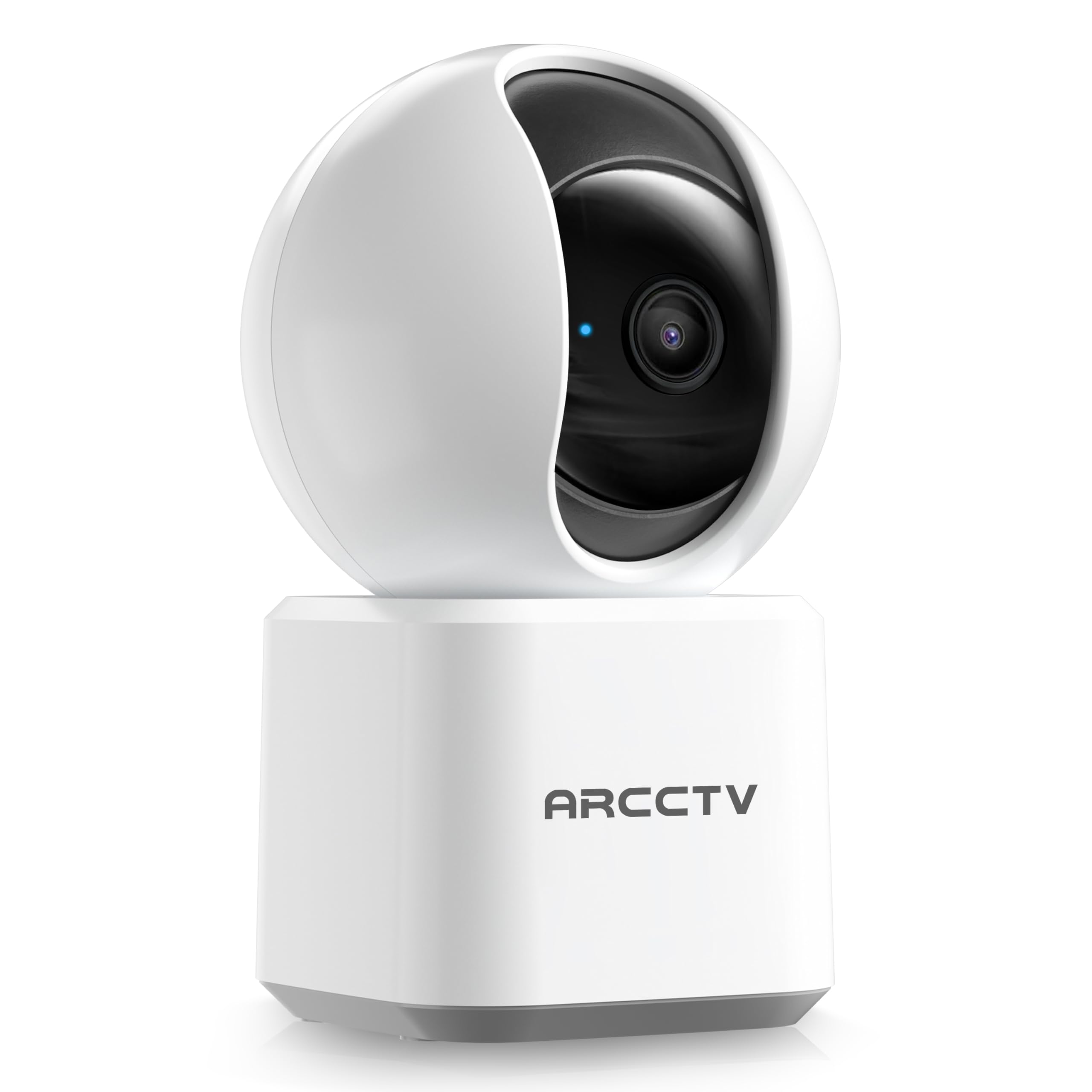
Image: The ARCCTV Y2U3 Indoor Security Camera.
상자 안에 무엇이 들어있나요?
Upon unboxing your ARCCTV Y2U3 camera, you should find the following components:
- ARCCTV Y2U3 Indoor Security Camera Body
- USB Power Adapter (for your region)
- USB-C 전원 케이블
- 장착 브래킷
- 장착 나사 및 벽 앵커
- 빠른 시작 가이드

Image: The ARCCTV Y2U3 camera and its included accessories laid out on a wooden surface.
Video: An unboxing video demonstrating the contents of the ARCCTV Y2U3 Indoor Security Camera package, including the camera, power adapter, USB-C cable, mounting bracket, screws, and quick start guide.
설정
- 전원 켜기: Connect the USB-C cable to the camera's port (located at the back of the base) and the USB power adapter. Plug the adapter into a power outlet. The camera will initiate a self-test and a blue indicator light will appear.
- 앱 다운로드: Scan the QR code in the Quick Start Guide or search for the "ARCCTV Security" app on your smartphone's app store (available for Android and iOS).
- 계정 등록: 앱을 열고 새 계정을 등록하거나 이미 계정이 있다면 로그인하세요.
- 장치 추가: Follow the in-app instructions to add your new camera. This typically involves selecting "Add Device," choosing your camera model, and scanning a QR code displayed on your phone with the camera's lens.
- Wi-Fi 연결: Ensure your smartphone is connected to a 2.4GHz or 5GHz Wi-Fi network. The camera supports both bands. The app will guide you through connecting the camera to your home Wi-Fi.
- MicroSD 카드 설치(선택 사항): If you plan to use local storage, gently rotate the camera lens upwards to reveal the microSD card slot. Insert a compatible microSD card (up to 256GB, not included) with the gold contacts facing down.
- 장착(선택 사항): If mounting the camera, use the provided mounting bracket, screws, and wall anchors. Secure the bracket to your desired location (wall or ceiling), then attach the camera to the bracket. Ensure the camera is within range of a power outlet.
영상: 사전view of the ARCCTV Y2U3 camera setup process, demonstrating the initial power-on, app connection, and basic functionality like pan/tilt control and live view.
작동 지침
살다 View 및 팬/틸트 제어
Access the live feed through the ARCCTV Security app. Use the on-screen controls to remotely pan (355° horizontal) and tilt (90° vertical) the camera lens, providing a 360° panoramic view of your space. This allows you to monitor every corner of the room.

Image: The camera's pan and tilt capabilities are illustrated, showing its wide coverage range.
양방향 오디오
Utilize the built-in microphone and speaker for real-time two-way communication. Speak through the app to interact with family members, pets, or deter intruders. The audio quality is designed for clear conversations.

Image: A visual representation of the two-way communication feature, allowing interaction with individuals near the camera.
모션 감지 및 추적
The camera features intelligent motion detection that sends instant notifications to your smartphone when activity is detected. With Smart Motion Tracking, the camera's lens automatically follows moving subjects, ensuring continuous monitoring of important events. You can customize monitoring zones to focus on specific areas.

Image: The camera's precision motion detection capability, distinguishing between human and pet movements.

Image: Smart motion tracking in action, where the camera automatically adjusts to follow moving subjects.
나이트 비전
The camera is equipped with true-color night vision using an invisible light spectrum, allowing for clear monitoring in low-light conditions without disruptive red glows. The night vision range is up to 32 feet.

Image: A depiction of the camera's night vision capability, providing clear monochrome images in darkness.
저장 옵션
The ARCCTV Y2U3 supports local storage via a microSD card (up to 256GB) for continuous recording. Additionally, encrypted cloud storage is available through a paid subscription, ensuring your data is secure even if the device is damaged.

Image: The camera highlighting its microSD card slot for local video storage.

Image: An illustration of encrypted cloud storage, emphasizing data security and accessibility.
알렉사 호환성
Integrate your ARCCTV Y2U3 camera with Amazon Alexa for convenient voice control. Use simple voice commands like "Alexa, show me the nursery" to view 호환되는 Alexa 지원 기기에서 실시간 영상을 시청할 수 있습니다.
Image: A user interacting with the camera via Alexa voice commands, viewing the feed on a tablet.
유지
- 청소: Gently wipe the camera lens and body with a soft, dry cloth. Avoid using harsh chemicals or abrasive materials that could scratch the lens or surface.
- 펌웨어 업데이트: Regularly check the ARCCTV Security app for available firmware updates. Keeping your camera's firmware up-to-date ensures optimal performance, security, and access to new features.
- 전원 주기: If the camera experiences connectivity issues or unusual behavior, try power cycling it by unplugging it from the power source for 10 seconds and then plugging it back in.
- MicroSD 카드 관리: microSD 카드를 사용하는 경우 주기적으로 재설정하십시오.view and back up important recordings. Format the card within the app as needed to maintain performance and free up space.
문제 해결
- 카메라 오프라인:
- 카메라의 전원이 켜져 있고 전원 어댑터가 제대로 연결되어 있는지 확인하세요.
- Verify your Wi-Fi network is active and the camera is within range of the router.
- Wi-Fi 라우터와 카메라를 다시 시작하세요.
- Ensure the camera is connected to a supported 2.4GHz or 5GHz Wi-Fi network.
- 낮은 비디오 품질:
- 카메라 렌즈가 깨끗하고 먼지나 얼룩이 없는지 확인하세요.
- Check your Wi-Fi signal strength in the app. A weak signal can affect video quality.
- Adjust the video resolution settings within the app to a lower quality if your network bandwidth is limited.
- 동작 감지가 작동하지 않음:
- 앱 설정에서 동작 감지 기능이 활성화되어 있는지 확인하십시오.
- Adjust the motion detection sensitivity levels.
- 카메라를 가리는 장애물이 없는지 확인하십시오. view in the monitored zones.
- 양방향 오디오 문제:
- 앱 내 마이크 및 스피커 볼륨 설정을 확인하세요.
- Ensure there is no physical obstruction covering the microphone or speaker on the camera.
- 원활한 의사소통을 위해 배경 소음을 최소화하십시오.
- 카메라 재설정: If issues persist, locate the reset button (usually near the microSD card slot, accessible by rotating the lens upwards) and press and hold it for several seconds until you hear a prompt or see the indicator light change. This will restore factory settings, and you will need to set up the camera again.
명세서
| 특징 | 세부 사항 |
|---|---|
| 모델명 | Y2U3 |
| 상표 | ARCCTV |
| 연결 기술 | 무선(Wi-Fi) |
| 무선 통신 기술 | Bluetooth, Wi-Fi (Dual-Band: 2.4GHz, 5GHz) |
| 비디오 캡처 해상도 | 1440p (2.5K 쿼드 HD) |
| 효과적인 스틸 해상도 | 4 MP |
| 특별 기능 | 2-Way Audio, PTZ Technology (Pan/Tilt/Zoom), Motion Tracking, Night Vision, Alexa Compatibility |
| View잉 각도 | 360도 회전 (좌우 좌우 이동) |
| 나이트 비전 범위 | 32 피트 |
| 전원 | 유선 전기(5볼트) |
| 플래시 메모리 지원 크기 최대 | 256 GB (MicroSD card) |
| 품목 치수 L x W x H | 10 x 1.98 x 2.7 인치 |
| 품목 무게 | 12.6 온스 |
| 제품의 권장 용도 | 실내 보안 |
보증 및 지원
For warranty information, technical support, or further assistance with your ARCCTV Y2U3 Indoor Security Camera, please refer to the official ARCCTV website or contact their customer service directly. Details can typically be found in the Quick Start Guide or on the product packaging.
You can also visit the ARCCTV Store on Amazon for product updates and additional resources: ARCCTV Store