
XIAOVV B0FT15RN39
XIAOVV WiFi 보안 카메라(모델 B0FT15RN39) 사용 설명서
4K Solar Dual-Eye Outdoor Wireless 360° PTZ WiFi Camera
1. 서론
Thank you for choosing the XIAOVV WiFi Security Camera. This manual provides essential information for setting up, operating, and maintaining your 4K Solar Dual-Eye Outdoor Wireless 360° PTZ WiFi Camera (Model B0FT15RN39). Please read this manual thoroughly before use to ensure proper functionality and safety.
This camera features a solar-powered design for continuous surveillance, a 360° dual-lens system with PTZ capabilities to eliminate blind spots, and dual storage options (microSD card up to 128GB or cloud). Its IP65 weather-resistant construction ensures year-round outdoor performance, and smart WiFi connectivity allows for remote viewing and control via a mobile app.
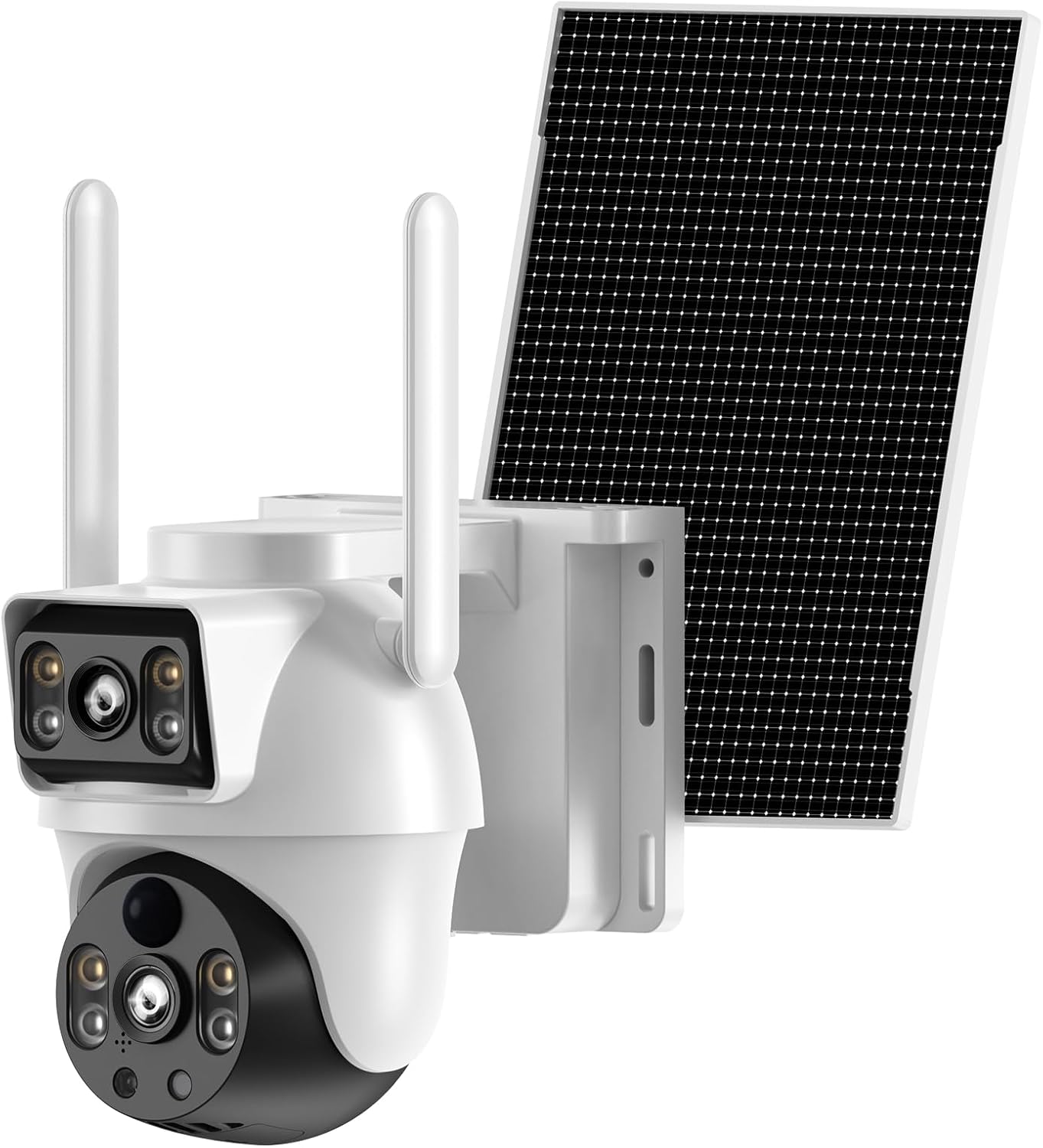
Figure 1: XIAOVV 4K Solar Dual-Eye Outdoor Wireless 360° PTZ WiFi Camera
2. 패키지 내용
아래 나열된 모든 품목이 패키지에 포함되어 있는지 확인하세요. 품목이 누락되었거나 손상된 경우 고객 지원팀에 문의하세요.
- XIAOVV WiFi Security Camera (Model B0FT15RN39)
- 태양광 패널
- 카메라 장착 브래킷
- 태양 전지 패널 장착 브래킷
- USB 충전 케이블
- Screw Bag (with screws and wall anchors)
- 사용 설명서 (본 문서)
영상 1: 언박싱 및 패키지 내용 확인view
This video demonstrates the unboxing process and provides a visual guide to all items included in the XIAOVV security camera package, including the camera unit, solar panel, mounting hardware, and cables.
3. 제품 오버view
Familiarize yourself with the main components and interfaces of your XIAOVV security camera.

그림 2: 카메라 측면 View

Figure 3: Camera Front View (Dual Lens)

Figure 4: Camera Back View

Figure 5: Camera Bottom View (항구)
The camera features a dual-lens system, with one fixed wide-angle lens and one PTZ (Pan-Tilt-Zoom) lens. It includes a microSD card slot, reset button, charging port, and power button, all protected by a waterproof cover.
4. 설정
4.1 초기 충전
Before first use, fully charge the camera using the provided USB cable. A full charge typically takes 8-13 hours. The indicator light will change from red to green when fully charged.
4.2 앱 다운로드 및 등록
Download the companion app to your smartphone (Android or iOS). 검색 "O-KAM Pro" in the Google Play Store or Apple App Store. Follow the on-screen instructions to register a new account and log in.
Video 2: App Download and Initial Setup
This video guides you through downloading the O-KAM Pro app, registering an account, and the initial steps to prepare for camera connection.
4.3 WiFi 연결
Ensure your smartphone is connected to a 2.4GHz WiFi network. The camera does not support 5GHz WiFi. Turn on the camera. If you do not hear a voice prompt, press and hold the reset button for 4 seconds until the camera prompts "Reset successful." Follow the app's instructions to connect the camera to your home WiFi network.
Video 3: WiFi Connection Methods
This video demonstrates the process of connecting the camera to your home WiFi network using the mobile application, including troubleshooting steps for voice prompts and resetting the device.
5. 설치
The camera is designed for outdoor use and can be wall-mounted. Choose a location that provides optimal surveillance coverage and sufficient sunlight for the solar panel.
- 카메라 장착: Secure the camera mounting bracket to your desired location using the provided screws and wall anchors. Attach the camera to the bracket.
- 태양 전지판 장착: Secure the solar panel mounting bracket. Install the adjustment plate in sequence, and fix the solar panel. Ensure the solar panel is positioned to receive maximum direct sunlight throughout the day.
- 태양광 패널을 카메라에 연결하세요: Connect the solar panel's cable to the camera's charging port. Ensure the waterproof silicone plug is securely in place.
Video 4: Outdoor Installation Guide
This video provides a step-by-step guide on how to physically install the XIAOVV security camera and its solar panel outdoors, including securing brackets and connecting components.

그림 6: 예ample of Outdoor Installation
6. 카메라 작동
6.1 라이브 View 및 PTZ 제어
Access the live feed from your camera via the O-KAM Pro app. Use the on-screen controls to pan, tilt, and zoom the PTZ lens for a 360° view of your property. Both wide-angle and PTZ views can be monitored simultaneously.

Figure 7: 360° Dual-Lens View잉
6.2 야간 투시경
The camera supports both infrared night vision (black and white) and intelligent full-color night vision, providing clear images even in low-light conditions.

Figure 8: Full Color Night Vision
6.3 동작 감지 및 알림
The camera features smart motion detection. When motion is detected, you will receive real-time notifications on your smartphone. The camera can also trigger an LED light alarm and siren.

그림 9: 동작 감지 및 알림
6.4 양방향 오디오
Utilize the built-in microphone and speaker for two-way communication through the app, allowing you to listen in or speak to visitors.
6.5 저장 옵션
Recordings can be saved locally to a microSD card (up to 128GB, not included) or securely uploaded to the cloud storage service (subscription may be required).

Figure 10: MicroSD Card and Cloud Storage
6.6 Sharing and Remote Access
라이브 음식을 공유하세요tage and camera access with family members or other authorized users. Monitor your property from anywhere with an internet connection.

Figure 11: Shareable Live Stream and Remote Control
7. 유지관리
7.1 청소
카메라 렌즈와 태양광 패널을 부드러운 천으로 정기적으로 청소하세요.amp 최적의 성능을 위해 천을 사용하십시오. 강한 화학 물질이나 연마재 사용을 피하십시오.
7.2 내후성
The camera has an IP65 rating, making it resistant to dust and water jets. It operates in temperatures from -4°F to 140°F. Ensure all port covers are securely closed to maintain weather resistance.
Video 5: Waterproof Test Demonstration
This video demonstrates the camera's IP65 waterproof capabilities, showing it withstands direct water exposure, highlighting its durability for outdoor use.

Figure 12: IP65 Weather-Resistant Design
8. 문제 해결
- 카메라 전원이 켜지지 않음: Ensure the camera is fully charged. Check the power switch is in the ON position.
- Wi-Fi에 연결할 수 없습니다: Ensure your router is broadcasting a 2.4GHz WiFi signal. Verify the WiFi password. Keep the camera close to the router during setup. Try resetting the camera by holding the reset button for 4 seconds.
- 비디오 품질이 좋지 않음: 인터넷 연결 속도를 확인하세요. 카메라 렌즈가 깨끗하고 장애물이 없는지 확인하세요.
- 동작 감지가 작동하지 않습니다: 앱에서 동작 감지 설정을 확인하세요. 카메라의 view 방해받지 않습니다.
- 태양광 패널이 충전되지 않습니다: Ensure the solar panel is receiving direct sunlight for several hours daily. Clean the solar panel surface.
9. 사양
| 특징 | 사양 |
|---|---|
| 모델 | B0FT15RN39 |
| 비디오 캡처 해상도 | 4K |
| 연결 프로토콜 | Wi-Fi(2.4GHz만 해당) |
| 전원 | 태양열 전원 |
| 특징 | PTZ (Pan-Tilt-Zoom), Dual-Lens, Night Color, Motion Detection |
| 실내/실외 사용 | 집 밖의 |
| 방수 레벨 | IP65 방수 |
| 작동 온도 | -4°F ~ 140°F(-20°C ~ 60°C) |
| 저장 | MicroSD 카드(최대 128GB), 클라우드 스토리지 |
| 장착 유형 | 벽걸이형 |
| 품목 치수 L x W x H | 10 x 7 x 5 인치 |
| 품목 무게 | 3파운드 |
10. 보증 및 지원
XIAOVV products come with a standard manufacturer's warranty. For detailed warranty information, technical support, or service inquiries, please refer to the warranty card included in your package or visit the official XIAOVV web대지.
For additional assistance, you may contact XIAOVV customer service through the contact information provided on their official channels.
Ask a question about this manual
Ask about setup, troubleshooting, compatibility, parts, safety, or missing instructions. Manuals+ will review the question and use this page’s manual context to help answer it.