
WALFRONT ADF4351 RF Signal Generator Module
사용자 설명서
1. 서론
This manual provides detailed instructions for the proper use and operation of the WALFRONT ADF4351 RF Signal Generator Module. Designed for hobbyists and engineers, this frequency synthesizer offers a wide output frequency range and flexible control options. Please read this manual thoroughly before operating the device to ensure safe and efficient use.
2. 안전 정보
중요한: This board requires professional knowledge and ability for proper use. Incorrect handling or connections can lead to damage to the module or connected equipment. Always observe the following safety precautions:
- 전원 공급 장치 볼륨을 확인하십시오.tage is within the specified range (DC4-9V, typical 5V).
- Avoid short circuits on any pins or connectors.
- Do not expose the module to moisture, extreme temperatures, or static electricity.
- Handle the board by its edges to prevent damage to components.
- 연결 작업을 하거나 변경하기 전에 전원을 차단하십시오.
3. 제품 오버view
The WALFRONT ADF4351 module is a compact RF signal generator and frequency synthesizer. It features a well-designed circuit board layout and offers a versatile frequency range for various RF applications.
주요 특징:
- Versatile Frequency Generation: Output frequency range from 35 MHz to 4.4 GHz.
- Easy Control Interface: Three-wire SPI design for straightforward operations and flexible frequency adjustments.
- Crystal Oscillator Included: Features a 25 MHz active crystal oscillator for reliable and accurate frequency synthesis.
- 음소거 기능: RF output level can be muted via a dedicated pin or software control.
- 컴팩트한 디자인: Measures 49 x 37 x 12 mm, ideal for integration into custom setups and DIY projects.
모듈 구성 요소:
The module consists of the ADF4351 chip, a 25M active crystal oscillator, power input, control pins, and SMA output connectors.

그림 3.1: 상단 및 하단 view of the WALFRONT ADF4351 RF Signal Generator Module. The top view shows the main components including the ADF4351 chip, crystal oscillator, and control pins. The bottom view shows solder pads and mounting holes.
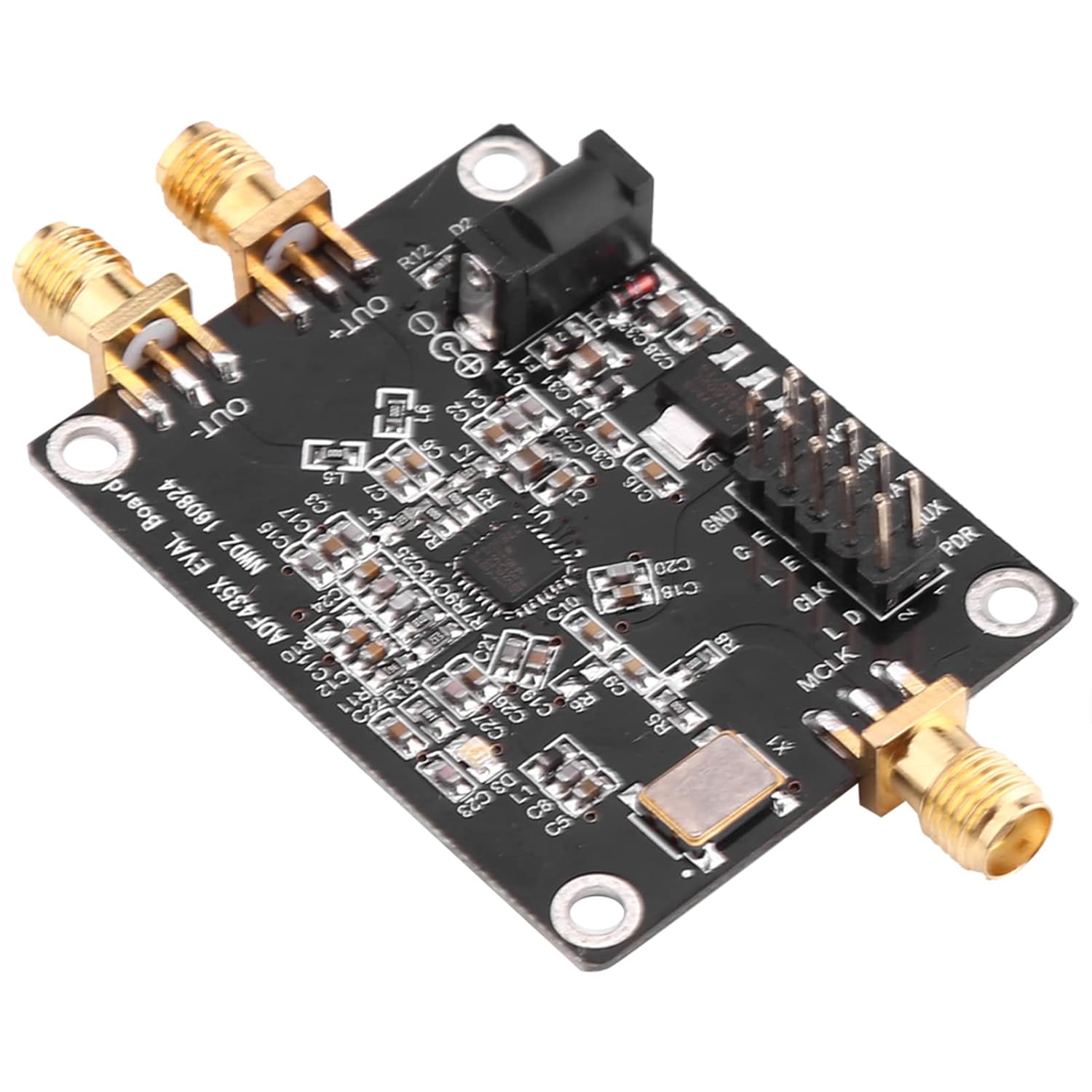
그림 3.2: 각도 view of the ADF4351 module, highlighting the SMA output connectors and the DC power input jack.
4. 설정
Follow these steps to set up your ADF4351 module:
4.1. 전원 연결
- Locate the DC002 interface on the module.
- Connect a stable DC power supply providing 4-9V (typical 5V) to this interface. Ensure correct polarity.
4.2. Signal Output Connection
- Identify the SMA female connectors labeled 'OUT+' and 'OUT-'.
- Connect your RF measurement equipment or load to these SMA connectors using appropriate RF cables.

그림 4.1: 클로즈업 view of the SMA female output connectors ('OUT+' and 'OUT-') on the ADF4351 module.
4.3. Control Interface Connection
The module is controlled via a three-wire SPI interface. All control pins are led out for convenient operation. Refer to the provided circuit diagram (in PDF format) for detailed pin assignments.
- Connect the SPI control pins (e.g., CLK, DAT, LE) from your microcontroller or control board to the corresponding pins on the ADF4351 module.
- 적절한 볼륨 확인tage levels (e.g., 3.3V) for the control signals.

그림 4.2: 상세 view of the control pin header (GND, 3V3, DAT, LE, CLK, MUX, PDR) and the DC power input jack.
5. 사용 설명서
Once the module is powered and connected, you can begin operating it using the SPI interface.
5.1. Frequency Generation
The ADF4351 module can generate frequencies from 35 MHz to 4.4 GHz. The output signal type varies with frequency:
- 2.2 GHz - 4.4 GHz: Fundamental wave (sine wave).
- 35 MHz - 2.2 GHz: Fundamental division (square wave).
5.2. SPI Control
The three-wire SPI interface allows for comprehensive control over the module's functions. This includes:
- 주파수 조정 : Program the desired output frequency.
- Point Frequency Sweep: Configure the module to sweep across a range of frequencies.
- 주파수 호핑: Implement frequency hopping sequences.
- 스테핑: Adjust frequency in precise 1 kHz steps.
The module can be controlled by official software provided by the manufacturer. Refer to the software documentation and the provided test program for programming examples and detailed SPI communication protocols.
5.3. Mute Functionality
The RF output level can be muted to optimize signal usage or for testing purposes. This can be achieved in two ways:
- Via Pin: Use a dedicated control pin (refer to circuit diagram for specific pin).
- 소프트웨어를 통해: Implement the mute function through SPI commands.
6. 사양
| 매개변수 | 값 |
|---|---|
| 출력 주파수 범위 | ADF4351: 35 MHz - 4.4 GHz |
| 전원 공급 장치 | DC002 Interface DC4-9V (typical 5V) |
| Output Signal (2.2-4.4 GHz) | Fundamental wave (sine wave) |
| Output Signal (35M-2.2 GHz) | Fundamental division (square wave) |
| 신호 출력 커넥터 | SMA 여성 |
| 크리스털 발진기 | 25 MHz active crystal oscillator (+/-50ppm) |
| 제어 인터페이스 | Three-wire SPI |
| 치수 | 49 x 37 x 12mm(1.93 x 1.45 x 0.47인치) |
| 품목 무게 | 0.459 온스 |
| 모델 번호 | WALFRONT0fyc712r5g |
7. 유지관리
The ADF4351 module is designed for durability, but proper care can extend its lifespan:
- 모듈을 깨끗하게 유지하고 먼지와 이물질이 쌓이지 않도록 하십시오. 청소할 때는 부드럽고 마른 천을 사용하십시오.
- Store the module in a dry environment, away from direct sunlight and extreme temperatures.
- Avoid physical shock or excessive vibration.
- Ensure all connections are secure but do not overtighten SMA connectors.
8. 문제 해결
If you encounter issues with your ADF4351 module, consider the following common troubleshooting steps:
- 전원 없음: 전원 공급 장치 연결을 확인하고 볼륨을 확인하십시오.tage is within the 4-9V range. Verify the power adapter is functioning correctly.
- No RF Output:
- 모듈에 전원이 공급되고 있는지 확인하십시오.
- Check if the RF output has been muted via pin or software.
- Ensure the SMA cables and connected equipment are working correctly.
- Incorrect Frequency Output:
- Double-check your SPI programming for the desired frequency.
- Ensure the SPI communication is stable and error-free.
- Verify the 25 MHz crystal oscillator is functioning.
- Module Not Responding to SPI:
- Check all SPI pin connections (CLK, DAT, LE) for continuity and correct wiring.
- Ensure the control signals are at the correct voltage levels (e.g., 3.3V).
- Review your SPI communication code for any errors.
If problems persist, and you have verified all connections and programming, it is recommended to consult the official circuit diagram and test program, or seek assistance from experienced professionals.
9. 보증 정보
Specific warranty details for the WALFRONT ADF4351 RF Signal Generator Module are typically provided by the seller or manufacturer at the time of purchase. Please retain your proof of purchase for any warranty claims. For detailed information regarding warranty coverage, duration, and terms, please contact your point of purchase or the Walfront customer support directly.
10. 지원
For further technical assistance, documentation, or inquiries not covered in this manual, please contact Walfront customer support. You may also find additional resources, including circuit diagrams and test programs, on the manufacturer's official web웹사이트 또는 판매자의 지원 채널을 통해 문의하십시오.