
1. 제품 오버view
The Lightbiz L900 is a 20-inch rechargeable picture light designed to illuminate artwork, photos, and wall decor. It features a cordless, battery-operated design with adjustable brightness and color temperature, controlled via touch or remote.

Image 1.1: Lightbiz L900 Picture Light showing its 20-inch length, 4.3-inch main unit width, and 2-inch depth, along with the power display and light bars.
주요 특징:
- 대용량 배터리 : Equipped with two 5000mAh detachable and replaceable rechargeable batteries, providing a total capacity of 10000mAh. Offers approximately 20 hours of operation at maximum brightness and 40 hours at medium brightness.
- Wide Illumination Range: The 20-inch light bar effectively illuminates artwork up to 80 inches wide, ideal for pieces 18 inches or larger.
- 조절 가능한 색온도: Three color temperature options: Warm White (3000K), Natural (4500K), and Cool White (6500K).
- 디머블 밝기: Five adjustable brightness levels (20%, 40%, 60%, 80%, 100%).
- 이중 제어 방법: Control via touch buttons on the light unit or with the included remote control.
- 타이머 기능: Remote control includes options for 15, 30, or 60-minute automatic shut-off.
- 배터리 잔량 표시기: An indicator light on the unit displays the remaining battery level.
2. 상자 안에 무엇이 들어있나요?
- Picture Light (1 unit)
- 리모콘(1개)
- 사용설명서(1개)
- USB 충전 케이블(1개)
- 장착 나사 (2개)
- 벽 앵커(2개)
- 3M Adhesive Pad (1 unit)

Image 2.1: Contents of the Lightbiz L900 package, including the picture light, remote control, and mounting hardware.
3. 설정 및 설치
Follow these steps to assemble and install your Lightbiz L900 Picture Light.
3.1 조립
- Identify the left and right light bars.
- Carefully insert each light bar into its corresponding interface on the central unit until fully seated.
3.2 장착 옵션
The Lightbiz L900 offers two installation methods:
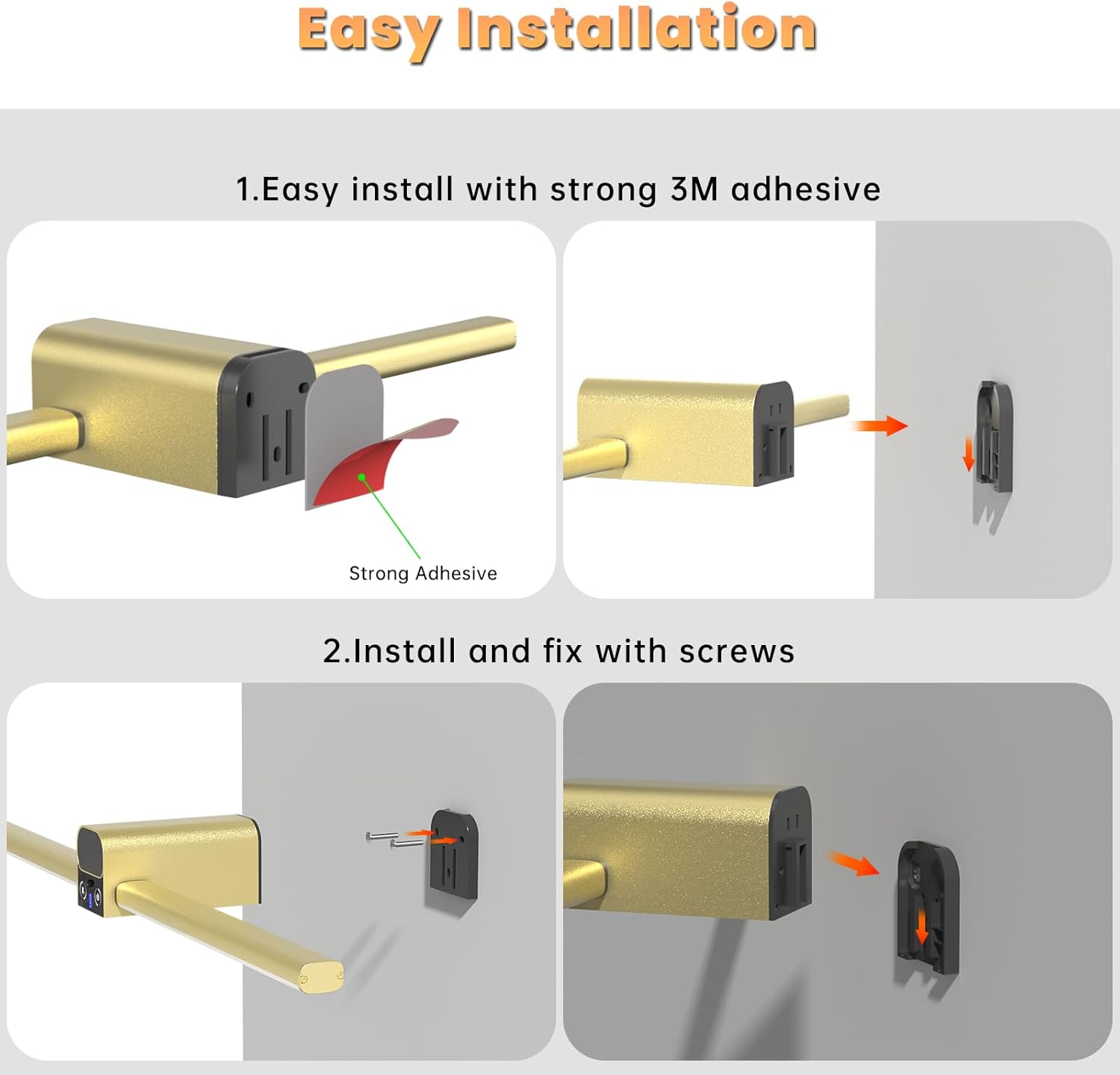
Image 3.1: Visual guide for installing the Lightbiz L900 using either 3M adhesive or screws.
- 3M 접착제 사용:
- Ensure the wall surface is clean, flat, and dust-free for optimal adhesion.
- Peel the backing from the strong 3M adhesive pad and firmly press the mounting bracket onto the desired location on the wall.
- Hold for 30 seconds to ensure a secure bond.
- 나사 사용:
- This method provides a more stable installation and is recommended for uneven walls or if you prefer a permanent fixture.
- Mark the desired mounting points on the wall using the bracket as a template.
- 필요한 경우 드릴로 파일럿 구멍을 뚫고 벽 앵커를 삽입하십시오.
- 제공된 나사를 사용하여 장착 브래킷을 벽에 고정합니다.
3.3 배터리 설치
The Lightbiz L900 features detachable and replaceable batteries for convenient charging.

Image 3.2: Illustration of the detachable 5000mAh batteries and USB-C charging port.
- Ensure the batteries are charged using the provided USB charging cable.
- Insert a charged battery into the battery compartment of the central unit. Press firmly until it clicks into place.
- To remove, press the battery to pop it out.
3.4 설치 비디오
Video 3.1: Official Lightbiz video demonstrating the installation process of the picture light.
4. 사용 설명서
Control your Lightbiz L900 Picture Light using either the touch buttons on the unit or the remote control.

이미지 4.1: 이상view of the two control methods: touch buttons on the light unit and the included remote control.
4.1 전원 켜기/끄기
- 터치 컨트롤: Press the power button on the central unit to turn the light on or off.
- 원격 제어: Press the 'ON/OFF' button on the remote.
4.2 밝기 조정
The light offers 5 brightness levels (20%, 40%, 60%, 80%, 100%).

Image 4.2: Visual representation of the five adjustable brightness levels.
- 터치 컨트롤: Repeatedly press the brightness button (usually indicated by a sun icon or '+' / '-' symbols) on the central unit to cycle through brightness levels.
- 원격 제어: Use the '+' and '-' buttons to increase or decrease brightness.
4.3 색온도 조정
Choose from three color temperatures: Warm White (3000K), Natural (4500K), and Cool White (6500K).
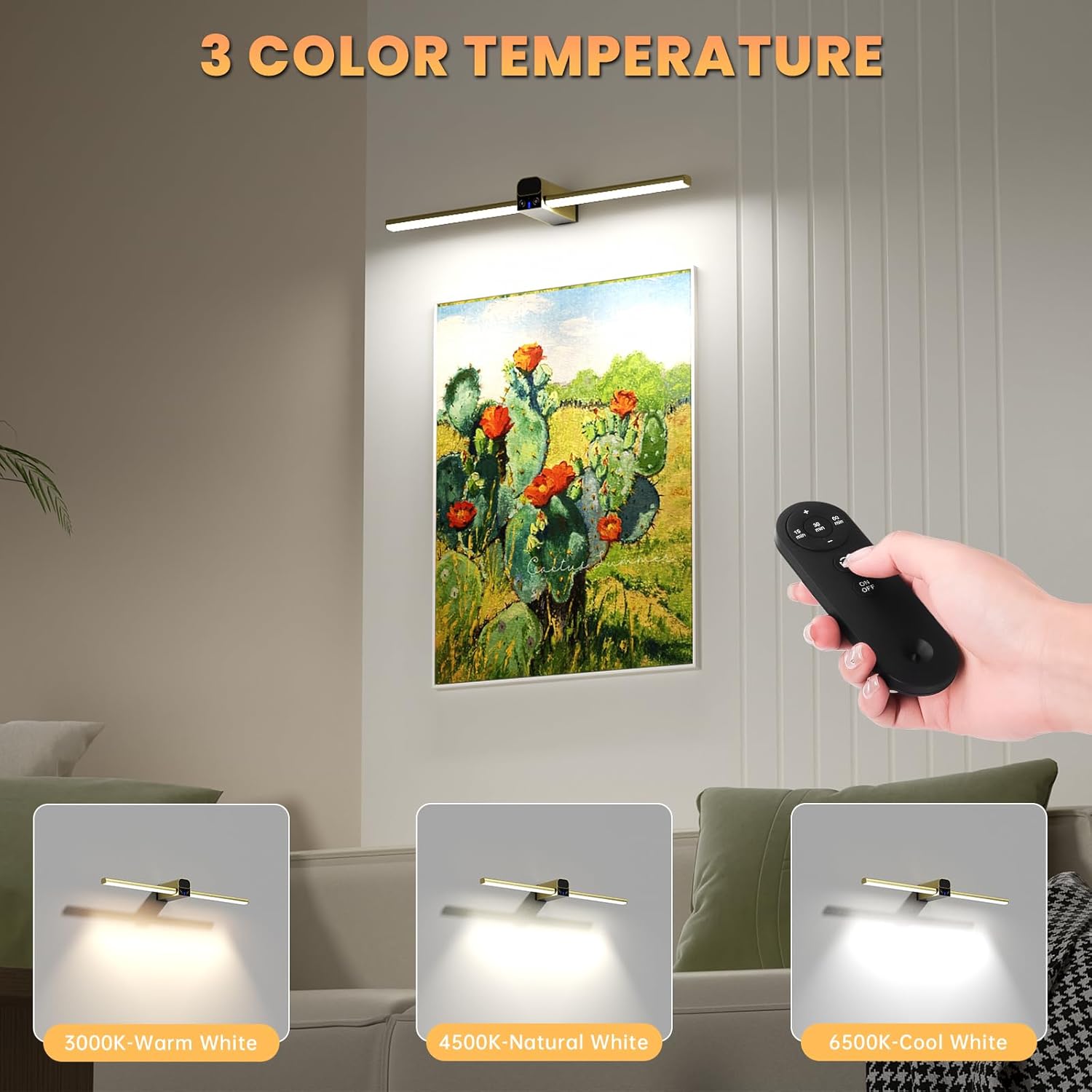
이미지 4.3: Examples of the three available color temperatures: Warm White, Natural, and Cool White.
- 터치 컨트롤: Press the color temperature button (usually indicated by a 'K' icon) on the central unit to cycle through the temperature options.
- 원격 제어: Press the 'K' button on the remote to switch between color temperatures.
4.4 타이머 기능
Set the light to automatically turn off after a specified period.

Image 4.4: Remote control buttons for setting the 15, 30, or 60-minute timer.
- 원격 제어: Use the '15 min', '30 min', or '60 min' buttons on the remote to activate the timer. The light will turn off automatically after the selected duration.
5. 유지관리
To ensure the longevity and optimal performance of your Lightbiz L900 Picture Light, follow these maintenance guidelines:
- 청소: Wipe the light unit and light bars with a soft, dry cloth. Avoid using abrasive cleaners or solvents that may damage the finish.
- 배터리 관리 : Recharge batteries regularly, even if not in constant use, to maintain battery health. Store spare batteries in a cool, dry place.
- 저장: If storing the light for an extended period, remove the batteries and store them separately.
6. 문제 해결
If you encounter any issues with your Lightbiz L900 Picture Light, refer to the following common troubleshooting steps:
- 조명이 켜지지 않음:
- Ensure the battery is fully charged and correctly inserted into the unit.
- Check if the light bars are fully inserted into the central unit's interfaces.
- Verify the remote control battery is functional and that there are no obstructions between the remote and the light.
- 리모콘이 응답하지 않음:
- 리모콘 배터리를 교체하십시오.
- 리모컨의 유효 작동 범위 내에 있는지 확인하십시오.
- 배터리 수명이 짧음:
- 사용하기 전에 배터리가 완전히 충전되었는지 확인하십시오.
- Operating at maximum brightness will consume battery faster. Consider using lower brightness settings for extended use.
- If battery life significantly degrades, consider replacing the rechargeable batteries.
For further assistance, please contact Lightbiz customer support.
7. 사양
| 기인하다 | 세부 사항 |
|---|---|
| 상표 | 라이트비즈 |
| 모델명 | L900 |
| 제품 치수 | 20인치 길이 x 1.2인치 너비 x 4.8인치 높이 |
| 품목 무게 | 1.3파운드 |
| 색상 | 금 |
| 재료 | Acrylonitrile Butadiene Styrene, Aluminum, Metal |
| 전원 | USB 충전식 배터리 |
| 배터리 용량 | 10000mAh(2 x 5000mAh) |
| 광원 유형 | 주도의 |
| 명도 | 150루멘 |
| 색온도 | 3000K (Warm White), 4500K (Natural), 6500K (Cool White) |
| 제어 방법 | 터치, 원격 제어 |
| 설치 유형 | 벽걸이형 |
| 실내/실외 사용 | 실내 |
| 권tage | 5볼트(DC) |
| 왓tage | 5 와트 |
| 연결 프로토콜 | 적외선 |
8. 보증 및 지원
The Lightbiz L900 Picture Light comes with a 평생 보증.
Lightbiz is committed to product quality and customer satisfaction. If you have any product issues, questions, or require support, please do not hesitate to contact Lightbiz customer service. Refer to the contact information provided in your product packaging or visit the official Lightbiz web도움이 필요한 경우 사이트를 방문하세요.