
1. 서론
The AJAZZ AKP03 Macro Keypad Stream Controller is a versatile device designed to enhance productivity and streamline workflows for gamers, streamers, and professionals. Featuring six programmable keys with LCD displays, three physical knobs, and three toggle switches, it offers extensive customization options for various tasks.
This manual provides detailed instructions for setting up, operating, and maintaining your AKP03 device, ensuring optimal performance and user experience.
2. 제품 특징
- Six Programmable Macro Keys: Customizable LCD displays for single or continuous actions.
- Three Physical Knobs: For precise control over various functions.
- Three Toggle Switches: Additional control options.
- 원클릭 작동: Instant execution of macro commands, text input, application launches, and media control.
- Intuitive Driver Software: Drag-and-drop functionality for easy key assignment and property configuration.
- 폭넓은 호환성: Seamless integration with platforms like Streamlabs, Twitch, YouTube, and various software applications on Windows and Mac.
- Removable 40° Stand: Provides an ergonomic viewing angle and stable placement.

그림 2.1: 이상view of the AJAZZ AKP03 Macro Keypad, highlighting its programmable buttons, toggle switches, and scroll wheels.
3. 패키지 내용
패키지에 모든 품목이 들어 있는지 확인하세요.
- AJAZZ AKP03 Macro Keypad Stream Controller
- USB-C to USB-A 케이블
- Removable 40° Stand
- 사용 설명서 (본 문서)
4. 설정
4.1 물리적 연결
- Attach the removable 40° stand to the bottom of the AKP03 for an ergonomic angle, if desired.
- Connect the provided USB-C cable to the USB-C port on the AKP03.
- 케이블의 USB-A 단자를 컴퓨터(PC 또는 Mac)의 사용 가능한 USB 포트에 연결하십시오.
- 장치의 전원이 자동으로 켜집니다.

Figure 4.1: Attaching the removable 40° stand to the AKP03.
4.2 소프트웨어 설치
To unlock the full customization capabilities of your AKP03, you must install the dedicated driver software.
- 당신의 web browser and navigate to the official AJAZZ web대지: www.a-jazz.com.
- Locate the 'Driver Download' section.
- 검색 'AKP03' or browse for the corresponding driver for your model.
- Download the driver software compatible with your operating system (Windows or macOS).
- 설치 프로그램을 실행하고 화면의 지시에 따라 설치를 완료합니다.
- 메시지가 나타나면 컴퓨터를 다시 시작하세요.
Video 4.1: Demonstrates the software installation process and initial setup for the AJAZZ Macro Keypad.
5. 사용 설명서
5.1 Customizing Keys and Knobs
The AKP03's driver software provides a user-friendly interface for customization:
- Launch the 'Stream Dock AJAZZ' software from your desktop or applications folder.
- The software will display a visual representation of your AKP03.
- To assign an action, drag and drop a desired function (e.g., launch application, media control, macro command) from the software's library onto one of the six programmable keys.
- For knobs, select the knob in the software and assign functions such as volume control, scrolling, or zooming.
- You can configure properties for each assigned action, including specific file 경로, web URLs, or macro sequences.
- The LCD displays on the keys will update to show the assigned icon or text.
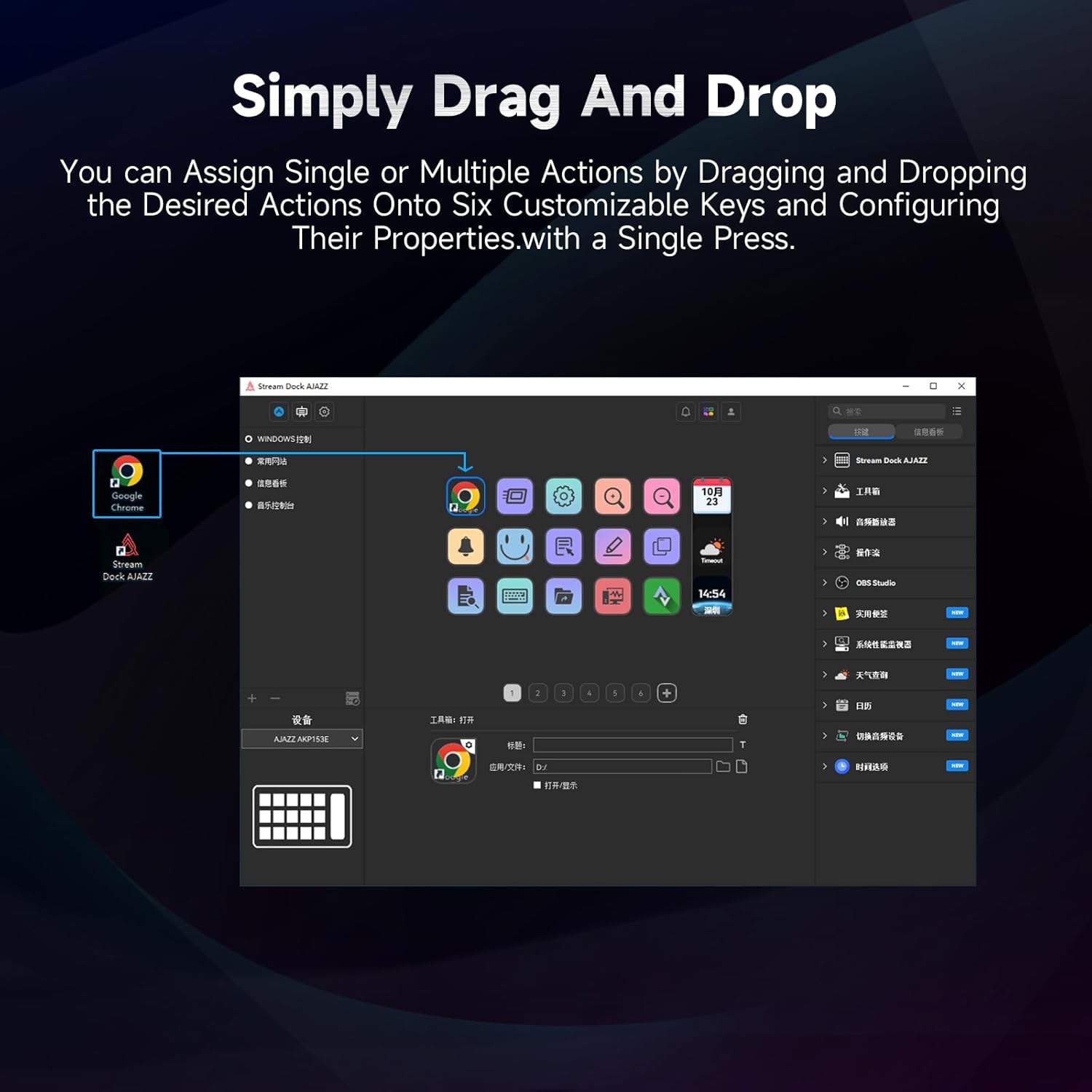
Figure 5.1: Customizing keys using the drag-and-drop interface in the AJAZZ software.
Video 5.1: Demonstration of assigning actions to keys for launching web pages and software with a single click.
5.2 Using Profiles and Pages
The software supports multiple profiles and pages, allowing you to switch between different sets of key assignments for various applications or tasks.
- 새 프로 만들기files for specific games, editing software, or streaming setups.
- 각 프로 내에서file, you can create multiple pages of key assignments, accessible by navigating through the device's buttons or software interface.
- The AKP03 automatically switches to the relevant profile when a linked application is in focus.
Video 5.2: Illustrates the multi-functional capabilities and profile switching of the AKP03 for various tasks.
6. 유지관리
To ensure the longevity and optimal performance of your AJAZZ AKP03, follow these maintenance guidelines:
- 청소: Use a soft, dry cloth to wipe the surface of the device. Avoid abrasive cleaners or solvents.
- 저장: 본 기기는 직사광선과 극한의 온도를 피해 시원하고 건조한 곳에 보관하세요.
- 케이블 관리: 손상을 방지하려면 USB 케이블을 과도하게 구부리거나 비틀지 마세요.
- 소프트웨어 업데이트: 정기적으로 AJAZZ를 확인하세요 web소프트웨어 및 펌웨어 업데이트 사이트로, 호환성을 보장하고 새로운 기능에 접근할 수 있도록 합니다.
7. 문제 해결
If you encounter issues with your AKP03, refer to the following common troubleshooting steps:
- 인식되지 않는 장치:
- Ensure the USB cable is securely connected to both the AKP03 and your computer.
- 다른 USB 포트에 연결해 보십시오.
- 컴퓨터를 다시 시작하세요.
- Verify that the driver software is correctly installed and up to date.
- 키가 응답하지 않음:
- Check the software to ensure keys are properly assigned and the correct profile 활성화되어 있습니다.
- 드라이버 소프트웨어가 백그라운드에서 실행 중인지 확인하세요.
- 소프트웨어 문제:
- 드라이버 소프트웨어를 다시 설치하세요.
- Check for software updates on the AJAZZ web대지.
8. 사양
| 특징 | 세부 사항 |
|---|---|
| 상표 | 아재즈 |
| 모델명 | AKP03 |
| 호환 장치 | PC, 노트북 |
| 컨트롤러 유형 | 건반 |
| 연결 기술 | USB-C |
| 버튼 수량 | 6 Programmable Keys (with LCD displays), 3 Physical Knobs, 3 Toggle Switches |
| 품목 무게 | 0.32 킬로그램 |
| 품목 치수(L x W x H) | 5 x 3 x 2 인치 |
| 전원 | 코드식 전기 |
9. 보증 및 지원
9.1 보증 정보
The AJAZZ AKP03 Macro Keypad Stream Controller comes with a 1년 한정 보증 구매일로부터. 본 보증은 정상적인 사용 중 발생한 제조상의 결함 및 오작동에 적용됩니다. 오용, 사고, 무단 개조 또는 부적절한 설치로 인한 손상은 보증되지 않습니다.
보증 청구를 위해 구매 증명서를 보관하십시오.
9.2 고객 지원
For technical assistance, troubleshooting, or warranty inquiries, please contact AJAZZ customer support:
- Web대지: www.a-jazz.com (Refer to the 'Support' or 'Contact Us' section)
- 이메일: [Insert Customer Support Email, if available]
- 핸드폰: [Insert Customer Support Phone Number, if available]
Our support team is available to assist you with any questions or concerns regarding your product.