
1. 서론
Thank you for choosing the OUKITEL P1500E PLUS Portable Power Station. This device is a high-capacity, versatile power solution designed to provide reliable electricity for various applications, including home backup, outdoor camping, travel, and emergency situations. With a robust 1536Wh LiFePO4 battery and an 1800W continuous AC output (3600W peak), it ensures your essential devices remain powered.
This manual provides important information regarding the safe operation, setup, maintenance, and troubleshooting of your P1500E PLUS. Please read it thoroughly before using the product to ensure optimal performance and safety.

Image: OUKITEL P1500E PLUS Portable Power Station in an outdoor setting, showcasing its compact design and portability.
2. 안전 지침
To ensure safe operation and prolong the lifespan of your OUKITEL P1500E PLUS, please adhere to the following safety guidelines:
- Do not disassemble, repair, or modify the unit. Incorrect assembly may lead to fire, explosion, or injury.
- Keep the device away from fire, heat sources, and direct sunlight to prevent overheating.
- Do not use or store the device in bathrooms or areas exposed to water or high humidity.
- 정품 또는 인증된 케이블과 액세서리만 사용하세요.
- 기기를 떨어뜨리거나 충격을 가하거나 강한 진동에 노출시키지 마십시오.
- 어린이와 애완동물의 손이 닿지 않는 곳에 보관하세요.
- The integrated LiFePO4 battery features a SuperSafe Battery Management System (BMS) that provides protection against short circuits, over-temperature, over-charge, and other potential hazards.
- 과열을 방지하기 위해 사용 및 충전 시에는 적절한 환기를 유지하세요.
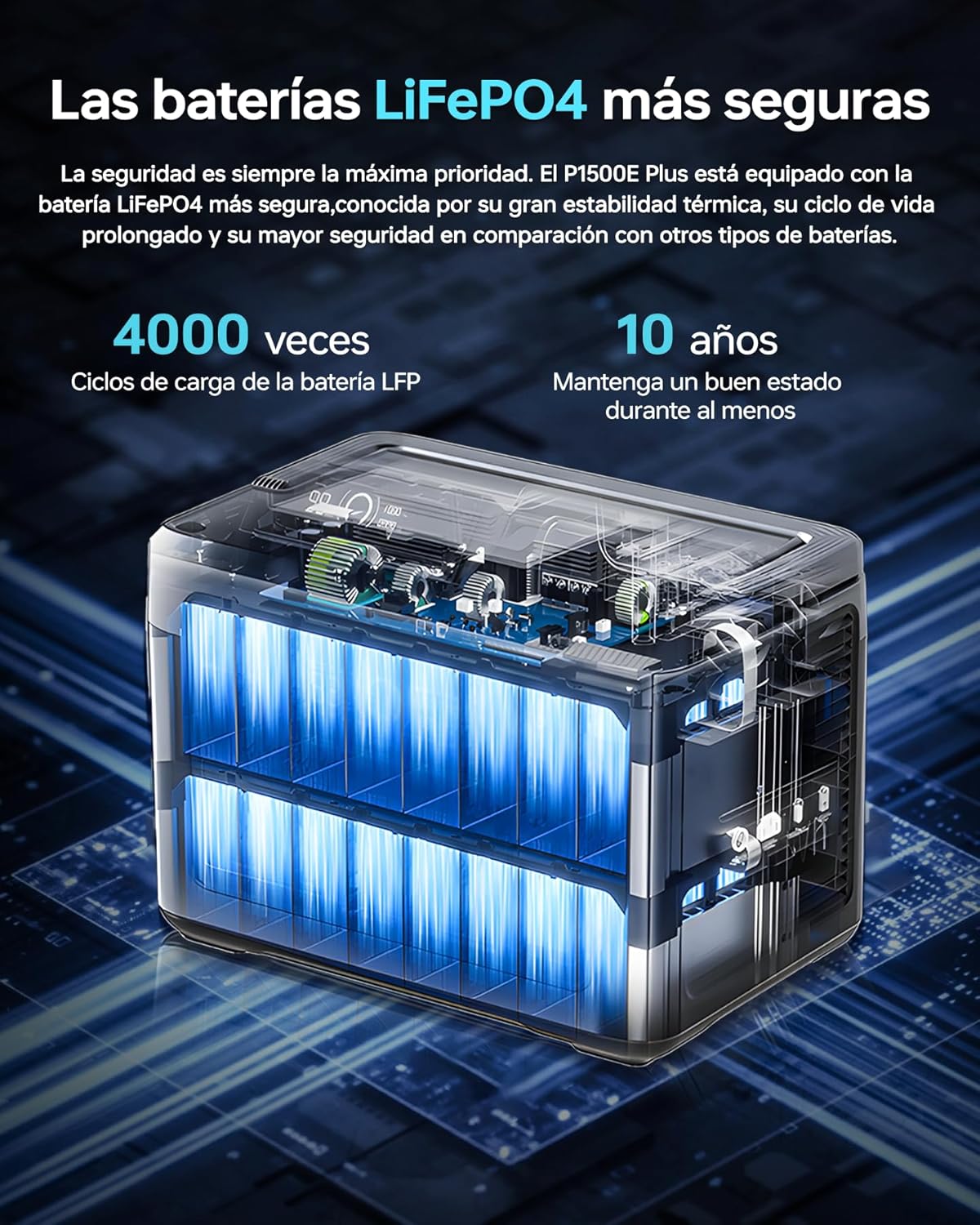
이미지: 내부 view of the OUKITEL P1500E PLUS LiFePO4 battery cells, highlighting the safety and longevity of the battery technology. The text on the image indicates '4000 cycles' and '10 years' lifespan.
3. 패키지 내용
개봉 후 포장 내용물을 확인해 주세요. 누락되었거나 손상된 품목이 있는 경우 고객 지원 센터에 문의하세요.
- 1 x OUKITEL P1500E PLUS Portable Power Station
- 2 x PV100 Foldable Solar Panels
- 1 x AC 전원 케이블
- 1 x MC4 to XT60 Cable
- 1 x Bluetooth Pairing Pin
- 1 x 보증 카드
- 1 x 사용자 설명서

Image: Diagram showing the contents of the OUKITEL P1500E PLUS package, including the power station, AC charging cable, MC4-XT60 cable, and manual.
4. 제품 오버view
4.1. 포트 및 제어
The OUKITEL P1500E PLUS is equipped with a variety of output and input ports to accommodate diverse charging needs:
- AC Outputs (x4): 연속 출력 1800W, 최대 출력 3600W.
- USB-A QC3.0 (x2): Quick Charge for compatible devices.
- USB Type-C PD20W (x1): Power Delivery for smaller devices.
- USB Type-C PD100W (x1): High-speed Power Delivery for laptops and larger devices.
- DC5521 Outputs (x2): For DC-powered appliances.
- Car Charging Port (x1): 12V/10A 출력.
- LED 조명: 조명 기능이 내장되어 있습니다.

이미지: 상세 view of the OUKITEL P1500E PLUS ports and controls, labeling AC outputs, USB ports, DC outputs, and the car charging port.
4.2. 디스플레이 인터페이스
The clear digital display provides real-time information about the power station's status:
- 1. Discharge Remaining: Time remaining for discharge.
- 2. High Temperature Protection: Indicator for overheating.
- 3. Low Temperature Protection: Indicator for low temperature.
- 4. Fan Status: Indicates fan operation.
- 5. Power Status: 배터리 충전 수준.
- 6. UPS Mode: Indicates Uninterruptible Power Supply mode.
- 7. PV Charging Mode: Indicates solar charging.
- 8. Total Input Power: Current power input in watts.
- 9. Total Output Power: Current power output in watts.
- 10. Cigarette Lighter (12V) Output: Indicator for car port use.
- 11. DC (12V) Output: Indicator for DC output use.
- 12. 무음 모드: Indicator for quiet operation.
- 13. Fast Charging Mode: Indicator for rapid charging.
- 14. Slow Charging Mode: Indicator for slower, battery-preserving charging.
- 15. 과부하 보호: Indicator for excessive load.
- 16. USB 출력: Indicator for USB-A output use.
- 17. PD Output: Indicator for USB-C Power Delivery output use.
- 18. AC Output: Indicator for AC output use.
- 19. Frequency Switching: Allows switching between 50Hz/60Hz.
- 20. WiFi / Bluetooth: Connection status for app control.

Image: Diagram illustrating the OUKITEL P1500E PLUS display interface and its indicators, with numbered labels corresponding to their functions.
5. 설정
5.1. 초기 충전
Before first use, fully charge the OUKITEL P1500E PLUS. Connect the AC power cable to the input port and plug it into a wall outlet. The display will show the charging status. It is recommended to fully charge the unit every 3 months if not in regular use.
5.2. 태양광 패널 연결
To charge using solar power, connect the PV100 solar panels to the power station using the MC4 to XT60 cable. Ensure the solar panels are placed in direct sunlight for optimal charging efficiency. The display will indicate solar charging activity.
6. 사용 설명서
6.1. 발전소 충전
The P1500E PLUS offers flexible charging options:
- AC 충전: Connect the AC cable to a wall outlet. Supports fast charging (Max 1200W) and slow charging (Max 500W). Fast charging can fully charge the unit in approximately 1 hour and 40 minutes.
- 태양열 충전: Connect solar panels via the MC4 to XT60 cable. The unit supports up to 500W solar input.
- 자동차 충전: Use a car charger (not included) to charge from your vehicle's 12V/24V outlet.

Image: OUKITEL P1500E PLUS charging via AC power from a wall outlet and simultaneously via foldable solar panels. The image indicates charging times for AC (1h 40m), Solar (3h 20m), Car (12h/6h), and combined AC+Solar (59 minutes).
6.2. Discharging (Using Outputs)
기기에 전원을 공급하려면:
- Press the main power button to turn on the power station.
- Press the respective output button (AC, DC, USB) for the port you wish to use. The indicator light for that output will illuminate.
- 기기를 해당 포트에 연결하세요.
- When finished, turn off the output ports and then the main power button.
6.3. UPS 기능
The P1500E PLUS features an Uninterruptible Power Supply (UPS) function with a switchover time of less than 10 milliseconds. This ensures continuous operation for sensitive devices like PCs, servers, and freezers during sudden power outages 또는 voltage drops, preventing data loss and downtime.

Image: OUKITEL P1500E PLUS providing UPS backup to a computer setup during a simulated power outage, demonstrating its ability to maintain power for critical devices. The text on the image highlights 'UPS without interruptions of 1800W <10ms'.
6.4. 앱 제어
Control your P1500E PLUS remotely via the dedicated mobile application. Use the Bluetooth pairing pin to connect your device. The app allows you to:
- 배터리 상태와 전력 소비를 모니터링합니다.
- Adjust discharge limits.
- Select charging speed (fast or slow).
- Turn outputs on/off.

Image: A user controlling the OUKITEL P1500E PLUS via a smartphone app in an outdoor setting, demonstrating the convenience of remote management. The text on the image indicates 'Smart control via application'.
7. 유지관리
적절한 유지보수는 발전소의 수명과 성능을 보장합니다.
- 저장: Store the unit in a cool, dry place, away from direct sunlight and extreme temperatures. For long-term storage, charge the battery to 50-80% every 3 months.
- 청소: 제품 외부를 닦을 때는 마른 부드러운 천을 사용하십시오. 연마성 세제나 용제를 사용하지 마십시오.
- 배터리 관리 : Avoid fully discharging the battery frequently. While LiFePO4 batteries are robust, maintaining a charge between 20% and 80% can extend their overall lifespan.
- 통풍: 과열을 방지하기 위해 환기구에 먼지와 이물질이 쌓이지 않도록 하십시오.
8. 문제 해결
If you encounter issues with your OUKITEL P1500E PLUS, refer to the following common problems and solutions:
| 문제 | 가능한 원인 | 해결책 |
|---|---|---|
| 장치가 켜지지 않습니다 | 배터리가 완전히 방전되었습니다. 전원 버튼이 제대로 눌리지 않았습니다. | Charge the unit using AC power; Press and hold the power button for 3 seconds. |
| AC/DC/USB 포트에서 출력이 없습니다. | Output port not activated; Overload protection triggered; Device not compatible. | Press the corresponding output button; Reduce the load; Check device power requirements. |
| 충전 속도가 느림 | Slow charging mode activated; Low solar input; High ambient temperature. | Switch to fast charging mode via app or unit settings; Ensure solar panels are in direct sunlight; Move to a cooler environment. |
| 디스플레이에 과열 경고 표시 | 과도한 부하; 환기 불량; 높은 주변 온도. | Reduce the connected load; Ensure ventilation openings are clear; Move to a cooler environment. |
If the problem persists, please contact OUKITEL customer support.
9. 사양
| 특징 | 사양 |
|---|---|
| 모델 번호 | P1500E 플러스 |
| 상표 | 오키텔 |
| 배터리 유형 | 인산철(LiFePO4) |
| 용량 | 1536Wh(480000mAh) |
| 교류 출력 | 1800W (Continuous), 3600W (Peak) |
| AC 콘센트 | 4 |
| USB-A 출력 | 2 x QC3.0 |
| USB-C 출력 | 1 x PD20W, 1 x PD100W |
| DC 출력 | 2 x DC5521, 1 x Car Charging Port (12V/10A) |
| AC 입력(충전) | Max 1200W (Fast), Max 500W (Slow) |
| 태양 광 입력 | 최대 500W |
| UPS 전환 시간 | <10ms |
| 치수(길이 x 너비 x 높이) | 38.6 x 22.8 x 30.5cm(15.2 x 9.0 x 12.0인치) |
| 무게 | 약 14.2kg (31.3lbs) |
| 권장 사용 | 주거용, Camping, 응급 |
10. 보증 및 지원
The OUKITEL P1500E PLUS Portable Power Station comes with a 2년 보증 구매일로부터. 본 보증은 정상적인 사용 중에 발생한 제조상의 결함 및 제조상의 결함을 보장합니다.
보증은 다음 사항을 포함하지 않습니다:
- 오용, 남용 또는 부적절한 작동으로 인한 손상.
- Damage caused by unauthorized disassembly, repair, or modification.
- Damage caused by natural disasters or external forces.
- 정상적인 마모 및 파손.
For warranty claims, technical support, or any questions regarding the use of your OUKITEL P1500E PLUS, please contact OUKITEL customer service. Please have your purchase receipt and product model number ready when contacting support.