
1. 서론
This manual provides detailed instructions for the installation, setup, and operation of your JOYING JY-TT163N4 Android 13 Car Stereo. This unit is designed specifically for Toyota Corolla models manufactured between 2008 and 2013, offering advanced features such as Android 13 operating system, 9-inch touch screen, CarPlay, Android Auto, GPS navigation, and Bluetooth connectivity.
적절한 기능과 안전을 보장하기 위해 설치 및 사용 전에 이 설명서를 자세히 읽어보세요.
2. 패키지 내용
아래 나열된 모든 품목이 패키지에 포함되어 있는지 확인하세요.
- 9" Radio Unit (x1)
- Single Din Cage (x1)
- Left & Right Bracket (x1)
- 와이파이 안테나 (1개)
- GPS 안테나 (1개)
- 4G 안테나(x2)
- External Mic (x1)
- USB 케이블(x2)
- AR 케이블 (1개)
- 스크린 리본 케이블 (1개)
- 전원 케이블(x1)
- 사용 설명서(x1)

Figure 2.1: All included accessories for the JOYING JY-TT163N4 car stereo.
3. 설치 가이드
전문가의 설치를 권장합니다. 설치를 시작하기 전에 차량의 전원을 차단하세요.
3.1. 호환성 확인
This unit is designed for Toyota Corolla 2008-2013. Please verify your car's dashboard configuration to ensure compatibility, especially regarding JBL amplifier systems and screen sizes.

Figure 3.1: Dashboard compatibility for models without factory JBL amplifier (Option A).
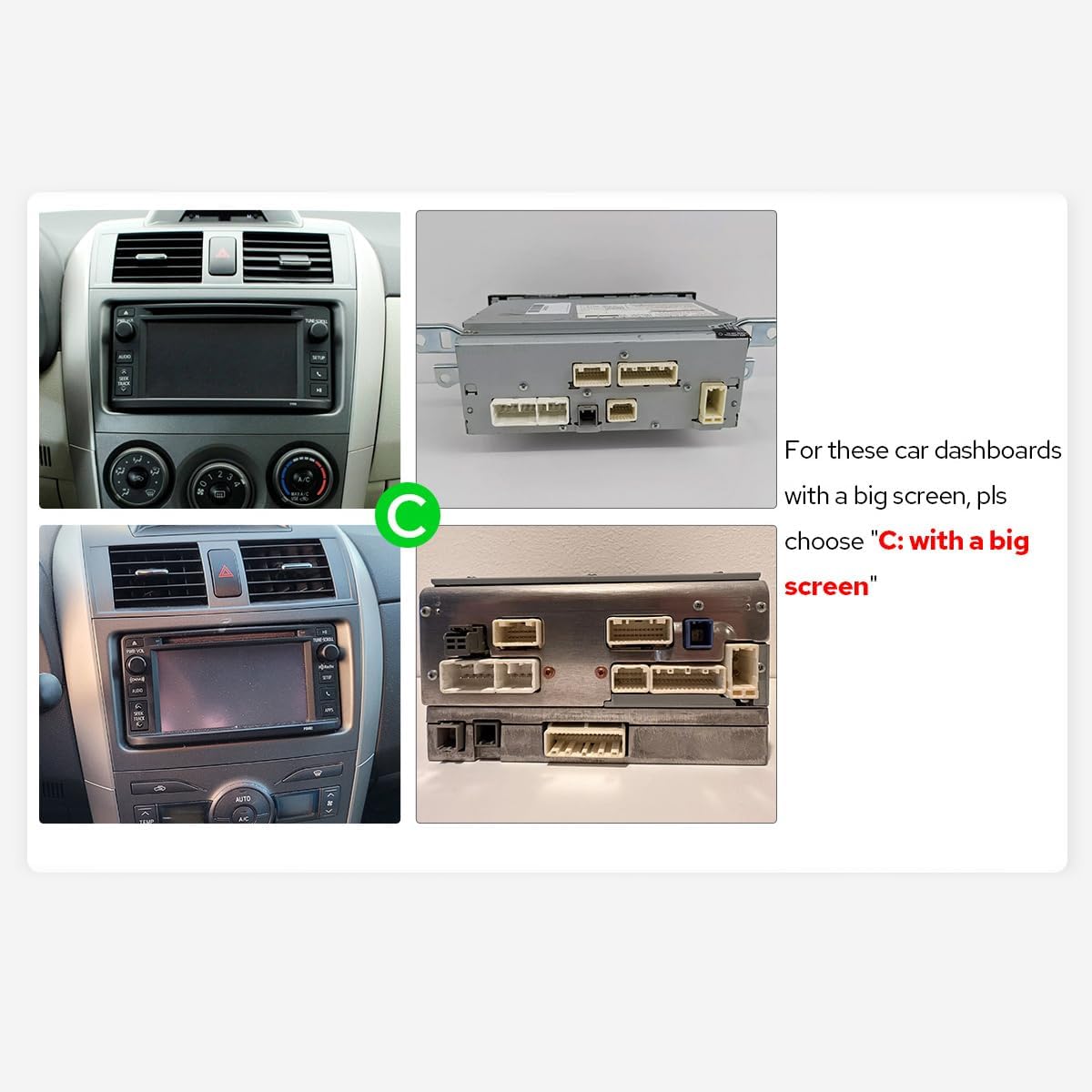
Figure 3.2: Dashboard compatibility for models with a big screen (Option C).
3.2. 배선 연결
Connect the provided cables to the corresponding ports on the car stereo and your vehicle's harness. Ensure all connections are secure.

그림 3.3: 후면 view of the car stereo with labeled connection ports.
Video 3.1: This video demonstrates the general wiring operation for car stereo installation. It shows how to connect the power cable, RCA harness, USB adapter cables, radio antenna, and GPS antenna to the head unit.
Video 3.2: This video illustrates the installation effect of a car stereo in a Toyota Corolla 2009-2013 model, providing a visual reference for the final appearance.
4. 초기 설정
4.1. 첫 번째 부팅
Upon inserting the car key, the unit will start up and enter the user interface within 2 seconds (initial boot may take 30-40 seconds).
4.2. AC Settings
To adjust AC settings, including temperature units (Fahrenheit) and display options:
- Navigate to the main home screen.
- Tap on 'My Car'.
- '설정'을 선택하세요.
- Choose 'AC setting'.
- Toggle the 'Fahrenheit' option to your preference.
- Ensure 'Display large Air' is enabled for full AC display.
- Click 'Confirm' to save changes.
Video 4.1: This video demonstrates how to access and adjust the AC settings on your car stereo, including switching between Celsius and Fahrenheit and enabling the large air display option.
5. 사용 설명서
5.1. CarPlay 및 Android Auto
Connect your mobile phone via USB cable or Bluetooth to share apps, navigation, make calls, and listen to music on the larger screen.

Figure 5.1: Built-in CarPlay and Android Auto interfaces.
Video 5.1: This video demonstrates the main functions of the car stereo, including how to connect and use CarPlay, Android Auto, and Mirror Link features.
Video 5.2: This video provides instructions on how to set up and use Wireless CarPlay and Android Auto with the car stereo.
Video 5.3: This video guides users through the process of connecting their smartphone to the car stereo for CarPlay and Android Auto functionality.
Video 5.4: This video demonstrates the steps to connect your device to the car stereo for CarPlay functionality.
5.2. 미러 링크
Mirror your smartphone screen directly onto the car stereo display for enhanced viewing of apps and content.
비디오 5.5: 이 짧은 사전view video demonstrates the wireless mirroring feature, showing a smartphone screen duplicated on the car stereo display.
5.3. GPS 내비게이션
The unit features precise GPS engines and includes GPS antennas for accurate positioning and faster real-time navigation. Offline maps are supported in areas where data download is available.
5.4. 블루투스 5.0
Supports audio streaming, automatic phone book transfer, and hands-free calling. Note: It primarily supports phone and OBD dongle connections.
5.5. 미디어 재생
Enjoy music and videos from various sources. The unit supports split-screen multitasking, allowing you to run two applications simultaneously.
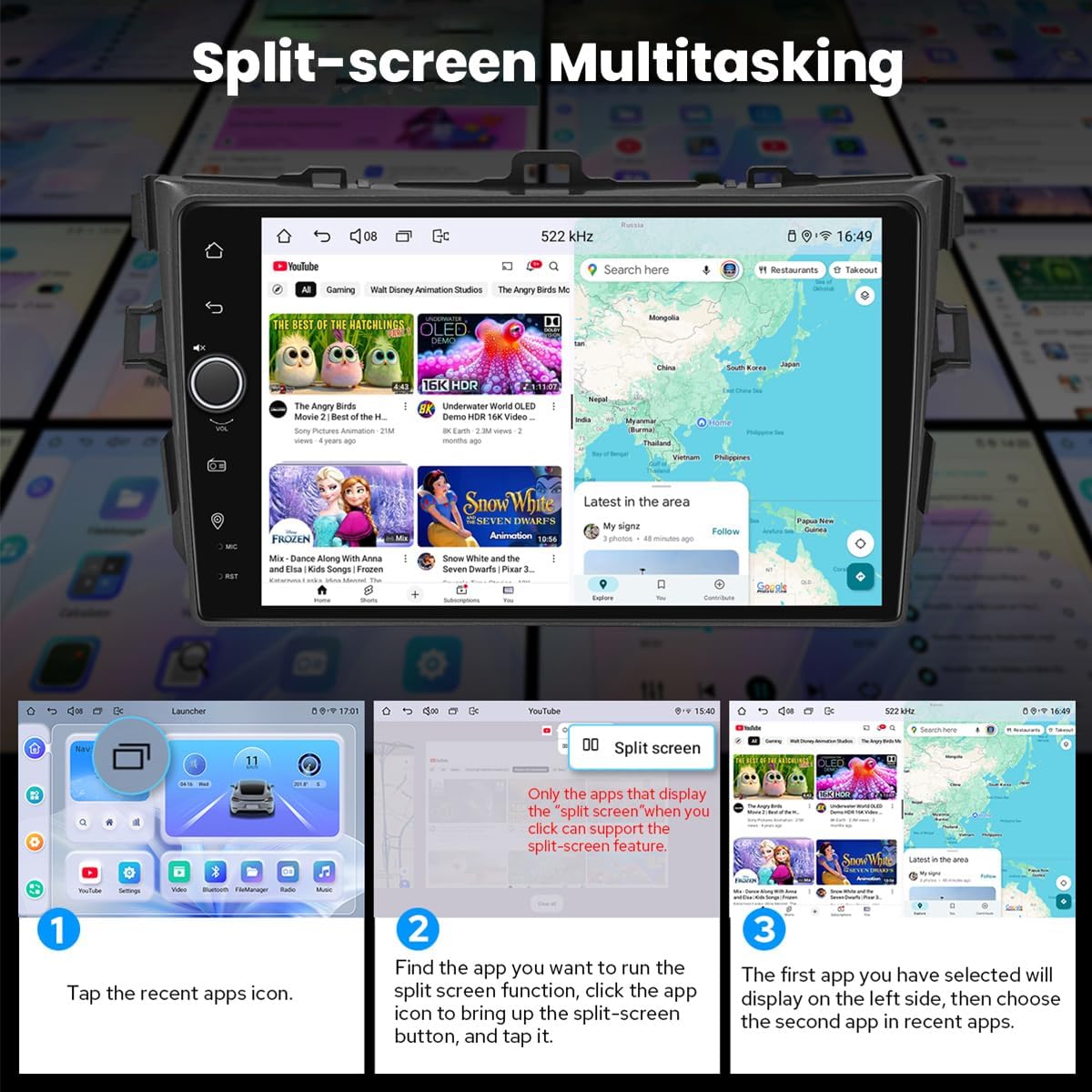
Figure 5.2: Split-screen multitasking interface.
5.6. Personalized Settings
Customize your stereo with various options including car boot logos, wallpapers, and changeable button colors.

Figure 5.3: Personalized settings options.
5.7. Sound Enjoyment
Equipped with a TDA7851 DSP chip, a 48-Band Graphic Equalizer, and 4x50W Max Output Power. Supports aftermarket amplifiers with 4 Audio Outputs, 1 SUB Output, Fiber Optical Output, SPDIF Coaxial Output, and Center Channel Output.

Figure 5.4: High-quality sound features.
5.8. Built-in 4G Module
Insert a SIM card for internet access. Supports FDD-LTE: B2/B4/B5/B7/B12/B13/B14/B17/B25/B26/B38/B66/B71 and TDD-LTE: B41. Does not support phone calls or SMS.
5.9. HDMI 출력
Provides full digital image and sound output for external displays like headrest monitors, offering 1080P clear picture without stuttering. HDMI cable is not included.
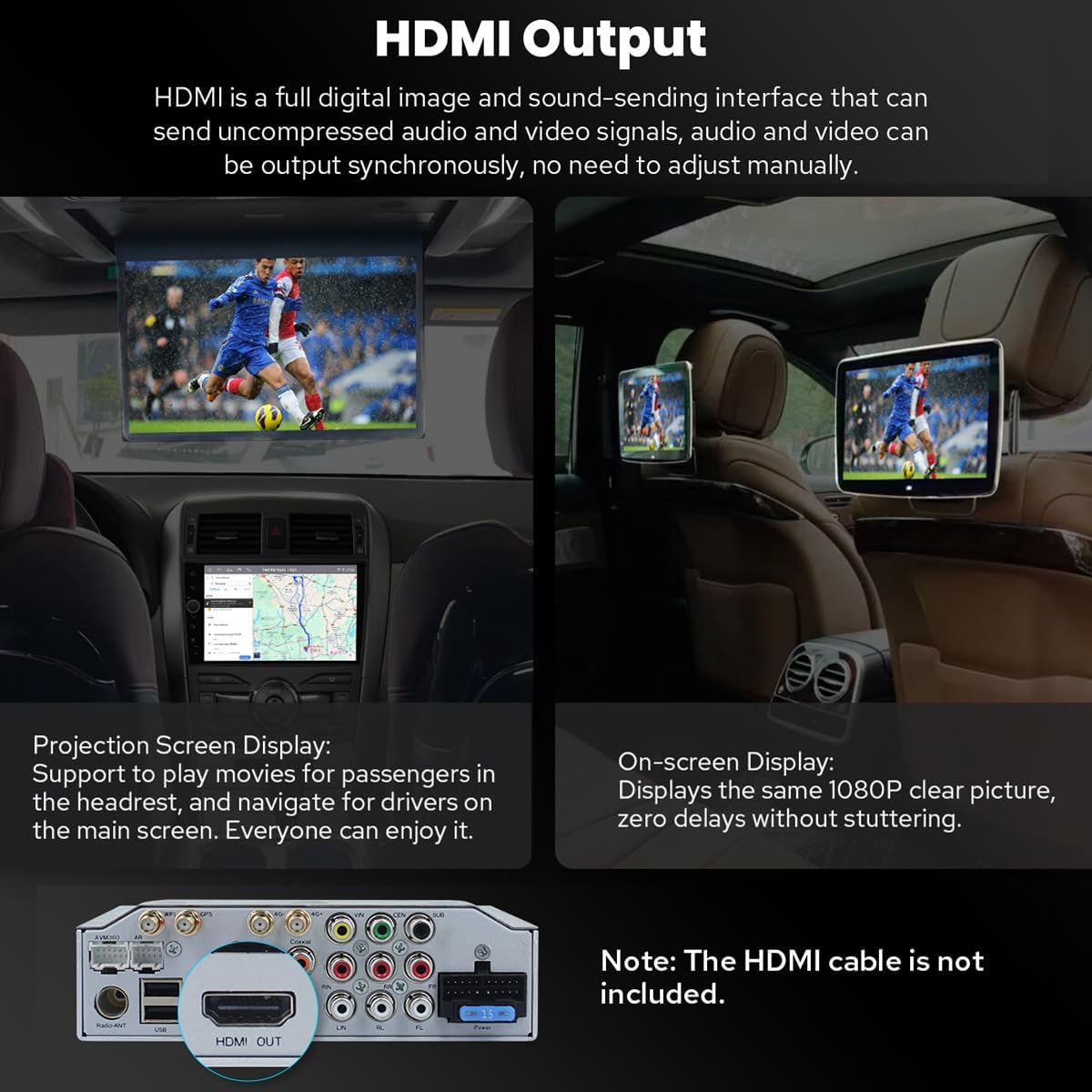
Figure 5.5: HDMI Output functionality.
5.10. 기타 특징
Includes Picture-in-Picture, 3 USB Ports, Micro SD Card Slot, and 4G SIM Card Slot.

그림 5.6: 이상view 추가 기능.
6. 유지관리
6.1. 화면 청소
부드럽고 보풀이 없는 천을 사용하여 화면을 부드럽게 닦으세요. 잘 지워지지 않는 얼룩은 가볍게 닦아주세요.amp천에 물이나 화면에 안전한 세척제를 묻혀 닦아주세요. 강한 화학 물질이나 연마재는 사용하지 마세요.
6.2. 냉각 시스템
The unit features a dual heat sink design for superior heat dissipation and improved temperature control. A warning value can be set for volume or CPU temperature; if exceeded, the fan will automatically activate to prevent overheating.

Figure 6.1: Cooling system features.
6.3. WiFi Signal
An independent WiFi antenna ensures stable signal quality and provides fast and smooth internet access, supporting 802.11a/b/g/n/AC standards across 2.4GHz/5GHz spectral bands.

Figure 6.2: WiFi signal features.
7. 문제 해결
If you encounter any issues, please refer to the following general troubleshooting steps:
- 전원 없음: 모든 전원 연결부와 퓨즈를 점검하십시오. 시동이 켜져 있는지 확인하십시오.
- 소리 없음: 스피커 연결, 볼륨 레벨, 오디오 출력 설정을 확인하세요.
- 블루투스 연결 문제: 스테레오와 기기 모두에서 블루투스가 활성화되어 있는지 확인하십시오. 기기 연결을 해제했다가 다시 연결해 보세요.
- GPS 신호 손실: GPS 안테나가 제대로 설치되었고 깨끗한지 확인하십시오. view 하늘의.
- 터치스크린이 반응하지 않음: 기기를 다시 시작해 보세요. 문제가 지속되면 지원팀에 문의하세요.
For more specific issues, consult the detailed troubleshooting section in the full user manual or contact JOYING customer support.
8. 사양
| 특징 | 사양 |
|---|---|
| 품목 모델 번호 | JY-TT163N4 |
| 디스플레이 크기 | 9 인치 |
| 화면 크기 | 9 인치 |
| 터치스크린 타입 | 용량성 |
| 운영 체제 | 안드로이드, iOS (CarPlay/안드로이드 오토 경유) |
| 메모리 저장 용량 | 64GB (XNUMX기가바이트) |
| 연결 기술 | 블루투스, 이더넷, USB, Wi-Fi |
| 특징 | 블루투스, 터치스크린 |
| 오디오 출력 모드 | 스테레오 재생 |
| 지도 유형 | 북아메리카 |
| 제조업체 | 기쁨 |
9. 보증 및 지원
9.1. 보증 정보
This JOYING car stereo comes with a 2년 보증 구매일로부터. 보증 청구를 위해 구매 증빙을 보관하세요.
9.2. 고객 지원
For technical assistance, troubleshooting, or warranty inquiries, please contact JOYING customer support through the retailer where the product was purchased or visit the official JOYING web연락처 정보 사이트.