
1. 제품 오버view
The OnePlus 15 is an advanced Android smartphone designed for high performance and extended usage. It features a powerful Snapdragon 8 Elite Gen 5 processor, a large 7,300mAh battery, and a vibrant 6.78-inch 165 Hz AMOLED display. The device is equipped with a triple 50 MP camera system for detailed photography and offers robust durability with IP66/IP68/IP69 and IP19K ratings for dust and water resistance.
주요 특징:
- Massive 7,300 mAh Battery: Provides extended power for all-day use and beyond.
- Tri-Chip System: Integrates the Snapdragon 8 Elite Gen 5, a dedicated Wi-Fi chip, and a CPU scheduler for optimized performance, connectivity, and efficiency.
- Triple 50 MP Camera System: Captures high-quality images with wide, ultra-wide, and telephoto capabilities.
- 내구성 있는 디자인: Built to resist dust and water, with IP66/IP68/IP69 and IP19K ratings for enhanced protection.
- 6.78-inch 165 Hz AMOLED Display: Delivers vivid colors, smooth motion, and exceptional clarity.
2. 상자 안에 무엇이 들어있나요?
제품 포장에 모든 품목이 들어 있는지 확인하세요.
- OnePlus 15 Smartphone x1
- 충전기 x1
- USB 데이터 케이블 x1
- SIM Ejector Tool x1
- 퀵 가이드 x1
- Safety Guide x1

Image: Contents of the OnePlus 15 retail box, showing the smartphone, charger, USB data cable, SIM ejector tool, quick guide, and safety guide.
3. 설정
3.1 SIM 카드 설치
- Locate the SIM card tray on the side of your OnePlus 15.
- Insert the provided SIM ejector tool into the small hole on the SIM tray. Press firmly until the tray pops out.
- Place your Nano-SIM card(s) into the tray with the gold contacts facing down. Ensure they are correctly oriented according to the tray's outline.
- Carefully push the SIM tray back into the phone until it is flush with the device.
3.2 초기 전원 켜기 및 구성
- 원플러스 로고가 나타날 때까지 기기 오른쪽 측면에 있는 전원 버튼을 길게 누르세요.
- 화면의 안내에 따라 언어를 선택하고, Wi-Fi 네트워크에 연결하고, Google 계정을 설정하세요.
- You may be prompted to transfer data from an old device. Follow the instructions or skip this step to set up as a new device.
- 지문 잠금 해제, 얼굴 인식 잠금 해제 또는 PIN/패턴과 같은 보안 설정을 구성하십시오.

이미지: 앞면 view of the OnePlus 15 smartphone, showcasin디스플레이와 전면 카메라를 갖추고 있습니다.
4. 장치 작동
4.1 화면 및 탐색
The OnePlus 15 features a 6.78-inch 165 Hz AMOLED display. Navigate the interface using touch gestures:
- 수도꼭지: 항목을 선택하거나 기능을 활성화하세요.
- 강타: 화면이나 목록을 스크롤합니다.
- 꼬집기: 이미지 확대/축소 및 web 페이지.
- 길게 누르기 : 상황에 맞는 메뉴에 접근하거나 아이콘을 이동합니다.
4.2 버튼 및 포트
Familiarize yourself with the physical controls and connections:
- 전원 버튼: Located on the right side. Press to wake/sleep the screen, long press to power off or restart.
- 볼륨 버튼: Located on the left side. Adjust media volume, ringtone volume, and alarm volume.
- USB 타입-C 포트: Located at the bottom. Used for charging, data transfer, and connecting Type-C headphones.
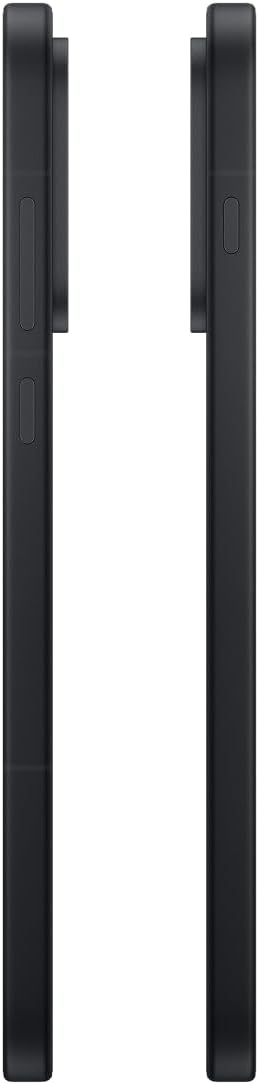
이미지: 측면 view of the OnePlus 15, showing the placement of the power and volume buttons.
4.3 카메라 사용
The OnePlus 15 features a versatile triple 50 MP camera system. To open the camera app, tap the camera icon on your home screen or lock screen.
- 스위치 모드: 화면을 왼쪽이나 오른쪽으로 스와이프하여 사진, 비디오, 인물 모드 등 다양한 모드 간에 전환하세요.
- 줌: Pinch in or out on the viewfinder, or tap the zoom icons (e.g., 0.6x, 1x, 2x) to adjust magnification.
- 포착: 셔터 버튼을 탭하여 사진을 찍거나 비디오 녹화를 시작/중지하세요.
- 설정: Access camera settings for features like flash, timer, aspect ratio, and more.

이미지: 뒤로 view of the OnePlus 15, highlighting the triple 50 MP camera system.
4.4 배터리 관리
Your OnePlus 15 is equipped with a 7,300 mAh battery. To optimize battery life:
- 화면 밝기를 조절하고 화면 시간 초과를 더 짧게 설정하세요.
- 사용하지 않을 때는 Wi-Fi, 블루투스, GPS를 비활성화하세요.
- Close background apps that are consuming power.
- Utilize Battery Saver mode when your battery is low.
- Use the provided charger and USB cable for optimal fast charging.
5. 유지관리
5.1 장치 청소
To clean your OnePlus 15:
- 부드럽고 보푸라기가 없는 천을 사용하여 화면과 뒷면 패널을 닦으세요.
- 완고한 얼룩의 경우 약간 damp천에 물이나 화면 세척제를 묻혀 닦으세요.
- 독한 화학 물질, 연마재 또는 압축 공기를 사용하지 마십시오.
5.2 소프트웨어 업데이트
정기적인 소프트웨어 업데이트는 새로운 기능, 보안 강화 및 버그 수정을 제공합니다. 업데이트를 확인하려면:
- 이동하다 설정 > 기기 정보 > OxygenOS 버전.
- 수도꼭지 업데이트 확인.
- If an update is available, follow the on-screen instructions to download and install it. Ensure your device has sufficient battery and is connected to Wi-Fi before updating.
6. 문제 해결
OnePlus 15 사용 중 문제가 발생하면 다음의 일반적인 문제 해결 단계를 시도해 보세요.
- 장치가 응답하지 않음: 전원 버튼을 약 10초간 길게 눌러 강제로 다시 시작하세요.
- 앱 충돌: 문제가 있는 앱의 캐시와 데이터를 삭제하세요. 설정 > 앱 > [앱 이름] > 저장소 및 캐시.
- 배터리가 빠르게 소모됨: Review 배터리 사용량 설정 > 배터리 to identify power-hungry apps. Adjust settings as described in Section 4.4.
- 네트워크 연결 문제: Toggle Airplane Mode on and off, restart your device, or reset network settings in 설정 > 시스템 설정 > 백업 및 재설정 > 전화 재설정 > Wi-Fi, 모바일 및 블루투스 재설정.
- Screen protector installation: For assistance with screen protector installation, refer to the following video guide:
Video: Installation guide for a screen protector on the OnePlus 15 5G. This video demonstrates the steps to correctly apply a screen protector to your device.
7. 사양
| 모델명 | 원플러스 15 |
| 품목 모델 번호 | CPH2749 |
| 제품 치수 | 6.36 x 3.02 x 0.33 인치 |
| 품목 무게 | 1.29파운드 |
| 운영 체제 | 안드로이드 16 |
| CPU 모델 | Snapdragon 8 Elite Gen 5 |
| CPU 속도 | 4.61GHz |
| 설치된 RAM 메모리 크기 | 12GB (XNUMX기가바이트) |
| 메모리 저장 용량 | 256GB (XNUMX기가바이트) |
| 화면 크기 | 6.78 인치 |
| 해결 | 2772*1272 |
| 새로 고침 빈도 | 165Hz |
| 배터리 용량 | 7300밀리amp 시간 |
| 전화 통화 시간 | 68.7시간 |
| 연결 기술 | 블루투스, 적외선, NFC, USB, Wi-Fi |
| 특별 기능 | Dual SIM, Wireless Charging |
| 제조업체 | 원플러스 |
8. 중요한 안전 정보
Please read all safety information before using your device to ensure safe and proper use. Improper use may cause damage to the device or personal injury.
- 장시간 극한의 온도나 직사광선에 기기를 노출시키지 마세요.
- 승인된 충전기, 배터리 및 액세서리만 사용하세요.
- 기기를 떨어뜨리거나 심한 충격을 주지 마십시오.
- Keep the device away from water and liquids, despite its water resistance ratings, to prevent potential damage.
- 장치를 분해하거나 개조하지 마십시오.
9. 보증 및 지원
Your OnePlus 15 is covered by a manufacturer's warranty. For detailed warranty information, technical support, or service inquiries, please visit the official OnePlus web사이트를 방문하거나 고객 서비스에 문의하세요.
추가 지원 및 제품 정보는 다음에서 확인하실 수 있습니다. OnePlus Store.