
1. 서론
This manual provides detailed instructions for the installation, operation, and maintenance of your ANNKE H1200 12MP Security Camera System. Please read this manual thoroughly before using the product to ensure proper setup and functionality. Keep this manual for future reference.
2. 상자 안에 무엇이 들어있나요?
패키지에 모든 구성품이 들어 있는지 확인하세요.
- 1 x H1200 12MP Bullet PoE Kit (NVR)
- 2 x 8MP Dual Lens PoE Camera
- 2 x 100ft PoE Cat5 Cable
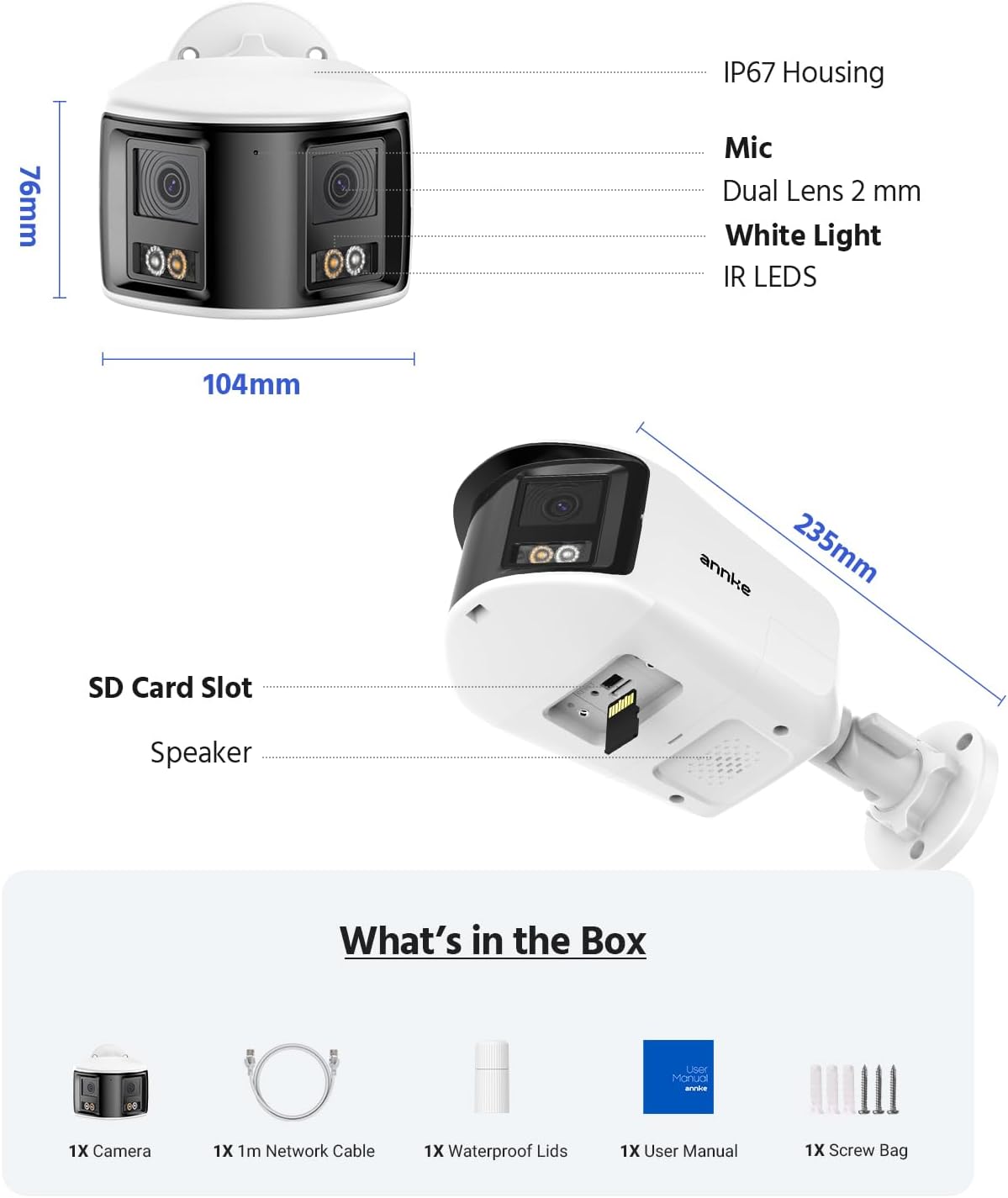
Figure 2.1: Package Contents. This image displays the NVR, two dual-lens cameras, two 100ft PoE cables, a user manual, and a screw bag.
3. 제품 특징
3.1. 12MP UHD Clarity
Experience superior image quality with 12-megapixel Ultra High Definition resolution, providing clear and detailed surveillance footage 보안 강화를 위한 것입니다.

Figure 3.1: 12MP UHD Clarity. This image demonstrates the high resolution, showing a wide shot of a backyard with a child and a magnified inset highlighting the detail.
3.2. Intelligent Motion Detection
The system features advanced motion detection capable of distinguishing between humans and vehicles, reducing false alarms and providing more relevant alerts via push notifications, email, or buzzer.

Figure 3.2: Intelligent Motion Detection. This image shows the system identifying a human and a vehicle, with options for push notifications, email alerts, and a buzzer.
3.3. Easy Remote Access
Monitor your property from anywhere, anytime, using various devices such as smartphones, tablets, and computers. The system supports remote viewing for convenient surveillance.

Figure 3.3: Easy Remote Access. This collage demonstrates viewing live camera feeds on a tablet, laptop, and smartphone, emphasizing accessibility from any location.
3.4. Three Night Vision Modes
The cameras offer three distinct night vision modes: Full Color Mode for vivid nighttime images, IR Night Mode for traditional black and white infrared viewing, and Motion Detected Color Mode which activates color vision upon detecting movement.

Figure 3.4: Three Night Vision Modes. This image displays examples of Full Color, IR, and Motion Detected Color night vision, with a camera unit at the bottom.
3.5. 180 Ultra-Wide View잉
Equipped with dual lenses, the cameras provide a 180-degree ultra-wide viewing angle, eliminating blind spots and offering comprehensive coverage of your surveillance area.
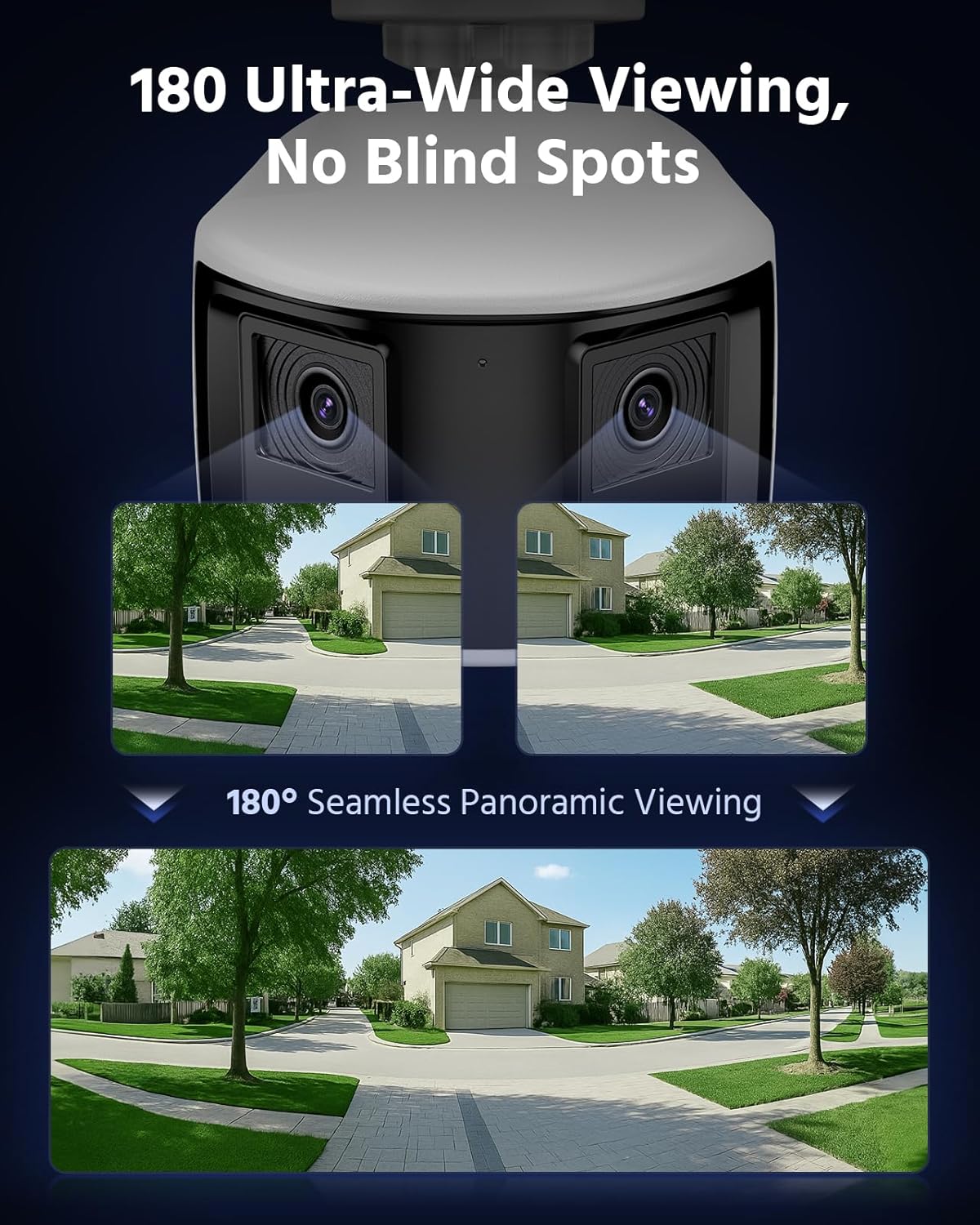
Figure 3.5: 180 Ultra-Wide Viewing. This image illustrates how the dual lenses combine to create a seamless 180-degree panoramic view, covering a wide area without blind spots.
3.6. 4K Ultra HD Visual
The system delivers 4K Ultra HD visuals at 4096x1860 resolution at 20 frames per second, featuring an F1.6 aperture and Dual-Light Color technology for exceptional detail and color reproduction.
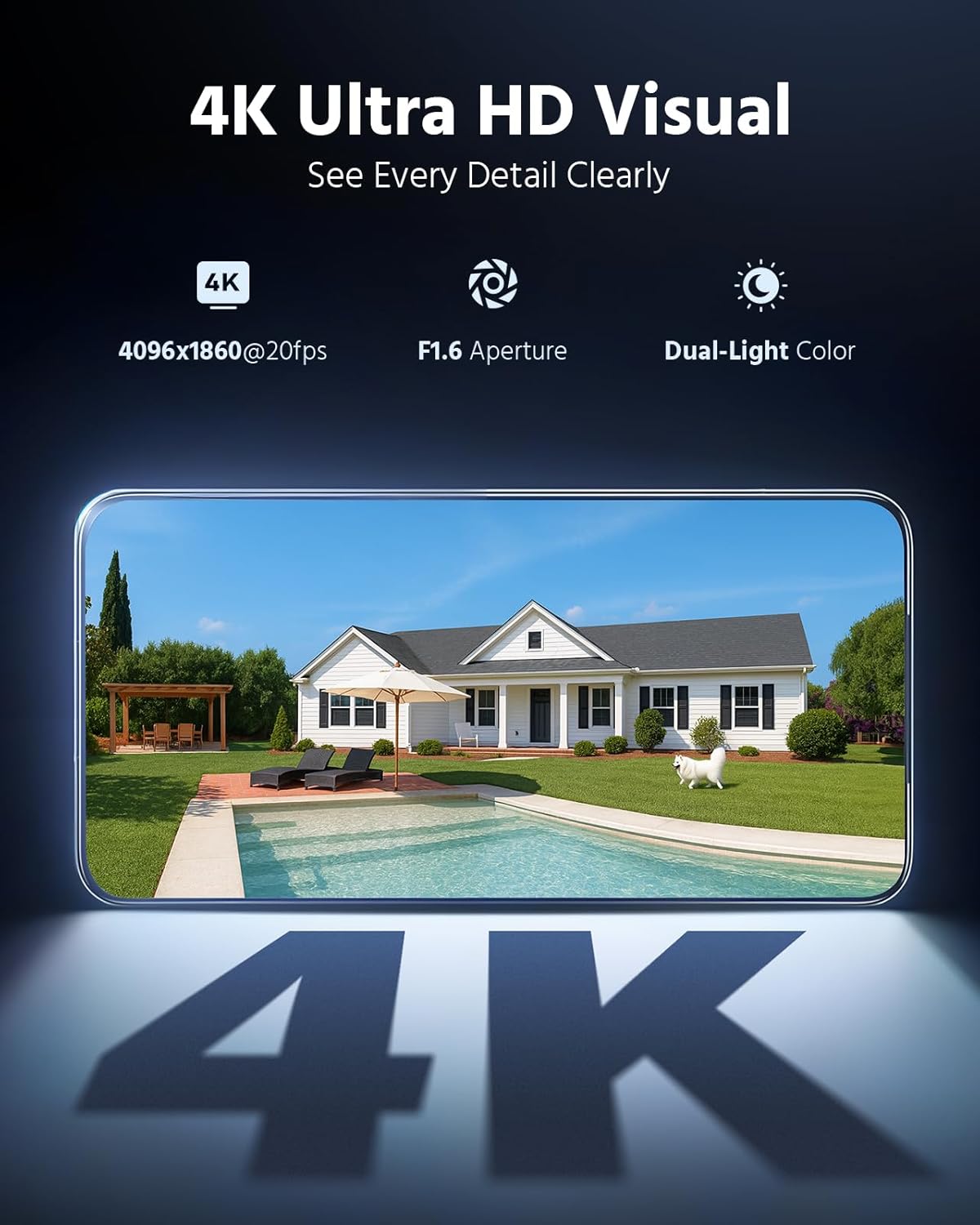
Figure 3.6: 4K Ultra HD Visual. This image showcases the high-resolution video quality, detailing an outdoor scene and listing key specifications like resolution, frame rate, aperture, and Dual-Light Color.
3.7. 3 Modes for Smart Security
The cameras offer three smart security modes: Color Mode for continuous color night vision, IR Mode for standard infrared black and white, and Smart Dual-Light Triggered Mode which switches to color upon motion detection.
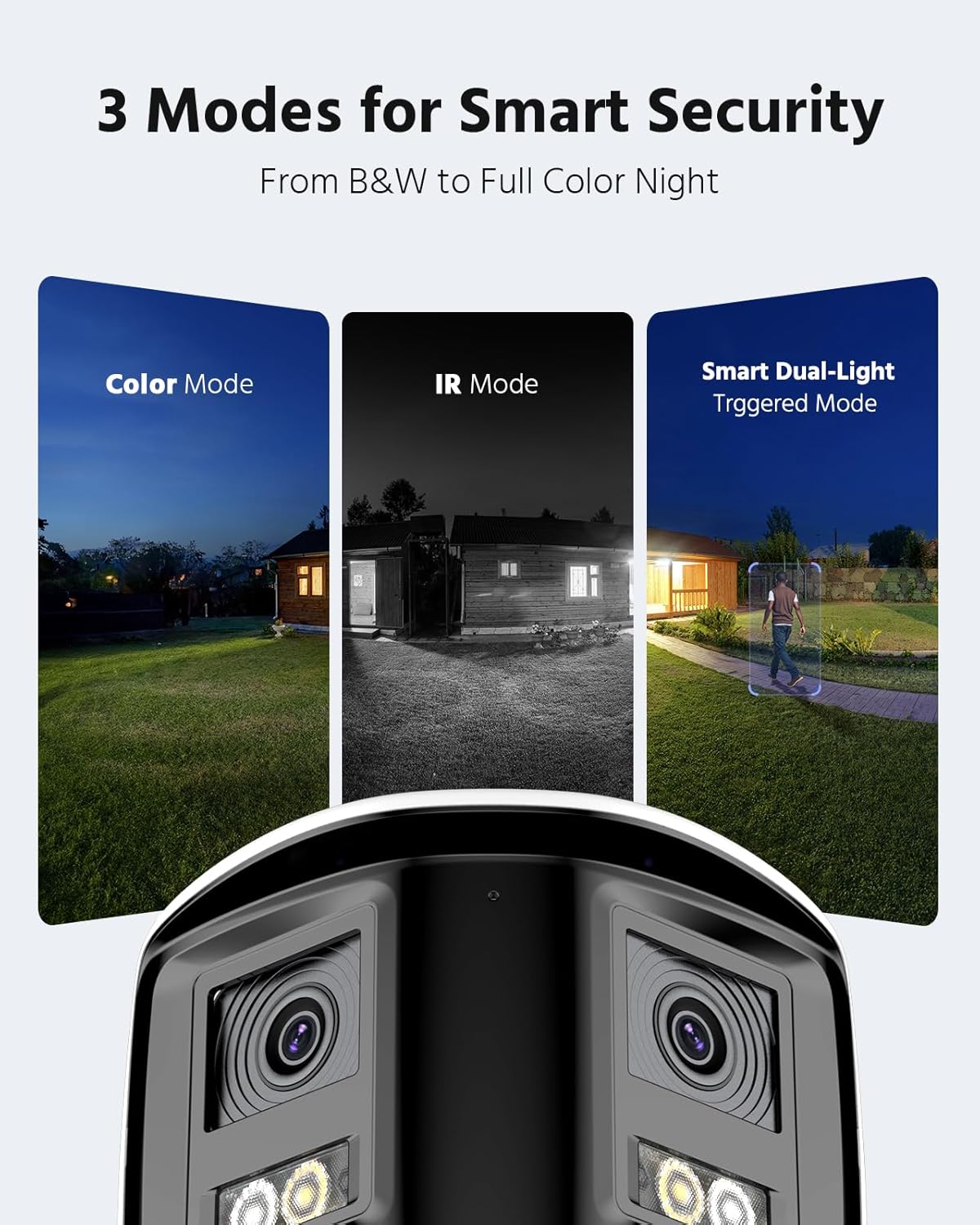
Figure 3.7: 3 Modes for Smart Security. This image illustrates the different night vision capabilities: Color Mode, IR Mode, and Smart Dual-Light Triggered Mode, with the camera unit shown below.
3.8. Camera Dimensions
The dual-lens cameras are designed with an IP67 housing for weather resistance, include a built-in microphone, dual 2mm lenses, white light illuminators, and IR LEDs. They also feature an SD card slot and a speaker.
Figure 3.8: Camera Dimensions and Features. This diagram provides the physical dimensions of the camera and highlights its key components including the IP67 housing, microphone, dual lenses, white light, IR LEDs, SD card slot, and speaker.
4. 시스템 설정
4.1. NVR 연결
- 제공된 전원 어댑터를 사용하여 NVR을 전원에 연결하세요.
- 네트워크에 접속하려면 이더넷 케이블을 사용하여 NVR을 라우터에 연결하십시오.
- Connect a monitor to the NVR's HDMI or VGA port for initial setup and local view주고받음.
- 탐색을 위해 USB 마우스를 NVR에 연결하십시오.
4.2. 카메라 설치 및 연결
- 최적의 위치를 확보하면서 카메라를 원하는 곳에 설치하십시오. view각도와 범위를 조절합니다.
- Connect each PoE camera to an available PoE port on the NVR using the provided Cat5 Ethernet cables. The NVR will supply power and data to the cameras.
- 모든 케이블 연결이 안전하고 환경적 요소로부터 보호되는지 확인하세요.
4.3. 초기 구성
- Follow the on-screen prompts on the connected monitor to complete the NVR's initial setup wizard, including setting up a password and network settings.
- The NVR should automatically detect and add the connected PoE cameras. If not, refer to the NVR's specific manual for manual camera addition.
5. 시스템 운영
5.1. 라이브 View
라이브 액세스 view on your connected monitor or through the ANNKE VISION mobile app/client software to see real-time footag모든 카메라에서.
5.2. 재생
Review 기록된 footage by selecting the desired date and time. Use the timeline to navigate through recordings and identify specific events.
5.3. 동작 감지 구성
Configure motion detection settings via the NVR interface or mobile app. Adjust sensitivity, define detection zones, and set up notification preferences (push, email, buzzer).
5.4. 원격 접속
Download the ANNKE VISION app from your device's app store. Register an account and add your NVR by scanning the QR code or entering its serial number. This enables remote view잉 및 제어.
5.5. 야간 투시 모드
The cameras automatically switch between day and night modes. You can configure specific night vision preferences (Full Color, IR, Smart Dual-Light) through the NVR settings or camera-specific settings in the app.
6. 유지관리
6.1. 청소
카메라 렌즈는 부드러운 천으로 정기적으로 닦아주세요.amp 선명한 화질을 위해 천을 사용하십시오. 강한 화학 물질이나 연마재를 사용하지 마십시오.
6.2. 펌웨어 업데이트
Check for and install firmware updates for both the NVR and cameras periodically. Firmware updates often include security enhancements, bug fixes, and new features. Refer to the ANNKE web업데이트 방법은 해당 사이트 또는 앱을 참조하세요.
6.3. 케이블 검사
Periodically inspect all cables for any signs of wear, damage, or loose connections. Ensure waterproof connections remain sealed.
7. 문제 해결
7.1. 영상이 표시되지 않음
- Check power connections for both NVR and cameras.
- Verify Ethernet cable connections between cameras and NVR, and NVR and router.
- Ensure the monitor is correctly connected to the NVR and set to the correct input source.
- NVR과 카메라를 재시작하세요.
7.2. 원격 접속 문제
- NVR이 인터넷에 연결되어 있는지 확인하세요.
- 모바일 기기의 인터넷 연결 상태를 확인하세요.
- Verify that the NVR is properly added to the ANNKE VISION app and is online.
- Check firewall settings on your router if you are experiencing connection blocks.
7.3. 동작 감지 기능이 작동하지 않음
- Review motion detection settings in the NVR or app, ensuring it is enabled and sensitivity is appropriate.
- Check the defined detection zones to ensure they cover the desired areas.
- 알림 설정이 올바르게 구성되어 있는지 확인하십시오.
8. 사양
| 특징 | 사양 |
|---|---|
| 상표 | 안케 |
| 연결 기술 | 열광한 |
| 비디오 캡처 해상도 | 4000x3000 (12MP) |
| 호환 장치 | 카메라 |
| 프레임 속도 | 15프레임 |
| 녹화 모드 | 마디 없는 |
| 하드웨어 인터페이스 | 이더넷 |
| 렌즈 유형 | Fixed, Varifocal (Dual Lens) |
| 비디오 입력 | RJ45(PoE) |
| 신호 형식 | 디지털 |
| 광센서 기술 | CMOS |
| ASIN | B0FS5YL8TZ |
9. 보증 및 지원
보증 정보, 기술 지원 또는 서비스 문의는 ANNKE 공식 웹사이트를 참조하십시오. website or contact ANNKE customer support directly. Keep your purchase receipt as proof of purchase for warranty claims.
공식 ANNKE Web대지: www.annke.com