
Aninerel ANJ-12KP-SP-WIFI
Aninerel ANJ-12KP-SP-WIFI 12000W Solar Hybrid Inverter User Manual
Model: ANJ-12KP-SP-WIFI
Brand: Aninerel
1. 제품 오버view
The Aninerel ANJ-12KP-SP-WIFI is a 12000W solar hybrid inverter designed for both on-grid and off-grid solar power systems. It converts 48V DC power to 120V single-phase or 240V split-phase AC power, providing a continuous output of 12,000W and a peak output of 24,000W. This inverter features two built-in MPPT solar charging controllers, supporting up to 6,000W + 6,000W PV input with a maximum DC voltage of 500V and a maximum PV charging current of 220A. It is suitable for various applications including RVs, homes, cabins, and workshops.

이미지 1.1: 앞면 view of the Aninerel ANJ-12KP-SP-WIFI 12000W Solar Hybrid Inverter, showing the display screen and indicator lights.

Image 1.2: Diagram illustrating a typical single-phase hybrid inverter system setup, showing power flow from solar panels, grid, and battery to household loads.
2. 주요 특징
- 고성능 출력: 12,000W continuous, 24,000W peak output, 48V DC to 120V/240V AC split-phase conversion.
- Dual MPPT Solar Charging: Two built-in MPPT controllers support up to 6,000W + 6,000W PV input with a maximum DC voltage of 500V and a maximum PV charging current of 220A.
- 병렬 처리 기능: Supports parallel connection of up to 6 units for a maximum output power of 72kW. Can achieve 120V single-phase, 240V split-phase, or 208V three-phase output with appropriate configurations.
- Smart LCD Monitoring: Features an LCD screen and indicator LEDs for real-time monitoring of power input/output, battery status, and system alerts. Allows configuration of charging current, voltage thresholds, and priority modes.
- Flexible Charging & Output Modes: Four charging modes (Solar Only, AC Priority, Solar Priority, Hybrid Charging) and three output modes (Mains Priority, PV Priority, Inverter Output) for diverse scenarios.
- 배터리 호환성: Compatible with AGM, GEL, Lead-acid, Li-ion, and LiFePO4 48V batteries. Supports no-battery mode for direct solar-to-load applications.
- 견고한 디자인: IP65-rated enclosure for dustproof and durable operation in various environments. Features intelligent cooling with a variable speed fan.
- 포괄적인 보호 조치: 과전압에 대한 내장된 보호 기능tag전자, 언더볼tage, reverse polarity, and short circuits.
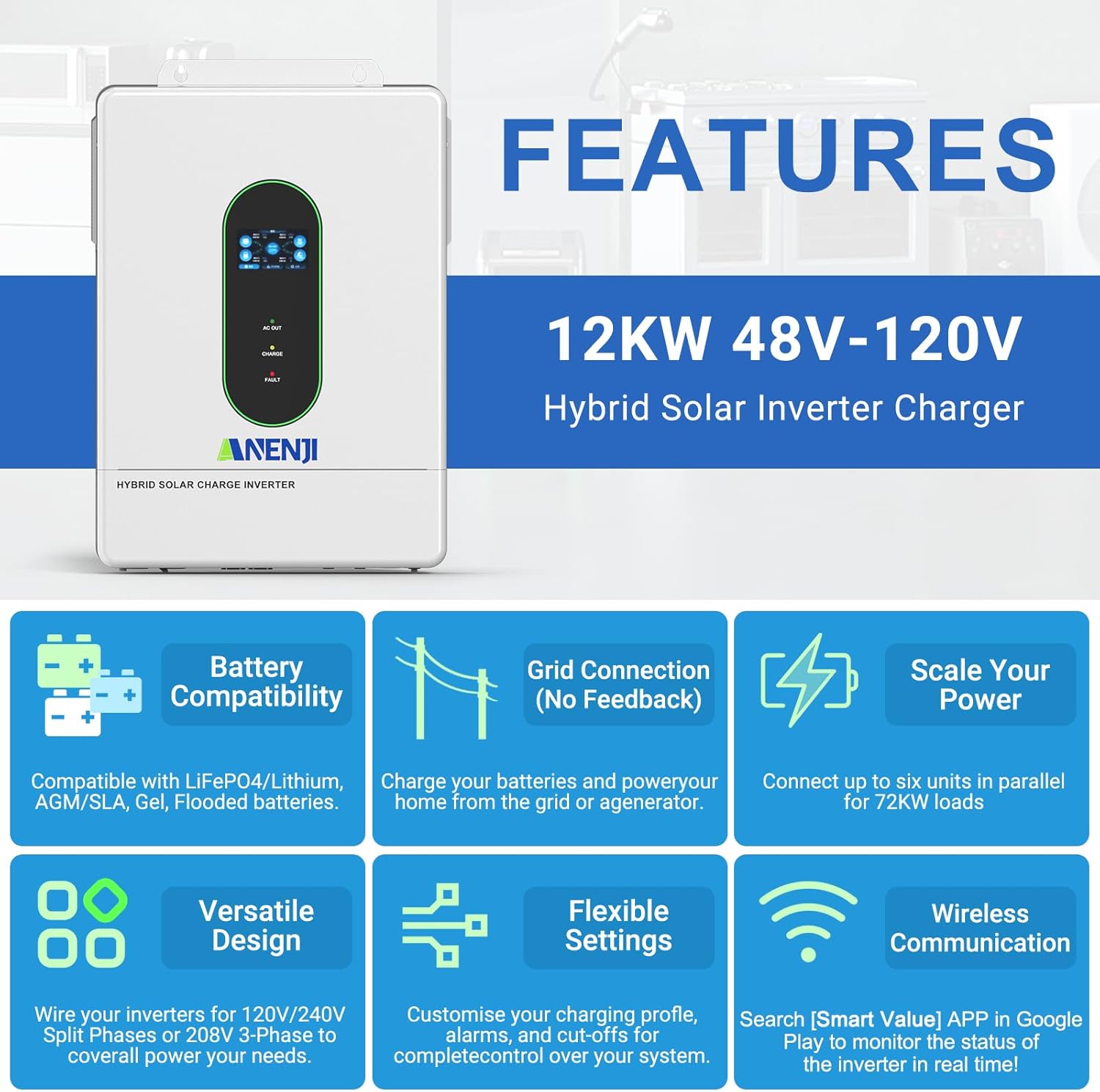
이미지 2.1: 이상view of key features including battery compatibility, grid connection, scalability, versatile design, flexible settings, and wireless communication.
3. 제품 구성품 및 액세서리
The following items are typically included with your Aninerel ANJ-12KP-SP-WIFI Hybrid Solar Inverter:
- Aninerel ANJ-12KP-SP-WIFI Hybrid Solar Inverter Unit
- 사용 설명서
- 설치 툴킷
- Parallel Cable (x1)
- Anti-reverse current CT (x2)
- WiFi 모듈 (1개)
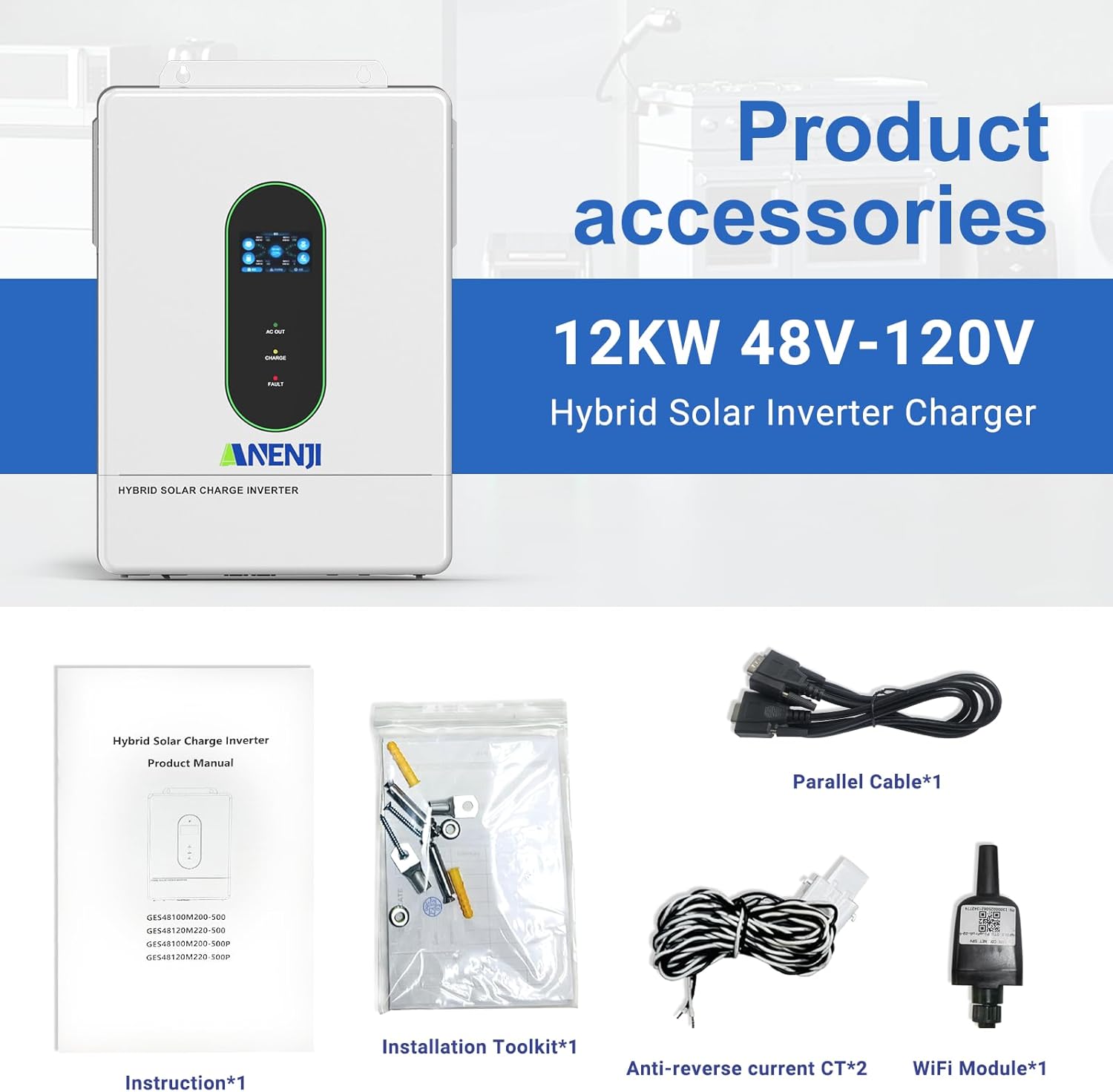
Image 3.1: Contents of the product package, including the inverter, manual, installation tools, cables, CTs, and WiFi module.
4. 설정 및 설치
4.1. 물리적 설치
Ensure the inverter is mounted in a well-ventilated area, protected from direct sunlight and moisture. The IP65 rating allows for indoor or semi-outdoor use. Refer to the included instruction manual for detailed mounting procedures and clearances.
4.2. Connection Ports Overview
Familiarize yourself with the various connection ports on the inverter. Proper connection is crucial for safe and efficient operation.

이미지 4.1: 상세 view of the inverter's connection panel, labeling each port for display, pilot lamp, AC output, AC input, WiFi port, USB, communication ports (RS485-1, RS485-2/CAN), dry contact, CT sensing, ON/OFF switch, PV parameters, battery parameters, parallel communication, AC input breaker, and grounding screw hold.
- 디스플레이 화면
- 파일럿 lamp
- AC 출력 포트
- AC 입력 포트
- WiFi 포트(선택 사항)
- USB 통신 포트
- RS485-1 통신 포트
- RS485-2/CAN 통신 포트
- 건식 접촉 포트
- CT sensing for self-consumption (optional)
- ON/OFF 로커 스위치
- 태양광(PV) 매개변수
- 배터리 매개변수
- 병렬 통신 포트(병렬 모듈만 해당)
- AC 입력 차단기
- 접지 나사 홀드
4.3. 전기 연결
All electrical wiring should be performed by a qualified electrician in accordance with local electrical codes and regulations.
- PV 입력: Connect your solar panel arrays to the PV input terminals. The inverter supports dual MPPT inputs, each up to 6000W. Ensure the PV array voltage는 지정 범위(90-450VDC) 내에 있습니다.
- 배터리 연결: Connect a 48V battery bank (AGM, GEL, Lead-acid, Li-ion, or LiFePO4) to the battery terminals. Observe correct polarity.
- 교류 입력(전력/발전기): Connect the grid or a generator to the AC input port.
- AC 출력: Connect your household loads to the AC output port. The inverter provides 120V (L1/N, L2/N) or 240V (L1/L2) split-phase output.
- 접지: Ensure the inverter is properly grounded using the grounding screw hold.

Image 4.2: Detailed wiring diagram showing connections for PV input, utility/generator input, battery, and inverter output to household loads.
4.4. 병렬 연결
The inverter supports parallel connection of up to 6 units to increase total power output and surge capacity. This allows for flexible configurations including single-phase, split-phase, or three-phase systems.

Image 4.3: Diagrams illustrating various parallel connection configurations for single-phase and split-phase systems, showing how multiple inverters can be combined.

Image 4.4: Illustration of maximum 6 parallel connections for 120V single-phase/240V split-phase residential systems, delivering up to 72kW of power.
4.5. WiFi Monitoring Setup
The inverter includes a WiFi module for real-time monitoring of its operating status via a mobile application. Install the WiFi module into the designated port. Download the "Smart Value" app from the Google Play Store or Apple App Store to configure and monitor your system.
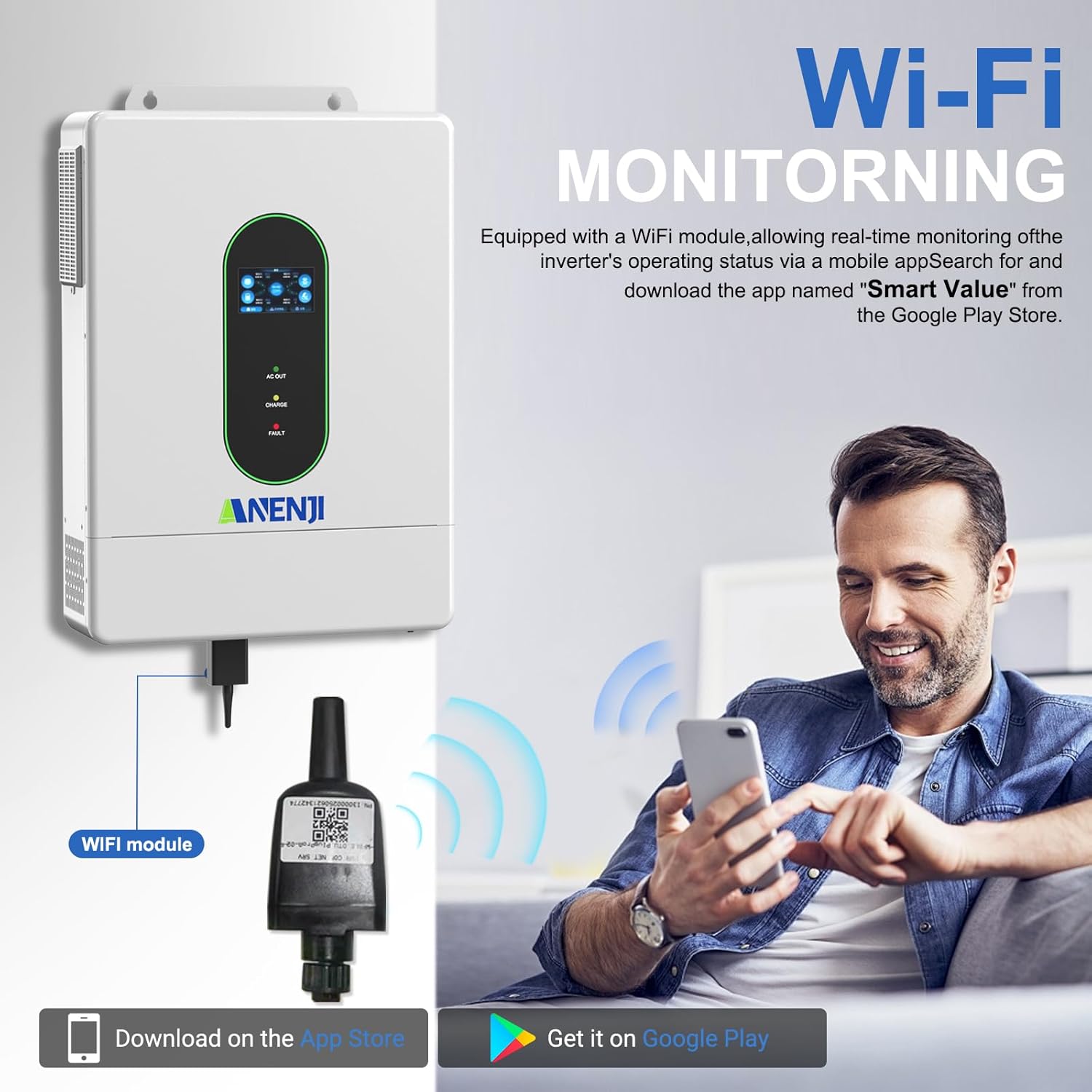
Image 4.5: Diagram showing the WiFi module connection to the inverter and a user monitoring the system via a smartphone app. The app "Smart Value" is available on Google Play and the App Store.
For detailed instructions on connecting the WiFi module and setting up the monitoring application, refer to the specific instructions provided with the WiFi module or contact customer support.
5. 사용 설명서
5.1. LCD Screen and Indicator LEDs
The inverter features an LCD screen and indicator LEDs to provide real-time status updates. The LCD allows for configuration of various system settings.
- AC 출력 LED: Indicates AC output status.
- 충전 LED: 배터리 충전 상태를 나타냅니다.
- 오류 LED: Indicates system errors or faults.
Use the control buttons adjacent to the LCD screen to navigate menus and adjust settings such as charging current, voltage thresholds, and operational priority modes.
5.2. Charging Priority Modes
The inverter offers four charging modes to control how the battery bank is charged from different power sources:
- 태양광 우선 순위: The inverter prioritizes solar power for charging. AC input will only charge the battery when solar power is insufficient.
- Solar and AC Input: The inverter charges the battery bank from both solar and AC power simultaneously.
- 태양광 전용: The inverter charges the battery bank exclusively from available solar power.
- 하이브리드 충전: (Details typically configured via settings, balancing solar and AC based on battery level and load).
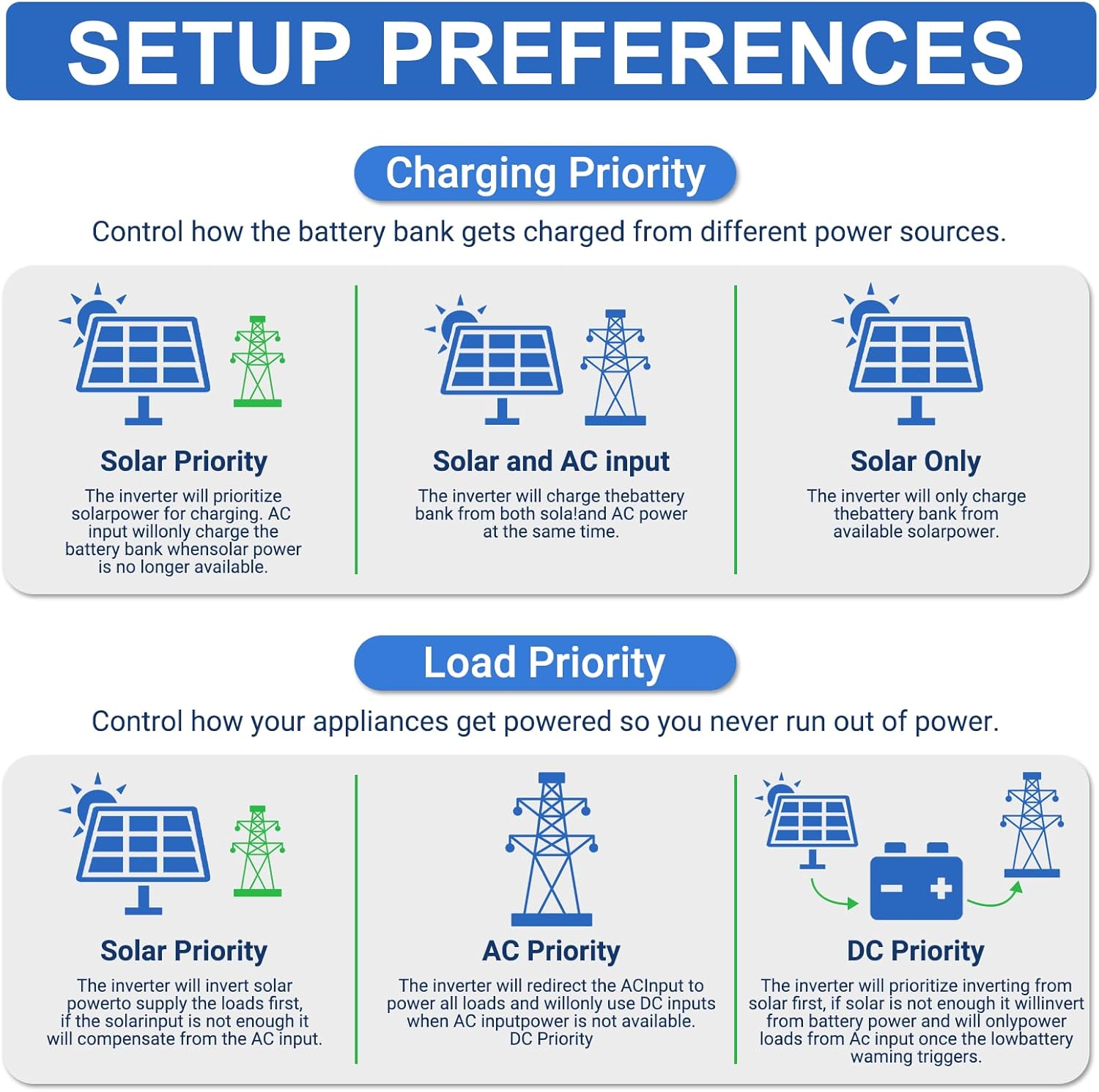
Image 5.1: Diagrams illustrating the different charging priority modes (Solar Priority, Solar and AC input, Solar Only) and load priority modes (Solar Priority, AC Priority, DC Priority).
5.3. Output Priority Modes
The inverter provides three output modes to manage how appliances are powered:
- Mains Priority (AC Priority): The inverter will redirect AC input to power all loads. If AC input is not available, it will switch to inverter output from batteries/solar.
- PV Priority (Solar Priority): The inverter will use solar power to supply the load first. If solar power is insufficient, it will draw from AC input or batteries.
- Inverter Output (DC Priority): The inverter prioritizes drawing power from the battery. If the battery level is low, it will switch to AC input.
5.4. No-Battery Operation
The inverter supports operation without a connected battery bank for direct solar-to-load applications. In this mode, the inverter will directly power loads from solar PV input. Ensure proper configuration for this mode as per the detailed manual.
6. 유지관리
Regular maintenance helps ensure the longevity and optimal performance of your inverter. Always disconnect all power sources before performing any maintenance.
- 청소: 인버터 외부를 주기적으로 마른 천으로 닦아주십시오. 통풍구에 먼지와 이물질이 없는지 확인하십시오.
- 사이: 매년 모든 전기 연결부의 조임 상태와 부식 여부를 점검하십시오.
- 배터리 상태: If using a battery bank, monitor battery health and perform maintenance as recommended by the battery manufacturer.
- 펌웨어 업데이트: 제조사 확인해보세요 website or app for any available firmware updates for the inverter or WiFi module.
7. 문제 해결
This section provides general guidance for common issues. For detailed troubleshooting, refer to the complete instruction manual or contact technical support.
| 문제 | 가능한 원인 | 해결책 |
|---|---|---|
| 인버터가 켜지지 않습니다 | No DC input from battery/PV; AC input breaker tripped; ON/OFF switch off. | 배터리 연결 및 용량 확인tage; ensure PV input is sufficient; reset AC input breaker; turn ON/OFF switch to ON. |
| AC 출력 없음 | Overload; battery low; fault condition; output mode setting. | Reduce load; check battery charge; check fault codes on LCD; verify output mode settings. |
| 배터리가 충전되지 않음 | PV input insufficient; charging mode setting; battery fault. | Check solar panel connections and sunlight; verify charging mode (e.g., Solar Only); inspect battery health. |
| WiFi 모니터링이 작동하지 않습니다 | WiFi module not installed correctly; network issues; app configuration. | Ensure WiFi module is securely connected; check local WiFi network; reconfigure app settings. |

Image 7.1: Diagram illustrating the various built-in protections of the inverter, including overcharge, overload, overcurrent, overvoltage, short circuit, overheat, overspeed, and undervoltag전자 보호.
8. 사양
Detailed technical specifications for the Aninerel ANJ-12KP-SP-WIFI Hybrid Solar Inverter.
| 매개변수 | 값 |
|---|---|
| 모델 | ANJ-12KP-SP-와이파이 |
| 정격 출력 전력 | Split phase 12000VA/12000W (Single phase: 7200VA/7200W limited by wiring terminals) |
| 최대 피크 전력 | Split phase 18000VA, Single phase 18000VA |
| 정격 출력 Voltage | 120Vac (L1/N, L2/N)/240Vac (L1/L2) |
| 모터의 부하 용량 | 6마력 |
| 정격 AC 주파수 | 50Hz/60Hz |
| 병렬 용량 | 1~6 units |
| 출력 볼륨tage 파형 | 순수 사인파 |
| 과부하 보호 | (102%<load<125%) +10% report error, turn off output after 5 minutes; (125%<load<150%) +10% report error, turn off output after 10 seconds; load>150% +10% report error, turn off output after 5 seconds. |
| 배터리 유형 | Lithium/Lead-acid batteries |
| 정격 배터리 Voltage | 51.2V(최소 시작 볼륨tag전자 44V) |
| Mains/Generator Input Range | (90Vac ~ 140Vac) ± 2 % |
| 안전인증 | UL STD.1741 |
| 최대. MPPT 충전 전류 | 160A |
| 최대 주전원/발전기 충전 전류 | 160A |
| Max. Hybrid Charge Current | 220A |
| 번호 MPP 추적기 | 2 |
| 최대 PV 어레이 전력 | 6000W×2 |
| 최대 입력 전류 | 22A×2 |
| 맥스. Voltag개방회로의 e | 500Vdc |
| MPPT 권tag및 범위 | 90Vdc ~ 500Vdc |
| Max. Bypass Phase Overload Current | 2P, 63A/63A (L1/L2) |
| MPPT 추적 효율성 | 95% |
| 지원 커뮤니케이션 | WiFi Modules/RS485/CAN/USB/Dry contact |
| 치수 | 24.39 x 17.72 x 5.19인치(61.95 x 45.01 x 13.18cm) |
| 무게 | 62.9파운드(28.53kg) |

Image 8.1: A table summarizing the detailed technical specifications of the ANJ-12000W-LVP-WIFI model.
9. 지원 및 연락처 정보
For technical assistance, warranty inquiries, or further information, please contact Aninerel customer support.
- 이메일: anenji168@outlook.com
- 핸드폰: +86 188 0375 9233
- 영업 시간: PDT: 9 AM - 6 PM

Image 9.1: Contact details for Aninerel customer support, including email, phone number, and operating hours.
Ask a question about this manual
Ask about setup, troubleshooting, compatibility, parts, safety, or missing instructions. Manuals+ will review the question and use this page’s manual context to help answer it.